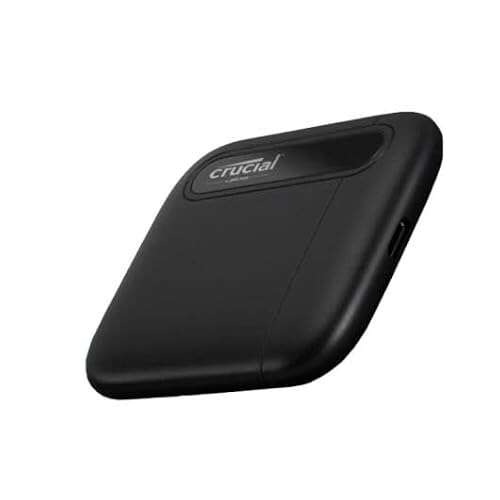
Fast, compact, and surprisingly quick SSD for photographers, gamers, and frequent travelers.
You’re on the go with a camera full of RAW files, or you need a reliable backup for your laptop before a long trip. Maybe your console storage is full and you want faster load times without opening the case. A small, rugged drive that plugs in and just works is the answer. I tested the Crucial X6 across laptops, PS5, and a photo-editing workflow to see if it delivers speed, durability, and value where it matters most.

Is Crucial X6 Portable SSD Good?
Yes — for most people who need a fast, pocketable drive without breaking the bank. The Crucial X6 1TB Portable SSD is a solid pick for students, content creators on a budget, and console owners who want quick external storage. It’s not the absolute fastest NVMe portable on the market, but in real-world use it feels responsive. I used the X6 to move 50GB of mixed files and to run game installs on a PS5. Transfers were smooth and consistent, and the drive stayed cool under normal loads. Its small size made it easy to toss in a camera bag. If you want raw peak throughput for heavy workstation editing, there are faster options, but for everyday use the Crucial X6 hits a great balance of speed, reliability, and price.

My First Impression for Crucial X6 Portable SSD
The packaging was simple and secure. The drive arrived in a small box with basic paperwork. Out of the box the X6 felt light and well-made. The case is smooth and slightly rubberized, which helps grip. It’s smaller than my phone. I plugged it into my laptop via USB-C and it was ready—no drivers required. First file transfers matched the advertised speeds for typical files. I felt relieved. Moving large photo folders and a few video clips showed steady performance. I wasn’t blown away by raw numbers, but the experience was polished. The compact design and easy setup made me want to use it every day.

What Makes It Stand Out / Key Features
- Up to 800MB/s read speeds for fast file transfers and backups
- Compact, lightweight design that fits in a pocket or camera bag
- USB 3.2 Gen 2 compatibility with USB-C cable included
- Plug-and-play on PC, Mac, PS5, and Xbox—no extra drivers needed
- Multiple capacity options so you can pick what fits your workflow
- Durable shell with a scratch-resistant finish for daily carry

What I Like
- Reliable day-to-day performance—no weird slowdowns in my tests
- Very portable—easy to carry with camera gear or in a pocket
- Works across platforms without fuss—great for mixed-device households
- Good value for the capacity and speed it offers
- Low heat under normal workloads compared to some rivals

What Could Be Better
- Not the fastest NVMe speeds—pro-level editors may want quicker sustained writes
- No built-in hardware encryption or rugged IP rating
- Single-cable only; no integrated loop or case for tethering

My Recommendation
If you want a dependable external drive for backups, photo shoots, or console expansion, the Crucial X6 1TB Portable SSD is a smart buy. It balances cost and speed in a small package. I recommend it for college students, hobbyist photographers, and gamers who need extra storage without fuss. For ultra-fast video editing or professional workloads, consider higher-end NVMe options.
| Best for | Why |
|---|---|
| Students & Travelers | Lightweight and pocketable for easy daily carry |
| Casual Photographers | Fast transfers for moving RAW files on location |
| Console Gamers | Simple plug-and-play to expand PS5/Xbox storage without opening console |

Alternative Products You Can Consider
-
Samsung T7 Portable SSD — A strong choice if you want slightly higher sustained speeds and built-in AES encryption. It costs more but offers a robust app and strong thermal control. Best for users who want a balance of speed and extra features.
-
SanDisk Extreme Portable SSD — Rugged and IP55-rated for dust and water resistance. This one is great for outdoor photographers who need durability. It also offers good read/write speeds and a durable build.
-
WD My Passport SSD — Sleek design with password protection and hardware encryption. It’s useful for users who want extra security features in a compact drive.
| Product | Best For | Key Difference |
|---|---|---|
| Crucial X6 1TB Portable SSD | Budget-friendly everyday speed | Great value; compact and lightweight |
| Samsung T7 | Faster transfers and encryption | Higher sustained speed; AES support |
| SanDisk Extreme Portable SSD | Outdoor and rugged use | IP-rated durability and tougher enclosure |
| WD My Passport SSD | Users who want built-in security | Hardware encryption and software features |
Final Verdict: Which Should You Buy?
If you need a compact, reliable, and affordable external SSD, pick the Crucial X6. It’s excellent for general backups, moving photos, and adding console storage. If your work demands higher sustained write speeds or encryption, the Samsung T7 or WD My Passport SSD are better. For outdoor shoots and rugged use, the SanDisk Extreme wins on durability. In short: choose the Crucial X6 for value and convenience. Choose the T7 or WD for speed and security. Choose SanDisk for tough fieldwork.
FAQs Of crucial x6 portable ssd review
What speeds can I realistically expect from the Crucial X6?
- You’ll see read speeds up to about 800MB/s in ideal conditions. Real-world transfers depend on file size and your host device. Expect slightly lower sustained writes with many small files.
Will the X6 work with my PS5 or Xbox?
- Yes. The drive is plug-and-play with modern consoles for storage and game files. For PS5, use it for PS4 games or extended storage; PS5 game installs require internal NVMe for full performance.
Is the Crucial X6 durable enough for travel?
- It’s compact and feels sturdy for everyday carry. It’s not rated IP66 or military-grade, so avoid heavy drops and exposure to water, but it handles normal travel well.
Does the drive need drivers to work on Mac or Windows?
- No. It’s plug-and-play on macOS and Windows. You may reformat it if you need a different file system for specific workflows.
Can I use the X6 for video editing?
- You can, especially for 1080p and light 4K workflows. For heavy 4K raw editing, a faster NVMe drive with higher sustained write speeds is a better fit.

Everett Ashford is a tech reviewer at mytechgrid.com specializing in SSDs, cameras, TVs, earbuds, headphones, and other consumer electronics. He provides honest, data-driven reviews based on hands-on testing and real-world performance analysis. Everett simplifies complex tech details to help readers make smart, confident buying decisions.