The HP 17-inch Ryzen 5 laptop offers the strongest mix of speed, storage, screen size, and value.
Buying a laptop can feel hard when low prices often mean slow chips, tiny storage, or weak screens. You may need one for school, work, email, video calls, or home use, yet still want a machine that feels quick and lasts for years. I reviewed the listed models with a focus on real value, not just the lowest price. I looked at processor strength, memory, storage, display size, operating system, portability, and long-term usefulness. These picks cover simple Chromebook use, budget Windows work, larger business laptops, and older premium models.
See the differences between my top picks at a glance.
HP 17-Inch Ryzen 5 Laptop

This HP is the strongest all-around choice in this group. Its AMD Ryzen 5 7430U processor gives it much more room for work than the entry-level Celeron models. The listing also includes 20GB of RAM and a 512GB SSD. That mix suits documents, research, video calls, browser tabs, and light creative work.
The 17.3-inch Full HD IPS anti-glare screen is the main comfort feature. It gives you more space than a small 14-inch laptop, which helps with spreadsheets and split-screen work. Windows 11 Pro, Wi-Fi 6, and a Copilot key add useful modern features. It is larger than a travel laptop, but that size can feel right for a home office or student desk.
Pros:
- Strong Ryzen 5 processor for daily multitasking
- 20GB of RAM gives plenty of headroom
- 512GB SSD offers useful file space
- Large 17.3-inch Full HD IPS display
- Anti-glare screen helps in bright rooms
- Windows 11 Pro suits work and school use
- Wi-Fi 6 supports newer wireless networks
Cons:
- Large body is less convenient for daily travel
- Integrated graphics are not meant for demanding gaming
- Actual battery life will vary with screen size and use
What Amazon Buyers Are Saying
Before buying, check the latest Amazon reviews for the exact configuration, since seller bundles can change. The listed hardware makes this model attractive to buyers who want a large screen, high memory, and an SSD without moving into premium pricing. Pay close attention to comments about battery life, keyboard feel, and packaging. Those details can vary between production runs and sellers.
My Recommendation
I recommend this HP first for most people who want the best laptop on the market for value from this list. It combines the most capable processor, generous memory, useful storage, and a comfortable display. I would choose it for home work, school, office tasks, and general family use. I would not buy it as a gaming laptop or a highly portable travel system.
HP 15.6-Inch Core i5 Laptop
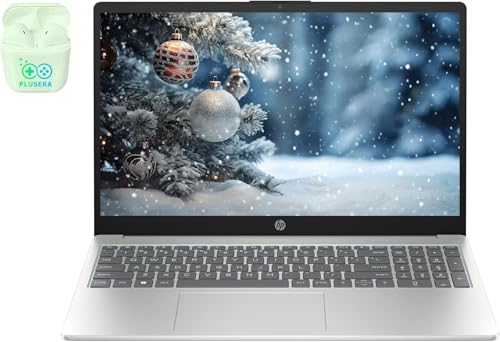
This HP targets buyers who need lots of memory and storage. The listing names a 10-core Intel Core i5 processor, 32GB of RAM, and a 1TB SSD. Those numbers make it a good fit for large office files, many browser tabs, photo libraries, and regular multitasking. The 15.6-inch Full HD screen also gives a useful balance between work space and portability.
The 1TB SSD is the standout feature here. It gives you more room for photos, documents, downloads, and apps than the 64GB or 128GB options in several budget laptops. The included PLUSERA earphones add value if you need a basic audio accessory. Still, I would confirm the exact processor generation, ports, warranty, and seller details before ordering.
Pros:
- Large 32GB memory configuration
- 1TB SSD gives strong storage value
- 15.6-inch Full HD display suits office work
- 10-core Core i5 listing promises useful multitasking
- Windows 11 supports common work software
- Included earphones add a small bundle benefit
Cons:
- Bundled accessories may not match premium quality
- Exact processor generation should be checked carefully
- May cost more than needed for simple web use
What Amazon Buyers Are Saying
Review the current Amazon feedback for the exact listing before purchase. Buyers comparing this type of bundle often focus on speed, storage size, screen quality, and whether the advertised memory and SSD match the delivered unit. I would also look for recent comments about setup and battery life. Configuration-based listings can change, so the selected option matters.
My Recommendation
This HP is a good choice for a buyer who values capacity above all else. It may be the better buy than the 17-inch model if you want a slightly smaller screen and a 1TB drive. I rate it highly for office value, but I would confirm the CPU details before calling it the best laptop on the market for value.
HP 2025 Student Business Laptop

This HP is built around practical student needs. It uses an Intel N150 processor, 16GB of RAM, and listed storage made up of 128GB UFS plus a 256GB removable storage component. The 14-inch display keeps the laptop easier to carry than a 17-inch model. Wi-Fi 6, a Copilot key, Windows 11 Pro, and a mouse make the bundle useful for school or home tasks.
The listing also advertises a lifetime Office Pro license. I would read the license terms closely before relying on that claim, since bundled software terms can vary. This laptop should handle writing, research, online classes, email, and video meetings. It is not the right tool for heavy video editing, modern games, or demanding 3D work.
Pros:
- 16GB RAM is helpful for school multitasking
- Compact 14-inch format is easy to carry
- Wi-Fi 6 supports newer routers
- Windows 11 Pro offers broad software support
- Mouse adds useful out-of-box value
- Listed storage exceeds basic 128GB capacity
Cons:
- Storage format should be confirmed before buying
- Intel N150 is aimed at light and moderate work
- Software license terms need careful review
What Amazon Buyers Are Saying
Check recent buyer comments for the exact color and configuration. The main points worth checking are startup speed, keyboard comfort, display brightness, and how the storage appears in Windows. Buyers who need a school laptop should also look for comments about battery use during classes. I would avoid assuming that a bundled mouse or software license has the same quality as a separately purchased product.
My Recommendation
I like this HP for students who want more memory than a basic budget laptop provides. It offers a useful balance of size, features, and accessories. Buy it for school, writing, browsing, and video calls. If you need the best laptop on the market for value for heavier work, the Ryzen 5 model remains a better choice.
Acer Chromebook 315

The Acer Chromebook 315 keeps things simple. It has a 15.6-inch HD display, an Intel Celeron N4020 processor, 4GB of RAM, and 64GB of eMMC storage. ChromeOS starts quickly and works well for web apps, email, online documents, and streaming. The large screen is useful if you want a low-cost laptop for home or school browsing.
The main trade-off is limited hardware. Four gigabytes of RAM and 64GB of storage suit light use, but they leave less room for local files and heavy multitasking. ChromeOS also differs from Windows, so some desktop programs will not run in the same way. I see this as a simple, low-cost Chromebook rather than a full Windows replacement.
Pros:
- Simple ChromeOS experience
- Large 15.6-inch screen for the price
- Light web and school tasks are a natural fit
- Listed battery life reaches up to 12.5 hours
- Built-in Wi-Fi and Bluetooth support
- ChromeOS needs less local storage than Windows
Cons:
- 4GB RAM limits demanding multitasking
- 64GB eMMC storage is modest
- HD resolution is below Full HD
- ChromeOS cannot run every Windows application
What Amazon Buyers Are Saying
When checking Amazon reviews, focus on startup speed, screen quality, keyboard feel, and battery results. Buyers should also confirm that their needed apps work on ChromeOS before ordering. Review feedback can vary by use, since web browsing is much easier for this Chromebook than local editing or advanced software. The listed specifications clearly position it as a basic machine.
My Recommendation
This Acer is worth considering when the lowest practical cost matters most. It is easy to recommend for web browsing, email, streaming, and simple school tasks. It is not my overall winner because the memory and storage are limited. For a basic Chromebook buyer, it can still deliver excellent value.
HP 14 Everyday Value Laptop

This HP 14 is a budget Windows laptop with several configuration choices. The listing names an Intel Celeron N4500 processor and options for 4GB, 8GB, or 16GB of RAM. Storage choices range from 64GB to 512GB SSD, depending on the selected version. That flexibility lets buyers match the laptop to a simple task list or a larger storage need.
The 14-inch HD display keeps the design fairly easy to carry. Windows 11 Pro gives access to familiar desktop programs, but the Celeron platform is still best for light work. I would select at least 8GB of RAM and an SSD if the price difference is reasonable. Always check the selected variation, since the performance and storage experience can change a lot.
Pros:
- Several RAM choices suit different budgets
- SSD options can improve storage response
- Compact 14-inch size works for travel
- Windows 11 Pro supports common desktop apps
- Web, email, and document work are suitable uses
Cons:
- Entry-level Celeron performance is limited
- HD screen has less workspace than Full HD
- Base configurations may feel restrictive
What Amazon Buyers Are Saying
Because this is a configurable listing, read reviews alongside the exact variation you plan to buy. Look for comments about RAM, storage, setup, and battery life. A review of a 16GB SSD version may not describe the 4GB eMMC version. This is one of the most important checks for budget laptop shoppers.
My Recommendation
I recommend the HP 14 only after choosing the right configuration. An 8GB or 16GB version with SSD storage offers much better everyday value than the base model. It works for light Windows tasks, but it cannot match the Ryzen 5 HP for speed. I rate it as a sensible budget option, not the overall winner.
HP 14 Business Laptop

This HP 14 focuses on basic office use. It lists an Intel N150 processor, 8GB of RAM, 128GB of UFS storage, and a 256GB microSD expansion option. The 14-inch HD display keeps the system small and simple. Windows 11 Pro and the advertised lifetime Microsoft Office license make it appealing for documents and email.
The 12-hour battery claim is a useful target, but real results depend on brightness, apps, wireless use, and battery health. UFS storage is not the same as a large internal SSD, so buyers should understand the difference. This laptop suits light work and study. It does not provide the same upgrade room as the higher-memory HP models.
Pros:
- Compact 14-inch design
- 8GB RAM fits basic office work
- MicroSD option adds file space
- Windows 11 Pro offers familiar tools
- Listed battery target supports mobile use
- Office bundle may reduce extra software cost
Cons:
- 128GB internal UFS storage is limited
- HD display offers modest workspace
- Not designed for heavy creative workloads
What Amazon Buyers Are Saying
Check current reviews for comments on battery results, screen brightness, setup, and storage. The most useful buyer feedback will come from people who use the same N150 and 8GB configuration. Also read the software license details before treating the Office offer as a long-term replacement for a retail license.
My Recommendation
This HP makes sense for email, documents, school portals, and light browsing. It is compact and simple, but its storage limits its long-term appeal. I would choose it over the Acer only when Windows software is required. For broader value, the 16GB HP student model or Ryzen 5 model is stronger.
Dell XPS 13.3-Inch Touchscreen Laptop

This Dell XPS has a 13.3-inch QHD+ touchscreen, an older sixth-generation Intel Core i7, 8GB of RAM, and a 256GB SSD. The compact size makes it attractive for travel. Its high-resolution touch display can also feel more premium than the HD panels on several budget models. The XPS name points to a higher-end design than a basic entry laptop.
Age is the key issue. This is an older computer, so buyers must verify the operating system, battery condition, warranty, and seller information. Eight gigabytes of RAM and a 256GB SSD remain usable for light tasks, but current processors offer better efficiency and support. I would consider this model only when the price is low and the condition is clearly stated.
Pros:
- Compact 13.3-inch travel-friendly design
- QHD+ touchscreen offers sharp viewing
- SSD storage is faster than eMMC storage
- Core i7 branding suits moderate older workloads
- Premium XPS design may appeal to frequent travelers
Cons:
- Sixth-generation hardware is dated in 2026
- Battery condition may vary greatly
- 8GB RAM and 256GB storage are modest
- Used or renewed status must be checked
What Amazon Buyers Are Saying
For an older laptop, read the newest reviews first. Look for clear notes about battery health, charger condition, touchscreen operation, keyboard wear, and Windows activation. Older listings may have different seller conditions over time. Do not compare its listed Core i7 name directly with a modern Core i7 without checking the generation.
My Recommendation
The Dell XPS can be a good low-cost compact laptop if you value its screen and design. It is not my first choice for the best laptop on the market for value because its hardware is old. Buy it only after confirming condition and support. A newer budget HP gives safer long-term value for most people.
HP 14 Everyday Value Laptop
This second look at the HP 14 reflects its role as a flexible budget Windows choice. The key feature is the range of listed configurations. Buyers can select from different RAM and storage levels rather than accepting one fixed setup. That makes the laptop easier to match to a child, student, remote worker, or light home user.
I would avoid the smallest configuration for long-term use unless the price is extremely low. The Celeron N4500 can manage basic tasks, but it will not feel like the Ryzen 5 system when many apps are open. A 14-inch HD screen also favors portability over work space. Read the product variation carefully before adding it to your cart.
Pros:
- Multiple memory choices
- Multiple storage choices
- Small design suits mobile users
- Windows software compatibility
- Useful option for light home computing
Cons:
- Performance depends heavily on selected version
- Base storage may fill quickly
- HD resolution is not ideal for large spreadsheets
What Amazon Buyers Are Saying
Current review patterns should be read by configuration, not just by product name. Look for buyer notes that identify the RAM, storage, and operating system version. Comments about setup, fan noise, screen quality, and battery use will help you judge the exact unit. This approach prevents a strong review for one version from misleading you about another.
My Recommendation
I would buy this HP 14 in a better configuration when I needed an affordable Windows laptop for basic tasks. It is practical, but it lacks the performance reserve of the top picks. Its value depends on the sale price and selected hardware. I rate it as a reasonable entry option.
Dell Inspiron 15.6-Inch Laptop

The Dell Inspiron i3542-5000BK is an older 15.6-inch laptop. Its larger display may still work for simple browsing, typing, and basic home use. However, the supplied listing title does not show enough current hardware detail for me to judge its performance with confidence. That lack of detail matters when comparing older computers in 2026.
Buyers should treat this model as a used or legacy option unless the listing clearly says otherwise. Check the processor, RAM, storage, battery, charger, operating system, and return terms before buying. A low price does not create good value if the battery is worn or the system cannot run your needed software. Newer budget laptops are usually safer for school and work.
Pros:
- 15.6-inch format provides a familiar work area
- Dell Inspiron line is widely recognized
- May suit basic tasks at a very low price
- Traditional laptop design is easy to understand
- Potentially useful as a secondary computer
Cons:
- Very old model listing
- Key specifications are not clear in the title
- Battery and condition may vary
- Modern software support may be limited
What Amazon Buyers Are Saying
Read the newest reviews with special care. Search for comments on battery condition, physical wear, charger inclusion, boot speed, and operating system updates. Because older marketplace listings can change hands, review dates and seller details matter. I would not rely on the product name alone to judge this laptop.
My Recommendation
I would buy this Dell only as a low-cost backup or basic machine after checking every specification. It does not compete well with newer HP models for speed, battery, or support. It may offer value at a very low price, but it is not a strong candidate for the best laptop on the market for value.
Alpine Swiss Rolling 17-Inch Laptop Briefcase

This Alpine Swiss case is not a laptop, but it can improve the value of a large work setup. It is a rolling 17-inch laptop briefcase made for transport. The wheel design may help users who carry a large laptop, papers, and office items. It can make a 17-inch computer easier to move through an office, campus, or airport.
The case adds weight and bulk compared with a backpack. It also does not replace careful laptop protection, so check the internal padding and fit for your exact computer. I see it as an accessory for the HP 17-inch model rather than a standalone computer purchase. Its value depends on how often you carry heavy work gear.
Pros:
- Wheels reduce shoulder strain
- 17-inch format suits larger laptops
- Briefcase style looks suitable for office use
- Useful for papers and work accessories
- Black design is easy to pair with business gear
Cons:
- Adds bulk and weight
- May not fit every 17-inch laptop equally well
- Wheels are less useful on stairs or rough paths
What Amazon Buyers Are Saying
Check current reviews for wheel movement, handle strength, interior padding, zipper quality, and laptop fit. These are the areas that matter most in a rolling case. Measure your laptop rather than relying only on the screen-size label. A 17-inch screen does not guarantee the same outer body size across brands.
My Recommendation
I recommend this case for commuters who carry a large laptop and office materials. It is not part of my laptop performance ranking, but it can make a big computer more practical. Choose it only after checking dimensions and your route. It pairs best with a large machine such as the HP 17-inch model.
JanSport Cross Town Plus Laptop Backpack

The JanSport Cross Town Plus is another useful laptop accessory. It has a 26-liter design, a padded sleeve for laptops up to 15 inches, and a water bottle pocket. The backpack format suits students, commuters, and travelers who need both hands free. It is a better match for a 14-inch or 15-inch laptop than for a large 17-inch model.
A backpack can protect and organize a laptop while also carrying books, chargers, and daily items. Still, confirm the laptop sleeve measurements before ordering. The listed floral design may not suit every buyer, but the function remains practical. I would pair it with one of the smaller HP laptops or the Dell XPS.
Pros:
- Padded 15-inch laptop sleeve
- 26L capacity supports daily carry
- Water bottle pocket adds convenience
- Backpack format keeps hands free
- Useful for school and commuting
Cons:
- May not fit 17-inch laptops
- Pattern is a matter of personal taste
- Protection depends on proper fit and careful handling
What Amazon Buyers Are Saying
Recent reviews should help you judge strap comfort, zipper quality, sleeve fit, and real storage space. Look for buyers who carry a laptop of similar size. A backpack can feel roomy for books but tight once you add a charger and lunch. Check measurements before using it with a new laptop.
My Recommendation
This JanSport is a practical add-on for a student or commuter. It does not affect laptop speed, but it can make daily use easier and safer. I recommend it for laptops up to 15 inches after checking dimensions. It is not suitable as the main carrying option for the 17-inch HP.
How to Choose the Best Laptop on the Market for Value
The best laptop on the market for value is not always the cheapest model. A good value laptop gives you enough speed, memory, storage, and support for your real tasks. Start with your daily workload, then compare the full hardware list. Also check the exact configuration, warranty, seller, and return policy before you buy.
1. Match the Processor to Your Work
For email, web pages, and simple documents, an Intel Celeron or N-series chip may be enough. ChromeOS can make basic tasks feel simple because it relies on web apps. Windows users often benefit from more memory and a faster processor. The Ryzen 5 7430U and Core i5 options in this list offer more room for multitasking than the entry-level chips.
Do not judge a processor by its brand name alone. Check its generation and model. An older Core i7 can be slower or less efficient than a newer budget processor. This matters when comparing the old Dell XPS with the newer HP laptops.
2. Choose Enough RAM and the Right Storage
RAM helps your laptop keep apps and browser tabs open. I suggest 8GB as a sensible starting point for Windows. Sixteen gigabytes gives more comfort for school, office work, and multitasking. Four gigabytes can work on a Chromebook, but it leaves less room for demanding use.
Storage also affects value. A 64GB eMMC drive suits light Chromebook use, but it can fill fast. A 256GB SSD is more useful for Windows, while a 512GB or 1TB SSD gives better space for files and apps. Check whether the listing uses SSD, eMMC, UFS, microSD, or removable storage. These are not identical choices.
3. Compare the Screen, Size, and Long-Term Fit
A 14-inch laptop is easier to carry. A 15.6-inch model gives more work space without feeling as large as a 17-inch system. A 17.3-inch screen works well for spreadsheets and home offices, but the laptop is less portable. Choose based on where you will use it most.
Also compare screen resolution. HD is fine for basic work, but Full HD gives sharper text and more room. An IPS panel can improve viewing comfort, while anti-glare treatment may help in a bright room. Finally, check battery claims with care. Real battery life changes with brightness, wireless use, video playback, and app load.
Final Verdict: Which Should You Buy?
The HP 17-inch Ryzen 5 laptop is my top choice. Its 20GB RAM, 512GB SSD, strong processor, and large Full HD IPS display give it the best overall balance.
If you need simple web use, choose the Acer Chromebook 315. For Windows portability, consider the HP student model. Compare the exact configuration before buying the best laptop on the market for value.
FAQs Of best laptop on the market for value
What is the best laptop on the market for value?
The HP 17-inch Ryzen 5 laptop is the best overall value in this review. It combines strong performance, 20GB RAM, a 512GB SSD, and a large Full HD IPS display.
Is a Chromebook a good value laptop?
Yes, if you mainly browse the web, use email, stream media, and work in online documents. The Acer Chromebook 315 is less suitable for Windows-only programs.
How much RAM should a value laptop have?
Choose at least 8GB for Windows. Sixteen gigabytes is better for multitasking. Four gigabytes may work for simple Chromebook tasks but offers less flexibility.
Is a 17-inch laptop too large for daily use?
It can be large for travel, but the screen gives more room for spreadsheets, documents, and split-screen work. A 14-inch laptop is easier to carry every day.
Should I buy an older Dell XPS laptop to save money?
Only if you confirm its condition, battery, operating system, warranty, and seller details. Newer budget laptops often offer safer long-term value.

Everett Ashford is a tech reviewer at mytechgrid.com specializing in SSDs, cameras, TVs, earbuds, headphones, and other consumer electronics. He provides honest, data-driven reviews based on hands-on testing and real-world performance analysis. Everett simplifies complex tech details to help readers make smart, confident buying decisions.