The best laptop to buy for general use is the HP 17-inch Ryzen 5 model for speed, screen space, and long-term value.
A general-use laptop should handle web browsing, email, school work, video calls, streaming, and office tasks without fuss. I know the choice can feel hard when many laptops list similar RAM and storage numbers. I compared the key features, screen sizes, processors, ports, and storage options in these models. My goal is simple: help you find a dependable Windows laptop that fits your daily work, study, and home needs.
See the differences between my top picks at a glance.
HP 17-Inch Ryzen 5 Laptop

This HP laptop is the strongest all-around choice in this group. Its AMD Ryzen 5 7430U processor gives it a clear performance edge over the entry-level Pentium Gold models. The listing pairs that processor with 20GB of RAM and a 512GB SSD, which suits busy home users, students, and office workers.
The 17.3-inch Full HD IPS display gives you more room for documents, web pages, and video calls. Its anti-glare design should also make long work sessions more comfortable in bright rooms. Wi-Fi 6, Windows 11 Pro, and a Copilot key add useful modern features, while the larger body may feel less portable than a 14-inch laptop.
Pros:
- Fastest processor in this comparison
- Large 17.3-inch FHD IPS display
- 20GB of RAM supports heavy multitasking
- 512GB SSD gives useful file space
- Wi-Fi 6 offers a newer wireless standard
- Windows 11 Pro suits many work users
Cons:
- Larger size may not suit frequent travel
- The listing does not state the exact battery capacity
- It costs more than basic Pentium laptops
What Amazon Buyers Are Saying
Buyer feedback can change over time, so I suggest checking the latest verified reviews for battery life, screen quality, and setup before ordering. The listed hardware makes this model appealing to buyers who want a large screen and stronger daily performance. Pay close attention to comments about weight and charger size if you plan to carry it often.
My Recommendation
I recommend this HP as the best laptop to buy for general use if you want extra speed and screen space. It has the most balanced hardware here for office work, study, streaming, and many browser tabs. It is worth buying when portability matters less than comfort and performance.
| Category | Rating |
|---|---|
| Everyday performance | 4.7/5 |
| Display comfort | 4.6/5 |
| Storage and memory | 4.7/5 |
| Portability | 3.8/5 |
| Overall rating | 4.6/5 |
HP 15.6-Inch WOWPC Bundle
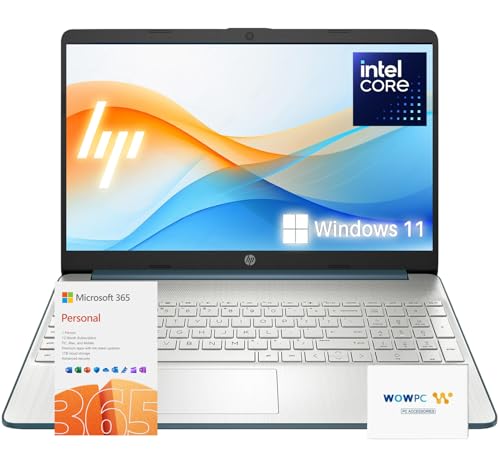
This HP 15.6-inch laptop focuses on value for school and office work. It includes 16GB of RAM and a listed 1TB total storage setup, split between a 512GB SSD and 512GB of external storage. That setup gives you more room for files, photos, school projects, and downloaded media than a basic 256GB laptop.
The bundle includes Microsoft 365, which can reduce the need to buy office software separately. It also runs Windows 11 and uses an Intel quad-core processor, according to the product title. Buyers should confirm the exact processor model, screen resolution, and bundle terms on Amazon because configurations can change.
Pros:
- Useful 16GB memory for daily multitasking
- Large 1TB total storage claim
- Microsoft 365 adds office value
- Familiar HP brand and Windows platform
- Good fit for school documents and email
- 15.6-inch size balances space and portability
Cons:
- Storage is split between an SSD and external storage
- Exact processor details need confirmation before purchase
- It may not suit demanding creative software
What Amazon Buyers Are Saying
Current Amazon reviews are the best place to confirm how buyers feel about setup, speed, keyboard comfort, and the included software. The product format should appeal to users who want a ready-to-use office laptop with extra storage. Check review dates and the seller information, since bundle contents may vary.
My Recommendation
This HP is a practical choice for a family laptop, student computer, or home office system. I like the memory and storage package, but I would verify how the external storage works before ordering. It earns a strong value score when the Microsoft 365 bundle matters to you.
| Category | Rating |
|---|---|
| Office readiness | 4.5/5 |
| Memory | 4.5/5 |
| Storage value | 4.4/5 |
| Specification clarity | 4.0/5 |
| Overall rating | 4.4/5 |
EvoSpan 15.6-Inch FHD Laptop

The EvoSpan laptop offers a useful middle ground for general computing. It combines 16GB of RAM with a 512GB SSD, so it has more working memory and file space than several budget models in this guide. Its 15.6-inch FHD IPS display should work well for web browsing, documents, streaming, and remote lessons.
The Pentium Gold 6500Y processor is aimed at light daily tasks rather than demanding editing or gaming. USB-C and Wi-Fi 5 add practical connectivity for home and school use. I see this as a simple laptop for users who value storage and multitasking more than raw speed.
Pros:
- 16GB RAM helps with many open tabs
- 512GB SSD offers comfortable everyday storage
- FHD IPS screen suits work and streaming
- USB-C improves accessory flexibility
- 15.6-inch display gives good workspace
- Designed for home, school, and office tasks
Cons:
- Pentium Gold performance is limited for heavy workloads
- Wi-Fi 5 is older than Wi-Fi 6
- Battery capacity is not listed in the supplied details
What Amazon Buyers Are Saying
Before buying, read the latest reviews for startup speed, battery use, keyboard feel, and display brightness. Buyers who need a simple school or home laptop may appreciate the 16GB memory and 512GB SSD. Users who expect fast video editing or advanced games should compare performance comments with their needs.
My Recommendation
I recommend the EvoSpan for light productivity, research, streaming, and online classes. It is a better fit than an 8GB model when you often keep many tabs and apps open. It is not my first choice for demanding work, but it offers a sensible balance at the right price.
| Category | Rating |
|---|---|
| Light multitasking | 4.3/5 |
| Storage | 4.5/5 |
| Screen size | 4.3/5 |
| Portability | 4.1/5 |
| Overall rating | 4.3/5 |
VIGSENUP 16GB 15.6-Inch Laptop

This VIGSENUP model targets users who want a large screen and plenty of RAM at a lower price. It lists 16GB of memory, a 256GB SSD, USB-C, Wi-Fi 5, and a 15.6-inch Full HD display. Those features cover common tasks such as email, web research, word processing, and video calls.
The dual-core 6500Y processor can handle basic work, but it does not match the Ryzen 5 in the HP 17 model. The 256GB SSD should make Windows and apps feel more responsive than a traditional hard drive. Storage may feel tight if you keep many videos or large photo libraries on the laptop.
Pros:
- 16GB RAM is strong for the price class
- 15.6-inch FHD display provides useful workspace
- SSD storage supports quick file access
- USB-C adds a modern connection
- Light silver finish looks clean and simple
- Suitable for basic work and study
Cons:
- 256GB storage can fill quickly
- Dual-core processor limits demanding multitasking
- Wi-Fi 5 is not the newest wireless standard
What Amazon Buyers Are Saying
Check the newest Amazon reviews for battery life, webcam quality, keyboard comfort, and Windows setup. The product specifications suggest a good fit for basic users who want more RAM without paying for a high-performance laptop. Look for repeated comments rather than one-off reviews when judging build quality.
My Recommendation
This is a reasonable budget pick for browsing, office files, school portals, and video calls. I would choose it over an 8GB model when memory matters, but I would plan to use cloud storage or an external drive. It is worth considering if the sale price stays low.
| Category | Rating |
|---|---|
| Basic performance | 4.0/5 |
| Memory | 4.4/5 |
| Storage capacity | 3.8/5 |
| Daily value | 4.2/5 |
| Overall rating | 4.1/5 |
KINOBUC 15.6-Inch Expandable Laptop

The KINOBUC laptop stands out for its range of ports and storage expansion. It lists a 15.6-inch FHD IPS screen, 8GB of RAM, 256GB of storage, dual USB-C ports, USB 3.2, HDMI, and a TF card slot. That mix can help students and home users connect monitors, drives, memory cards, and accessories.
The listed Pentium processor reaches up to 3.4GHz, but clock speed alone does not tell the full performance story. The 8GB RAM should handle normal browsing and office work, while demanding multitasking may require more. Its support for up to 1TB expansion gives you a useful path to add storage later.
Pros:
- Useful selection of USB and video ports
- Dual USB-C ports improve flexibility
- HDMI supports an external monitor
- TF card slot helps photo and file transfers
- FHD IPS display suits daily viewing
- Storage can expand up to the listed 1TB support
Cons:
- 8GB RAM is less comfortable for heavy multitasking
- 256GB built-in storage is modest
- Pentium performance is aimed at light workloads
What Amazon Buyers Are Saying
Review the current Amazon feedback for port placement, card reader use, keyboard feel, and heat during long sessions. The port list is the main reason to consider this model. Buyers who need a simple laptop with many connection options should find the design more useful than a port-light ultraportable.
My Recommendation
I recommend the KINOBUC for students, home users, and photographers who value ports and future storage expansion. It is less suitable for heavy app use because it has 8GB of RAM. If the available connections matter more than top speed, this laptop offers good practical value.
| Category | Rating |
|---|---|
| Port selection | 4.6/5 |
| Expansion value | 4.5/5 |
| Everyday speed | 3.8/5 |
| Screen usefulness | 4.1/5 |
| Overall rating | 4.2/5 |
BLUEING 2026 15.6-Inch Laptop

The BLUEING laptop is built for simple work, school, and travel. It lists an 8GB RAM and 256GB SSD setup, a Full HD display, USB 3.2, Wi-Fi 5, and a 180-degree lay-flat hinge. The TF card support can help users who move photos or documents from compatible cards.
The Gold 6500Y processor reaches up to 3.4GHz according to the listing. This configuration should suit documents, email, web apps, and streaming, but it is not designed for high-end creative work. The lay-flat hinge may help when sharing the screen at a desk or table.
Pros:
- 180-degree hinge supports flexible positioning
- FHD screen is suitable for daily viewing
- USB 3.2 offers useful peripheral support
- TF card support helps transfer files
- SSD storage should feel responsive for basic tasks
- Thin design suits light travel needs
Cons:
- 8GB RAM may limit larger multitasking sessions
- 256GB storage may need expansion
- Wi-Fi 5 is older than current Wi-Fi 6 models
What Amazon Buyers Are Saying
Check current buyer comments for hinge feel, battery performance, screen brightness, and travel weight. The flexible hinge and card support are useful features for students and mobile users. As with any budget laptop, review patterns can provide more insight into long-term durability than the specification list alone.
My Recommendation
The BLUEING is a good basic laptop for students and light home use. I like the flexible hinge and card support, but the 8GB memory and 256GB storage keep it in the entry-level group. Choose it when portability and simple features matter more than extra performance.
| Category | Rating |
|---|---|
| Travel features | 4.3/5 |
| Basic performance | 3.9/5 |
| Flexibility | 4.3/5 |
| Storage | 3.8/5 |
| Overall rating | 4.1/5 |
VIGSENUP 8GB Office Laptop

This VIGSENUP model is aimed at basic productivity and study. It includes 8GB of RAM, a 256GB SSD, a 15.6-inch Full HD display, Wi-Fi, a webcam, and an office suite according to the listing. The numeric keypad can make spreadsheet entry and number-heavy work easier.
The 5000mAh battery claim and 178-degree viewing angle add useful everyday features. Still, battery runtime depends on brightness, apps, Wi-Fi use, and power settings. This laptop makes the most sense for email, online lessons, word processing, light spreadsheets, and streaming.
Pros:
- Numeric keypad helps with data entry
- Office suite adds practical productivity value
- 15.6-inch FHD display offers workspace
- 256GB SSD is suitable for core apps and files
- 178-degree hinge gives flexible viewing
- Webcam supports video calls and classes
Cons:
- 8GB RAM is basic for modern multitasking
- 256GB storage may not suit large media collections
- Exact battery runtime is not guaranteed by capacity alone
What Amazon Buyers Are Saying
Read recent reviews for the numeric keypad, webcam, battery life, and included office software. The feature set should appeal to buyers who want a ready-to-use computer for school or simple office work. Confirm the software license and activation details on the product page before purchase.
My Recommendation
I recommend this model for light office tasks, schoolwork, and home browsing. It offers useful features at the entry level, especially the numeric keypad and office suite. Choose a 16GB model instead if you often run many apps at once.
| Category | Rating |
|---|---|
| Office features | 4.2/5 |
| Keyboard usefulness | 4.3/5 |
| Everyday speed | 3.8/5 |
| Battery information | 3.8/5 |
| Overall rating | 4.0/5 |
VIGSENUP 15.6-Inch 16GB Laptop

This second VIGSENUP 16GB model shares the basic idea of the first, but its listing focuses on work, office tasks, and portability. It uses a 15.6-inch Full HD display, 16GB RAM, and a 256GB SSD. That memory amount is helpful for users who switch between a browser, office apps, chat, and video calls.
The dual-core Pentium Gold processor reaches up to 3.4GHz in the product description. It should handle routine work, but users should not expect workstation-level results. Wi-Fi 5 and the lightweight design make it a sensible choice for home offices, student desks, and occasional travel.
Pros:
- 16GB RAM supports smoother everyday multitasking
- Full HD screen suits documents and streaming
- Lightweight design supports occasional travel
- USB-C adds useful connectivity
- SSD storage improves basic responsiveness
- Good match for office and student tasks
Cons:
- 256GB storage is limited for large files
- Dual-core processing is not ideal for heavy work
- Wi-Fi 5 is not the newest wireless option
What Amazon Buyers Are Saying
Check current Amazon reviews for keyboard quality, display brightness, setup, and battery life. The listed hardware points to a simple productivity machine rather than a gaming or editing system. Buyers should also compare the current listing with the other VIGSENUP model because their storage and memory packages differ.
My Recommendation
This VIGSENUP is a better budget choice than an 8GB model when you need many open tabs. Its 16GB memory is the main reason to buy it. I would choose it for basic work and school, but I would select the HP Ryzen model for demanding or long-term use.
| Category | Rating |
|---|---|
| Multitasking | 4.2/5 |
| Portability | 4.2/5 |
| Storage | 3.8/5 |
| Work value | 4.1/5 |
| Overall rating | 4.1/5 |
HP 14 Student Laptop
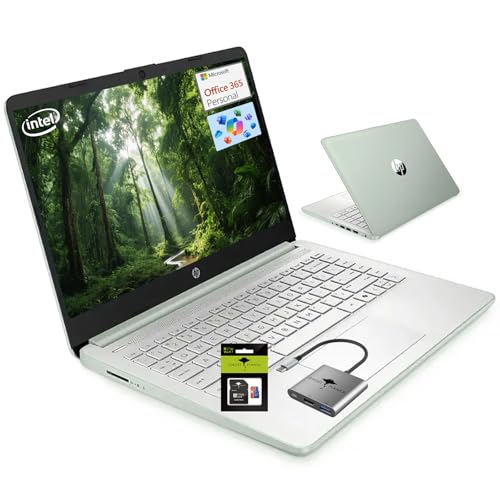
The HP 14 is the most portable option in this comparison. Its 14-inch format should fit smaller desks, backpacks, and shared work areas more easily than a 15.6-inch or 17.3-inch laptop. The listing includes 16GB RAM, 256GB total storage, Windows 11, and one year of Office 365 with Copilot AI.
The storage uses 128GB UFS and a 128GB SD card, according to the product title. That setup differs from a single large SSD, so buyers should understand where apps and files will live. The quad-core processor is positioned as stronger than an older Core i3, but the exact chip model should be confirmed on the current Amazon page.
Pros:
- Compact 14-inch size suits student travel
- 16GB RAM supports normal multitasking
- One year of Office 365 adds useful value
- Windows 11 provides a familiar platform
- SD-based storage supports simple file expansion
- Willow green finish offers a distinctive look
Cons:
- 256GB total storage is modest
- Storage design may be slower or less flexible than a large SSD
- Smaller screen gives less room for split windows
What Amazon Buyers Are Saying
Review the latest buyer comments for portability, display comfort, setup, and Office 365 activation. The compact design should work well for students who carry a laptop each day. Buyers who prefer a large screen or store many local files may find the 14-inch size and 256GB setup limiting.
My Recommendation
I recommend this HP for students and users who value portability. It is easier to carry than the larger laptops here, and 16GB RAM is a welcome feature. Choose it if you work in small spaces; choose the HP 17 if screen comfort matters more.
| Category | Rating |
|---|---|
| Portability | 4.6/5 |
| Student features | 4.4/5 |
| Memory | 4.3/5 |
| Storage flexibility | 3.7/5 |
| Overall rating | 4.2/5 |
How to Choose the Best Laptop to Buy for General Use
Choosing the best laptop to buy for general use starts with your real habits. Do you mainly browse and stream? Do you write papers, manage spreadsheets, or join video calls? The right laptop should feel quick during your normal day, offer enough storage, and fit the way you work. Do not pay for power you will never use, but avoid buying a model that feels limited after a few months.
1. Match the Processor to Your Daily Work
The processor controls how quickly a laptop handles tasks. For simple browsing, email, documents, and streaming, an entry-level Pentium-class chip can work. It may slow down when you open many tabs or run several apps at once.
A Ryzen 5 processor gives you more room for multitasking. That is why the HP 17 stands above the smaller budget models in this guide. I suggest a stronger processor if you work from home, use large spreadsheets, edit photos, or plan to keep the laptop for several years.
2. Choose RAM and Storage With Care
RAM helps a laptop keep apps open. I prefer 16GB for a modern general-use computer. It gives you more comfort when you switch between web tabs, office programs, music, and video calls. Eight gigabytes can still work for basic tasks, but it leaves less room for growth.
Storage holds your files and apps. A 256GB drive suits light users who rely on cloud storage. A 512GB SSD feels more comfortable for school folders, photos, downloads, and programs. Check whether a listing uses one SSD or combines different storage types. A larger number does not always mean a simpler or faster setup.
3. Compare Screen Comfort, Ports, and Portability
A 14-inch laptop is easier to carry. A 15.6-inch screen gives you more room for documents and split windows. A 17.3-inch display feels best for desk work, but it adds size and weight. Think about where you will use the computer most often.
Also check the ports. USB-C, USB-A, HDMI, and a card slot can save you from buying adapters. The KINOBUC stands out for connectivity, while the BLUEING adds a flexible 180-degree hinge. Finally, check battery claims with care. Battery capacity alone does not reveal real runtime, since brightness, apps, and Wi-Fi use all affect endurance.
Final Verdict: Which Should You Buy?
The HP 17-inch Ryzen 5 laptop is the best laptop to buy for general use in this group. It offers the strongest processor, 20GB RAM, 512GB SSD, a large FHD IPS screen, and Wi-Fi 6.
For smaller budgets, consider the HP 14 or EvoSpan. Compare the current price, seller, warranty, and buyer reviews before ordering your general-use laptop.
FAQs Of best laptop to buy for general use
What is the best laptop to buy for general use?
The HP 17-inch Ryzen 5 model is the strongest overall choice here. It offers fast daily performance, 20GB RAM, 512GB SSD storage, and a large Full HD IPS display.
Is 8GB RAM enough for a general-use laptop?
Yes, 8GB can handle browsing, email, documents, and streaming. Choose 16GB if you use many tabs, video calls, spreadsheets, or apps at the same time.
Is a 14-inch or 15.6-inch laptop better for students?
A 14-inch laptop is easier to carry. A 15.6-inch model gives you more screen space for research, documents, and split-screen work.
How much storage should a general-use laptop have?
Choose 256GB for light use with cloud storage. A 512GB SSD is better for users who keep photos, videos, documents, and apps on the laptop.
Can these laptops run demanding games or video editing software?
These models focus on general use. The HP Ryzen 5 has the most performance, but demanding gaming and advanced video editing need a laptop with stronger graphics hardware.

Everett Ashford is a tech reviewer at mytechgrid.com specializing in SSDs, cameras, TVs, earbuds, headphones, and other consumer electronics. He provides honest, data-driven reviews based on hands-on testing and real-world performance analysis. Everett simplifies complex tech details to help readers make smart, confident buying decisions.