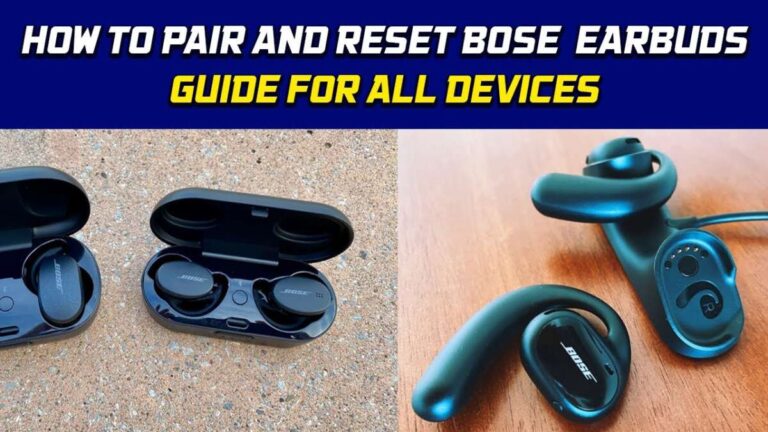
The best wireless earbuds for multiple devices are Bose QuietComfort Earbuds and JBL Vibe Beam 2.
You may use a phone for calls, a laptop for work, and a tablet for travel. Constantly opening Bluetooth settings can turn a simple task into a chore. The best wireless earbuds for multiple devices should offer a stable connection, clear controls, useful battery life, and easy switching between devices. I reviewed the listed products with that real-world problem in mind. A few items are charging stations or wired earphones, so I clearly mark them as alternatives rather than true wireless earbud picks.
See the differences between my top picks at a glance.
Bose QuietComfort Earbuds

Bose QuietComfort Earbuds are the strongest true wireless option in this group. The listed model includes active noise cancellation, a microphone, USB-C charging, and an IPX4 rating. Bose also lists up to 8.5 hours of playtime, which is enough for most workdays or flights. The fit and quiet listening experience make these earbuds a good match for people who move between a phone, computer, and tablet.
These earbuds do not appear to promise every advanced multi-device feature in the product title, so I would check the current Bose app details before buying. Still, Bluetooth pairing is simple, and the controls are made for daily use. Noise cancellation helps during travel, while the microphone supports calls in busy places. IPX4 means splash resistance, not full waterproofing, so I would not use them in heavy rain.
Pros:
- Effective active noise cancellation for travel and office use
- Up to 8.5 hours of stated earbud playtime
- USB-C charging fits most current device bags
- IPX4 splash resistance adds useful daily protection
- Built-in microphone supports phone and video calls
- Comfortable design for longer listening sessions
Cons:
- The product title does not confirm automatic device switching
- The charging case battery details are not stated here
- IPX4 does not protect against submersion
What Amazon Buyers Are Saying
Buyer feedback should be checked on the live Amazon listing because reviews and seller details can change. Common points shoppers tend to examine with this model include noise reduction, comfort, call quality, and Bluetooth stability. Some users may prefer a strong seal, while others may find the fit less ideal because ear shape differs.
My Recommendation
I recommend the Bose QuietComfort Earbuds for listeners who value quiet sound and call support more than a long feature list. They are the best overall choice here for commuting, flights, and mixed work use. Confirm the latest app and device-switching functions before checkout.
JBL Vibe Beam 2

The JBL Vibe Beam 2 is the best value-focused true wireless model in this list. It offers JBL Pure Bass sound, noise canceling, Smart Ambient technology, and four microphones for calls. JBL states up to 40 hours of playback, which is a major advantage for long trips and frequent users. Its IP54 rating also covers dust and water resistance, though the earbuds still need care around pools and deep water.
This model suits people who want one pair for music, calls, and travel. Smart Ambient mode can help you hear outside sounds without removing the earbuds. The four-microphone setup is useful for voice calls, but call results can still change with wind and traffic. The product information does not clearly confirm seamless switching between several active devices, so check the current JBL app and Bluetooth details if that feature is essential.
Pros:
- Very long stated playback time of up to 40 hours
- Noise canceling helps reduce common background sound
- Smart Ambient mode improves awareness outdoors
- Four microphones support clearer calls
- IP54 rating adds dust and water resistance
- Pure Bass tuning suits pop, rock, and video content
Cons:
- Bass-heavy sound may not suit every listener
- Automatic multi-device switching is not confirmed in the supplied details
- Small earbuds can fit differently from person to person
What Amazon Buyers Are Saying
When checking Amazon feedback, focus on repeated comments about battery life, bass level, fit, microphone quality, and the noise-control modes. Those are the areas that matter most in daily use. Review patterns can change over time, so I would read the newest verified-purchase comments instead of relying only on the average score.
My Recommendation
I recommend the JBL Vibe Beam 2 for buyers who want long battery life and strong features at a likely lower price than premium noise-canceling models. It is a smart pick for travel, music, and mixed device use. Choose Bose instead if quiet listening is your top need.
HyperX Cloud Earbuds II

The HyperX Cloud Earbuds II is not wireless, but it deserves mention for gamers who use several devices. It has 14 mm drivers, a built-in microphone, and a 3.5 mm plug. The cable removes Bluetooth pairing from the setup. That makes it useful with compatible PCs, phones, handheld consoles, and Nintendo Switch devices.
A wired connection also avoids battery charging and wireless delay. However, you must have a working 3.5 mm port or a suitable adapter. It will not switch between devices by software, and the cable can become a hassle at a desk. I see this as a practical backup, not one of the best wireless earbuds for multiple devices.
Pros:
- No battery charging is needed
- 3.5 mm plug supports many gaming devices
- 14 mm drivers offer a full sound presentation
- Built-in mic supports game chat
- Wired use avoids Bluetooth pairing problems
- Useful as a low-cost backup headset
Cons:
- It is not wireless
- No automatic switching between devices
- Needs a 3.5 mm port or adapter
What Amazon Buyers Are Saying
For this type of product, Amazon buyers often focus on sound, comfort, microphone performance, cable quality, and console compatibility. Check whether recent buyers mention the fit during long gaming sessions. Also confirm the return policy if you are unsure about the ear tip size.
My Recommendation
I recommend the HyperX Cloud Earbuds II for gamers who prefer a wired connection or need a reliable spare pair. It is not the right choice if you want wireless freedom or fast switching. Its value comes from simple plug-in use.
GETPALS 3-in-1 Apple Charging Station
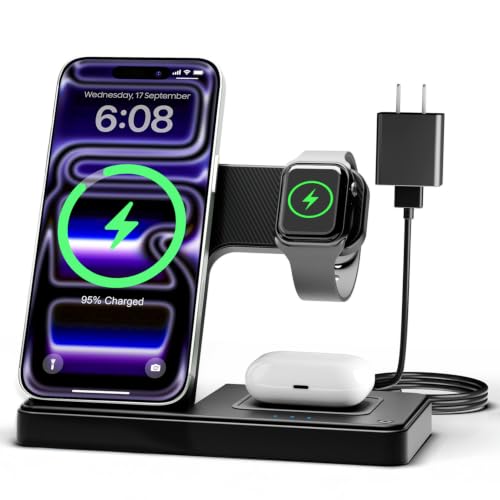
The GETPALS product is a charging station, not a pair of wireless earbuds. It is designed to charge an iPhone, Apple Watch, and AirPods in one stand. The listed compatibility covers several Apple product families. That makes it relevant to a multi-device audio setup because a neat charging point can keep earbuds ready for use.
This stand may help reduce cable clutter on a desk or bedside table. It does not improve Bluetooth range, pairing, sound, or call quality. Check your exact phone, watch, and AirPods generation before ordering because wireless charging alignment can vary by case and model. I would judge it as an accessory for earbuds, not as an earbud purchase.
Pros:
- Charges three Apple device types in one place
- Helps reduce cable clutter
- Stand design keeps devices visible
- Useful beside a bed or work desk
- Supports a more organized earbud routine
Cons:
- It does not include wireless earbuds
- Compatibility can vary with cases and device models
- Charging speed details are limited in the supplied title
What Amazon Buyers Are Saying
For charging stands, buyers usually discuss alignment, heat, build quality, cable management, and whether each device charges at the same time. Read current reviews for reports about thick cases and watch placement. Those details matter more than the number of charging slots.
My Recommendation
I recommend GETPALS only if you already own compatible Apple devices and need a simple charging stand. It cannot replace the best wireless earbuds for multiple devices. It can, however, help keep a separate earbud setup charged and ready.
5-in-1 Apple Wireless Charging Station

This 5-in-1 product is another charging station rather than an audio product. The title describes a wireless charging stand for an iPhone, Apple Watch, and AirPods. It may suit households with several Apple devices. The main benefit is convenience, not better Bluetooth performance.
A multi-device stand can make a real difference if you often forget to charge your earbuds. Still, charging claims depend on the exact device, adapter, case, and alignment. I would review the current listing for included accessories and supported models. Do not buy it expecting wireless earbuds in the box.
Pros:
- Designed for several Apple devices
- Can reduce the need for separate charging spots
- Stand format is useful for desks and nightstands
- May keep AirPods easy to locate
- Good accessory for an Apple-focused setup
Cons:
- Not an earbud product
- Exact charging output is not confirmed here
- Thick cases may affect alignment
What Amazon Buyers Are Saying
Look for repeated buyer comments on charging reliability, stand stability, and case fit. Reviews may also mention whether all charging areas work at once. I would give more weight to recent comments than older reviews because product batches and included adapters can change.
My Recommendation
This station makes sense for Apple users who want one charging area for several devices. It does not belong on a shortlist of the best wireless earbuds for multiple devices. Buy it only as a support accessory.
Anlmz 3-in-1 Charging Station

The Anlmz station targets Apple users who want a phone, watch, and AirPods charger in one compact stand. Its title lists an 18W adapter, which may simplify setup. A charger like this can support a better earbud habit because the case has a clear place to rest each night.
This product does not offer sound, Bluetooth, microphone, or noise-control features. Its value depends on reliable alignment and the quality of the included power setup. Check your device generation and case thickness before ordering. If you already have a good wireless earbud pair, this may be a useful bedside accessory.
Pros:
- Includes an 18W adapter according to the listing title
- Charges several Apple devices in one location
- Useful for bedside or desk use
- Can reduce loose charging cables
- May keep an AirPods case easy to find
Cons:
- Not wireless earbuds
- Charging results can depend on case design
- Does not solve device switching or Bluetooth issues
What Amazon Buyers Are Saying
When reading buyer feedback, look for comments about heat, charging speed, stability, and whether the 18W adapter meets expectations. Buyers may also report how well the stand handles protective cases. These practical details help more than the product name alone.
My Recommendation
I recommend Anlmz as a low-clutter charging accessory for compatible Apple gear. It is not a contender for the best wireless earbuds for multiple devices. Pair it with earbuds you already trust rather than treating it as an audio purchase.
Acer 7-in-1 Charging Station

The Acer 7-in-1 product is aimed at Apple households with several devices. The listing describes a wireless charging stand for an iPhone, Apple Watch, and AirPods. It also mentions Bluetooth TimeSync, which may add a clock or timing function to the station. That feature can be helpful on a desk, but it does not relate to earbud pairing.
This station may appeal to buyers who want one central charging hub. A larger feature count does not always mean faster charging, so I would check the exact output for each section. Confirm the supported phone and watch models as well. It is best viewed as a charging accessory for a multi-device audio setup.
Pros:
- Designed for a broad Apple device setup
- Seven-in-one format may reduce desk clutter
- Stand design keeps devices organized
- Bluetooth TimeSync adds a clock-focused feature
- Useful for a home office or bedside table
Cons:
- Does not include wireless earbuds
- More features may mean a larger footprint
- Exact charging performance needs confirmation
What Amazon Buyers Are Saying
Check buyer comments for reports on size, clock readability, charging alignment, and long-term reliability. Buyers may also discuss whether the station works well with protective cases. Since this is a larger dock, desk space and cable placement matter.
My Recommendation
I recommend the Acer station for Apple users who need a central charging hub and like the TimeSync feature. It is not one of the best wireless earbuds for multiple devices because it is not an audio product. It works best beside a separate earbud purchase.
2-in-1 Apple Wired Earbuds

These Apple wired earphones are not wireless, but the 2-in-1 format makes them useful for people with different iPhone ports. The title describes Lightning and USB-C versions, plus an inline remote for music, calls, and volume. Wired earbuds start playing without Bluetooth pairing or battery charging. That can be a major benefit when you switch between compatible devices.
The main limit is the cable. You cannot move freely like you can with true wireless earbuds, and the correct connector must match the device. The listing calls them Apple MFi certified, but I would still confirm the exact package contents before ordering. They are a practical backup for travel, work, and emergencies.
Pros:
- Lightning and USB-C options support newer and older devices
- No battery charging is required
- Inline remote offers music and call controls
- Simple plug-and-play setup
- Useful backup for travel
- Wired connection avoids wireless interference
Cons:
- Not wireless earbuds
- Connector choice still matters for each device
- Cables can tangle or limit movement
What Amazon Buyers Are Saying
For wired Apple earphones, buyers tend to focus on remote response, sound balance, cable strength, connector fit, and microphone quality. Check recent reviews for comments about both connector types. Also verify that your case does not block the port.
My Recommendation
I recommend this set as a useful backup for Apple users who own devices with different ports. It cannot provide wireless switching, but it removes pairing and charging worries. Keep it in a laptop bag or travel case.
Foldable 3-in-1 Magnetic Charging Station

This foldable 3-in-1 station is built for Apple devices, including an iPhone, Apple Watch, and AirPods. Its foldable design may help people who travel with several devices. Magnetic positioning can make phone placement easier on supported models. Again, this is a charging accessory, not a wireless earbud set.
A foldable dock can reduce the space needed in a bag or on a nightstand. It may also help keep your earbud case in one place when you are not listening. Check whether your phone case supports the required magnetic alignment. Also confirm if a power adapter comes with the station before you buy.
Pros:
- Foldable design suits travel
- Charges several Apple device types
- Magnetic positioning may simplify phone placement
- Compact option for small desks
- Can keep an AirPods case organized
Cons:
- It is not a pair of earbuds
- Magnetic charging may depend on the case
- Power adapter details need confirmation
What Amazon Buyers Are Saying
Read reviews for comments about hinge strength, magnetic hold, charging stability, and travel use. Buyers may also mention whether the folded unit fits their bag well. Those points show how the stand performs outside product photos.
My Recommendation
I recommend this dock for travelers who want a compact Apple charging setup. It does not compete with the best wireless earbuds for multiple devices, but it can support them by keeping the case charged. Confirm compatibility before ordering.
How to Choose the Best Wireless Earbuds for Multiple Devices
Choosing the best wireless earbuds for multiple devices takes more than checking the Bluetooth label. I look at switching, pairing, battery life, comfort, call quality, and device support. I also separate true wireless earbuds from wired earphones and charging accessories. That step prevents an attractive product title from creating the wrong expectations.
1. Check Multipoint and Switching Support
Multipoint lets earbuds stay connected to two devices at once. For example, you can listen to a laptop and answer a phone call without opening Bluetooth settings. Not every Bluetooth earbud offers this feature. Some models only remember many devices and connect to one at a time.
Look for clear wording such as “multipoint,” “dual-device connection,” or an app setting that controls switching. Also check whether the feature works across Android, iPhone, Windows, macOS, and tablets. Ecosystem features may work best inside one brand. If a product page does not confirm multipoint, assume you may need manual switching.
2. Match Sound, Fit, and Call Needs
A secure fit helps sound quality and noise control. Try different ear tips if the box includes them. A poor seal can reduce bass and make outside noise seem louder. Comfort matters just as much because multi-device users often wear earbuds for long workdays.
Active noise cancellation helps reduce steady sounds such as engines and air conditioners. Ambient mode lets outside sound in when you need awareness. A good microphone setup matters for calls, but no earbud can remove every sound in wind or traffic. Think about where you use the earbuds most before paying for features you may not need.
3. Compare Battery, Durability, and Real Value
Check both earbud playtime and total case playtime. A long case rating helps during travel, but charging speed can matter more during a busy day. USB-C is convenient because many phones, tablets, and laptops now use it. Wireless charging is useful, but it should not replace a strong fit or stable connection.
Use the IP rating as a guide. IPX4 or IP54 can help with sweat and splashes, but neither rating means you can swim with the earbuds. Review the warranty, app support, return policy, and replacement tip cost. The best wireless earbuds for multiple devices offer useful features without making daily use hard.
Final Verdict: Which Should You Buy?
The Bose QuietComfort Earbuds are my top pick for quiet listening, travel, and calls. The JBL Vibe Beam 2 is the better value choice, with longer stated playback and useful ambient features.
For the best wireless earbuds for multiple devices, confirm multipoint support before checkout. The other products are wired backups or charging docks, not true wireless alternatives.
FAQs Of best wireless earbuds for multiple devices
What are the best wireless earbuds for multiple devices?
Bose QuietComfort Earbuds are the strongest overall choice here. JBL Vibe Beam 2 is a good value option with long stated battery life and useful sound modes.
Do wireless earbuds switch between a phone and laptop?
Only models with multipoint or a similar switching feature can stay connected to two devices. Check the current product specifications before buying.
Are wired earbuds better for using many devices?
Wired earbuds avoid pairing and charging, but you must use the correct port or adapter. They do not offer wireless switching or cable-free movement.
Does active noise cancellation help with multiple devices?
Noise cancellation does not control device switching. It does make calls, music, and video easier to hear in busy places.
Can a charging station improve Bluetooth performance?
No. A charging station can keep an earbud case powered, but it does not improve Bluetooth range, sound, microphone quality, or device switching.

Everett Ashford is a tech reviewer at mytechgrid.com specializing in SSDs, cameras, TVs, earbuds, headphones, and other consumer electronics. He provides honest, data-driven reviews based on hands-on testing and real-world performance analysis. Everett simplifies complex tech details to help readers make smart, confident buying decisions.