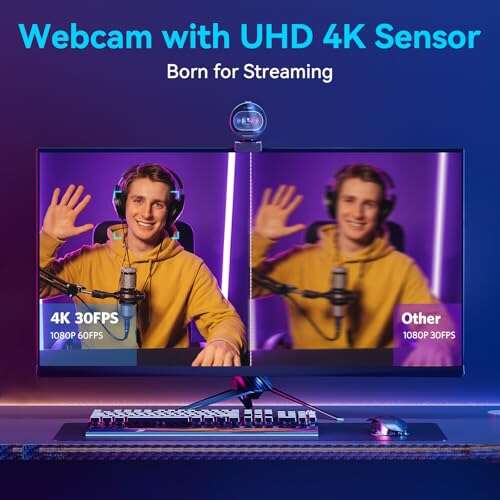
The best camera for PS5 streaming is a fast 4K webcam with 1080p60 output.
You want clean video, fast focus, and smooth motion. You want a camera that makes your stream feel pro, even if you film in a small room. If you go live from a PS5, you can still look sharp with the right setup. The trick is simple. Use a USB webcam that shines at 1080p60 and run your console through a capture card or Remote Play to a PC. In this guide, I break down the best camera for PS5 streaming for different budgets and spaces, so you can pick the one that matches your goals.
EMEET S600 4K Webcam with PDAF Autofocus

The EMEET S600 pairs a 1/2.55″ Sony sensor with PDAF autofocus. It locks focus in a snap. Motion stays smooth at 1080p60, which looks great for streams. Colors are rich and clean without heavy tuning. The built-in mics help in a pinch, though I still suggest a USB mic for voice.
This is a strong pick if you want a crisp, pro look. The 73° field of view fits most desk or couch setups. A privacy cover gives peace of mind between sessions. It works well with OBS, Streamlabs, and common tools. For PS5 streaming, use it with a capture card or Remote Play on a PC.
Pros:
- Fast PDAF autofocus that locks quickly on your face
- Clean 1080p at 60 fps for smooth motion
- Large Sony sensor for better low-light detail
- Privacy cover for simple camera control
- Natural color with minimal tweaks
- Compact body that sits well on top of a monitor or TV
Cons:
- Works best with extra lighting
- Built-in mics are basic for pro audio needs
- Needs a capture card or Remote Play for PS5 use
My Recommendation
If you want the best camera for ps5 streaming without fuss, start here. The EMEET S600 gives you fast focus, smooth frames, and a strong sensor. It shines in dim rooms with a small light. It also works well for streamers who move or gesture a lot on camera.
Use it with a capture card on a PC to add your face to PS5 gameplay. The result looks sharp and steady. Many creators want 1080p60, and this delivers it with ease. For the price, it hits a sweet spot for quality and speed.
| Best for | Why |
|---|---|
| Console streamers on PC | 1080p60 output and fast autofocus |
| Low-light rooms | Sony sensor keeps detail and color clean |
| Creators who move | PDAF tracks faces fast with fewer focus hunts |
EMEET S600 4K Webcam + Tripod Bundle

This bundle gives you the same S600 image plus a tripod. That tripod is a quiet hero. It lets you place the camera above a TV, off to the side, or on a shelf. You get better angles and better eye lines. The 73° FOV helps you center your shot in tight spaces.
Autofocus stays snappy thanks to PDAF. 1080p60 looks clean with live gameplay. The two mics are fine for calls, but I like a separate mic for streaming. If you want a ready-to-go setup, this kit saves time. It lines up with what I call the best camera for ps5 streaming strategy.
Pros:
- Tripod included for flexible camera placement
- Sharp 1080p60 for smooth facecam video
- Fast, reliable PDAF autofocus
- Privacy cover for easy blocking between streams
- Good color right out of the box
- Compact and easy to move around a living room
Cons:
- Tripod quality is basic, but useful
- Needs extra light for the best image
- Not a direct USB camera for PS5 console streaming
My Recommendation
Go with this bundle if you need flexible framing. The tripod makes your stream look more natural. You can place the lens at eye level. That one change boosts viewer connection a lot. If you want the best camera for ps5 streaming with a ready mount, this bundle is a smart buy.
Pair it with a capture card and you are set. The fast focus and 1080p60 keep motion smooth. It is a great fit for couch streamers and desk setups. The value is strong if you do not own a tripod yet.
| Best for | Why |
|---|---|
| Couch streaming | Tripod allows eye-level placement near a TV |
| Beginner creators | Bundle saves time and setup stress |
| Eye contact framing | Tripod height control makes angles look pro |
1080p Streaming Kit: Cam, Mic, and LED Light

This kit packs a 1080p30 webcam, an RGB USB mic, and an LED light. It is built for PC streaming. Note that it is not for PS5 or Xbox direct use. That is important. You can still stream PS5 gameplay with this kit by using a capture card or Remote Play on a PC.
The mic is the star here. It upgrades your voice quickly. The light fills shadows and reduces noise in the video. The camera is 1080p30, which is fine for talking shots. It will not match a 1080p60 webcam for motion. Still, it is a budget friendly way to start.
Pros:
- All-in-one kit that covers image, audio, and lighting
- RGB USB mic gives a clean voice sound with style
- LED light boosts clarity in dark rooms
- Simple way to launch a stream setup fast
- Good value if you lack any gear
Cons:
- Camera is limited to 1080p30
- Not for direct PS5 or Xbox use
- Image quality depends a lot on the included light
My Recommendation
Pick this if you want the cheapest full kit to get going. It is not the best camera for ps5 streaming by itself. But it is a smart starter setup if you plan to connect your PS5 through a PC. The mic and light do heavy lifting for a clean look and sound.
If budget is tight, this kit is a solid path. You can always upgrade the camera later to a 1080p60 model. Keep the mic and light as you grow. It is a low-risk way to learn your workflow.
| Best for | Why |
|---|---|
| First-time streamers | One kit covers key streaming needs |
| Budget builds | Low cost start with room to upgrade |
| PC-based PS5 streams | Works with capture card or Remote Play |
Acer 4K Webcam with Sony Sensor and PDAF
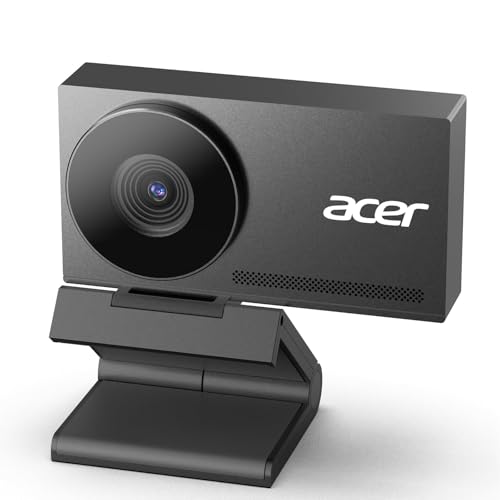
This Acer webcam leans into build quality. The all-metal unibody is rigid and light. Cooling is quick, which helps on long streams. A Sony 1/2″ sensor and PDAF add speed and clarity. Skin tones look natural once you set white balance.
It includes two noise reduction mics and a privacy cover. The look is sleek and pro. It suits creators who want stable, long sessions with fewer drops. For PS5 streaming, pair it with a capture card or a PC bridge. It does not plug straight into a PS5 for facecam use.
Pros:
- All-metal body feels premium and durable
- Large Sony sensor helps in low light
- PDAF autofocus is quick and steady
- Runs cool during long sessions
- Privacy cover for secure downtime
Cons:
- Higher price than basic 1080p cams
- Requires tuning for best color in mixed light
- Needs PC capture workflow for PS5 facecam
My Recommendation
Choose this if you value build and long-term use. It is a good candidate for the best camera for ps5 streaming if you want a premium feel. The sensor and autofocus help a lot. Your face stays sharp even when you lean in or pull back.
It fits streamers who run long, daily sessions. The metal build and cooling help avoid thermal issues. It is a strong hub camera in a clean setup. Add a small key light for the best results.
| Best for | Why |
|---|---|
| Long sessions | Fast cooling and stable performance |
| Pro setups | All-metal body and premium sensor |
| Low-light rooms | Larger sensor retains detail and color |
EMEET PIXY 4K Dual-Cam AI PTZ Webcam

The EMEET PIXY is for creators who move. It has dual cameras, AI tracking, and PTZ. It follows you smoothly and reframes fast. Autofocus is quick at 0.2s. The Sony 1/2.55″ sensor helps with detail and color.
It adds gesture control, presets, and three mics. This is a streamer’s tool, not just a simple webcam. It is great for IRL talks, desk builds, and fitness streams. For PS5, you will still need a capture card to bring it into your scene. But once in OBS, it feels like a real studio cam.
Pros:
- AI tracking with PTZ keeps you centered as you move
- Fast 0.2s autofocus with PDAF
- 4K capture with strong detail
- Gesture controls and presets for quick framing
- Three mics for backup audio
Cons:
- More costly than standard webcams
- Requires software learning to master features
- Needs PC workflow for PS5 streaming
My Recommendation
This is for creators who move and still want a clean frame. It might be the best camera for ps5 streaming if you show more than your face. Think product demos, room shots, or stand-up chats. The PTZ tracking feels natural and smooth.
If you want a studio feel without a big rig, this is it. The sensor and autofocus handle tough scenes. It is overkill for simple desk streams. But it shines if you aim to level up your show.
| Best for | Why |
|---|---|
| Active streamers | AI PTZ keeps you framed while you move |
| Demos and tutorials | Presets and gestures switch views fast |
| Pro feel streams | 4K detail and fast autofocus |
FAQs Of best camera for ps5 streaming
Can I plug a USB webcam directly into a PS5?
Most third-party webcams will not work directly for console streaming. Use a capture card or Remote Play on a PC to add your facecam to a PS5 stream.
Do I need 4K for a facecam on PS5?
No. 1080p60 is ideal for smooth motion and a natural look. 4K sensors can still help with detail and low-light performance.
What frame rate should I choose for facecam video?
Go for 60 fps if you can. It matches fast gameplay and looks smooth. If not, 30 fps is fine for talking shots.
How do I get the best color from my webcam?
Use a small key light. Set white balance manually. Lower sharpness a touch. Adjust exposure to avoid clipping highlights.
Can I stream PS5 without a capture card?
Yes, by using Remote Play on a PC and capturing that window. A capture card gives more stability and lower latency.
Final Verdict: Which Should You Buy?
The EMEET S600 is the best blend of speed, detail, and value. It nails the basics for the best camera for ps5 streaming, especially at 1080p60.
Need flexible mounting? Get the S600 Tripod Bundle. Want pro tracking and a studio feel? Pick the EMEET PIXY. For budget starts, the 1080p kit works with a PC bridge.
Related Posts

Jamie Lee is a seasoned tech analyst and writer at MyTechGrid.com, known for making the rapidly evolving world of technology accessible to all. Jamie’s work focuses on emerging technologies, product deep-dives, and industry trends—translating complex concepts into engaging, easy-to-understand content. When not researching the latest breakthroughs, Jamie enjoys exploring new tools, testing gadgets, and helping readers navigate the digital world with confidence.