Yes, headsets often look more professional for video calls because they improve sound, focus, and meeting etiquette.
So, are headsets more professional for video calls? In most work settings, yes. A good headset can make your voice clearer, reduce background noise, and show that you take the meeting seriously. However, professionalism depends on more than the device itself. Fit, audio quality, camera placement, lighting, and how you use the headset all matter.
After testing different wired, wireless, office, and gaming headsets in remote work settings, I have found that the right model can make calls feel smoother and less tiring. This guide explains when headsets help, when they may not, and how to choose one that supports a polished video call experience.

Are headsets more professional for video calls?
Yes, headsets are usually more professional for video calls when they provide clear audio and match the setting. They help prevent echo, limit outside noise, and keep your microphone close to your mouth. These benefits can make meetings easier for everyone.
A headset also sends a quiet visual signal. It suggests that you are ready to listen and speak. In a busy home office, that signal can be useful because it shows you are treating the call as a focused work session.
Still, a headset is not automatically professional. A poor-quality model with crackling audio, a loose microphone, or bright gaming lights may look less suitable for a job interview or client meeting.
When asking, “are headsets more professional for video calls,” think about three things:
• Audio clarity: Can people hear your voice without effort?
• Visual fit: Does the headset suit your workplace or industry?
• Practical comfort: Can you wear it throughout a long meeting?
A simple black headset with a small microphone may look more professional than expensive headphones with flashing lights. In most cases, clear communication matters more than brand or price.

Why headsets can improve video call quality
The main advantage of a headset is control. It puts the speaker and microphone in a stable position near your ears and mouth. This often creates a more consistent sound than a laptop’s built-in microphone and speakers.
Better microphone performance
Laptop microphones sit several inches away from your mouth. They may capture keyboard noise, room sounds, air conditioning, and other voices. A headset microphone stays closer, so it can capture your speech with less room noise.
Many office headsets also use noise reduction. This feature can reduce steady sounds such as fans or traffic. It does not remove every sound, but it can make your voice easier to follow.
Less echo
Echo happens when your microphone picks up sound from your speakers. Video call software tries to remove this echo, but the result can sometimes sound clipped or unnatural.
Headsets send call audio directly to your ears. This greatly lowers the chance that your microphone will capture the other person’s voice. That is one reason are headsets more professional for video calls is often answered with a clear yes.
Better focus
Headphones can create a small boundary between you and the room. This can help you focus during long meetings, especially in a shared home or open office.
Noise cancellation may help, too. However, it is not always ideal. If you need to hear a child, coworker, doorbell, or safety alarm, choose a transparency mode or a headset with one open ear.
Fewer interruptions
A headset can help you hear every word. This reduces the need to ask people to repeat themselves. It also lowers the risk of missing a key detail during interviews, team calls, or client discussions.
In my experience, many call problems blamed on the internet are actually caused by poor microphones or weak speakers. A reliable headset often fixes the issue in minutes.

When a headset looks more professional
The most professional headset is usually the one that fits the meeting and does not distract from it. A client presentation may call for a simple office headset, while a casual team call may allow more freedom.
Consider these features:
• Neutral design: Black, gray, white, or muted colors usually fit formal settings.
• Small microphone boom: A short, adjustable boom looks tidy and keeps your voice clear.
• Minimal branding: Large logos and bright designs may distract from your face.
• Clean condition: Wipe the ear cushions and microphone before important calls.
• Proper fit: A headset that sits straight looks more polished than one that keeps slipping.
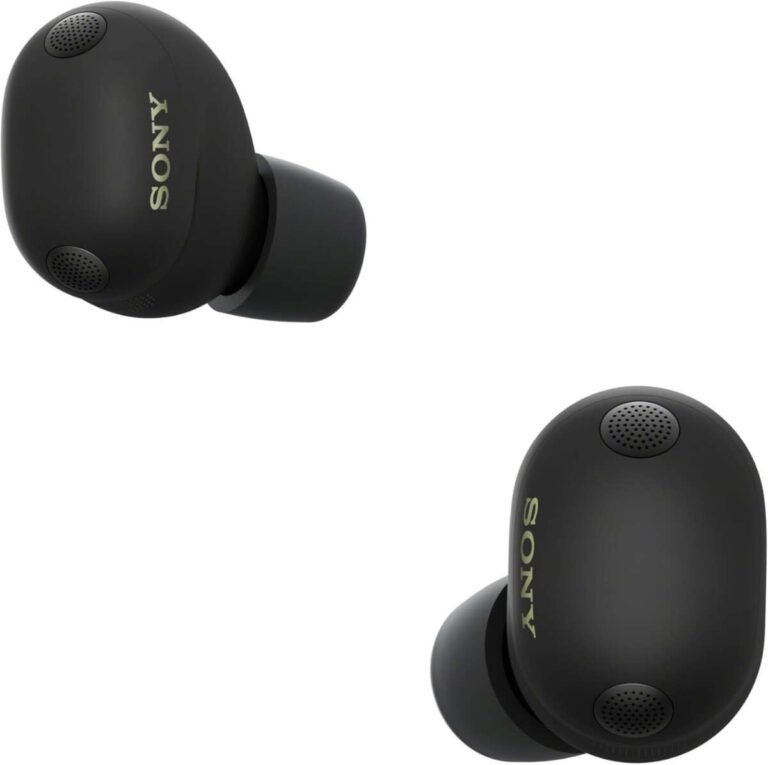
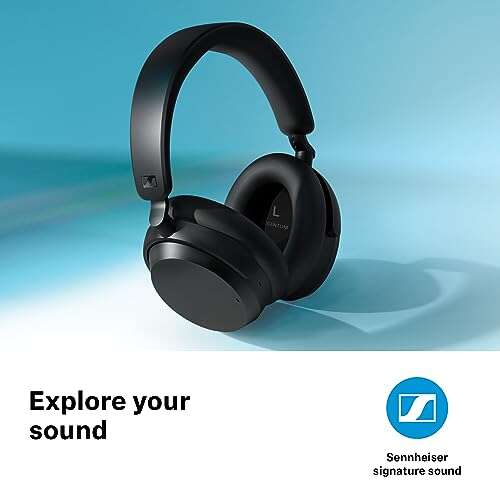
Over-ear headphones can look professional when they are simple and well maintained. Wireless earbuds can also work well, especially when they have a small design and strong microphone quality.
The question “are headsets more professional for video calls” also depends on your industry. A software company may accept modern earbuds or gaming-style headphones. A law firm, medical office, bank, or consulting company may favor a more traditional office headset.
Your role matters, too. A customer service worker may need a dedicated call-center headset. An executive may prefer discreet earbuds. A teacher may need a headset that blocks classroom noise.

Headsets versus built-in microphones
Built-in microphones are convenient, but convenience does not always equal professionalism. They sit inside a laptop, monitor, tablet, or webcam. Their performance depends on the room and your distance from the device.
A headset usually performs better in these areas:
| Feature | Headset | Built-in microphone |
|---|---|---|
| Voice clarity | Usually stronger | Varies by device |
| Echo control | Excellent | Depends on software |
| Background noise | Often reduced | More likely to capture noise |
| Mobility | Good, especially wireless | Limited |
| Setup | Requires wearing a device | Ready to use |
| Appearance | More visible | Almost invisible |
A built-in microphone may be enough in a quiet room with good acoustics. It can also look more natural on camera because nothing covers your ears or hair.
This is why the answer to are headsets more professional for video calls is not universal. A high-quality webcam microphone in a quiet room may sound better than a cheap headset. Test both options before an important call.
Record a short sample in your normal workspace. Listen for echo, room noise, muffled words, and volume changes. This simple test can reveal more than a product description.

Types of headsets for professional video calls
Different headset styles suit different needs. The best choice depends on your work, room, comfort, and budget.
Wired USB headsets
USB headsets are often the safest choice for office calls. They do not need charging, and they usually connect quickly to computers.
Benefits include:
• Stable connection
• Low delay
• Simple setup
• Reliable microphone power
The cable can create clutter, but it also prevents battery problems. For interviews and important presentations, a wired USB headset is a dependable option.
Wireless Bluetooth headsets
Bluetooth headsets offer freedom to move. They are helpful if you step away from your desk or switch between a computer and phone.
Possible limits include:
• Battery life
• Pairing problems
• Audio delay
• Bluetooth profile changes during calls
Some computers switch to a lower-quality Bluetooth mode when the microphone turns on. Newer devices handle this better, but testing remains important.
Wireless USB headset systems
Many business headsets use a small USB receiver instead of standard Bluetooth. These systems often provide stronger range and more stable call performance.
They may cost more, but they can be a good choice for people who spend hours in meetings each week.
Earbuds
Earbuds are small and easy to carry. They can look clean and modern on camera. Some premium models have excellent microphones, while cheaper models may make your voice sound thin or distant.
Earbuds work best when you test them in the same room where you plan to take calls.
Gaming headsets
Gaming headsets often have strong microphones and comfortable ear cups. Yet some models have bold colors, large designs, or bright lights.
A simple gaming headset can work for remote work. Turn off lighting effects, check the microphone position, and use a neutral background if you want a more businesslike appearance.

How to choose a professional video call headset
Choosing a headset involves more than searching for the most expensive model. Focus on the features that affect your daily calls.
1. Check microphone quality
The microphone is often the most important part. Look for clear voice pickup and a design that reduces nearby noise.
Do not trust every marketing term. “Noise canceling” may refer to the headphones rather than the microphone. Read independent reviews and test recorded samples when possible.
2. Prioritize comfort
A headset can be technically excellent but still fail if it hurts after 30 minutes. Check the weight, ear cushion, headband, and clamping force.
For long meetings, breathable cushions and a flexible headband can make a major difference. If you wear glasses, choose a model that does not press hard against the frames.
3. Consider connection type
USB is simple and reliable for computers. Bluetooth is flexible but may require more troubleshooting. A wireless receiver can provide a useful balance between freedom and stability.
If your work depends on video calls, keep a backup connection available. A wired headset can save the day when a wireless battery runs out.
4. Look for useful controls
Mute buttons, volume controls, and call answer buttons can help. A visible mute light is especially useful because it reduces the risk of speaking while muted.
Some business headsets also provide software that shows your call status. This can help when you use several meeting platforms.
5. Match the design to your role
Ask yourself:
• Will clients see the headset often?
• Do I work in a formal industry?
• Do I need strong noise reduction?
• Do I move between rooms?
• Do I wear glasses or earrings?
• Do I need one-ear or two-ear audio?
Your answers will guide you toward the right style. Professional appearance is about fit and purpose, not just price.

How to make any headset look more professional
Even a good headset can look unprofessional if it is used carelessly. Small habits make a big difference.
Before a call:
-
Charge wireless devices.
-
Clean the ear cups and microphone.
-
Test the input and output settings.
-
Place the microphone near the corner of your mouth.
-
Check that your voice is not too loud or too quiet.
-
Turn off unnecessary lights and alerts.
-
Keep a backup headset or wired earbuds nearby.
During the call, avoid tapping the microphone or adjusting the ear cups repeatedly. These movements create noise and can distract others.
Place the microphone about one or two fingers from your mouth. Do not put it directly in front of your lips, where breathing sounds may become noticeable.
Use the correct audio settings in Zoom, Microsoft Teams, Google Meet, or another platform. Automatic noise removal can help, but aggressive settings may cut off soft speech or natural pauses.
A common mistake I have made is joining a call without checking which microphone the computer selected. The system sometimes chooses the laptop microphone instead of the headset. A 10-second audio test prevents this problem.

Limitations of using a headset
Headsets are useful, but they are not perfect. Some people dislike wearing them because they feel warm, heavy, or restrictive. Others find that headbands flatten their hair or interfere with glasses.
A headset may also create a less personal appearance. In a one-to-one conversation, natural eye contact and facial expression can matter more than maximum noise control.
Wireless models bring extra concerns. Batteries degrade over time, and connections can fail. Bluetooth can also cause setup problems when several nearby devices compete for the connection.
Noise cancellation has limits as well. It may reduce low, steady sounds but struggle with sudden voices, barking dogs, or construction noise. A quiet room and a good microphone still matter.
This is another reason are headsets more professional for video calls should be treated as a practical question, not a rule. Use a headset when it improves the meeting. Skip it when it reduces comfort, connection, or natural communication.
Headset etiquette for work meetings
Professionalism includes behavior. A headset cannot replace good meeting habits.
Follow these simple rules:
• Mute yourself when you are not speaking in a noisy place.
• Unmute before talking and pause briefly so the platform can detect your voice.
• Tell others if you need to adjust your equipment.
• Avoid eating while the microphone is active.
• Keep music and private conversations away from the microphone.
• Use one headset consistently if you attend frequent calls.
• Look at the camera when presenting an important point.
• Keep your face well lit and your background tidy.
If you are in a formal interview, test the headset with the exact meeting app beforehand. Ask a friend to listen to a short recording. This gives you a clear idea of how others will hear you.
Professional communication is like a group project. Everyone shares the responsibility for clear sound, respectful timing, and limited distractions.
Common mistakes to avoid
Many headset problems come from simple errors rather than bad equipment.
Avoid these mistakes:
• Buying based only on price: Expensive does not always mean clear.
• Ignoring fit: Discomfort can reduce focus during long calls.
• Skipping tests: A headset may work for music but sound poor on calls.
• Placing the microphone too far away: This can make your voice quiet.
• Covering the microphone: Clothing and hair can create unwanted noise.
• Forgetting battery levels: Wireless devices can fail at the worst moment.
• Using maximum noise cancellation: It may make your voice sound unnatural.
• Wearing a distracting design in a formal meeting: Bright lights and large logos can pull attention away from you.
The biggest lesson from testing headsets is simple: judge the complete experience. A balanced headset with a clear microphone, stable connection, and comfortable fit is more valuable than a feature-packed model you do not enjoy wearing.
Frequently Asked Questions About Are Headsets More Professional for Video Calls
Are headsets more professional for video calls than earbuds?
Often, yes, especially when the headset has a clear boom microphone and a simple design. However, high-quality earbuds can look equally professional if they provide reliable audio and fit the meeting setting.
Do headsets make you look more serious on a video call?
A headset can make you appear prepared and focused, but appearance depends on the design. A clean, neutral headset usually looks more professional than a bright or oversized model.
Is it better to use a wired or wireless headset for work calls?
Wired headsets offer dependable power and a stable connection. Wireless headsets provide more freedom, but you must manage battery life and possible connection issues.
Can I use gaming headphones for professional video calls?
Yes, if the microphone sounds clear and the design is not distracting. Turn off bright lighting effects and test the headset with your meeting software before using it for work.
What headset features matter most for video meetings?
Prioritize microphone clarity, comfort, echo control, connection stability, and easy mute access. Noise cancellation is useful, but it should not replace a quiet room and good microphone placement.
Should I wear a headset during a job interview?
A simple headset can be a good choice if it improves your voice quality and reduces noise. Test it in advance, and avoid models that look distracting or create connection problems.
Conclusion
Headsets are often more professional for video calls because they improve voice clarity, reduce echo, and help you stay focused. The best option is not always the most expensive one. A comfortable, reliable headset with a clean design will usually serve you better than a flashy model with extra features.
Before your next meeting, test your microphone, check your battery, adjust the boom near your mouth, and listen to a short recording. Choose equipment that supports clear communication without distracting from your face or message.
Try these steps on your next call, then share your headset experience or explore more video meeting tips to build a smoother remote work setup.

Everett Ashford is a tech reviewer at mytechgrid.com specializing in SSDs, cameras, TVs, earbuds, headphones, and other consumer electronics. He provides honest, data-driven reviews based on hands-on testing and real-world performance analysis. Everett simplifies complex tech details to help readers make smart, confident buying decisions.