The HP 15.6-inch N200 laptop is my top basic laptop for home use in 2026.
Many home users need a laptop for email, online banking, school work, video calls, shopping, and streaming. They do not need a costly gaming machine or a high-end business laptop. They need a system that starts quickly, feels simple, and handles daily tasks with less fuss. I reviewed the listed models with those needs in mind. I looked at screen size, memory, storage, software, portability, and likely home use. I also included a mini Android computer and speakers because they may appeal to buyers who want a very small device or better sound.
See the differences between my top picks at a glance.
15.6-Inch N4020 Laptop for Home

This 15.6-inch laptop targets simple home work. It uses an Intel Celeron N4020 processor, 4GB of DDR4 memory, and 128GB of eMMC storage. The large FHD LCD gives you more room for web pages, email, and documents than a small travel computer. Windows 11 also gives you access to familiar apps and settings.
The storage is modest, but the listing says it supports up to a 1TB TF card. That can help if you save photos, school files, or downloaded media. I would use this model for browsing, word processing, video calls, and streaming rather than demanding editing or gaming. It is a sensible pick when screen size matters more than speed.
Pros:
- Large 15.6-inch FHD screen
- Windows 11 gives access to common home apps
- 128GB storage is useful for basic files
- TF card expansion can add room
- Portable design suits a home office or study desk
Cons:
- 4GB RAM limits heavy multitasking
- eMMC storage is slower than a modern SSD
- N4020 performance is best for light work
What Amazon Buyers Are Saying
Before buying, check the latest Amazon review mix for comments on setup, keyboard feel, battery life, and screen quality. Listings can change, and customer experiences may vary by batch. The main point to verify is whether buyers find the 4GB memory enough for their own daily apps.
My Recommendation
I recommend this laptop for a user who wants a large screen at a low cost. It is a good fit for email, web browsing, online classes, and documents. I would not choose it for many open browser tabs or advanced creative work.
HP 14-Inch N4500 Laptop for Home

HP’s 14-inch model offers a smaller and lighter format for home users who move between rooms. It has an Intel Celeron N4500 processor and 4GB of RAM. The package includes 64GB of eMMC storage and a 64GB SD card, which gives you a stated 128GB combined storage setup. It also includes Windows 11 in S mode and one year of Office 365 according to the listing.
The advertised 12-hour battery life and fast-charge feature may appeal to students and remote workers. Wi-Fi 6 is another useful feature for compatible home routers. The 14-inch size balances viewing comfort with easier carrying. Still, 4GB RAM and eMMC storage make this a light-duty machine, not a power laptop.
Pros:
- Compact 14-inch format is easy to carry
- Intel N4500 suits basic daily tasks
- Includes a 64GB SD card
- Wi-Fi 6 support can improve wireless use with compatible routers
- Listed long battery life helps away-from-outlet work
- Includes one year of Office 365 in the product description
Cons:
- 4GB RAM is limited for multitasking
- 64GB internal eMMC storage is small
- Windows S mode may restrict app installation until changed
What Amazon Buyers Are Saying
Review the current Amazon feedback for battery claims, setup, keyboard comfort, and the included card. Buyers often judge small laptops by portability and ease of use. I would pay close attention to comments about the 14-inch display and whether S mode fits your app needs.
My Recommendation
This HP is a practical choice for a student, traveler, or home user who values size. It works best for browser tasks, Office work, email, and video calls. I would pick a model with more RAM if you often run many apps at once.
HP 15.6-Inch N200 Laptop

This HP model is my leading pick for the best basic laptop for home use because it combines a familiar brand with a 15.6-inch format and an SSD. The listing names an Intel four-core N200 processor, 4GB of RAM, and a 128GB SSD. An SSD usually feels more responsive than eMMC storage during startup and file access. Windows 11 Home in S mode and Microsoft 365 add useful software value.
The 15.6-inch size works well on a desk for spreadsheets, recipes, video calls, and streaming. The N200 is still an entry-level chip, so I would keep expectations realistic. It should handle simple work, but 4GB RAM can become a limit with many tabs. For everyday home users who want a clean, simple setup, this is the most balanced option in the group.
Pros:
- SSD storage should feel quicker than eMMC storage
- 15.6-inch screen gives useful workspace
- N200 four-core design suits everyday tasks
- Microsoft 365 adds practical home-office value
- HP offers a familiar support and service name
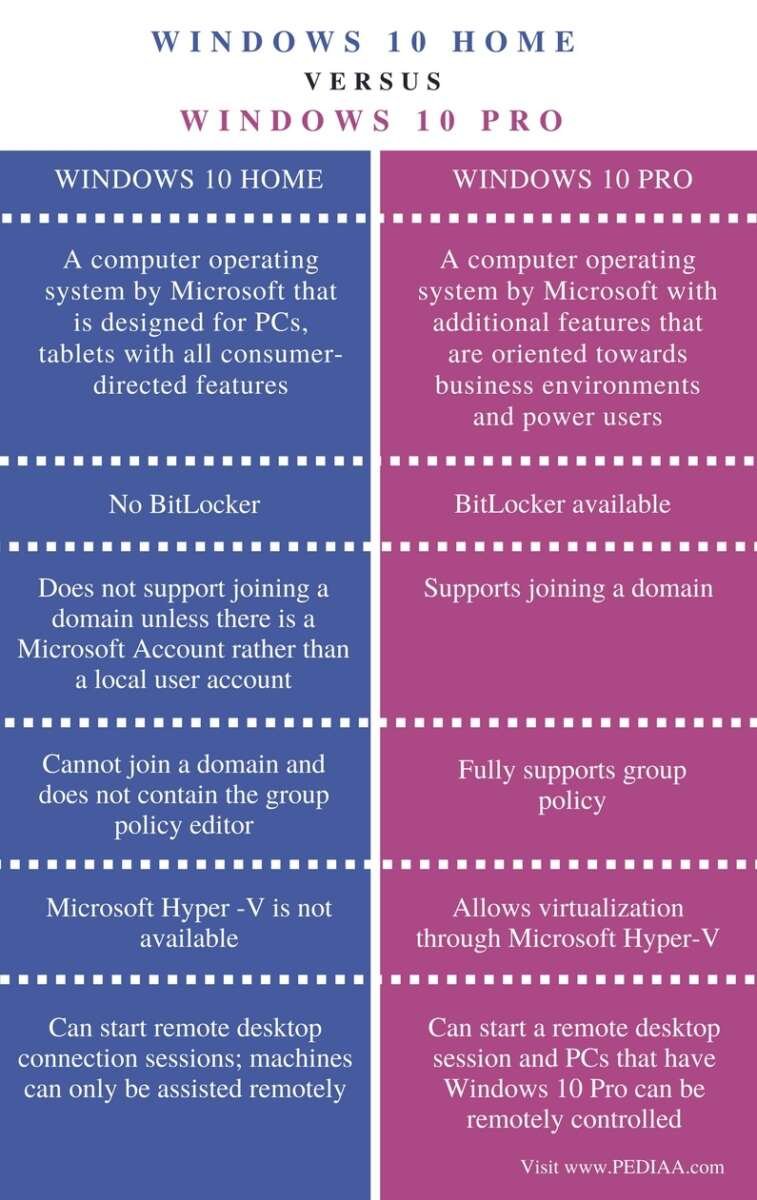
- Windows 11 Home provides broad app access after S mode considerations
Cons:
- 4GB RAM is not ideal for demanding multitasking
- Windows S mode may limit some desktop apps
- 128GB fills quickly with large photos and videos
What Amazon Buyers Are Saying
Check current buyer comments for the exact configuration, since marketplace listings can change. The most useful feedback will cover speed during setup, screen quality, battery behavior, and whether users needed to leave S mode. I would also compare recent reviews with the seller’s warranty details before ordering.
My Recommendation
I would buy this HP for email, documents, web research, streaming, and home administration. The SSD gives it an edge over the eMMC models here. It is not a gaming or editing laptop, but it is the strongest general choice for a simple Windows home computer.
MELIUNA 15.6-Inch Laptop with 12GB RAM

MELIUNA’s 15.6-inch laptop stands out through its 12GB of RAM and 256GB SSD. Those numbers offer more breathing room than the 4GB models in this guide. More memory can help when you keep several browser tabs, a video call, and a document open together. The larger SSD also gives you more space for family photos, downloads, and office files.
The listing calls this an AI laptop and includes Office 365. I would not treat the AI label alone as proof of advanced AI hardware or special performance. The key practical benefits are the listed memory and SSD capacity. Confirm the processor, operating system, warranty, and exact software term on the Amazon page before buying, since the supplied product title does not state them clearly.
Pros:
- 12GB RAM offers better multitasking room
- 256GB SSD provides useful file space
- 15.6-inch screen suits desk use
- Office 365 is listed as included
- Good fit for users who keep many tabs open
Cons:
- Processor details are not clear in the supplied title
- Operating system details need confirmation
- Brand support may be less familiar than HP or ASUS
What Amazon Buyers Are Saying
For this model, I suggest reading recent verified-purchase comments with extra care. Focus on reports about actual speed, setup, battery life, keyboard quality, and whether the advertised Office 365 access worked as expected. Buyer feedback matters here because the title gives less detail about the processor and operating system.
My Recommendation
This is a strong option if memory and storage matter most. I would consider it for home office work, school tasks, and heavier web use than the 4GB laptops can comfortably handle. Buy only after confirming the full specifications and return terms.
Aurant 15.6-Inch Core i3 Laptop

The Aurant model offers a useful step up from the smallest entry-level laptops. Its title lists a Core i3 processor, 8GB of DDR4 RAM, and a 128GB SSD. It also has a backlit keyboard and an FHD IPS display. These features suit users who type at night, work at a desk, or want a more comfortable screen for long sessions.
The laptop supports Wi-Fi 5 and Bluetooth 4.2. Its 180-degree lay-flat hinge may help when you want to share the screen. The 128GB SSD is fast enough for a basic setup, but it leaves less room than the MELIUNA model. I see this as a good practical choice for home office tasks when keyboard comfort and RAM matter.
Pros:
- 8GB RAM is better for daily multitasking
- Core i3 processor offers a stronger starting point
- Backlit keyboard helps in low light
- FHD IPS display supports clear viewing
- 180-degree hinge adds useful flexibility
- SSD storage should support quick startup and file access
Cons:
- 128GB storage may feel small over time
- Wi-Fi 5 is older than Wi-Fi 6
- Bluetooth 4.2 is not the newest standard
What Amazon Buyers Are Saying
Look for current reviews that discuss the backlit keys, display, hinge, fan noise, and battery life. These details affect daily comfort more than a short specification list can show. I would also confirm the exact Core i3 generation on the live listing, because processor generation can affect speed and battery use.
My Recommendation
I recommend the Aurant for users who want more comfortable daily performance without moving to a premium price class. It is one of the better fits for documents, remote work, browsing, and video calls. Its limited storage is the main trade-off.
Fwmntu 10.1-Inch Android Mini Laptop

The Fwmntu is not a typical Windows laptop. It is a 10.1-inch mini notebook that runs Android 12. Its IPS screen has an 800 by 1280 resolution, and the product includes built-in Wi-Fi and a webcam. The small body may work well for children, simple learning tasks, travel, or casual web access.
Android gives you access to mobile-style apps, but it does not offer the same desktop experience as Windows 11. That difference matters if you need Microsoft desktop software, advanced file tools, or a full office workflow. The product listing does not state RAM or storage, so check those details before purchase. I see it as a compact secondary device rather than the best basic laptop for home use.
Pros:
- Very small and easy to carry
- Android 12 offers a familiar mobile app style
- IPS screen supports broad viewing angles
- Built-in webcam helps with simple calls
- Useful for kids and basic home learning
Cons:
- 800 by 1280 resolution is modest
- RAM and storage are not stated in the supplied title
- Android may not replace a Windows laptop for office work
- Small keyboard may feel cramped for adults
What Amazon Buyers Are Saying
Read the latest reviews for keyboard size, app compatibility, battery life, and screen response. Buyers should also check whether the device meets their learning platform needs. Since the listing does not show core memory details in the supplied title, current customer photos and questions can be especially helpful.
My Recommendation
I recommend this mini device only for light use, children, travel, or a second screen. It is not my first choice for a home office or full Windows software. Its small size is its main advantage and its main limit.
ASUS 15.5-Inch Renewed Windows Laptop

This renewed ASUS laptop offers a large 15.5-inch Full HD screen, Windows 11 Home, 4GB of LPDDR4 memory, and a 128GB SSD. The listing also mentions a backlit keyboard. The SSD is a positive feature for startup and file access, while the large screen works well for home browsing and documents.
Because this is a renewed product, condition and included accessories deserve close attention. The listing names an Intel Celeron processor with speeds up to 2.76GHz, but clock speed alone does not tell the full performance story. The 4GB memory makes this best for light work. I would compare the renewed warranty and seller terms before placing an order.
Pros:
- Full HD screen suits movie and document viewing
- SSD storage should feel responsive
- Backlit keyboard helps in dim rooms
- Windows 11 Home supports common desktop apps
- ASUS is a recognized laptop brand
Cons:
- Renewed condition can vary by seller and unit
- 4GB RAM limits heavier use
- 128GB storage is not generous
- Processor is designed for basic work
What Amazon Buyers Are Saying
For a renewed laptop, focus on recent comments about cosmetic condition, battery health, charger inclusion, and setup. Also check how buyers describe the keyboard and display. Amazon’s current renewed terms and seller information should guide your decision more than the product title alone.
My Recommendation
This ASUS is worth considering when the renewed price is clearly lower than a new model. It gives you a big Full HD display and SSD storage. I would choose it for browsing and office tasks, but I would not pay a premium for an older 4GB configuration.
Amazon Basics Stereo Speakers for Laptop

These Amazon Basics speakers are an accessory rather than a laptop. I included them because built-in laptop speakers can sound thin during movies, music, classes, and video calls. This pair uses a 3.5mm auxiliary input for audio and USB power. A simple volume control makes daily use easy.
The 2.0 stereo layout keeps the setup small and affordable. You need a laptop or computer with a compatible 3.5mm audio output, plus a USB port or USB power source. These speakers will not replace a larger sound system. They make more sense for a desk where you want clearer left-and-right sound without wireless pairing.
Pros:
- Simple plug-in setup
- Dedicated volume control is convenient
- USB power avoids a separate wall adapter
- 3.5mm input works with many laptops
- Compact stereo design suits a home desk
Cons:
- Needs a USB power source and audio connection
- Not a portable wireless speaker system
- Small speakers cannot match deep bass from larger models
What Amazon Buyers Are Saying
Check current buyer reviews for volume, cable length, sound balance, and any noise from the USB power connection. People use small speakers in different rooms and setups, so desk placement can affect results. I would read recent comments that mention laptops rather than desktop computers.
My Recommendation
I recommend these speakers as a low-cost add-on for a basic home laptop. They are useful when you want more sound than the laptop provides at the desk. Buy them for simple stereo audio, not for high-volume music or strong bass.
How to Choose the Best Basic Laptop for Home Use
Choosing the best basic laptop for home use starts with your real tasks. Think about how you work today, not just the lowest price on a product page. A laptop for email and recipes has different needs from one used for remote work, school, and many browser tabs. These checks can help you avoid a slow or cramped system.
1. Match the Processor and RAM to Your Tasks
Entry-level Intel Celeron and N-series processors can handle email, web pages, streaming, documents, and simple video calls. They cannot match the speed of a modern Core i5 or Ryzen 5 laptop. That does not make them bad. It means you should buy them for light work.
RAM affects how many tasks stay open at once. A 4GB laptop can work for basic use, but it may slow down with many tabs. I prefer 8GB for a smoother home office setup. Models with 12GB give you more room for browser tabs, video calls, spreadsheets, and background apps.
2. Check Storage Type, Capacity, and Software
An SSD usually feels quicker than eMMC storage. It can improve startup and file access. Capacity matters too. A 64GB drive can fill fast after system files and updates. A 128GB drive works for basic files, but photos and videos may need an SD card or external drive. A 256GB SSD gives more comfort.
Also check the operating system. Windows 11 supports many familiar programs. Windows 11 in S mode focuses on apps from Microsoft’s approved store until you switch modes. Android can work well for mobile apps, but it may not replace Windows for desktop software. Confirm whether Office access is a trial, a one-year term, or a permanent license.
3. Judge Comfort, Support, and Total Value
A 15.6-inch screen gives more room for documents and split windows. A 14-inch laptop is easier to carry. A backlit keyboard helps in a dim room. An IPS screen can offer better viewing angles than a basic panel. These small comfort features matter when you use a laptop for hours.
Finally, check the seller, return policy, warranty, battery claims, and product condition. This matters most for renewed laptops and lesser-known brands. Do not pay for an “AI” label without checking the actual processor and memory. A clear specification list and a fair return policy often show better value than flashy marketing.
Final Verdict: Which Should You Buy?
For most shoppers, the HP 15.6-inch N200 is the best basic laptop for home use. Its SSD, large screen, Windows setup, and balanced design make it the easiest recommendation.
Choose the Aurant for 8GB RAM and a backlit keyboard, or MELIUNA for more memory and storage. Check current prices and specifications before ordering.
FAQs Of best basic laptop for home use
What is the best basic laptop for home use in 2026?
The HP 15.6-inch N200 is my top pick for simple home work. It combines a large screen, an SSD, Windows 11, and a practical entry-level processor.
Is 4GB RAM enough for a basic home laptop?
Yes, 4GB can handle email, browsing, documents, and streaming. I prefer 8GB or more if you use many tabs or apps at the same time.
Should I choose an SSD or eMMC laptop?
Choose an SSD when prices are close. SSD storage usually offers faster file access and startup, while eMMC models often cost less.
Is a 15.6-inch laptop too large for home use?
No. A 15.6-inch screen works well on a desk and gives more room for documents and video. Choose 14 inches if you carry the laptop often.
Can a basic laptop run Microsoft Office and video calls?
Most Windows models in this guide can handle basic Office work and video calls. Keep the number of open apps moderate, especially on 4GB models.
Is Windows 11 S mode good for a home laptop?
S mode can improve simplicity and security, but it limits app installation. Check your software needs before deciding whether to keep or leave S mode.

Everett Ashford is a tech reviewer at mytechgrid.com specializing in SSDs, cameras, TVs, earbuds, headphones, and other consumer electronics. He provides honest, data-driven reviews based on hands-on testing and real-world performance analysis. Everett simplifies complex tech details to help readers make smart, confident buying decisions.