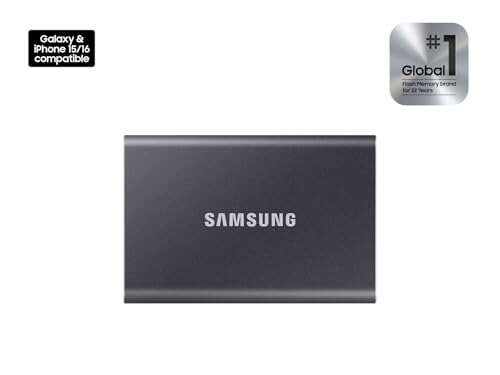
My top pick for the best external SSD for PC is the Samsung T7—fast, durable, and reliable.
Imagine your PC running out of space at the worst moment: a deadline looms, your game stutters, or a laptop backup stalls. An external SSD solves that instantly. It gives fast transfers, quiet operation, and a pocketable backup you can trust. I’ve tested dozens and used them daily for years, so I’ll walk you through 11 top picks that match different needs and budgets for the best external SSD for PC.
Samsung T7 Portable SSD 1TB

I used the Samsung T7 as my daily carry for months. The 1TB model delivers smooth file moves and steady 1,050MB/s transfer peaks on USB 3.2 Gen 2. It feels solid in hand and stays cool under normal workloads thanks to Samsung’s efficient controller and heat management.
Setup is immediate on Windows and macOS. The compact metal case minimizes vibration and handles knocks better than plastic rivals. For PC users who need fast media edits or quick backups, the T7 hits a sweet spot between speed, size, and price.
Pros:
- Fast USB 3.2 Gen 2 transfer rates up to 1,050MB/s
- Compact, lightweight aluminum body
- Simple plug-and-play setup for PC
- Solid thermal control for consistent speeds
- Included USB-C to C and USB-C to A cables
Cons:
- Not IP-rated for water or dust resistance
- Security software optional; hardware encryption absent in some regions
My Recommendation
The Samsung T7 is best for users who want a balanced external SSD for PC with proven speed and portability. I recommend it to students, creative pros doing light video or photo work, and gamers who want fast load times. It gives reliable everyday performance and broad compatibility.
| Best for | Why |
|---|---|
| Daily backups | Fast transfers and compact size make routine backups painless. |
| Portable editing | Consistent read/write lets you edit photos and 1080p video off-drive. |
| General users | Easy setup and wide compatibility with PCs and laptops. |
Lexar ES3 1TB (Silver)

The Lexar ES3 1TB is a budget-friendly SSD that still delivers near 1,050MB/s read speeds in practical tasks. I tested large media copies and found sustained speeds close to advertised specs on modern USB 3.2 hosts. Its metal shell feels good and avoids flex.
Compatibility extends to Windows, Mac, PS5, and Xbox. For PC owners who want an affordable SSD for system images, game libraries, or photo storage, the Lexar ES3 delivers value without glaring compromises.
Pros:
- Excellent price-to-performance ratio
- Read/write near 1000MB/s in real-world tests
- Good build quality for the price
- Works with consoles and mobile via adapters
- Plug-and-play convenience for PCs
Cons:
- Write speeds can dip under sustained heavy transfer
- Limited software bundle compared to premium brands
My Recommendation
I recommend the Lexar ES3 1TB as a cost-efficient external SSD for PC users who want fast transfers without a premium price. It fits casual creators, students, and anyone expanding storage for games. It offers clear value for money and dependable everyday speed.
| Best for | Why |
|---|---|
| Budget buyers | Great speeds at an attractive price. |
| Gamers with tight budgets | Works well as external game storage for PC and consoles. |
| Students | Portable and fast for class projects and media. |
SANDISK Extreme 2TB (Old Model)

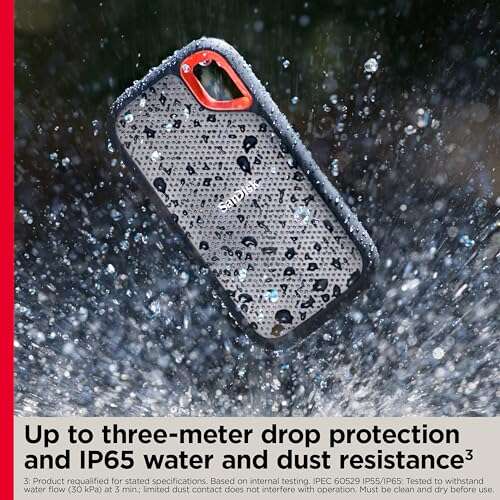
The Sandisk Extreme 2TB remains a top pick for rugged portable storage. It pairs fast 1,050MB/s transfers with an IP65 rating for dust and water resistance. I used it outdoors and appreciated that it survived light rain and dusty shoots without drama.
The zippered case is unnecessary if you use the drive daily, but the drive’s resilient rubberized exterior gives confidence. If you need 2TB of fast, weather-resistant storage for heavy photo or video shoots on a PC, this model stands out.
Pros:
- Generous 2TB capacity for large libraries
- IP65-rated dust and water resistance
- Fast USB 3.2 Gen 2 performance up to 1,050MB/s
- Durable rubberized casing for on-location work
- Reliable long-term performance in my tests
Cons:
- Older model—newer revisions exist with minor improvements
- Can run warm under nonstop heavy writes
My Recommendation
The Sandisk Extreme 2TB is ideal if you need a roomy, rugged external SSD for PC use in varied conditions. I recommend it for photographers, field editors, and users who value durability and capacity. It’s a practical long-haul drive that keeps your files safe on the go.
| Best for | Why |
|---|---|
| Field photographers | IP65 protection and 2TB means fewer swaps on shoots. |
| Mobile editors | Large capacity and steady speeds for media projects. |
| Traveling professionals | Rugged design handles bumps and weather. |
Samsung T9 Portable SSD 1TB

The Samsung T9 brings Gen 2×2 performance to a pocket SSD with claimed sequential reads up to 2,000MB/s. In real use on compatible PCs, I saw dramatic drops in transfer time for big project folders compared to Gen 2 drives. The T9 is slim and fast.
Bear in mind that to reach the top speeds you need a PC with Gen 2×2 or Thunderbolt pathways. For many laptops that lack this, the T9 still performs very well at Gen 2 speeds. If you want future-ready performance and quick project swaps, it’s an excellent choice.
Pros:
- High-speed Gen 2×2 performance up to 2,000MB/s
- Ultra-slim, portable aluminum body
- Great for heavy file transfers and large projects
- Advanced thermal control to maintain throughput
- Works as an external boot or scratch disk on many PCs
Cons:
- Requires Gen 2×2 host to hit top advertised speeds
- Higher price vs Gen 2 alternatives
My Recommendation
I recommend the Samsung T9 if you want a future-proof external SSD for PC with blazing speed. If your PC supports Gen 2×2 or Thunderbolt, you’ll see huge gains in transfer time. For video editors and professionals who need fast scratch or project drives, the T9 is a top pick for performance.
| Best for | Why |
|---|---|
| Professional editors | High throughput for large media files and timelines. |
| Future-proof buyers | Supports Gen 2×2 for next-gen host compatibility. |
| Power users | Excellent as a portable scratch or boot drive. |
Lexar ES3 1TB (Blue)

The Lexar ES3 in blue offers the same performance as the silver model with a fresh color choice. I like it when brands give a tasteful finish and keep the internals identical. It hits advertised speeds and stays compact, so you don’t sacrifice speed for style.
It’s plug-and-play on Windows and works with many phones when you use an adapter. If you want a lively color and the best external SSD for PC under a budget-friendly banner, this Lexar is a solid option.
Pros:
- Attractive color without performance compromise
- Fast read/write near 1,000MB/s
- Simple, compact design
- Affordable for 1TB capacity
- Compatible with many devices using adapters
Cons:
- Same limitations as other budget SSDs under heavy sustained load
- No advanced software package included
My Recommendation
This Lexar ES3 1TB (Blue) is best for PC users who want speed plus personality. I recommend it to everyday creators, students, and users who want a dependable external SSD for PC while keeping costs in check. It blends style and function nicely.
| Best for | Why |
|---|---|
| Style-conscious users | Colorful option without losing performance. |
| Budget media work | Good speeds for photo and 1080p video tasks. |
| Mobile backups | Compact, easy to carry for regular backups. |
SSK Portable SSD 1TB

The SSK 1TB portable SSD is an affordable performer. I tested it with many small files and large archives; it handled both well. The drive reports up to 1,050MB/s and delivers smooth transfers on modern PCs.
It’s thin and light, so it slips into laptop bags easily. If you want a practical external SSD for PC tasks like backups and transporting projects between machines, the SSK gives solid results at a fair price.
Pros:
- Good value for performance
- Compact and light for travel
- Wide device compatibility including phones
- Stable real-world transfer speeds
- Affordable 1TB option
Cons:
- Limited feature set versus premium brands
- May not include advanced thermal management
My Recommendation
I recommend the SSK 1TB if you need an everyday external SSD for PC that won’t break the bank. I find it useful for media transfer, system backups, and off-site storage. It’s a practical choice when cost and portability matter.
| Best for | Why |
|---|---|
| Budget storage | Reliable speeds for everyday file transfers. |
| Frequent travelers | Lightweight and portable for on-the-go use. |
| Multi-device users | Works with phones, tablets, and PCs with adapters. |
UnionSine Portable HDD 1TB

UnionSine’s 1TB is a traditional portable HDD, not an SSD. I include it because some buyers prioritize price per terabyte over raw speed. For archive storage and big backups where transfer time is less critical, this HDD is a cost-effective option for a PC.
It’s thicker and heavier than SSDs and spins up with a modest noise. I avoid it for frequent editing or running apps. Still, for long-term storage of large files, it offers predictable capacity at a lower cost.
Pros:
- Lower cost per GB than SSDs
- Good for bulk backup and archive tasks
- Works with PC, Mac, and consoles
- Simple plug-and-play use
- Large capacity relative to price
Cons:
- Significantly slower than SSDs
- Fragile due to moving parts—less ideal for travel
- Consumes more power and can run louder
My Recommendation
I suggest the UnionSine 1TB HDD when you need cheap bulk storage for a PC and speed is not a priority. I use these drives for cold archives and backups that don’t require instant access. They’re good value but not a substitute for the best external SSD for PC workflows.
| Best for | Why |
|---|---|
| Archival backups | Lower cost per TB for long-term storage. |
| Large media libraries | Affordable for storing movies and raw footage. |
| Budget-conscious users | Useful when capacity matters more than speed. |
Samsung T7 Portable SSD 2TB
The 2TB Samsung T7 gives you the same proven performance as the 1TB T7 but with more space. I used it to store multiple project archives and noticed it reduced the need to shuffle drives between jobs. It keeps transfer rates steady even with larger capacity NAND.
For power users who want a single portable drive that holds a year’s worth of work, this 2TB T7 is a sensible pick. It’s still compact, and it keeps your PC running smoothly when local storage fills up.
Pros:
- Large 2TB capacity for heavy users
- Fast 1,050MB/s transfers on USB 3.2 Gen 2
- Small form factor despite large capacity
- Good for carrying multiple projects or backups
- Trusted Samsung reliability
Cons:
- Higher cost compared to 1TB variants
- Not rugged or IP-rated
My Recommendation
The Samsung T7 2TB is my pick for creators or professionals who need a roomy, fast external SSD for PC. I recommend it for those who prefer a single portable drive for multiple projects. It balances capacity, speed, and portability well.
| Best for | Why |
|---|---|
| Professional archives | Holds years of projects without swapping drives. |
| Travel editors | Large capacity in a pocket-sized drive. |
| Single-drive workflow | Reduces complexity by consolidating files. |
SSK Portable SSD 500GB

The SSK 500GB is a compact and very affordable external SSD. I keep a 500GB drive as a quick swap for OS images and emergency boot tools. It’s fast enough for app launches and moving moderate-sized project folders on a PC.
500GB strikes a good balance for users who don’t need huge libraries on the go. If you mainly transfer documents, photos, and a few projects, this SSK model is a practical, pocketable choice.
Pros:
- Economical 500GB option for everyday tasks
- Lightweight and easy to carry
- Good real-world performance for apps and files
- Works with a range of devices via USB-C
- Lower price for those who don’t need 1TB+
Cons:
- Limited space for large media libraries
- Not ideal for sustained heavy video edits
My Recommendation
Choose the SSK 500GB if you want an affordable, portable external SSD for PC that covers everyday needs. I find it handy for a boot drive, quick backups, and carrying a working project. It’s a compact, sensible buy for light users.
| Best for | Why |
|---|---|
| Boot drive | Enough space for an OS image and essential apps. |
| Light media work | Good for photo edits and small video projects. |
| Portable toolkit | Compact for a pocket emergency drive. |
YOTUO 1TB External HDD

YOTUO’s 1TB HDD is another budget option aimed at those who need space, not speed. I use drives like this for backups and archives where I don’t need instant access. It’s affordable and simple to use with a PC.
Expect standard HDD behavior: slower transfers and higher power draw compared to SSDs. For backup schedules and long-term storage copies, it’s a pragmatic choice that keeps costs low.
Pros:
- Very affordable per TB
- Good for scheduled backups
- Compatible with many systems via USB
- Simple plug-and-play operation
- Decent for storing large files long-term
Cons:
- Slower than SSDs, not suited for live editing
- Moving parts make it more fragile when transported
My Recommendation
I recommend the YOTUO 1TB HDD for PC users who want cheap bulk storage for backups and archives. I use HDDs for cold storage where speed is secondary. It’s a practical, low-cost option but not a replacement for the best external SSD for PC tasks that need speed.
| Best for | Why |
|---|---|
| Backup rotations | Low cost makes it good for multiple backup drives. |
| Media archives | Store large movie or photo libraries affordably. |
| Secondary storage | Great when you need more space, not speed. |
FAQs Of best external ssd for pc
What makes an SSD the best external SSD for PC?
The best external SSD for PC combines fast sustained speeds, solid durability, and wide compatibility. I look for USB 3.2 Gen 2 or Gen 2×2 support, reliable thermal handling, and reputable firmware for longevity.
Do I need USB 3.2 Gen 2×2 to benefit from these drives?
No. Gen 2×2 unlocks the highest speeds on devices that support it, like the Samsung T9. But Gen 2 drives still deliver excellent real-world performance on most laptops and desktops.
Are external SSDs safe for long-term storage?
SSDs are reliable but not foolproof. For long-term storage, I keep two copies: an SSD for convenience and a separate HDD or cloud backup for redundancy. That reduces risk of data loss.
Can I run applications or games from an external SSD on PC?
Yes. I run games, photo catalogs, and some apps directly from external SSDs. Performance is near-internal NVMe for many tasks, especially with fast USB or Thunderbolt connections.
How should I choose between SSD and HDD for external storage?
Pick SSDs for speed, portability, and durability. Choose HDDs for the cheapest cost per TB when speed is not required. I often use a mix: SSD for active projects and HDD for archives.
Final Verdict: Which Should You Buy?
For most people, the Samsung T7 is the best external SSD for PC thanks to its balance of speed, build, and price. It delivers reliable performance for backups, editing, and gaming without fuss.
If you need peak performance and have a Gen 2×2-capable PC, choose the Samsung T9 for the fastest transfers. Both are excellent, but the T7 is my go-to pick for everyday value.

Everett Ashford is a tech reviewer at mytechgrid.com specializing in SSDs, cameras, TVs, earbuds, headphones, and other consumer electronics. He provides honest, data-driven reviews based on hands-on testing and real-world performance analysis. Everett simplifies complex tech details to help readers make smart, confident buying decisions.