The best headphones for audio editing deliver clear, balanced sound, comfort, and detail without coloring your mix.
You know the problem: a voice sounds clean in your headphones, but harsh on speakers. Or a bass line seems perfect, then disappears in the car. The best headphones for audio editing help you hear noise, clicks, room tone, sibilance, and balance before your project reaches anyone else. I focused on wired studio models because they avoid Bluetooth delay and battery limits. I also looked closely at comfort, sound balance, cable design, isolation, and value for editors, podcasters, musicians, and video creators.
RØDE NTH-100 Headphones

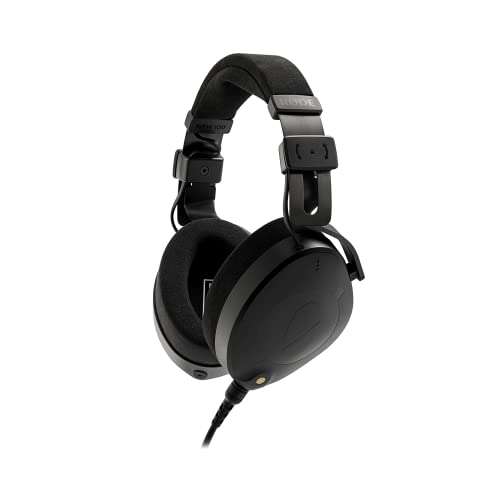
The RØDE NTH-100 is made for people who spend long hours editing audio, video, podcasts, and online content. Its sound has enough detail to expose mouth noise, clicks, edits, and uneven levels without making every session feel painfully bright. The closed-back design also helps reduce outside noise while limiting sound spill into a nearby microphone. I find that useful when I edit in a bedroom, shared office, or small production room.
Comfort is one of this model’s strongest points. The ear cushions use a soft cooling material, and the headband includes a system that helps keep the fit stable as you move. The cable can connect to either earcup, which gives you more freedom around a desk. It is not a wireless headphone, and that is a benefit for serious editing because a wired connection keeps timing direct and dependable.
Pros:
- Balanced, detailed sound for editing work
- Closed-back design reduces outside noise
- Cooling ear cushions suit long sessions
- Adjustable fit stays secure during desk work
- Detachable cable can connect on either side
- Strong choice for podcasts, voice, and video
Cons:
- Closed cups can feel warm during very long sessions
- Not as spacious as a good open-back headphone
- Requires a wired source or adapter
My Recommendation
I recommend the RØDE NTH-100 for editors who want one dependable pair for voices, music, video, and general production. It is especially useful for creators who work near other people or record in the same room, since its closed cups provide useful isolation. The fit and cooling pads also make it a practical pick for long sessions. Among the best headphones for audio editing, this model offers a polished balance of comfort, detail, and everyday flexibility.
| Best for | Why |
|---|---|
| Podcast editing | Clear voice detail and useful isolation |
| Long editing sessions | Comfort-focused pads and stable fit |
| Home studios | Closed design helps limit sound leakage |
OneOdio A71D Studio Headphones
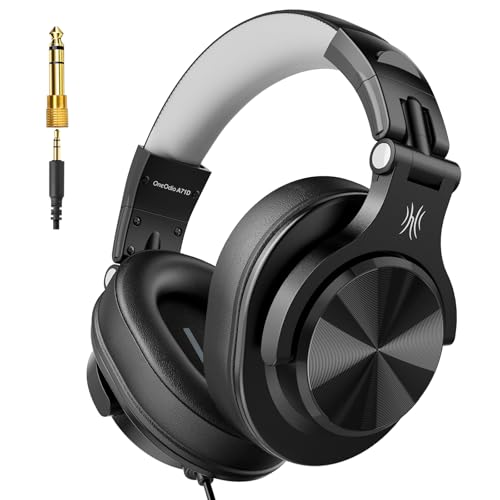
The OneOdio A71D is a budget-friendly wired headphone aimed at studio monitoring, DJ use, and home production. It provides an easy way to move from casual listening into basic editing without buying a costly interface or premium monitor pair. The over-ear fit gives your ears more space than small on-ear headphones. Its sound is lively and full, so it can make long music sessions enjoyable.
I would use this model for podcast cleanup, YouTube editing, rough mixes, and learning how an audio workstation works. It offers useful detail for the price, but its presentation is not as neutral as a high-end reference headphone. That means I would check important mixes on speakers or another trusted pair. The wired design avoids Bluetooth lag, which matters when you cut dialogue to a video frame.
Pros:
- Affordable entry point for home editing
- Over-ear design supports comfortable daily use
- Wired connection avoids wireless audio delay
- Useful detail for voice and basic music edits
- Good fit for students and new creators
- Works well for monitoring and general listening
Cons:
- Sound may add more character than strict reference models
- Build and finish are less refined than premium studio pairs
- Limited isolation compared with some closed-back competitors
My Recommendation
The OneOdio A71D suits beginners, students, and creators who need capable headphones without a large first investment. I like it most for editing dialogue, trimming clips, and learning basic EQ because it gives you an accessible view of the track. I would not rely on it alone for a final professional master. Still, it is one of the best headphones for audio editing when price and flexibility matter most.
| Best for | Why |
|---|---|
| Beginners | Simple wired design and approachable price |
| Podcast and video work | Clear monitoring without Bluetooth delay |
| Budget studio setups | Provides useful over-ear sound for less money |
beyerdynamic DT 990 Pro X Headphones

The beyerdynamic DT 990 Pro X is an open-back studio headphone designed for a wide, natural listening view. Its open construction lets air move through the earcups, which can make stereo placement and reverb tails easier to judge. For audio editing, that extra sense of space helps you notice when a sound sits too far left, right, near, or far. The 48-ohm design is also easier to drive from many modern audio interfaces and computers than some higher-impedance studio headphones.
This is the kind of headphone I would choose for editing in a quiet room. It can help with music arrangement, ambience, effects, and detailed timing because the presentation feels less closed in. However, open-back headphones leak sound, so I would never place one beside a live microphone. The treble can also feel forward for listeners who prefer a soft sound, so I suggest taking breaks and using a second reference before final delivery.
Pros:
- Open soundstage helps stereo editing
- Strong detail for ambience and effects
- 48-ohm load suits many modern devices
- Breathable design can reduce ear heat
- Useful for music, film, and game audio
- Professional design supports careful monitoring
Cons:
- Sound leakage makes it poor for recording beside a mic
- Open design offers little outside-noise isolation
- Bright detail may tire sensitive listeners
My Recommendation
I recommend the DT 990 Pro X to editors who work in a quiet space and want an open, spacious view of a mix. It is a strong fit for sound design, music editing, cinematic effects, and stereo placement. It is not the right tool for tracking vocals in the same room. If you understand that trade-off, this is one of the best headphones for audio editing when space and detail matter more than isolation.
| Best for | Why |
|---|---|
| Music editing | Open presentation reveals stereo balance |
| Sound design | Wide space helps place effects and ambience |
| Quiet control rooms | Breathable cups support long critical sessions |
beyerdynamic DT 770 Pro X Headphones

The DT 770 Pro X gives editors the privacy and focus of a closed-back design. It is built for studio monitoring, yet its 48-ohm load makes it more practical with computers, tablets that support wired audio, and many interfaces. The closed cups help block room noise and keep your playback from reaching a nearby microphone. That makes it a natural match for tracking, dialogue editing, and home recording.
I value this type of headphone when I need to find low-level problems in a noisy room. The focused sound makes clicks, breaths, chair movement, and background hum easier to isolate from the main track. It does not create the open, airy image of the DT 990 Pro X, but it gives a more controlled work space. The familiar studio shape and replaceable-style service parts on many beyerdynamic models also make this family attractive for long-term use.
Pros:
- Closed-back design supports focused editing
- Useful isolation for home and mobile studios
- 48-ohm impedance is easy for many sources
- Good for tracking and dialogue cleanup
- Detailed sound reveals small recording faults
- Comfortable over-ear fit for extended work
Cons:
- Closed cups may become warm over time
- Less open and spacious than the DT 990 Pro X
- Some listeners may find the top end bright
My Recommendation
The DT 770 Pro X is best for editors who need isolation, detail, and dependable wired monitoring. I would choose it for voice recording, podcast production, location review, and home studio work where outside noise can distract you. It is also a strong second pair for checking edits that were mixed on open headphones. For many creators, it ranks among the best headphones for audio editing because it handles both recording and detailed cleanup well.
| Best for | Why |
|---|---|
| Voice recording | Closed cups reduce playback spill into microphones |
| Noisy rooms | Isolation helps you hear low-level problems |
| Hybrid home studios | Works for both tracking and editing |
Panasonic RP-HT161-K Headphones

The Panasonic RP-HT161-K is a simple, low-cost wired headphone for basic audio tasks. It uses a lightweight over-ear design and a long cable, so it can work at a desk, with a laptop, or beside a television. Its sound is clear enough for checking cuts, speech levels, and obvious background noise. The extra-bass feature adds energy for casual listening, though that color matters when you make final mix decisions.
I see this model as a practical backup rather than a strict reference tool. It can help a new editor learn waveform timing, remove long pauses, and catch loud pops without spending much. The long cable is convenient, but it can also tangle around a small desk. Because the bass is not perfectly neutral, I would compare every finished project on a more balanced pair or reliable speakers.
Pros:
- Very accessible price for basic editing
- Lightweight fit is easy to wear
- Long cable provides useful desk reach
- Over-ear shape gives more comfort than earbuds
- Simple 3.5mm connection works with many devices
- Good backup for quick audio checks
Cons:
- Extra bass can affect mix judgment
- Build feels more basic than studio models
- Limited isolation and sound detail
My Recommendation
The Panasonic RP-HT161-K is best for beginners, classrooms, casual editors, and anyone who needs an inexpensive backup. I would use it for rough cuts and general playback, not for mastering a detailed music project. It offers real value when the goal is simple monitoring on a tight budget. If you need the best headphones for audio editing at a very low cost, this model can start the process, but a neutral second reference remains important.
| Best for | Why |
|---|---|
| Very tight budgets | Low cost makes basic monitoring accessible |
| Quick editing checks | Simple wired setup works without extra gear |
| Backup use | Long cable and light design suit spare duties |
Philips SHP9500 Open-Back Headphones

The Philips SHP9500 remains a popular open-back option for listeners who want a natural, relaxed presentation. Its spacious design can make panning, vocal placement, and room ambience easier to hear. The broad ear cushions leave room around the ears, which helps during long sessions at a desk. For creators who want to understand the shape of a stereo mix, this headphone offers a useful perspective.
Its open construction means I would use it in a quiet room and keep it away from live microphones. The sound is enjoyable and fairly revealing, but it should not be treated as an absolute measurement device. Like any headphone, it has its own tonal balance, and room speakers or another reference can reveal a different truth. Still, it is a comfortable choice for editing music, video soundtracks, and spoken-word projects.
Pros:
- Open design creates a broad stereo image
- Comfortable pads suit long editing sessions
- Useful for panning and ambience work
- Light build reduces pressure on the head
- Wired operation avoids Bluetooth latency
- Good value for an open-back headphone
Cons:
- Leaks sound into the room
- Provides little protection from outside noise
- May need a second reference for final tonal balance
My Recommendation
I recommend the SHP9500 for home editors who work in a calm room and want comfort with an open stereo view. It is especially useful for music arrangement, video ambience, and learning how space affects a mix. It is not suitable for recording beside a sensitive microphone. As one of the best headphones for audio editing on a value budget, it offers a spacious feel that many closed models cannot match.
| Best for | Why |
|---|---|
| Stereo editing | Open cups help reveal left-right placement |
| Long home sessions | Light fit and roomy pads reduce pressure |
| Ambient sound | Spacious presentation makes room tone easier to judge |
P PUPGSIS Wired DJ Headphones

The P PUPGSIS wired DJ headphone is designed for users who want an over-ear monitor at a modest price. Its closed style helps create a focused listening space for editing, DJ practice, guitar work, and home recording. The stereo presentation makes it easier to follow a voice or instrument across a timeline. For basic production, it gives you a direct and simple tool without wireless setup or software.
I would place this model in the practical beginner category. It can help you spot obvious noise, clipping, timing errors, and rough changes in volume. However, DJ-focused headphones often favor an energetic sound, so I would not assume that every bass or treble choice is perfectly flat. Use it with speakers or a second pair when your mix needs to travel well across phones, cars, and televisions.
Pros:
- Affordable over-ear design for new editors
- Closed cups support focused monitoring
- Useful for music, DJ, and podcast tasks
- Wired signal avoids Bluetooth timing delay
- Simple choice for home recording practice
- Can serve as a spare studio headphone
Cons:
- DJ-style tuning may not be fully neutral
- Long-session comfort may vary by head size
- Less proven than established studio models
My Recommendation
The P PUPGSIS headphone is best for beginners who want one inexpensive pair for editing, DJ practice, and general monitoring. It works well as a first step or backup, especially when you need a closed design. I would pair it with a trusted speaker check before publishing important music or film audio. It belongs on this best headphones for audio editing list because it offers broad basic use at a friendly starting price.
| Best for | Why |
|---|---|
| Entry-level users | Low-cost design supports first studio projects |
| DJ and music practice | Closed fit helps focus on the track |
| Backup monitoring | Wired setup is ready when another pair fails |
Shure SRH840A Studio Headphones

The Shure SRH840A is a serious closed-back monitoring headphone for editors who want controlled sound and strong isolation. It presents speech with enough body to judge tone, breaths, plosives, and changes in level. The closed earcups also make it suitable for recording sessions where playback must stay out of the microphone. This is a useful feature for voice actors, podcasters, and home musicians.
The foldable design helps with storage and travel, while the padded headband and ear cushions support extended work. It is not the smallest or lightest model here, but that solid feel can inspire confidence at a busy workstation. I would use it for dialogue editing, music tracking, and detailed cleanup. Its controlled presentation makes it easier to focus on the recording instead of the room around you.
Pros:
- Detailed closed-back studio monitoring
- Strong isolation for recording and editing
- Clear midrange helps with speech work
- Good choice for detecting breaths and plosives
- Foldable design improves storage and travel
- Comfortable padding supports longer sessions
Cons:
- Heavier than many casual headphones
- Closed cups can become warm
- May need an adapter for some mobile devices
My Recommendation
The SRH840A is best for serious podcasters, voice editors, home musicians, and creators who need isolation with dependable detail. I especially like it when the job involves cleaning dialogue, matching takes, or checking small vocal flaws. Its secure, studio-focused design is more practical for recording than an open-back pair. For buyers seeking the best headphones for audio editing and tracking in one tool, this Shure is a very strong option.
| Best for | Why |
|---|---|
| Dialogue cleanup | Focused midrange reveals speech problems |
| Home recording | Closed cups help prevent microphone bleed |
| Serious podcast work | Isolation and detail support precise edits |
beyerdynamic DT 770 Pro 80-Ohm

The beyerdynamic DT 770 Pro 80-ohm model is a long-standing studio favorite for closed-back monitoring. It gives editors a detailed view of the track while helping block room noise and prevent sound leakage. The over-ear cups create a stable listening space for checking dialogue, instruments, effects, and low-level background sounds. Its coiled cable also fits a fixed studio desk well, though it adds weight compared with a short straight cable.
I would choose this headphone when I want a proven work tool rather than a feature-heavy lifestyle product. The sound can feel lively, with clear high detail and solid bass presence, so I always compare a final mix on another system. Soft ear pads make it comfortable for many users, but the 80-ohm load performs best with a decent interface or headphone amplifier. For an editor who already owns suitable audio gear, it remains a dependable and serviceable choice.
Pros:
- Reliable closed-back studio design
- Good isolation for focused work
- Detailed sound exposes small editing faults
- Comfortable ear pads for extended sessions
- Durable build suits regular studio use
- Useful for both recording and mixing checks
Cons:
- 80-ohm version may need more power from weak devices
- Coiled cable can feel bulky at a small desk
- Bright highs may not suit every listener
My Recommendation
The DT 770 Pro 80-ohm is best for home studios, musicians, engineers, and editors who already use an interface or headphone amp. It offers excellent isolation and a detailed sound that helps find edits hiding under a voice or instrument. I would not call it the most neutral choice for every final mix, but it is a superb checking tool. It remains one of the best headphones for audio editing for users who value durability and studio history.
| Best for | Why |
|---|---|
| Home studio tracking | Closed cups reduce unwanted microphone bleed |
| Detailed cleanup | High-frequency detail exposes small faults |
| Interface users | 80-ohm design pairs well with stronger sources |
TASCAM TH-02 Studio Monitor Headphones
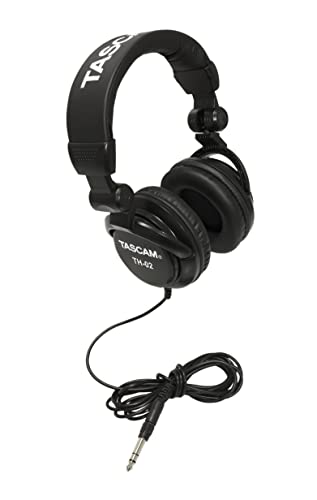
The TASCAM TH-02 is a compact, budget studio headphone made for recording, podcasting, DJ work, music, and guitar practice. Its closed over-ear design gives you a more focused sound than typical earbuds or open computer speakers. The foldable shape makes it convenient for a laptop bag or small editing station. It also includes a quarter-inch adapter, which is helpful when you switch between consumer and studio equipment.
This model is most useful for rough edits, practice sessions, and monitoring tracks while learning. It can reveal obvious timing issues, harsh sounds, and background noise, but its low-cost tuning may not show every subtle change in a professional mix. I would use it as part of a reference system rather than as the only judge of a final master. For the price, it gives new creators a practical path into wired monitoring.
Pros:
- Low price suits beginners and students
- Closed design supports focused monitoring
- Foldable construction improves portability
- Includes a quarter-inch adapter
- Works for music, guitar, and podcast practice
- Simple wired connection avoids delay
Cons:
- Sound detail is limited compared with premium models
- Ear cushions may feel warm during long use
- Not ideal as the sole reference for mastering
My Recommendation
I recommend the TASCAM TH-02 for students, beginners, casual podcasters, and anyone building a first editing kit. It offers the core benefit of wired over-ear monitoring without a large cost. The included adapter adds useful flexibility for interfaces and mixers. If you need the best headphones for audio editing on a starter budget, this is a sensible first pair, especially when you plan to cross-check on speakers.
| Best for | Why |
|---|---|
| First studio setup | Affordable and easy to connect |
| Portable editing | Foldable shape fits small bags |
| Practice and learning | Reveals basic timing and noise problems |
How to Choose Headphones for Audio Editing
Choosing the best headphones for audio editing is not the same as choosing headphones for workouts or travel. You do not need the biggest bass or the loudest sound. You need a clear window into the recording. The goal is to hear what exists, not what the headphone adds.
Choose the Right Design
Closed-back headphones seal the ear more closely. They reduce outside noise and help stop playback from entering a microphone. This makes them ideal for recording vocals, editing podcasts, and working in a busy room.
Open-back headphones allow more air to move around the earcups. They often create a wider and more natural stereo image. I prefer them for music editing, sound design, and spatial work in a quiet room. They are not suitable beside an open microphone because sound can leak out.
Look for a Balanced Sound
A headphone with heavy bass may make a mix seem powerful when the low end is actually too loud. A sharp treble peak may make speech seem detailed while encouraging you to remove too much high frequency. A balanced response helps you make safer decisions.
No headphone is perfectly flat in every room or for every listener. Your ears, source, music style, and software all affect the result. I suggest learning one pair well, then checking important work on speakers, earbuds, and a car system.
Check Impedance and Source Power
Impedance describes how much electrical resistance a headphone presents to its source. Low-impedance headphones are usually easier to drive from a laptop or phone. Higher-impedance models may need a headphone amplifier or audio interface to reach a useful level.
Loudness alone does not prove that a headphone is working well. A weak source can reduce headroom or make you raise the volume too far. Before buying, check whether your interface or computer output can comfortably drive the selected model.
Comfort Matters More Than Many Buyers Expect
Audio editing can take hours. A headphone that sounds excellent but hurts after 30 minutes will not help your work. Look for soft pads, a moderate clamp, a stable headband, and enough room for your ears.
I also recommend taking short breaks. Even the best headphones for audio editing cannot protect your hearing from excessive volume. Keep the level comfortable, and give your ears time to recover between long sessions.
Wired Beats Wireless for Critical Editing
Wireless headphones are convenient, but Bluetooth can add delay. That delay may not matter while listening to music, yet it can become annoying when you cut dialogue to video or play a software instrument. Wireless processing can also change the signal path.
A wired headphone gives you a direct connection and does not rely on battery life. For professional editing, I prefer wired models. You can still use a wireless pair for casual review after the main work is complete.
Practical Audio Editing Tips
Start every project at a moderate volume. High volume can make detail feel exciting, but it can also hide fatigue and lead to poor decisions. If a sound only seems correct when it is loud, check it again at a quiet level.
Use reference tracks when you edit music. Choose songs with a similar style and compare them at matched loudness. Do not compare a loud commercial master with a quiet work-in-progress, because the louder file will usually seem better even when it is not.
For podcasts and video, listen for more than words. Check breaths, mouth clicks, chair movement, fan noise, room echo, and changes in distance from the microphone. The best headphones for audio editing make these faults easier to find, but your judgment still matters.
Use mono checks when appropriate. A voice may sound clear in stereo but disappear when the listener uses a single speaker. Mono playback can reveal phase problems and overly wide effects. It is a small step that can prevent a large delivery problem.
Keep your headphones clean. Skin oils and dust can change pad comfort and shorten material life. Store them where the cable will not bend sharply. If the pads become flat, replacing them may restore both comfort and the seal.
FAQs Of best headphones for audio editing
Are open-back headphones good for audio editing?
Yes. Open-back headphones can provide a wider stereo image and a more natural sense of space. They work best in quiet rooms and should not be used beside a live microphone because they leak sound.
Are closed-back headphones better for podcast editing?
Usually, yes. Closed-back models reduce outside noise and help prevent playback from bleeding into a microphone. They are useful for recording, dialogue cleanup, and editing in shared spaces.
Do I need an audio interface for studio headphones?
Not always. Many low-impedance headphones work well from a computer or laptop. Higher-impedance models may need an interface or headphone amplifier for proper volume and control.
Should audio editing headphones have extra bass?
Extra bass can make music fun, but it may lead to a weak low end in the final mix. For editing, choose a balanced sound and use other systems to confirm your bass decisions.
Can I use wireless headphones for audio editing?
You can use them for general review, but wired headphones are safer for critical work. Wireless connections may add delay, compression, or battery limits that complicate video and music editing.
Final Verdict: Which Should You Buy?
The RØDE NTH-100 is my top all-around pick for the best headphones for audio editing. Choose the DT 990 Pro X for open detail, the DT 770 Pro X for isolation, or the TASCAM and OneOdio models for a lower budget.
Use a wired pair, keep volume safe, and cross-check every important mix. The right headphones turn small audio faults into clear fixes before your audience hears them.

Everett Ashford is a tech reviewer at mytechgrid.com specializing in SSDs, cameras, TVs, earbuds, headphones, and other consumer electronics. He provides honest, data-driven reviews based on hands-on testing and real-world performance analysis. Everett simplifies complex tech details to help readers make smart, confident buying decisions.