To pair a Vizio soundbar to your TV, connect it by HDMI ARC, optical cable, Bluetooth, or AUX, then select the matching input.
Learning how to pair Vizio soundbar to TV is easier when you match the right connection to your TV and soundbar. HDMI ARC is usually the best choice because it carries sound and lets your TV remote control the volume. Optical audio is a reliable backup, while Bluetooth works well for simple wireless listening.
This guide explains how to pair a Vizio soundbar to TV step by step. It also covers setup checks, remote control settings, common pairing problems, and tips gathered from testing soundbars with both smart and older televisions.

What You Need Before Pairing a Vizio Soundbar to a TV
Before you begin, check the ports on both devices. The best connection depends on the ports your TV and Vizio soundbar share.
Look at the back or side of your TV for these labels:
• HDMI ARC or HDMI eARC
• Optical or Digital Audio Out
• AUX or headphone output
• Bluetooth in the TV settings
Then inspect the soundbar for matching ports. Most Vizio soundbars include HDMI ARC, optical, Bluetooth, or AUX connections. Some newer models also support HDMI eARC, which can handle higher quality audio formats.
You should also have:
• The Vizio soundbar and power cable
• The soundbar remote
• A compatible HDMI, optical, or AUX cable
• The TV remote
• Both devices plugged into power
Remove any plastic caps from an optical cable before use. This small detail causes many setup failures because the cable may look connected while the caps block the light signal.
If your soundbar is new, place it close to the TV during setup. Once the connection works, you can move it to its final position.

The Best Way to Pair a Vizio Soundbar to TV: HDMI ARC
HDMI ARC is usually the best method for pairing a Vizio soundbar to a TV. ARC means Audio Return Channel. It allows the TV to send audio to the soundbar through an HDMI cable.
This method also supports volume control through many TV remotes. With the right settings, turning on the TV can turn on the soundbar as well.
Follow these steps to pair a Vizio soundbar to TV with HDMI ARC:
- Turn off the TV and soundbar.
- Find the HDMI port labeled ARC or eARC on the TV.
- Connect one end of an HDMI cable to that port.
- Connect the other end to the HDMI ARC port on the Vizio soundbar.
- Turn on the TV and soundbar.
- Press the Input button on the soundbar remote.
- Choose HDMI ARC, HDMI, or a similar option.
- Open the TV sound settings.
- Select External Speakers, Audio System, Receiver, or HDMI ARC.
- Set the TV’s digital audio output to Auto, Bitstream, or Passthrough if available.
- Play a video and test the sound.
The names can differ by TV brand. Samsung may use Anynet+, LG may use SIMPLINK, and Sony may use BRAVIA Sync. These settings control HDMI device communication, so turn them on if the soundbar does not respond to the TV remote.
A common mistake is plugging the HDMI cable into a normal HDMI input. That port may receive video but not send TV audio back to the soundbar. Always use the port marked ARC or eARC.
How to Pair a Vizio Soundbar to TV With an Optical Cable
Optical audio is one of the most dependable ways to connect a Vizio soundbar to a TV. It sends digital sound through a thin fiber optic cable and works with many older TVs.
Optical does not usually support advanced two way control. You may need to use the Vizio remote for volume. Still, it is a strong choice when HDMI ARC is missing or unreliable.
Here is how to pair a Vizio soundbar to TV with optical audio:
- Turn off both devices.
- Remove the protective caps from the optical cable.
- Plug one end into the TV port labeled Optical Out or Digital Audio Out.
- Plug the other end into the soundbar port labeled Optical In.
- Turn on the TV and soundbar.
- Press Input on the Vizio remote.
- Select Optical or Digital.
- Open the TV audio menu.
- Choose Optical, External Speaker, or Digital Audio Out.
- Set the TV audio format to PCM if you hear no sound.
PCM is often the safest setting for optical connections. Some TVs send Dolby Digital or another format that a specific soundbar may not decode correctly. If PCM works, you can test other formats later.
Do not bend an optical cable sharply. The cable carries light, so tight bends can weaken the signal. Think of it like a narrow glass path: it needs a clear route from the TV to the soundbar.

How to Pair a Vizio Soundbar to TV Using Bluetooth
Bluetooth is convenient because it avoids cables. It can be useful when the TV is mounted far from the soundbar or when the optical and HDMI ports are already in use.
However, Bluetooth may add a small audio delay. Voices can sound slightly out of sync with lip movement. The delay depends on the TV, soundbar, Bluetooth version, and the audio settings in use.
Use these steps to pair a Vizio soundbar to TV with Bluetooth:
- Turn on the Vizio soundbar.
- Press the Bluetooth button on the soundbar or remote.
- Wait for the Bluetooth indicator to flash or for the soundbar to announce pairing mode.
- Open the TV’s Settings menu.
- Select Sound, Audio, Bluetooth, or Speaker List.
- Choose Add Device, Search, or Pair New Device.
- Select the Vizio soundbar from the list.
- Confirm the connection.
- Play audio and adjust the volume.
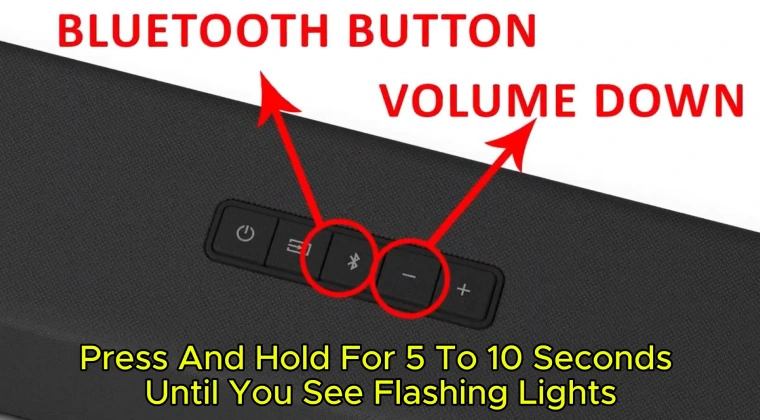
Some Vizio soundbars enter Bluetooth pairing mode when you press and hold the Bluetooth button for several seconds. The exact button action varies by model, so check the model manual if a short press does not work.
If the TV cannot find the soundbar, disconnect the soundbar from nearby phones, tablets, and computers. A soundbar may reconnect to the last device it used instead of appearing as a new device on the TV.
How to Pair a Vizio Soundbar to TV With AUX
AUX is an analog connection. It is helpful for older TVs, basic monitors, and devices without HDMI ARC, optical, or Bluetooth.
The sound quality may be lower than HDMI ARC or optical audio, but it is often simple and stable. AUX can also help you test whether the soundbar itself works.
To pair a Vizio soundbar to TV with AUX:
- Connect a 3.5 millimeter audio cable to the TV headphone or audio output.
- Connect the other end to the AUX input on the Vizio soundbar.
- Turn on both devices.
- Press Input on the soundbar remote.
- Select AUX.
- Raise the TV volume to a moderate level.
- Adjust the soundbar volume.
If the TV has red and white audio output ports, you may need a red and white RCA to 3.5 millimeter cable. Match the red and white plugs to the same colored TV ports.
Remember that a headphone output may mute the TV’s built in speakers. That is normal. If the sound is too quiet, raise the TV volume first, then adjust the soundbar.

How to Set Up the Vizio Soundbar Remote
Pairing the soundbar to the TV does not always mean the TV remote will control the soundbar. HDMI ARC offers the best chance of shared control, but the settings must be correct.
Start by turning on HDMI control in the TV menu. Look for names such as:
• HDMI CEC
• Device Link
• Anynet+
• SIMPLINK
• BRAVIA Sync
• VIERA Link
Then set the TV audio output to the external sound system. If the TV remains set to Internal Speakers, the soundbar may stay silent even though the cable is connected correctly.
For optical, AUX, and Bluetooth connections, volume control may work in different ways. Some TVs send volume commands to Bluetooth speakers. Others keep TV volume and external speaker volume separate.
If the Vizio remote does not control the soundbar, try these steps:
• Replace the remote batteries.
• Point the remote directly at the soundbar.
• Make sure the soundbar is not inside a closed cabinet.
• Select the correct input.
• Unplug both devices for one minute and reconnect them.
• Turn HDMI CEC off and back on if using HDMI ARC.
In my own setup tests, the most common mistake was not a faulty soundbar. It was choosing the wrong input after changing cables. A soundbar can be connected perfectly and still produce no sound if it remains on Bluetooth while the TV sends audio through optical.
Fixes When a Vizio Soundbar Will Not Pair With a TV
When you cannot pair a Vizio soundbar to TV, work through the setup in order. Randomly changing several settings can make the problem harder to find.
No sound from the soundbar
Check the selected input first. Choose HDMI ARC for an HDMI connection, Optical for an optical cable, or AUX for an analog cable.
Next, confirm that the TV audio output is set to an external speaker. Also raise the TV volume and soundbar volume. Some TVs show a volume bar even when the external audio output is muted.
If you use optical audio, change the TV digital output to PCM. This often fixes a silent connection caused by an unsupported audio format.
The TV does not detect the soundbar
Unplug the HDMI cable from both devices. Turn off the TV and soundbar, wait about 60 seconds, and plug the cable back into the ARC ports.
Turn on HDMI CEC or the TV’s device control feature. If the problem remains, try another HDMI cable. A damaged or older cable may still display video but fail to carry ARC audio correctly.
Bluetooth pairing keeps failing
Move the soundbar within a few feet of the TV during setup. Turn off Bluetooth on nearby phones and tablets. Then remove old Vizio soundbar entries from the TV’s Bluetooth menu and start a new search.
If the soundbar is connected to another device, disconnect it first. Bluetooth normally prefers a previously paired device.
Audio and video are out of sync
Look for an Audio Delay, Lip Sync, or AV Sync setting on the TV or soundbar. Make small changes until voices match the picture.
Bluetooth is more likely to cause delay than HDMI ARC or optical audio. If the delay remains annoying, switch to a wired connection.
The soundbar turns off by itself
Some Vizio models enter power saving mode when they receive no audio signal. This can happen when the TV is muted or when an app sends no sound.
Check the soundbar’s Eco Power, Energy Star, or power management setting. Also make sure the TV is sending audio through the same input selected on the soundbar.
How to Reset a Vizio Soundbar Before Pairing
A reset can help when the soundbar remembers an old TV or stays stuck on the wrong connection. It should not be the first step, because a reset removes stored settings and Bluetooth connections.
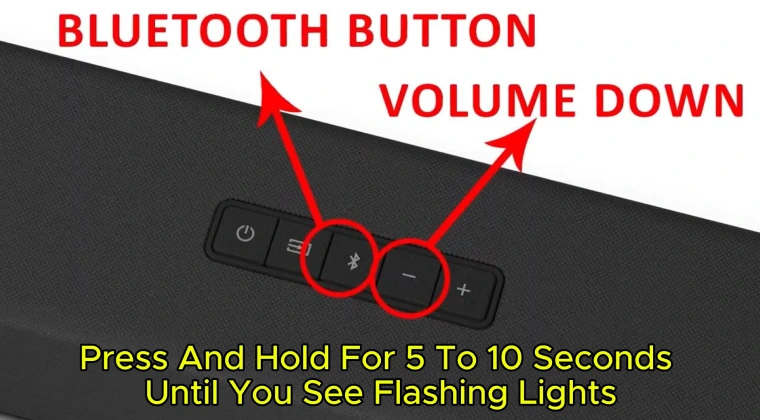
Vizio soundbar reset buttons vary by model. Many models use a combination of Volume Down and Bluetooth buttons, while others use Input and Bluetooth. Check the model number and its manual before pressing a button combination.
A safe reset process is:
- Turn on the soundbar.
- Hold the model specific reset buttons.
- Release them when the indicator lights flash or the soundbar announces a reset.
- Wait for the soundbar to restart.
- Select the correct input.
- Pair the soundbar with the TV again.
After resetting, place the soundbar in pairing mode and remove its old entry from the TV. This gives both devices a clean start.
Resetting is useful, but it will not repair a damaged cable, a faulty TV port, or an unsupported audio format. If the same issue returns after a reset, test another connection method.
Choosing the Right Connection for Your TV
Each connection has strengths and limits. The best option depends on the features you need.
HDMI ARC or eARC
Choose HDMI ARC when you want simple control with one remote. It is usually the most convenient option for modern smart TVs.
HDMI eARC can support higher bandwidth and advanced audio formats. Both the TV and soundbar must support eARC to use those features.
Optical audio
Choose optical when you want a stable digital connection and your TV lacks ARC. It is easy to install and avoids many HDMI control problems.
Its main limitation is that it provides little or no two way device control. You may need the soundbar remote for volume.
Bluetooth
Choose Bluetooth when you want a wireless connection with few cables. It works well for casual viewing and music.
Bluetooth may create audio delay, and some TVs provide limited control. It is convenient, but it is not always the best choice for movies or live sports.
AUX
Choose AUX for older TVs or simple backup setups. It is broadly compatible but usually offers less control and lower audio quality than digital connections.
Tips for Better Vizio Soundbar Performance
Correct pairing is only the first step. Placement and settings also affect the listening experience.
Place the soundbar below the TV and face it toward the seating area. Keep the front speakers clear. Do not cover them with decorations, a thick shelf, or the TV stand.
Keep the subwoofer near a wall but not tightly trapped in a corner. Corners can make bass sound boomy. Move it a few feet at a time until voices and bass feel balanced.
Use the soundbar’s dialogue or clear voice mode when speech sounds weak. For movies, a movie or surround mode may create a wider sound field. For news and podcasts, a speech mode is often better.
Avoid turning the TV speakers on at the same time as the soundbar. The two audio paths can create an echo. Set the TV to external speakers whenever possible.
Update the TV and soundbar firmware if the manufacturer provides an official update. Updates can improve HDMI compatibility, Bluetooth stability, and audio format support. Use only official instructions, since an interrupted update can cause new problems.
Common Mistakes to Avoid
Knowing what not to do can save time when you pair a Vizio soundbar to TV.
• Do not plug an HDMI cable into a regular TV HDMI port and expect ARC audio. Use the port labeled ARC or eARC.
• Do not select Bluetooth on the soundbar when the TV is connected by optical or HDMI.
• Do not leave protective caps on an optical cable.
• Do not assume every HDMI cable supports every eARC feature. Use a suitable High Speed or Ultra High Speed HDMI cable when required.
• Do not test only one streaming app. Try live TV, another app, and a device such as a game console.
• Do not place the soundbar behind the TV. The sound may become blocked or unclear.
• Do not reset the soundbar before checking the input and TV audio output.
In one troubleshooting session, switching from Internal Speakers to HDMI ARC solved the issue immediately. The cable had been installed correctly from the start. This is why checking the TV’s output menu should come before replacing equipment.
Frequently Asked Questions About How to Pair a Vizio Soundbar to TV
How do I pair a Vizio soundbar to a TV?
Connect the soundbar by HDMI ARC, optical, Bluetooth, or AUX. Select the matching input on the soundbar, then set the TV audio output to the connected external speaker.
Why will my Vizio soundbar not connect to my TV?
The soundbar may be on the wrong input, or the TV may still use its internal speakers. Check the cable, select the correct soundbar input, enable HDMI CEC for ARC, and set optical audio to PCM if needed.
Can I pair a Vizio soundbar to a TV without an HDMI cable?
Yes. You can use optical audio, Bluetooth, or AUX if both devices support the selected connection. Optical is often more stable than Bluetooth for watching TV.
How do I connect a Vizio soundbar to a Samsung TV?
Use the HDMI ARC ports or an optical cable. On the Samsung TV, open Sound Output and select the soundbar, then enable Anynet+ when using HDMI ARC.
How do I connect a Vizio soundbar to an LG TV?
Connect the soundbar to the LG TV’s HDMI ARC or optical port. Open Sound Out in the LG audio settings and choose HDMI ARC, Optical, or Bluetooth based on your connection.
Can I control a Vizio soundbar with my TV remote?
You often can when using HDMI ARC with HDMI CEC enabled. Optical, AUX, and Bluetooth control depends on the TV model, so the Vizio remote may still be needed.
Does Bluetooth sound have a delay on a Vizio soundbar?
It can. Wireless processing may create a small delay between speech and video, especially on older TVs. Use the TV’s lip sync setting or switch to HDMI ARC or optical audio.
Conclusion
Pairing a Vizio soundbar to TV usually takes only a few minutes. HDMI ARC is the best all around option for modern TVs, while optical audio offers a dependable wired connection. Bluetooth provides convenience, and AUX remains useful for older equipment.
Start by checking the available ports, connect the devices, select the matching soundbar input, and set the TV to external audio. If there is no sound, check the input, cable, audio format, and HDMI control settings before resetting the system.
Try the connection that best fits your TV, then adjust placement and dialogue settings for clearer sound. If this guide helped, explore your Vizio model’s manual for advanced features and share your setup tips with other readers.

Everett Ashford is a tech reviewer at mytechgrid.com specializing in SSDs, cameras, TVs, earbuds, headphones, and other consumer electronics. He provides honest, data-driven reviews based on hands-on testing and real-world performance analysis. Everett simplifies complex tech details to help readers make smart, confident buying decisions.