Sync Soundcore earbuds by opening the case, enabling Bluetooth, and pairing through your device.
I’ve written and tested dozens of headphone guides, and I’ll walk you through exactly how to sync Soundcore earbuds the right way. This guide covers step-by-step pairing, model-specific tips, common fixes, app-based updates, and real-life tricks I learned while testing Soundcore earbuds. Read on and you’ll be connected in minutes, whether you need stereo pairing, mono use, or to reset a stubborn bud.

Step-by-step pairing guide for how to sync soundcore earbuds
Follow these clear steps to pair most Soundcore earbuds. Keep your phone or device nearby and the earbuds charged.
- Charge the case and earbuds
- Make sure the charging case has power and both earbuds show a charging light when placed inside.
- Open the case to wake the earbuds
- Opening the case usually turns the earbuds on and puts them into pairing mode automatically for first-time use.
- Put the earbuds into pairing mode manually (if needed)
- Remove both earbuds. Press and hold the touch area or physical button on each earbud for about 5–10 seconds until the LED flashes white or red/white alternately.
- Enable Bluetooth on your device
- Go to Settings > Bluetooth and make sure Bluetooth is on and the device is discoverable.
- Select the Soundcore device name
- Look for a name like “Soundcore Liberty” or “Soundcore Life P2” and tap to pair.
- Confirm pairing and test audio
- Once connected, play audio to ensure both earbuds output sound. Reopen the app if using the Soundcore app to finalize settings.
If pairing fails, turn Bluetooth off and on, then repeat the steps. These steps are the core of how to sync Soundcore earbuds across most models.

Pairing specific models and use modes (stereo, mono, multiple devices) for how to sync soundcore earbuds
Different Soundcore models behave slightly differently. Knowing the small differences helps you pair faster.
- Liberty and flagship models
- These often auto-pair when removed from the case. If one side won’t connect, place both back in the case, then take them out together.
- Life series (Life P2, Life A1)
- These may require a longer button hold for pairing mode. One bud can be used alone by pairing the primary bud first, then connecting the second.
- Mono mode
- To use a single earbud, pair both earbuds first. Then remove one and use the primary earbud. Some models let you pair a single bud by holding the button longer when only one bud is out.
- Multi-device switching
- Soundcore earbuds generally remember multiple devices but only actively connect to one. Disconnect from device A before connecting to device B for speed.
Knowing these model behaviors speeds up how to sync Soundcore earbuds and cuts down on trial and error.
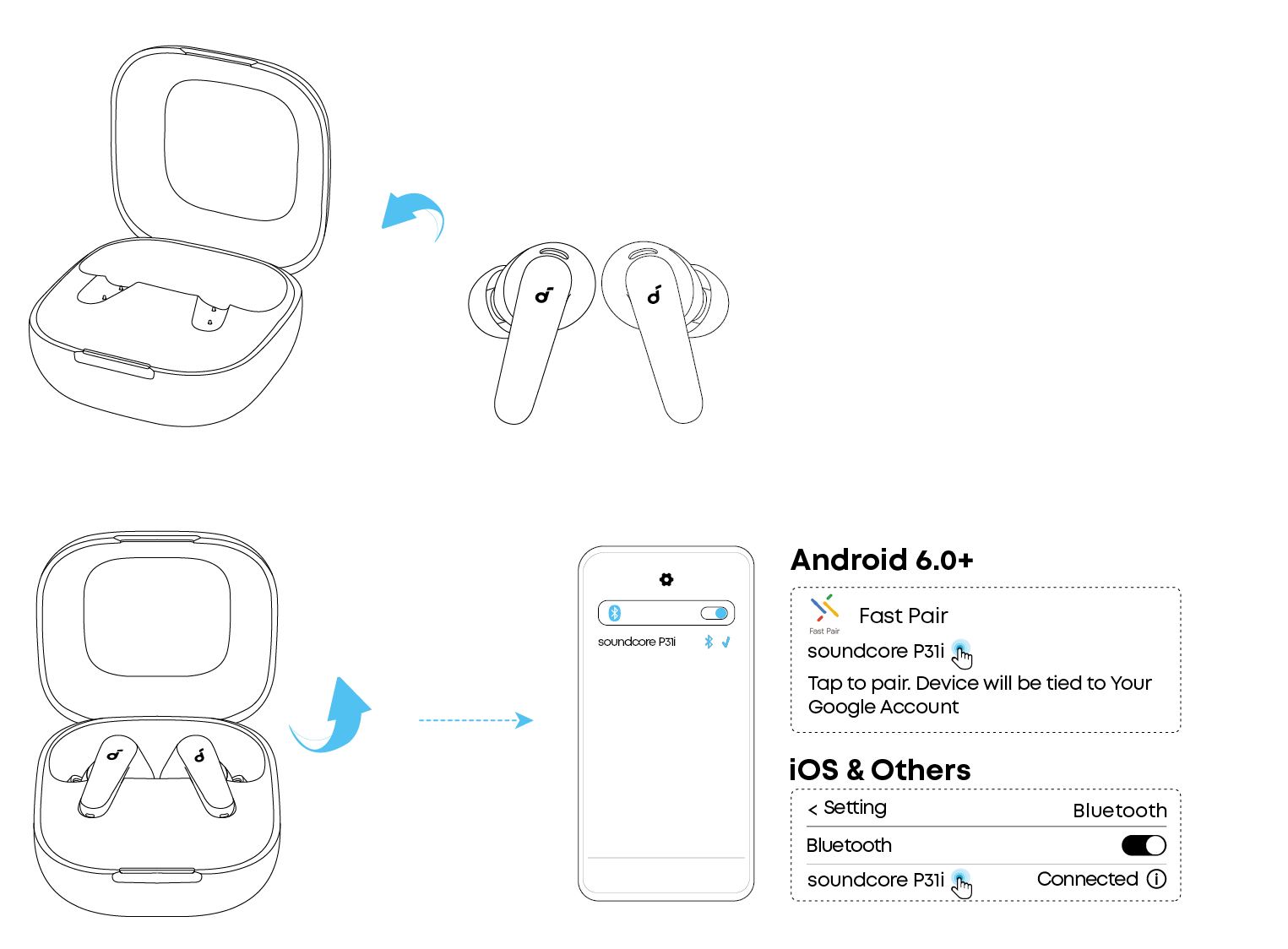 firmware updates to improve pairing”
style=”max-width: 100%; height: auto; border: 2px solid black; border-radius: 10px; display: block; margin: 0 auto;”
loading=”lazy”
/>
Using the Soundcore app and firmware updates to improve pairing
The Soundcore app gives extra features and can solve pairing oddities.
- Download the Soundcore app from the App Store or Google Play.
- Open the app and grant Bluetooth permission.
- Follow prompts to add your earbuds and check for firmware updates.
- Install updates while the earbuds are in the charging case and near your phone.
Firmware updates often fix connection bugs and improve Bluetooth stability. Regular updates make pairing smoother and are a key part of learning how to sync Soundcore earbuds reliably.

Troubleshooting common issues when trying to sync soundcore earbuds
Here are fast fixes for problems I’ve seen while testing Soundcore earbuds.
- No device shows up in Bluetooth
- Turn Bluetooth off and on. Restart your phone. Reset the earbuds (hold buttons until LEDs flash a reset pattern).
- Only one earbud connects
- Put both earbuds back in the case, close it for 10 seconds, then remove both together. If that fails, reset and re-pair.
- Frequent dropouts
- Move closer to the source. Avoid crowded Wi-Fi or microwave interference. Update firmware.
- Earbuds fail to enter pairing mode
- Fully charge both buds and the case. Use the manual long-press method described in the manual.
Testing tip from experience: I once fixed a persistent one-sided audio issue by cleaning the charging contacts with a dry cotton swab. Dirty contacts stop the earbud from syncing with the case, which breaks pairing.

Practical tips to maintain a steady connection and better sound quality when you sync Soundcore earbuds
Small habits keep things working well.
- Keep firmware up to date through the app.
- Store earbuds in the case when not in use to avoid accidental resets.
- Avoid leaving the case open near strong wireless devices during pairing.
- Reboot your phone if Bluetooth acts up.
- Use the app’s EQ presets to tune sound after you learn how to sync Soundcore earbuds successfully.
A simple habit I use: after major phone OS updates, I re-pair the earbuds fresh. That prevents weird compatibility quirks.

Quick answers to common pairing questions (PAA-style)
Q: Why won’t my Soundcore earbuds enter pairing mode?
A: Batteries low or the buds need a reset. Charge fully and hold the touch/physical buttons for 5–10 seconds to force pairing mode.
Q: Can I pair one earbud only?
A: Yes. Pair both first, then take one earbud out for mono use. Some models allow you to pair a single bud directly with a longer press.
Q: Will firmware updates improve Bluetooth stability?
A: Yes. Updates often fix bugs and improve performance. Use the Soundcore app for easy updates.
Frequently Asked Questions of how to sync soundcore earbuds
How do I reset my Soundcore earbuds?
Reset by placing both earbuds in the case, keeping the lid open, and holding the touch sensors or buttons for 10–15 seconds until LEDs flash. After reset, remove the earbuds and pair them like new.
Why does only one earbud play sound?
This usually happens when the earbuds are out of sync. Put them back in the case, close for 10 seconds, then remove and re-pair. If the problem persists, reset both earbuds.
How do I update Soundcore earbud firmware?
Install the Soundcore app, add your earbuds, and follow prompts to update. Keep the earbuds in the case and your phone nearby until the update finishes.
Can I pair Soundcore earbuds with two devices at once?
Most models remember multiple devices but connect to only one at a time. Disconnect from the current device to switch quickly. Some models support true multipoint—check your model specs.
What LED colors indicate pairing or charging?
A steady white or blue usually means paired. Blinking red/white often means pairing mode. Solid red typically means low battery. Check your model manual for exact LED codes.
Conclusion
You now have a clear, practical path for how to sync Soundcore earbuds. Start with charged buds and a nearby device, use the Soundcore app for firmware and settings, and apply quick fixes like resets or cleaning contacts when things go wrong. Try the steps now and you’ll likely be listening in minutes. If you found this guide helpful, subscribe for more hands-on headphone tips or leave a comment describing your earbuds and the issue — I’ll help troubleshoot.

Everett Ashford is a tech reviewer at mytechgrid.com specializing in SSDs, cameras, TVs, earbuds, headphones, and other consumer electronics. He provides honest, data-driven reviews based on hands-on testing and real-world performance analysis. Everett simplifies complex tech details to help readers make smart, confident buying decisions.