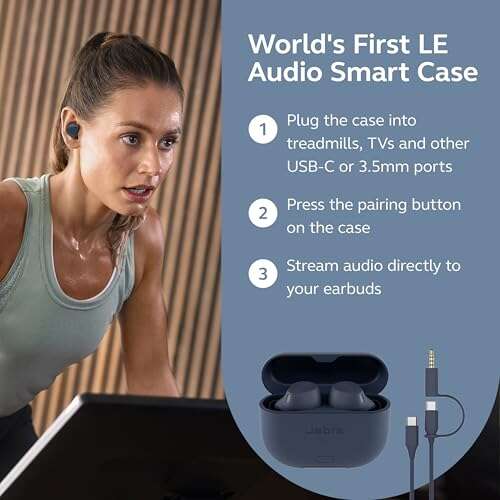
Put both JBL earbuds in the charging case, reset the pair, and reconnect them in stereo mode.
Knowing how to turn off mono mode on JBL earbuds can restore clear left and right audio in minutes. In most cases, mono sound is not a permanent earbud setting. It happens when one earbud connects alone, the earbuds lose their stereo link, or your phone enables mono audio. This guide explains the safest fixes, model limits, phone settings, and reset steps so you can solve the problem without guesswork.

What mono mode means on JBL earbuds
Mono mode sends the same audio signal to both channels or plays sound through only one earbud. Stereo mode sends separate left and right channels, which creates a wider and more natural soundstage.
JBL earbuds may enter a mono-like state for several reasons:
• You use only the left or right earbud.
• The two earbuds lose their connection to each other.
• Your phone turns on its Mono Audio accessibility setting.
• The earbuds need to be re-paired.
• One earbud has a low battery or dirty charging contact.
• A software update changes the pairing behavior.
Many JBL True Wireless Stereo models let you use one earbud by itself. This is useful for calls and awareness, but the single earbud will play mono sound. When both earbuds connect correctly, they should normally return to stereo playback.

How to turn off mono mode on JBL earbuds
Start with the simple reconnect method. It fixes many JBL stereo pairing problems without deleting any phone settings.
-
Put both JBL earbuds into the charging case.
-
Leave the lid open for about 10 seconds.
-
Check that both earbuds show charging lights or charging indicators.
-
Remove both earbuds from the case at the same time.
-
Wait several seconds for the left and right earbuds to connect to each other.
-
Open your phone’s Bluetooth menu.
-
Select your JBL earbuds from the list.
-
Play a stereo test track or video.
If the sound now comes from both earbuds with clear left and right separation, you have completed the basic fix for how to turn off mono mode on JBL earbuds.
Avoid removing only one earbud during this test. Some JBL models treat the first earbud you remove as the main connection. The second earbud may then remain disconnected until you place both units back in the case.
Turn off Mono Audio on your phone
Sometimes the JBL earbuds are working correctly, but the phone combines both audio channels. This setting is often called Mono Audio, Mono Sound, or Mono Audio Accessibility.
On an iPhone
-
Open Settings.
-
Tap Accessibility.
-
Select Audio & Visual.
-
Find the Mono Audio switch.
-
Turn Mono Audio off.
-
Keep the Balance slider in the center.
The Balance slider is also important. If it is moved fully to the left or right, one JBL earbud may seem silent even when stereo mode is active.
On an Android phone
Android menus vary by brand and software version. Try these steps:
-
Open Settings.
-
Tap Accessibility.
-
Look for Hearing enhancements, Audio adjustment, or Hearing.
-
Turn off the Mono audio option.
-
Center the Left/Right balance slider.
On Samsung phones, these controls may appear under Accessibility and Hearing enhancements. On Google Pixel phones, the location may differ by Android version. Use the Settings search bar and type mono audio if you cannot find the option.
This phone setting is separate from the JBL earbuds. Turning off Mono Audio is an important part of how to turn off mono mode on JBL earbuds, but it will not repair a broken earbud-to-earbud connection.

Forget and reconnect your JBL earbuds
If the earbuds keep playing mono sound, remove the old Bluetooth connection. A fresh pairing can rebuild the stereo link.
-
Open Bluetooth settings on your phone.
-
Tap the gear or information icon beside your JBL earbuds.
-
Choose Forget This Device, Unpair, or Remove Device.
-
Turn Bluetooth off for a few seconds.
-
Put both earbuds in the charging case.
-
Remove both earbuds.
-
Turn Bluetooth back on.
-
Select the JBL earbuds when they appear.
Keep the phone near the earbuds during setup. Also disconnect the earbuds from nearby tablets, laptops, and smart TVs. A second device may connect to one earbud and interrupt the stereo pairing process.
After reconnecting, play a track with clear stereo effects. A left-and-right speaker test can show whether each earbud is receiving its correct channel.
Reset JBL earbuds to restore stereo pairing
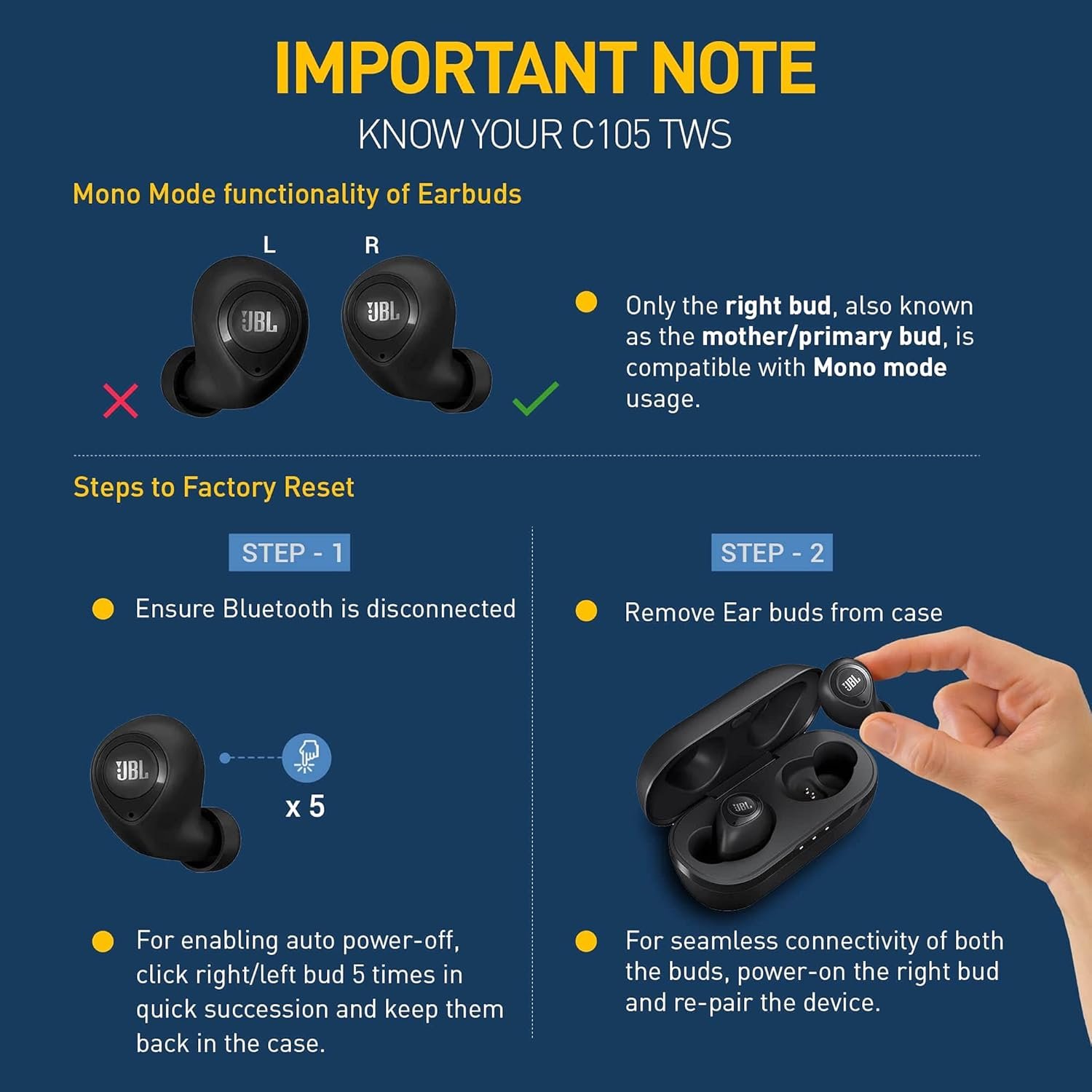
A factory reset is useful when normal reconnection does not work. It removes saved pairing data from the earbuds, so you must pair them again afterward.
The exact reset method depends on the JBL model. Many JBL True Wireless Stereo earbuds use one of these methods:
• Tap an earbud several times while it is outside the case.
• Press and hold the touch area for several seconds.
• Press a physical button while the earbuds are powered on.
• Use the JBL Headphones app if the model supports reset controls.
Because the sequence differs by model, check the manual for your specific product. Common model families include JBL Tune, JBL Live, JBL Wave, JBL Vibe, and JBL Reflect. Do not assume that a reset method for one family will work on another.
Before resetting, charge the case and both earbuds. Then forget the earbuds in your phone’s Bluetooth settings. Reset the earbuds, place them in the case, remove both at once, and pair them again.
This is often the most effective answer to how to turn off mono mode on JBL earbuds when the left and right units no longer recognize each other.

Check the JBL Headphones app
Some JBL earbuds work with the JBL Headphones app. The app can show battery levels, install firmware updates, and change certain listening settings.
Open the app and check these areas:
• Battery status for the left earbud, right earbud, and case.
• Firmware update notices.
• Balance or accessibility controls.
• Smart Audio & Video settings.
• Connection and device management options.
The app may not include a button labeled Mono Mode. That is normal. On many models, mono operation is automatic when only one earbud is connected. The solution is to restore the stereo connection rather than disable a named setting.
Keep the app and earbud firmware current, but update only when the earbuds have enough battery. Firmware behavior can vary by model, region, and phone system.

Fix one JBL earbud that is not working
If only one earbud plays sound, mono mode may not be the real issue. The silent earbud may not be charging or may have a blocked speaker grille.
Try these checks:
• Clean the metal charging contacts with a dry, soft cloth.
• Clean the speaker grille gently with a dry brush.
• Confirm that the silent earbud shows a charging light.
• Charge the case for at least 30 minutes.
• Test the earbuds with another phone.
• Check the left and right audio balance on your phone.
Do not push liquid, sharp tools, or metal objects into the speaker grille. Moisture can damage the driver, and a bent charging contact can stop the earbud from charging.
A useful test is to place both earbuds in the case, then remove only the quiet earbud. If it does not power on, the issue may involve charging or the battery rather than stereo mode.

Check whether your JBL model supports stereo use
Most current JBL true wireless models support stereo playback with both earbuds. However, features vary. Some models support independent single-earbud use, while others depend more heavily on a primary and secondary earbud connection.
Read your model’s user guide to confirm:
• Whether either earbud can work alone.
• Whether both earbuds must be removed together.
• How the earbuds enter pairing mode.
• The correct factory reset procedure.
• Whether the JBL Headphones app supports the model.
Older JBL earbuds may use a different pairing process from newer models. A model-specific manual is more reliable than a general online button sequence. This limitation matters when learning how to turn off mono mode on JBL earbuds because there is no single reset command for every JBL product.
How to test stereo sound correctly
Use a simple test instead of relying only on a song. Music can sometimes sound almost the same in mono and stereo.
Try this process:
-
Search for a left-right stereo test on a trusted audio platform.
-
Confirm that “left” plays mainly in the left earbud.
-
Confirm that “right” plays mainly in the right earbud.
-
Turn Mono Audio off if both earbuds play the same channel.
-
Repeat the test after reconnecting the JBL earbuds.
You can also test with a movie scene or game that places voices and effects across the sound field. If both earbuds work but the left and right channels are reversed, the issue may be the source file or app rather than the JBL earbuds.
Bluetooth sends the audio to the earbuds, but the phone, app, operating system, and earbud firmware all affect the final result. Testing more than one app helps isolate the cause.
Common mistakes to avoid
People often reset the earbuds too quickly. A reset can help, but it also removes pairing data and creates extra setup work.
Avoid these mistakes:
• Pairing only one earbud during setup.
• Leaving the earbuds connected to another device.
• Forgetting to turn off Mono Audio on the phone.
• Ignoring a left or right balance setting.
• Using a reset guide for a different JBL model.
• Cleaning the earbuds with water or sharp tools.
• Assuming one silent earbud always means mono mode.
In troubleshooting, change one thing at a time. For example, first check Mono Audio, then reconnect both earbuds, and only then try a factory reset. This approach makes it easier to identify the real cause.
How to prevent mono playback in the future
Once you know how to turn off mono mode on JBL earbuds, a few habits can help prevent the issue.
• Store both earbuds in the case after use.
• Keep the charging contacts clean and dry.
• Charge the case before the battery becomes fully empty.
• Disconnect the earbuds from devices you no longer use.
• Install official firmware updates when available.
• Remove both earbuds together when you want stereo sound.
• Check your phone’s accessibility settings after a system update.
If you often use one earbud for calls, place both earbuds in the case before switching back to music. This gives the earbuds a chance to rebuild their stereo link instead of carrying over a single-ear connection.
Frequently Asked Questions About How to Turn Off Mono Mode on JBL Earbuds
Why are my JBL earbuds only playing in one ear?
The silent earbud may be disconnected, out of power, or unable to charge. Put both earbuds in the case, clean the contacts, forget the Bluetooth connection, and pair them again.
Do JBL earbuds have a dedicated mono mode button?
Most JBL true wireless earbuds do not have a dedicated Mono Mode button. Mono playback usually happens automatically when one earbud is used or when the stereo link fails.
How do I turn off mono audio on an iPhone for JBL earbuds?
Open Settings, select Accessibility, choose Audio & Visual, and turn off Mono Audio. Also center the Balance slider between left and right.
How do I turn off mono audio on Android?
Open Settings and search for Mono audio. Turn it off under Accessibility or Hearing enhancements, then center the left and right balance control.
Will resetting JBL earbuds delete my Bluetooth connection?
A factory reset clears the earbuds’ saved pairing information. You will need to forget the old device on your phone and pair the JBL earbuds again.
Why does one JBL earbud work but the other does not charge?
Dirty charging contacts, a low case battery, or a poor fit in the case can prevent charging. Clean the contacts with a dry cloth and confirm that the earbud shows a charging indicator.
Can I use one JBL earbud without mono sound?
A single earbud normally plays mono audio because it cannot create a left and right pair by itself. Both earbuds must connect for standard stereo playback.
Conclusion
Learning how to turn off mono mode on JBL earbuds usually starts with placing both earbuds in the case, reconnecting them together, and checking your phone’s Mono Audio and balance settings. If those steps fail, forget the Bluetooth connection, inspect charging contacts, update the JBL app, and use the model’s correct reset method.
Work through the fixes in order rather than resetting immediately. With a clean connection and two charged earbuds, stereo sound should return quickly. If this guide solved your problem, explore your JBL model’s manual for advanced controls or share your result in the comments.

Everett Ashford is a tech reviewer at mytechgrid.com specializing in SSDs, cameras, TVs, earbuds, headphones, and other consumer electronics. He provides honest, data-driven reviews based on hands-on testing and real-world performance analysis. Everett simplifies complex tech details to help readers make smart, confident buying decisions.