Press and hold the power button for about 2 seconds until the LED or voice prompt confirms power on.
I’ve spent years testing earbuds and headphones, including many Soundcore models. In this guide I’ll show exactly how to turn on Soundcore headphones, how different models behave, common pairing steps, and quick fixes when things go wrong. Read on to get clear, practical instructions you can use right now.
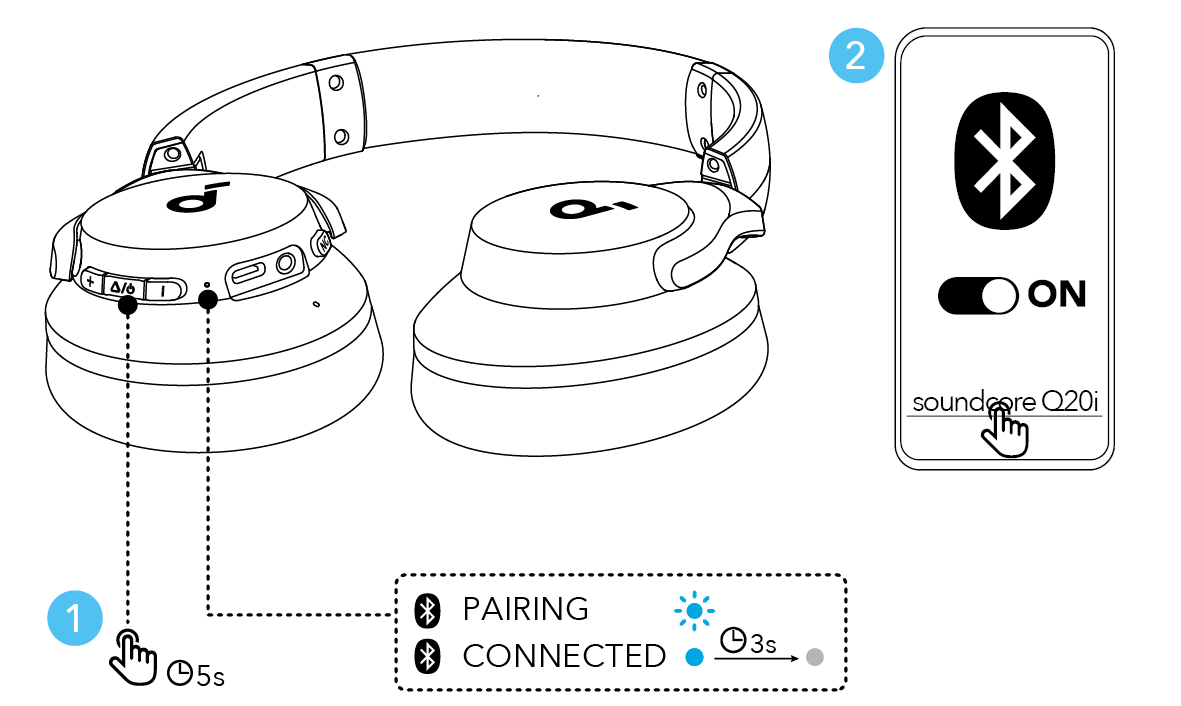
Quick steps to turn on Soundcore headphones
The simplest way to learn how to turn on Soundcore headphones is to find the power button and press it briefly or hold it down depending on the model. Most Soundcore headphones use a single multifunction button or a combination of buttons to power on and off.
Steps you can follow now:
- Locate the power or multifunction (MFB) button on the earcup or inline remote.
- Press and hold the button for about 2 seconds until you see an LED flash or hear a voice prompt.
- If you hear a “power on” prompt, the headphones are on and ready to pair.
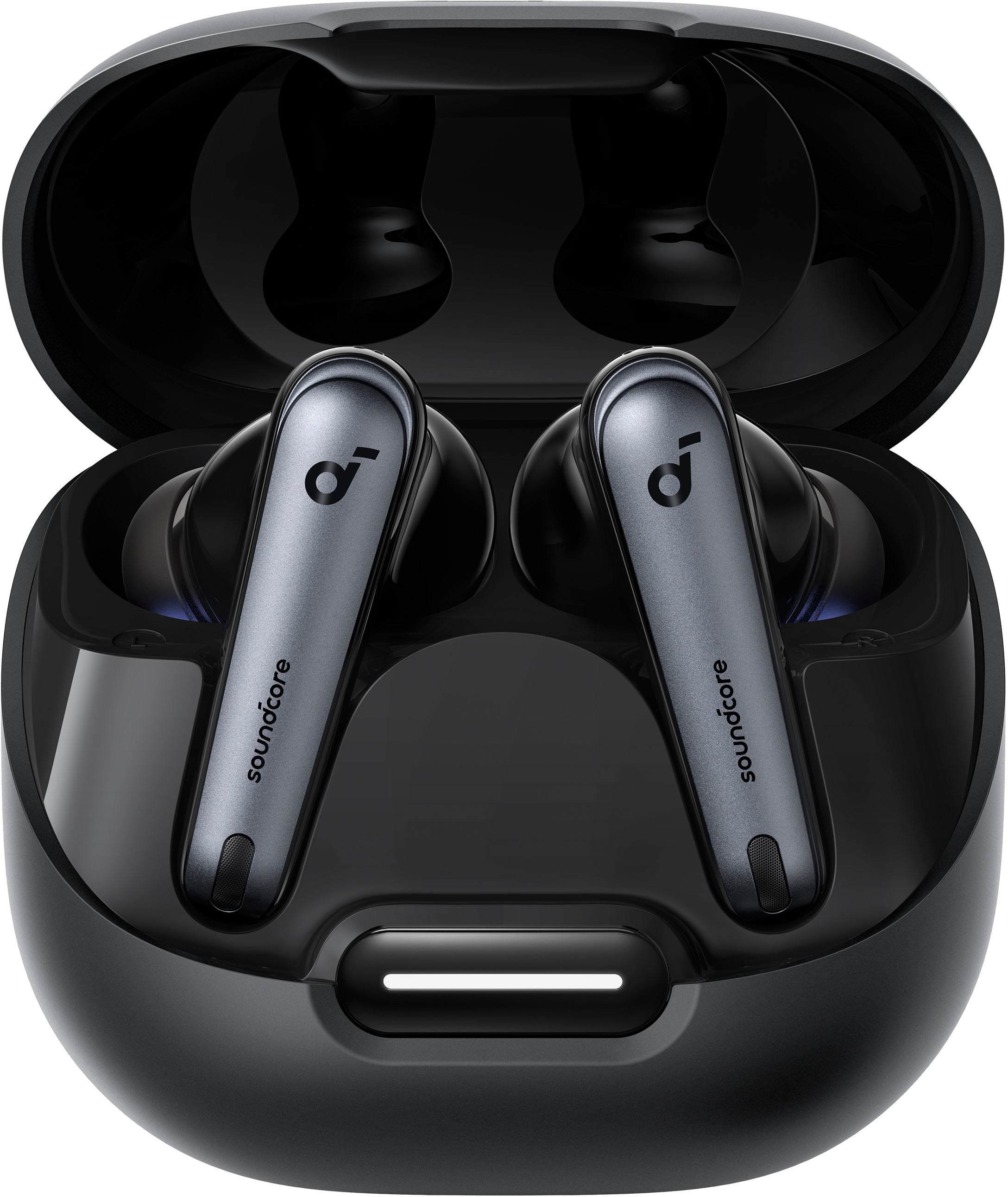
- For in-ear true wireless models, open the case and remove the earbuds; many models power on automatically when removed.
I recommend practicing these steps once so you remember them. If the headphones don’t respond, try charging them for at least 10–15 minutes before trying again.

Model-specific power methods
Soundcore makes on-ear, over-ear, and true wireless earbud models. Each may use a slightly different method to power on.
Common patterns by type:
- Over-ear headphones: press and hold the power/multifunction button for 2–4 seconds. Some models have a separate power switch.
- On-ear headphones: long press (2–3 seconds) the power button or slide the switch to ON.
- True wireless earbuds: earbuds often power on automatically when removed from the charging case. Some models require holding a touch area for a second.
If you own a specific model, check the user manual for exact timing and LED signals. In my experience, over-ear models respond to a firm press while earbuds depend on the case behavior. This nuance matters when you first learn how to turn on Soundcore headphones.

Pairing, Bluetooth, and first-time setup
Turning on your Soundcore headphones is often the first step before pairing them to a device. Here’s a simple flow for first-time setup.
First-time pairing steps:
- Turn on the headphones using the power method for your model.
- Put the headphones into pairing mode. This usually happens automatically on first power on or by holding the power/multifunction button for 3–5 seconds until the LED flashes blue/red or you hear “pairing.”
- On your phone or computer, open Bluetooth settings and select the Soundcore device name.
- Confirm pairing. You may hear a voice prompt like “connected” or see the device listed as connected.
If your headphones do not appear in Bluetooth settings, turn them off and on again, and try putting them in pairing mode manually. Knowing how to turn on Soundcore headphones correctly speeds up setup and avoids frustration.

Troubleshooting common power and connection issues
Even with simple steps, you may run into issues when you try to turn on Soundcore headphones. Below are common problems and quick fixes I use.
Problem and fixes:
- Headphones won’t power on: charge the battery for 15–30 minutes, then try again. Use the original cable or a high-quality charger.
- Headphones turn on but won’t pair: reset the Bluetooth cache on your phone or forget the device, then re-pair. Try pairing with another device to isolate the issue.
- One earbud won’t power on: place both earbuds in the case and charge them for 20 minutes. Remove both together to force sync.
- LED behavior unclear: consult the manual for LED color meanings. A common pattern is blue for power, red for low battery, and flashing for pairing.
People also ask:
- How long should I hold the button to enter pairing mode? Hold for about 3–5 seconds until the LED flashes or you hear “pairing.”
- What if the headphones say “battery low” on power on? Charge for at least 20 minutes before further use.
These fixes solved most problems for me when teaching others how to turn on Soundcore headphones.
Battery care and power-saving tips
Good battery habits help your Soundcore headphones turn on reliably each time. Batteries last longer and perform better with simple care.
Best practices:
- Charge fully before long use. A full charge gives you the expected runtime.
- Avoid leaving the headphones in extreme heat or cold.
- Use power-saving modes if available; some models auto-shutoff after inactivity.
- Store earbuds in the case to keep them charged and ready to power on quickly.
I learned the hard way that frequent short top-ups keep earbuds ready. If you want your headphones to turn on instantly, keep the case charged and avoid deep discharges.

Maintenance and safety
Treating your headphones gently prevents power and hardware issues. Simple maintenance saves time and extends life.
Maintenance tips:
- Clean charging contacts periodically with a dry cloth to ensure charging and power-on reliability.
- Inspect charging cables for damage and replace them when frayed.
- Update firmware when available; some power or pairing bugs are fixed through updates.
- Avoid exposing the headphones to liquids unless they are rated water-resistant.
Small steps like cleaning the contacts helped me avoid many no-power situations. Being proactive keeps your Soundcore headphones ready when you need them.
 soundcore headphones”
style=”max-width: 100%; height: auto; border: 2px solid black; border-radius: 10px; display: block; margin: 0 auto;”
loading=”lazy”
/>
Frequently Asked Questions of how to turn on soundcore headphones
How do I turn on Soundcore headphones for the first time?
Turn on your Soundcore headphones by pressing and holding the power or multifunction button for 2–4 seconds. For true wireless earbuds, remove them from the charging case; many models power on automatically.
My Soundcore headphones don’t power on after charging. What should I do?
Try a different cable and charger and charge for at least 30 minutes. If they still won’t power on, perform a reset as described in your manual or contact support.
How do I put my Soundcore headphones into pairing mode?
After powering on, press and hold the power or multifunction button for about 3–5 seconds until the LED flashes or you hear “pairing.” Then select the device in your Bluetooth settings.
One earbud won’t turn on. How can I fix it?
Place both earbuds back in the case and charge both for 15–20 minutes. Remove them together to resync and power on simultaneously.
How long should I hold the button to turn on my Soundcore headphones?
Typically, hold the power button for 2–4 seconds to turn on, and 3–5 seconds to enter pairing mode. Timing can vary slightly by model, so check the manual if unsure.
Conclusion
Turning on Soundcore headphones is quick once you know where the power controls are and how your model behaves. Remember to charge regularly, use proper pairing steps, and keep the charging contacts clean. Put these tips into practice to avoid common issues and enjoy reliable audio whenever you need it. If this guide helped, try the steps with your model now and leave a comment about your experience or subscribe for more tips.

Everett Ashford is a tech reviewer at mytechgrid.com specializing in SSDs, cameras, TVs, earbuds, headphones, and other consumer electronics. He provides honest, data-driven reviews based on hands-on testing and real-world performance analysis. Everett simplifies complex tech details to help readers make smart, confident buying decisions.