Pair, wear, and customize via the Bose Music app for clear, open-ear listening.
I’ve spent years testing earbuds and guiding users through audio gear. This guide walks you step-by-step through how to use Bose Ultra Open Earbuds, from unboxing to daily tips, pairing, controls, and troubleshooting. Expect practical advice, real-world examples, and easy instructions so you can get great sound and comfort fast.

What the Bose Ultra Open Earbuds are and why they matter
Bose Ultra Open Earbuds are open-design earbuds meant to keep you aware of your surroundings while you listen. They sit near your ear canal but don’t seal it, so ambient sound mixes with audio. This design is great for commuting, walking, or office use when situational awareness matters.
What makes them useful
- Natural awareness while you listen, unlike in-ear sealed buds.
- Lightweight and comfortable for long wear.
- Designed for clear voice calls and stable Bluetooth streaming.
How this guide helps you learn how to use Bose Ultra Open Earbuds
- Clear, step-by-step setup instructions.
- Practical tips for fit, controls, and app customization.
- Real troubleshooting advice from hands-on experience.

Unboxing and first steps
When you open the box, look for these items
- Charging case with earbuds inside
- USB-C cable
- Quick start guides and warranty card
Before you start using them
- Charge the case and earbuds until full.
- Download the Bose Music app on your phone for the best setup experience.
- Read the quick start guide to find the physical buttons or touch zones.
First setup checklist
- Charge the case and earbuds.
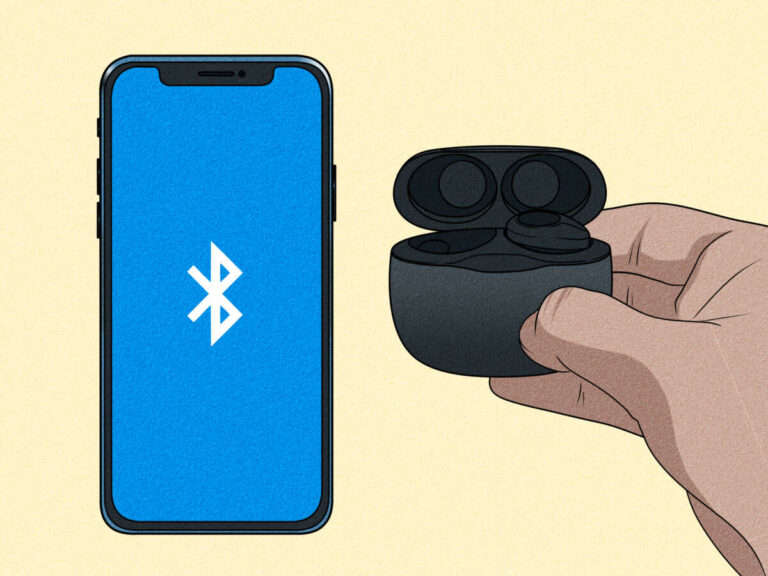
- Open the case near your phone to trigger pairing prompts.
- Open the Bose Music app and follow on-screen steps to add the earbuds.
.jpg)
Charging and battery care
How to charge
- Place earbuds in the case; ensure they click into place.
- Connect the case to power with the USB-C cable.
- The case usually shows LEDs to indicate charge level.
Battery care tips
- Fully charge before first use.
- Keep the case charged; it extends total listening time by storing extra charges.
- Avoid leaving batteries in extreme heat or cold.
Practical note from my experience
- I found charging overnight convenient. A short top-up before long outings prevents mid-day battery anxiety.

Pairing, Bluetooth setup, and the Bose Music app
Pairing basics
- With the case open, put the earbuds near your phone and enable Bluetooth.
- Accept any pairing prompts.
- If no prompt, press the pairing button on the case (if present) or hold the earbuds' touch area.
Why use the Bose Music app
- The app guides firmware updates, sound personalization, and control settings.
- It can help locate lost earbuds and manage device connections.
Step-by-step app setup
- Install and open the Bose Music app.
- Create or sign in to your Bose account.
- Tap Add Device and follow the instructions.
- Update firmware when prompted for optimal performance.
- How long does pairing take? Usually under a minute with the app and Bluetooth enabled.
- What if my phone won’t find the earbuds? Restart Bluetooth, close the case, then open it again to reset pairing mode.
- Can I pair to multiple devices? Yes. Use the app to manage connections and switch devices as needed.
Wearing, fit, and comfort
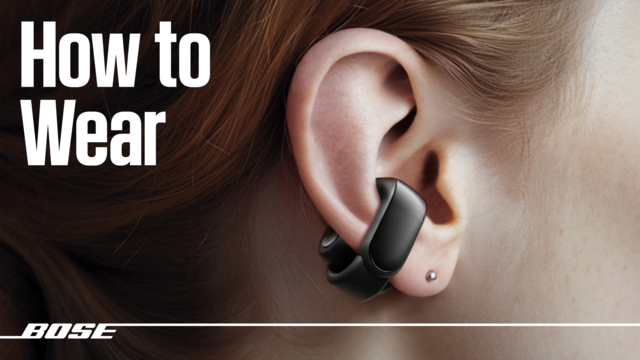
How to wear open-ear earbuds
- Place each earbud so it rests comfortably near the ear canal without sealing it.
- Slight adjustments forward or backward improve clarity and comfort.
- There are no deep tips to insert; let the buds sit naturally.
Fit tips from real use
- I found small adjustments made a huge difference. Tilt slightly inward for better balance.
- If you feel movement during exercise, double-check placement and case fit.
Comfort and long-term wear
- Because they don’t seal the ear, they stay comfortable for long sessions.
- If you feel fatigue, remove and rest your ears every hour.
Controls, voice assistant, and gestures
Common controls you’ll use
- Play/Pause: single tap on the primary bud (varies by configuration).
- Skip/Back: double or triple taps (set in app if adjustable).
- Volume: swipe or press and hold depending on settings.
- Answer/End calls: tap once; reject calls with a long press.
Voice assistant and ambient use
- Activate your phone’s voice assistant via the touch control.
- Use voice commands for calls, navigation, and music without taking out your phone.
Practical tip
- Customize controls in the Bose Music app. I switched a long-press to open the assistant and found it faster for navigation while walking.

Sound personalization and app features
What you can adjust
- EQ presets or simple EQ sliders in the Bose Music app.
- Firmware updates that refine sound and stability.
- Microphone and call settings for clearer voice pickup.
How to optimize sound
- Use the app’s equalizer to emphasize bass or clarity.
- For open-ear listening, slightly boost mid frequencies for clearer vocals.
- Run firmware updates as they improve performance over time.
Personal experience
- Tweaking the EQ made voices clearer without losing the natural open feel. Small adjustments matter more than dramatic changes.
Troubleshooting common issues
No sound or one earbud silent
- Re-seat the earbuds in the case and ensure both show charged.
- Restart Bluetooth on your device.
- Use the app to run a diagnostics or reset the earbuds.
Poor call quality
- Move to a quieter area or shield the microphone from wind.
- Check app settings for microphone enhancements.
- Make sure firmware is current.
Connectivity drops
- Reduce distance from the paired device.
- Turn off other Bluetooth devices that may interfere.
- Forget the device in Bluetooth settings, then re-pair.
Tips I learned the hard way
- A simple restart of the earbuds often fixes stubborn issues.
- Keeping firmware updated prevents many glitches.
Cleaning, storage, and maintenance
Simple cleaning routine
- Wipe earbuds with a soft, dry cloth after use.
- Use a small, soft brush to clear any debris from openings.
- Don’t use liquids or submerge the earbuds.
Proper storage
- Store earbuds in the charged case when not in use.
- Keep them away from humid or very hot places.
Longevity tips
- Avoid dropping the case.
- Keep firmware up to date to protect against software-related failures.
Frequently Asked Questions of how to use bose ultra open earbuds
How do I pair my Bose Ultra Open Earbuds with my phone?
Open the case near your phone with Bluetooth on, then follow the Bose Music app prompts to complete pairing.
Can I use one earbud at a time?
Yes, you can typically use a single earbud for calls or audio; check the app for single-ear modes and battery status.
How do I reset the earbuds if they won’t connect?
Put the earbuds in the case, close it, wait 30 seconds, and then re-open. If needed, use the app’s reset feature or press and hold the designated touch area according to the manual.
Are these earbuds water-resistant for workouts?
They are designed for light sweat and everyday use, but avoid full submersion and prolonged exposure to heavy rain.
How do I update firmware on the earbuds?
Open the Bose Music app, go to device settings, and follow the on-screen instructions to install firmware updates.
Conclusion
You now have a clear, practical roadmap for how to use Bose Ultra Open Earbuds: unbox, charge, pair through Bluetooth and the Bose Music app, fine-tune controls and sound, and maintain the earbuds for reliable daily use. Try one change at a time—start with app setup and a small EQ tweak—and you’ll quickly find the sweet spot for sound and comfort. Ready to get the most from your earbuds? Open the Bose Music app, pair them now, and leave a note below about your favorite setting or question.

Everett Ashford is a tech reviewer at mytechgrid.com specializing in SSDs, cameras, TVs, earbuds, headphones, and other consumer electronics. He provides honest, data-driven reviews based on hands-on testing and real-world performance analysis. Everett simplifies complex tech details to help readers make smart, confident buying decisions.