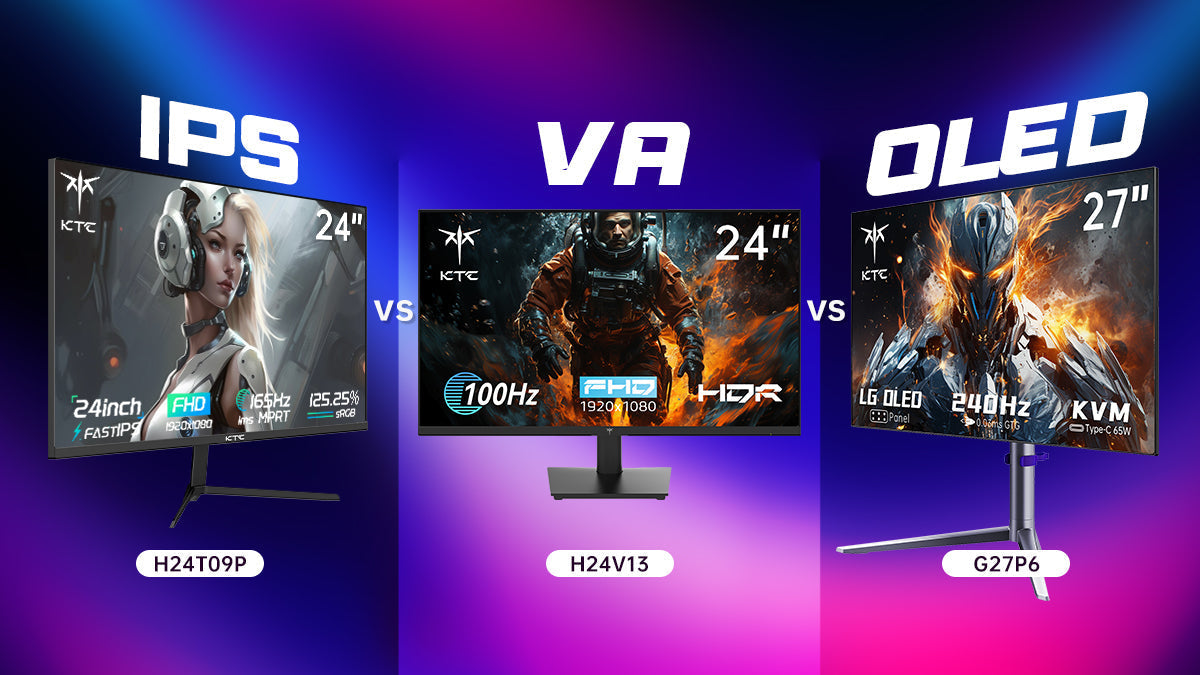
For laptop shoppers in the United States, the main difference is simple: IPS screens use a separate LED backlight, while OLED screens create light with each individual pixel. That design choice affects contrast, black levels, motion, battery life, price, and the risk of permanent image retention.
Choose IPS for lower cost, long work sessions, bright rooms, and less concern about burn-in. Choose OLED for deep blacks, strong contrast, vivid color, and movies or games where image quality matters most.
Introduction
When you compare laptops at U.S. retailers, an IPS display may offer better value and fewer long-term concerns. An OLED display may look more impressive, especially when you watch HDR video or use dark themes.
Neither panel type is best for every buyer. The right choice depends on your work, room lighting, battery needs, budget, and how long you plan to keep the laptop.

IPS vs. OLED: The Main Difference
The key difference is how each screen makes an image.
An IPS display is a type of LCD, or liquid-crystal display. It uses liquid crystals to control light from a separate LED backlight. The backlight is usually on across the screen, even when the image contains black areas.
An OLED display uses organic light-emitting diodes. Each pixel produces its own light. A pixel can turn off fully when the image needs true black.
This leads to a useful rule:
- IPS controls light from behind the pixels.
- OLED controls light at the pixel level.
That difference explains most of the practical results.
| Feature | IPS laptop screen | OLED laptop screen |
|---|---|---|
| Black levels | Dark gray to very dark | True black when pixels switch off |
| Contrast | Good, but limited by backlight | Usually much higher |
| Color | Good to excellent | Often very rich and wide-gamut |
| Motion | Good; varies by model | Usually very fast pixel response |
| Brightness | Often strong for office use | Can be strong, but full-screen brightness varies |
| Battery use | Often predictable and efficient | May use less on dark images, more on bright images |
| Burn-in risk | No OLED-style burn-in | Possible with repeated static images |
| Price | Usually lower | Usually higher |
| Best fit | Work, school, value, bright rooms | Media, creative work, games, premium use |
The panel type alone does not determine quality. Resolution, refresh rate, brightness, coating, color calibration, HDR support, and the laptop’s graphics hardware also matter.
Picture Quality: Why OLED Usually Looks More Dramatic
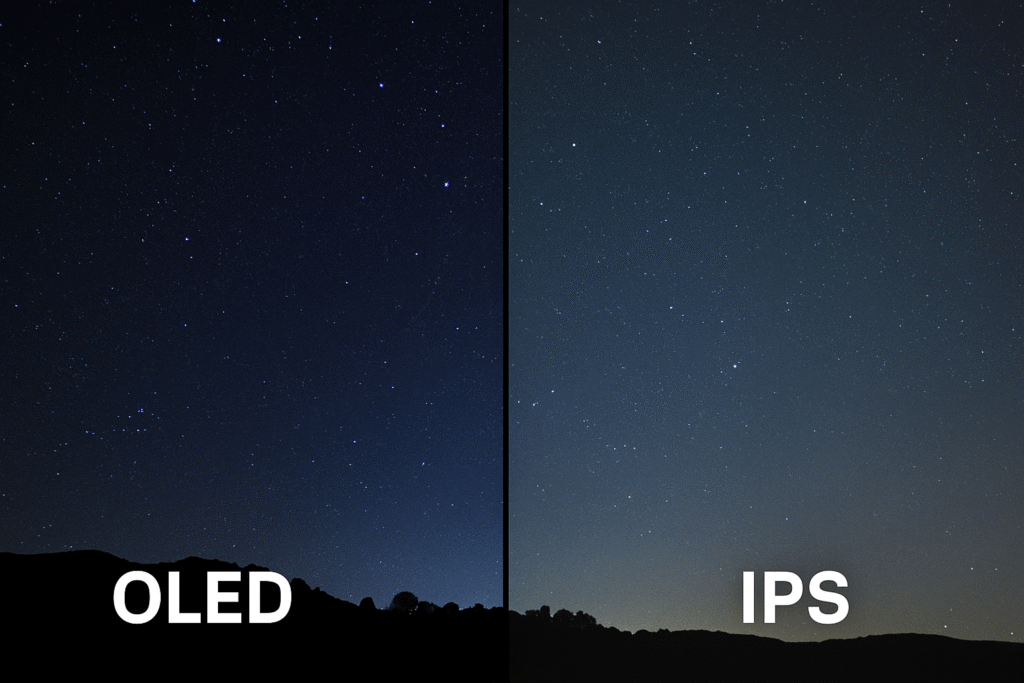
OLED usually provides the better-looking image in a dark room because it can turn individual pixels off. Black areas remain black instead of showing a small amount of backlight.
This creates high contrast. White text on a black background can look sharper, and dark scenes in films can show more separation between shadows and highlights.
IPS screens can still look excellent. A good IPS panel may have accurate color, high resolution, and strong brightness. However, its backlight can create a gray glow in dark scenes. This effect is often called backlight bleed or IPS glow, though the two terms describe different panel behaviors.
Contrast and black levels
OLED has a major advantage in contrast because its pixels can switch off. IPS contrast depends on how well the LCD blocks the backlight.
This matters most when you:
- Watch movies in a dark room
- Play games with many shadow areas
- Use a dark user interface
- Edit images with deep blacks
- Work in a room with controlled lighting
In a bright office, the difference may be less obvious. Reflections and room light can reduce the visual impact of perfect black levels.
Color
Many OLED laptop screens support a wide color gamut. A color gamut describes the range of colors a display can show. Wider-gamut screens can produce richer reds, greens, and other shades.
That does not automatically make OLED more accurate. A screen can show a wide range of colors but still need calibration. For photo or video work, check the laptop’s measured color accuracy or factory calibration rather than relying on “OLED” alone.
An IPS panel can be the better choice for professional color work if it offers:
- A wide color gamut
- Good factory calibration
- A color profile for your operating system
- Stable brightness
- The required color space, such as sRGB, Display P3, or Adobe RGB
Brightness and HDR: Check the Full Specification
OLED does not always mean brighter. Laptop makers may list brightness in nits, but the test area matters.
A display may reach a high brightness level in a small highlight while producing a lower level across the entire screen. This is common with OLED panels because their power and heat behavior can change with the amount of bright content on screen.
For a fair comparison, look for:
- Typical full-screen brightness
- Peak brightness for HDR highlights
- Whether HDR works on battery power
- The display’s finish and reflectivity
- Independent measurements under the same test conditions
HDR, or high dynamic range, can improve bright highlights and dark detail. But HDR quality depends on more than panel type. The screen also needs suitable brightness, contrast, color range, and software support. The VESA DisplayHDR standards provide a useful reference, although a certification does not describe every part of the viewing experience.
IPS laptops can offer strong full-screen brightness. That may make them easier to use near a window or under bright indoor lights.
OLED may look more vibrant in a dark room, while a bright matte IPS screen may be easier to read during daytime work.

Viewing Angles and Motion Performance
Both IPS and OLED can provide wide viewing angles, but OLED often keeps its contrast and color more consistent when you view the screen from the side.
OLED also has very fast pixel response. Pixel response is the time a pixel takes to change from one color to another. Faster response can reduce visible ghosting during fast camera movement or scrolling.
A modern IPS panel can also perform well. Some IPS laptop screens have high refresh rates, such as 120 Hz, 144 Hz, or higher, and can offer smooth motion.
Do not confuse refresh rate with response time:
- Refresh rate is how many times the screen can update each second.
- Response time is how quickly pixels change state.
A 144 Hz IPS display may feel smoother than a 60 Hz OLED display during gaming or scrolling. A 120 Hz OLED display may provide both smooth updates and fast pixel transitions.
For gaming, compare the whole display specification:
- Refresh rate
- Pixel response behavior
- Adaptive-sync support
- Resolution
- Graphics performance
- Input lag
The laptop’s graphics processor must also produce enough frames to benefit from a high refresh rate.
Battery Life and Power Use
Battery results depend on the laptop, operating system, brightness, refresh rate, processor, and the type of content on screen.
OLED pixels use little or no power when displaying black. A dark interface can therefore help reduce display power use. Bright white pages can cause OLED pixels to emit more light and may use more power than the same content on an IPS screen.
IPS uses a backlight that remains active across the display. Its power use is often more consistent across different images.
In practice:
- A dark-mode OLED laptop may use less display power.
- A bright document-heavy workload may reduce OLED’s advantage.
- A high-brightness or high-refresh-rate screen can use more power.
- The battery difference may be smaller than the difference caused by the CPU, GPU, or battery capacity.
Do not buy a laptop based on panel power claims alone. Check independent battery tests performed at similar brightness and settings. A manufacturer’s battery estimate is useful for comparison within its own product line, but it may not match your workload.
OLED Burn-In and Image Retention
OLED has a risk that standard IPS panels generally do not: permanent image retention, commonly called burn-in.
Burn-in can happen when the same pixels display the same bright shapes for very long periods. Examples may include:
- A taskbar that never moves
- A software toolbar
- A channel logo
- A fixed game interface
- A spreadsheet layout used for many hours each day
Temporary image retention may disappear after the screen shows different content. Permanent burn-in does not fully disappear.
Modern OLED laptops may include protection features such as pixel shifting, screen savers, logo dimming, and panel refresh cycles. These features reduce risk, but they do not make the risk impossible.
To reduce the chance of burn-in:
- Use automatic screen sleep.
- Hide the taskbar when practical.
- Avoid maximum brightness for long periods.
- Use dark mode if it suits your work.
- Allow the laptop’s panel-care routines to run.
- Vary content when possible.
For a typical mixed-use laptop, OLED may be a reasonable choice. For a workstation that displays the same static interface for eight or more hours each day, IPS may be the safer long-term option.
Check the specific U.S. warranty terms before buying. Some manufacturers exclude burn-in, while others provide limited coverage or separate conditions.
Eye Comfort: What Matters More Than IPS or OLED
Neither IPS nor OLED is automatically safer or more comfortable for every person.
Eye comfort depends on several factors:
- Brightness
- Glare and screen reflections
- Viewing distance
- Text sharpness
- Room lighting
- Flicker behavior
- Refresh rate
- How long you use the screen without breaks
Some OLED laptop screens use pulse-width modulation, or PWM, to control brightness. PWM rapidly turns the light source on and off. Some people notice this flicker and may experience eye strain or headaches. Other people do not notice it.
IPS screens can also use PWM. The panel label does not tell you the full flicker behavior.
If you are sensitive to flicker, look for independent testing at the brightness levels you use. A screen that is comfortable at maximum brightness may behave differently at 50 percent brightness.
You can also improve comfort by:
- Increasing text size
- Reducing glare
- Matching screen brightness to the room
- Taking regular breaks
- Keeping the display at a comfortable distance
If screen use causes repeated headaches, eye pain, or vision changes, seek advice from a qualified medical professional.
Which Is Better for Gaming, School, and Work?
The better screen depends on the task.
For gaming
OLED is attractive for dark games and fast motion because it can provide deep blacks and fast pixel response. Choose it when image contrast and motion clarity are high priorities.
IPS may be better if you want:
- A lower purchase price
- A bright matte screen
- Long sessions with static game interfaces
- Less concern about permanent image retention
- A high refresh rate at a lower cost
Also check response behavior, refresh rate, input lag, and graphics performance. OLED is not automatically better if the laptop has a weak GPU or a low refresh rate.
For school and office work
IPS is often the practical choice for web browsing, documents, email, and spreadsheets. It usually costs less and avoids OLED burn-in concerns.
OLED can still work well for school or office use. Reduce the risk of image retention by using sleep timers, hiding fixed interface elements, and avoiding maximum brightness for long periods.
If you read black text on white pages all day, compare battery tests and brightness behavior. Do not assume OLED will last longer on battery simply because it can turn off black pixels.
For photo and video editing
OLED can help when you need deep blacks, strong contrast, and a wide color range. It is useful for reviewing dark scenes and HDR content.
A well-calibrated IPS screen may be a better tool for color-managed work. The deciding factors are color accuracy, coverage of the required color space, calibration, resolution, and software support.
For professional work, an external calibrated monitor may still be preferable when consistent color matters across projects.
For watching movies
OLED usually wins for movies viewed in a dim room. Its black levels can make cinematic scenes look more like they do on a high-quality television.
IPS can be a better fit for shared spaces, bright rooms, or users who prefer a matte surface. Viewing distance and reflections may matter more than the panel type.

IPS or OLED: A Practical Buying Checklist
Use the panel label as a starting point, not the final answer. Before buying a laptop in the United States, check these specifications:
- Resolution: Full HD, 2.5K, 3K, and 4K affect sharpness and power use.
- Refresh rate: Higher rates make motion and scrolling smoother.
- Brightness: Compare typical brightness, not only a peak figure.
- Surface finish: Glossy screens can look vivid but reflect more light.
- Color coverage: Look for sRGB or Display P3 coverage when color matters.
- Calibration: Factory calibration can affect real-world accuracy.
- PWM behavior: Check independent measurements if you are flicker-sensitive.
- Battery tests: Compare tests at similar brightness and workloads.
- Warranty: Read the policy for OLED image retention.
- Use pattern: Consider whether static content will remain on screen daily.
A useful decision rule is:
- Pick IPS when value, bright-room use, static work, or long-term simplicity comes first.
- Pick OLED when contrast, black levels, color impact, and movie or gaming quality come first.
- Pick the better specific panel, not merely the better panel category.
For example, a bright, well-calibrated 120 Hz IPS screen may be a better purchase than a dim 60 Hz OLED screen. The reverse may also be true for a premium laptop used mainly for video and photo work.

Common Mistakes When Comparing Laptop Displays
Mistake 1: Assuming OLED always has better color
OLED often has strong color, but wide color range and color accuracy are different traits. Check measurements and color-space coverage.
Mistake 2: Comparing peak brightness only
Peak brightness may apply to a small area or HDR mode. Full-screen brightness gives a better idea of how the laptop feels during normal work.
Mistake 3: Ignoring screen reflections
A glossy OLED display can look excellent indoors but become difficult to read near a window. Screen finish can change the experience more than a small contrast difference.
Mistake 4: Treating burn-in as guaranteed
Burn-in is a risk, not an inevitable result. Usage pattern, brightness, static content, panel design, and care features all affect the outcome.
Mistake 5: Treating IPS as one fixed quality level
IPS laptop screens vary widely. Some are dim and slow; others are bright, accurate, and fast. Read the full specification and seek independent testing.
Mistake 6: Forgetting repair and replacement costs
A damaged laptop display may be expensive to replace. Check the exact model’s parts availability, warranty terms, and repair options before paying extra for OLED.
FAQs About IPS and OLED Laptop Screens
Is OLED better than IPS for a laptop?
OLED is better for contrast, black levels, and often motion response. IPS is often better for value, bright-room use, and long periods of static content. The best choice depends on your workload.
Does OLED use more battery than IPS?
It can. OLED may use less power with dark content and more power with bright content. IPS power use is usually more consistent. The full laptop design matters more than the panel label alone.
Can OLED laptop screens suffer from burn-in?
Yes. Repeated static images can cause permanent image retention. Automatic sleep, moderate brightness, varied content, and panel-care features can reduce the risk.
Is IPS or OLED easier on the eyes?
Neither is automatically easier for everyone. Check brightness, reflections, resolution, and flicker behavior. People who are sensitive to PWM should look for independent flicker tests.
Is OLED worth the extra cost?
OLED may be worth it if you value deep blacks, strong contrast, HDR content, or premium image quality. IPS may offer better value if you mainly write, browse, study, or work with static applications.
What should I choose for programming?
IPS is often the safer practical choice for long coding sessions with fixed menus and text. OLED can work well, especially with dark mode and screen-sleep settings, but check flicker behavior and warranty coverage.
Conclusion
IPS and OLED laptop screens serve different priorities.
IPS is the balanced choice for most office, school, and value-focused buyers. OLED is the image-quality choice for users who want true blacks, high contrast, rich color, and fast pixel response.
Before you decide, compare the exact screen’s brightness, refresh rate, resolution, color accuracy, glare, flicker behavior, battery results, and warranty. The panel type matters, but the complete display specification matters more.

Everett Ashford is a tech reviewer at mytechgrid.com specializing in SSDs, cameras, TVs, earbuds, headphones, and other consumer electronics. He provides honest, data-driven reviews based on hands-on testing and real-world performance analysis. Everett simplifies complex tech details to help readers make smart, confident buying decisions.