A digital camera is mainly hardware, but it relies on software to capture, process, and save images.
The question “is a digital camera hardware or software” has a simple answer with a deeper layer. The camera body, lens, sensor, buttons, battery, and memory card are physical hardware. However, firmware and image-processing software control how those parts work together. Understanding this connection helps you choose, use, and troubleshoot a digital camera with more confidence.
Is a Digital Camera Hardware or Software?
A digital camera is both hardware and software, but it is best described as a hardware device powered by software.
Hardware means the physical parts you can touch. Software means the coded instructions that tell those parts what to do. A digital camera needs both systems to take a photo.
For example, when you press the shutter button:
- The camera hardware receives the button press.
- Software checks the focus and exposure settings.
- The lens lets in light.
- The image sensor changes light into electronic data.
- The camera processor improves and converts that data.
- Software saves the final image to a memory card or internal storage.
Without hardware, the camera could not collect light. Without software, it would not know how to focus, expose, process, or save the image.

Why a Digital Camera Is Considered Hardware
A digital camera is often placed in the hardware category because it is a physical electronic device. You can hold it, connect it to other devices, repair some of its parts, and replace its accessories.
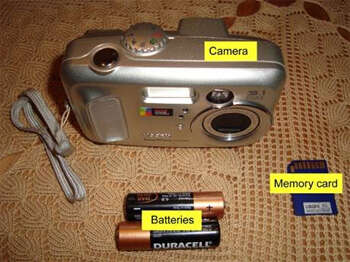
The main hardware components include:
• Camera body: Protects the internal parts and provides controls.
• Lens: Directs light toward the image sensor.
• Image sensor: Captures light and converts it into electronic signals.
• Shutter: Controls how long light reaches the sensor.
• Image processor: Handles image data inside the camera.
• Display screen: Shows menus, previews, and captured photos.
• Battery: Supplies electrical power.
• Memory card: Stores photos and videos.
• Buttons and dials: Let you control settings such as focus, shutter speed, and exposure.
These parts have physical properties. A scratched lens, damaged shutter, or dead battery is a hardware problem. You cannot solve such issues by changing a menu setting.
A camera sensor works much like a very fine digital canvas. Instead of paint, it receives light. The sensor has millions of small light-sensitive areas called pixels. Each pixel records light information, which the camera later turns into an image.
Why a Digital Camera Also Uses Software
Software gives the camera its intelligence. Most digital cameras use built-in software called firmware. Firmware is stored in the camera’s internal memory and starts working as soon as you turn the camera on.
Camera firmware may control:
• Autofocus
• Exposure measurement
• White balance
• Face and eye detection
• Image stabilization
• Noise reduction
• File format selection
• Video recording
• Menu functions
• Wireless connections
• Battery and storage warnings
The firmware does not float separately from the camera. It works closely with the hardware. When you change the ISO setting, for example, software tells the camera how to adjust sensor sensitivity and image processing.
This explains why two cameras with similar sensors can produce different results. Their processors, firmware, autofocus systems, and image-processing choices may differ.

How Hardware and Software Work Together
The easiest way to understand this relationship is to follow one picture from capture to storage.
1. Light enters the lens
The lens is hardware. Its glass elements focus light onto the sensor. Aperture blades inside the lens control how much light enters.
A wide aperture can create a soft background. A narrow aperture can keep more of a scene sharp. These effects begin with physical lens design, but software can also help with focus and exposure decisions.
2. The sensor records light
The image sensor is also hardware. Common sensor types include CMOS and, in older designs, CCD. Most modern digital cameras use CMOS sensors because they offer efficient performance, fast readout, and low power use.
The sensor records brightness and color data. On many cameras, a color filter array helps the sensor capture red, green, and blue information.
3. The processor analyzes the data
The image processor is hardware, but it runs software instructions. It interprets the sensor signal and applies settings chosen by the photographer or camera.
The processor may correct color, reduce noise, improve sharpness, and prepare the image for storage. This stage shows that hardware and software are not separate islands. They operate as a team.
4. The camera creates an image file
Software turns the processed data into a file. Common formats include:
• JPEG: A smaller file that receives strong in-camera processing.
• RAW: A larger file that keeps more original sensor data for later editing.
• HEIF: A newer format that can offer efficient storage and high image quality on supported devices.
The file format is software-based, but it depends on the camera’s hardware storage and processor.
5. The file is saved
The memory card is hardware. The file system that organizes photos on the card is software. If a card becomes corrupted, the issue may involve the card hardware, the file system, the camera firmware, or an unsafe removal process.
What Is Camera Firmware?
Firmware is the built-in software that controls a camera’s core functions. It is more permanent than an app but can often be updated by the manufacturer.
Firmware updates may:
• Fix bugs
• Improve autofocus
• Add support for new lenses
• Improve video features
• Correct connection problems
• Improve stability
• Add new menu options
Firmware updates can be useful, but they should be installed with care. A camera that loses power during an update may become unusable. Always use a charged battery, follow the manufacturer’s instructions, and avoid removing the memory card during the process.
One practical lesson many photographers learn is that a camera can appear to have a hardware fault when the real cause is outdated or damaged firmware. Resetting settings and checking for an official update can sometimes solve strange behavior.