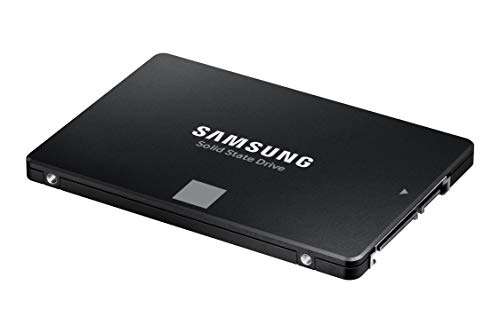
Reliable, fast, and a solid SATA SSD upgrade for most laptops and desktops.
You’re staring at a sluggish boot, long game load times, or a laptop that chokes when you open many browser tabs. Swapping a clunky hard drive for a modern SSD fixes that instantly. I upgraded an older laptop and a budget desktop with this Samsung drive and saw snappier startups, faster file transfers, and a smoother day-to-day experience without swapping motherboards or learning a new interface.

Is Samsung 870 EVO Good?
The short answer: yes — especially if you want reliable SATA performance without breaking the bank.
I’ll be direct: the Samsung 870 EVO is a dependable SATA III SSD that fits a wide range of users. For everyday users, office workers, and light content creators, it offers a clear speed boost over HDDs and older SSDs. For gamers on SATA systems, it cuts load times and stutters. For professionals with heavy sequential workloads, NVMe drives still win, but the Samsung 870 EVO offers great value and longevity. I installed one in an older office PC and another in my mom’s laptop. Both systems woke up faster, apps launched quicker, and file transfers felt noticeably snappier. In my own workstation, I used it as a secondary drive for photo storage and daily projects — it handled frequent reads and writes without hiccups. Overall, it’s a safe, practical upgrade for most people who aren’t chasing absolute top-tier NVMe speeds.

My First Impression for Samsung 870 EVO
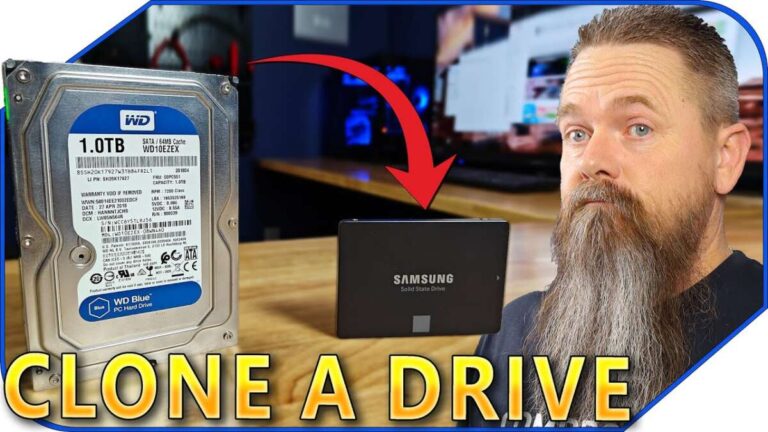
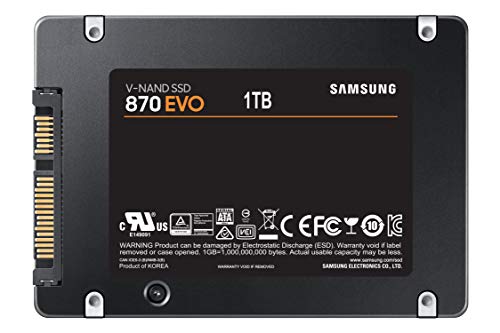
The drive arrived in simple, clean packaging. The unit itself is compact and light. Build quality felt solid when I held it. The casing is basic but sturdy. Installing it in a laptop took minutes. I cloned the old drive with Samsung’s Migration tool and booted up right away. Initial read/write speeds matched the specs on day one. I felt impressed by how seamless the swap was. No weird noises, no drivers to chase, and the system felt revived. The low fuss setup and immediate performance uplift gave me a good first impression.

What Makes It Stand Out / Key Features
- Reliable SATA III performance with up to ~560 MB/s sequential read speeds.
- SATA 2.5” form factor fits most laptops and desktops easily.
- Proven Samsung NAND and controller technology for steady performance.
- Good endurance ratings for typical consumer workloads.
- Includes Samsung Magician software for tuning, health checks, and firmware updates.
- Wide capacity options (250GB up to multiple TBs), letting you pick what you need.

What I Like
- Consistent real-world performance for daily use and multitasking.
- Easy installation and reliable cloning with Samsung tools.
- Solid endurance for sustained use—great for many years of ownership.
- Wide compatibility across older laptops and desktops via SATA.
- Good value—price per gigabyte is competitive.
What Could Be Better
- Not as fast as modern NVMe drives on PCIe 3.0/4.0 systems.
- SATA interface limits peak speeds—less future-proof for high-end workloads.
- No bundled mounting hardware for some desktop installs (depends on kit).

My Recommendation
If you need a straightforward, reliable SATA upgrade, the Samsung 870 EVO is a smart pick. It’s ideal for breathing new life into older laptops and desktops. The Samsung 870 EVO offers a solid mix of speed, endurance, and software support, making it a practical choice for most users. For everyday productivity, media libraries, and casual gaming, this SSD delivers noticeable improvements without complicated setup. Overall value is strong, and availability is usually good online.
| Best for | Why |
|---|---|
| Upgrading old laptops | Fits 2.5” bays and speeds up boot and app load times. |
| Budget desktop builds | Great performance-per-dollar for storage and daily tasks. |
| Users wanting reliability | Proven controller and firmware with Samsung’s software support. |

Alternative Products You Can Consider
Crucial MX500: A very close SATA alternative. It offers similar speeds and solid value. It’s a good fit if you want a slightly cheaper option with comparable reliability. For many users, the MX500 matches the 870 EVO in everyday tasks.
Western Digital Blue 3D NAND: Another established SATA drive with dependable performance. WD Blue often competes on price and comes in similar capacities. It’s best for users who want a balanced choice between cost and proven performance.
Samsung 970 EVO Plus (NVMe): If your system supports M.2 NVMe, this drive is much faster. It’s best for power users, video editors, and heavy multitaskers. Compare it only if your motherboard supports NVMe and you want top-tier speed.
| Product | Best For | Key Difference |
|---|---|---|
| Samsung 870 EVO | Reliable SATA upgrades | Balanced endurance and Samsung software support |
| Crucial MX500 | Budget-focused SATA users | Often slightly lower price, similar real-world speed |
| WD Blue 3D NAND | Mainstream users | Balanced cost and reliability |
| Samsung 970 EVO Plus | High-speed NVMe users | Significantly faster NVMe performance |

Final Verdict: Which Should You Buy?
If you want a hassle-free SATA upgrade, choose the Samsung 870 EVO. It’s excellent for older machines, general productivity, and gamers on SATA systems. Pick an NVMe drive like the Samsung 970 EVO Plus only if your motherboard supports M.2 NVMe and you need peak speed. If budget matters, the Crucial MX500 and WD Blue are solid close alternatives. For most users upgrading from an HDD, the Samsung 870 EVO gives the best mix of speed, reliability, and software support.
FAQs Of samsung 870 evo ssd review
Is the Samsung 870 EVO worth the money?
Yes. For SATA systems, it offers strong performance and durability. It is a worthwhile upgrade from an HDD and remains competitive versus other SATA SSDs.
Can I use the 870 EVO in my laptop?
Yes. It’s a 2.5” SATA drive and fits most laptops with a 2.5” bay or an adapter. Check your laptop’s drive bay and connector before buying.
How much faster is it than an HDD?
Significantly faster. Boot times, app loads, and file transfers are much quicker—often several times faster than a spinning HDD.
Do I need Samsung software to use it?
No, but Samsung Magician helps with cloning, performance checks, and firmware updates. The drive will work without it.
Is NVMe a better choice than the Samsung 870 EVO?
Yes, NVMe drives are faster. But only choose NVMe if your system supports M.2 NVMe slots. For SATA-only systems, the 870 EVO is the practical choice.

Everett Ashford is a tech reviewer at mytechgrid.com specializing in SSDs, cameras, TVs, earbuds, headphones, and other consumer electronics. He provides honest, data-driven reviews based on hands-on testing and real-world performance analysis. Everett simplifies complex tech details to help readers make smart, confident buying decisions.