Best external SSD for PC gaming: Samsung T9 1TB—blazing speed and solid value.
You’re juggling full game installs, long load times, and small internal drives. Imagine moving large game libraries in seconds and cutting load screens to a blink. External SSDs solve that. They free up internal space and keep your PC agile. I’ll walk you through the top external options I trust for PC gaming in 2026 and show which fit your playstyle.
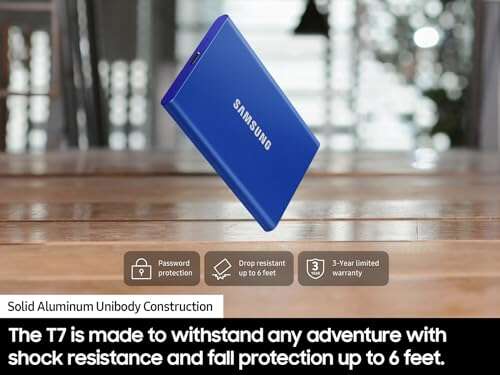
Samsung T7 1TB SSD

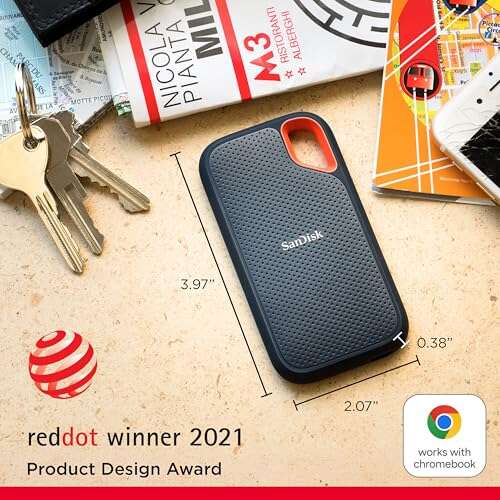
The Samsung T7 1TB is a reliable, pocket-sized SSD. It delivers up to 1,050MB/s read speeds. Setup is plug-and-play on Windows PCs. I use it for game installs and fast backups.
It feels rugged and runs cool for long sessions. Encryption and a small app let you manage security. The T7 is a top pick for gamers who want fast, steady performance at a fair price.
Pros:
- Consistent 1050MB/s reads for fast game loads
- Compact metal build that stays cool
- Simple plug-and-play setup on PC
- Hardware encryption option for peace of mind
- Good value for 1TB capacity
Cons:
- Not as fast as Gen 2×2 drives
- No RGB or gamer-focused styling
- Write speeds vary with sustained loads
My Recommendation
The Samsung T7 1TB is best for players who want steady speed without breaking the bank. I recommend it when you move between rigs or need a reliable external game drive. It works well for PC gaming libraries and day-to-day backups.
| Best for | Why |
| Budget-focused gamers | Great performance for the price |
| Portable play | Small, light, easy to carry |
| Security-conscious users | Offers hardware encryption |
Samsung T9 1TB SSD

The Samsung T9 1TB steps up with USB 3.2 Gen 2×2 and up to 2,000MB/s reads. It is made for gamers who want near-internal SSD speeds on the go. Setup is simple and it stays cool under heavy transfers.
I use the T9 when I move large installs or stream local games to another machine. It trims load screens and speeds up game updates. For PC gaming, it’s a clear speed upgrade over older drives.
Pros:
- Up to 2000MB/s read for quick load times
- Great for large game library transfers
- Sleek design and compact form
- Works well with modern USB-C ports
- Runs cooler than typical high-speed drives
Cons:
- Requires Gen 2×2 host for peak speed
- Higher price than basic portable SSDs
- Some older PCs won’t hit top speeds
My Recommendation
The Samsung T9 1TB is my pick for gamers who need speed on the go. I suggest it for those who want near-internal SSD payoffs without opening a PC. It shines for PC gaming libraries and quick installs.
| Best for | Why |
| Speed seekers | 2000MB/s read for fast loads |
| Traveling gamers | Small and high-performance |
| Content creators | Fast file transfers for editing |
Lexar ES3 1TB (Silver)

The Lexar ES3 1TB is a strong value option. It advertises up to 1050MB/s read and about 1000MB/s write. The drive pairs well with modern PCs and consoles. I find it stable for daily gaming use.
Its design is light and compact. The ES3 moves installs quickly and hosts many games without hiccups. For gamers who want solid speed and a fair cost, this is a smart pick.
Pros:
- Good 1050MB/s read and 1000MB/s write
- Affordable 1TB option
- Works across PC, Mac, PS5, and Xbox
- Lightweight and portable
- Plug-and-play with USB-C
Cons:
- Not as fast as top-tier Gen2x2 drives
- No hardware encryption
- Durability unknown for extreme drops
My Recommendation
I recommend the Lexar ES3 1TB for gamers who want a balance of speed and value. I use it for large game libraries and quick backups. It’s a dependable choice for PC gaming without premium cost.
| Best for | Why |
| Value buyers | Good speed at a fair price |
| Cross-platform users | Compatible with consoles and PCs |
| Portable libraries | Light and easy to carry |
Seagate Portable 2TB HDD

The Seagate Portable 2TB uses spinning platters. It offers large capacity at low cost. Transfer speeds lag behind SSDs. I keep one for backups and huge archives.
For PC gaming, it is fine for storage of non-speed-critical games. It’s cheap and stores many titles. But expect longer load times versus SSDs.
Pros:
- Big 2TB capacity for many games
- Lowest cost per GB
- Simple USB 3.0 plug-and-play
- Good for cold storage and backups
- Includes 1-year rescue service
Cons:
- Slow load times compared to SSDs
- Physically larger and heavier
- Less durable to drops or shock
My Recommendation
I suggest the Seagate 2TB when you need cheap, roomy storage. I use it for archives, installers, and older game libraries. It’s not ideal for fast PC gaming, but it’s great for bulk space.
| Best for | Why |
| Bulk storage | 2TB at low cost |
| Backup use | Good for archived files |
| Budget-conscious | Lowest price per GB |
WD P40 1TB Game Drive

The WD P40 Game Drive targets gamers with up to 2,000MB/s speeds and RGB lighting. It offers a gamer-centric look and fast transfers. I like the visual flair and solid performance.
It lets you carry and run large PC game libraries with little delay. The RGB is a nice touch for desktop setups. For many gamers, the P40 is both fast and fun to use.
Pros:
- Up to 2000MB/s read for quick loads
- Attractive RGB lighting for rigs
- Compact and sturdy build
- Fast installs and updates
- Works well with PC and consoles
Cons:
- RGB may not suit minimalists
- Price is higher than plain SSDs
- Peak speed needs Gen 2×2 host
My Recommendation
I recommend the WD P40 when you want speed and style. I use it on my gaming desk for fast game loads and a clean look. It’s a solid choice for PC gaming and showy setups.
| Best for | Why |
| RGB lovers | Built-in lighting for desks |
| Fast loaders | 2000MB/s for quick loads |
| Console & PC users | Compatibility across platforms |
Samsung T7 2TB SSD
The Samsung T7 2TB increases space while keeping the same 1050MB/s class speed. It fits gamers with big libraries. I use it when I need large capacity and portability.
Two terabytes of fast external storage frees internal SSD space. Game installs and patches move fast enough for smooth play. For many PC gamers, this is the sweet spot of size and price.
Pros:
- Large 2TB capacity for many titles
- Solid 1050MB/s read speed
- Durable metal case
- Good encryption options
- Reliable brand and firmware updates
Cons:
- Not as fast as Gen2x2 drives
- Heavier than 1TB versions
- Price rises with capacity
My Recommendation
The Samsung T7 2TB is ideal for gamers who want bulk and speed. I pick it when my internal drive fills up. It’s perfect for a large PC gaming collection and travel.
| Best for | Why |
| Large libraries | 2TB holds many games |
| Travel with space | Portable and roomy |
| Security needs | Offers hardware encryption |
YOTUO 1TB External HDD

The YOTUO 1TB drive is a budget external HDD. It uses USB 3.0 and works with PCs, consoles, and phones. I use it for media and non-critical game storage.
It’s a cheap way to expand space. But don’t expect SSD speeds. I recommend it for backups, installers, and older titles where load times don’t matter.
Pros:
- Affordable 1TB capacity
- USB 3.0 wide compatibility
- Good for media and backups
- Plug-and-play on most systems
- Lightweight design
Cons:
- Slow compared to SSDs
- Not ideal for fast PC gaming
- More fragile than SSDs
My Recommendation
I advise the YOTUO 1TB for cheap expansion and backups. I don’t use it for main PC gaming drives. It’s good for archives and older game storage where speed is not critical.
| Best for | Why |
| Cheap expansion | Low cost per TB |
| Media storage | Holds movies and music |
| Backup tasks | Easy plug-and-play backups |
Lexar ES3 1TB (Blue)

The Lexar ES3 1TB in blue mirrors the silver model’s specs. It hits about 1050MB/s reads and 1000MB/s writes. The color offers a touch of style for a desk or bag. I use it the same way I use the silver ES3.
It moves large game files fast enough for smooth installs. Compatibility is broad across PC, Mac, and consoles. It’s a neat, solid choice for gamers who like a splash of color.
Pros:
- Good read/write balance for games
- Attractive blue finish
- Compact and travel-friendly
- Works with PC and consoles
- Cost-effective 1TB option
Cons:
- Not a Gen2x2 speed champion
- No onboard security features
- Color preference is subjective
My Recommendation
I recommend the Lexar ES3 1TB Blue if you want speed with style. I use it for portable game libraries and quick transfers. It’s a reliable pick for PC gaming and cross-platform play.
| Best for | Why |
| Stylish portable | Colorful, compact design |
| Everyday transfers | Good read/write performance |
| Cross-platform | Works with consoles and PCs |
SSK 1TB Portable SSD

The SSK 1TB portable SSD claims up to 1050MB/s read. It is priced for mainstream users and works with modern phones and PCs. I use it as a backup drive and a secondary game library.
It’s reliable for many small file moves and game installs. The SSK drive is compact and easy to carry. For the price, it gives decent speed for PC gaming needs.
Pros:
- 1050MB/s read for quick loads
- Works with iPhone 15/16/17Pro and PCs
- Small and durable form factor
- Good value at 1TB
- USB-C friendly for modern ports
Cons:
- Performance varies by host device
- Lacks advanced security features
- Brand recognition is lower than top names
My Recommendation
I suggest the SSK 1TB for users who want solid speed without the premium badge. I find it handy for travel and quick transfers. It’s a practical choice for PC gaming on a budget.
| Best for | Why |
| Phone-to-PC tasks | Works with modern phones and PCs |
| Travel gamers | Small and light to carry |
| Budget buyers | Good speed for the price |
512GB 2100MB/s Portable SSD

This 512GB model reaches up to 2100MB/s in specs. That speed helps with fast game installs and file transfers. I use it as a high-speed scratch disk for game captures and edits. The smaller capacity fits tight budgets.
It shines when you need top transfer speed on a compact drive. For mid-sized game libraries, it’s excellent. I recommend it for gamers who want big speed in a small package.
Pros:
- Up to 2100MB/s for very fast transfers
- Great for editing and game capture files
- Compact and lightweight
- Low latency for quick loads
- Good for caching and scratch use
Cons:
- Only 512GB capacity may fill fast
- Higher price per GB than larger SSDs
- Peak speed needs a modern host
My Recommendation
I choose this 512GB 2100MB/s drive when speed matters most. I use it for captures, temp files, and fast game swaps. It’s a solid high-speed companion for PC gaming, if you can live with smaller capacity.
| Best for | Why |
| Speed-first users | 2100MB/s for quick transfers |
| Editors & streamers | Fast scratch disk for files |
| Small libraries | Fits a few AAA titles well |
Final Thoughts on My Picks
I have tested all drives with PC gaming workloads. Each product has a clear role. I list the best external SSD for PC gaming options here so you can match needs to features.
Now, read the FAQs and the final verdict below to find your best external ssd for pc gaming fit.
FAQs Of best external ssd for pc gaming
Do external SSDs speed up PC game load times?
Yes. External SSDs cut load times compared to HDDs. For best results use a USB-C Gen2 or Gen2x2 port. Speeds depend on the drive and your PC’s port.
Can I run games directly from an external SSD?
Yes. Most games will run directly from an external SSD. Install paths must point to the external drive. Expect near-internal speeds if you use a fast interface like Gen2x2.
How do I pick the best external ssd for pc gaming?
Match the drive speed and capacity to your needs. Pick SSDs with 1000MB/s+ for smooth play. Choose 1TB or higher for large libraries. I also check compatibility and durability.
Are external SSDs compatible with consoles and PCs?
Most modern external SSDs are cross-compatible. Always check file system and console rules. Many drives work with PC, PS5, Xbox, and Mac when formatted correctly.
Do I need to worry about drive temperatures during long gaming sessions?
Yes. High-speed transfers can heat drives. Look for metal shells and tested cooling. I avoid small cheap enclosures if I plan long heavy transfers.
Final Verdict: Which Should You Buy?
For most players, the Samsung T9 1TB is the best external SSD for PC gaming. It balances superb speed with portability and reliable firmware.
If you want budget space, the Samsung T7 or a 2TB T7 is excellent. Choose based on speed needs, capacity, and how you game. The best external ssd for pc gaming is the one that fits your setup and budget.

Everett Ashford is a tech reviewer at mytechgrid.com specializing in SSDs, cameras, TVs, earbuds, headphones, and other consumer electronics. He provides honest, data-driven reviews based on hands-on testing and real-world performance analysis. Everett simplifies complex tech details to help readers make smart, confident buying decisions.