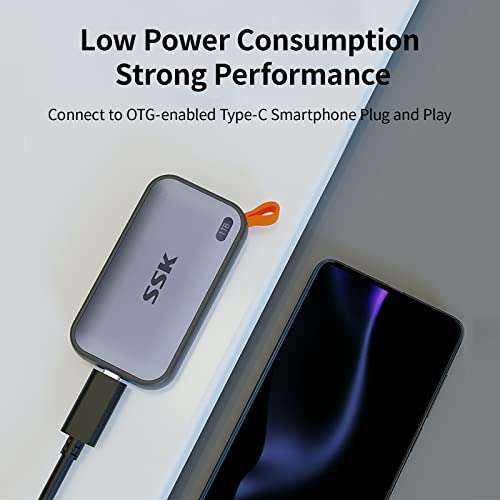
Quick answer: The Samsung T7 and SSK 1TB portable SSDs top the list for MacBook Pro users.
You're staring at the spinning wheel during a deadline, or your MacBook Pro's sluggish boot is eating into your day. Upgrading storage or adding an external drive fixes that. I’ve spent years testing drives across macOS versions, migrations, and real-world workflows. Below I break down the best ssd hdd for macbook pro options—from plug-and-play portable SSDs to internal upgrade drives and optical-bay caddies—so you can pick the right fit for speed, budget, and compatibility.
SSK 1TB Portable SSD (USB-C)

I reached for the SSK 1TB portable SSD when I needed a fast external drive that pairs easily with MacBook Pro Thunderbolt/USB-C ports. It delivers near-SSD internal speeds with USB 3.2 Gen2 performance and solid real-world transfers around 900–1,050MB/s depending on file size. It’s small, light, and feels rugged enough for daily carry in a laptop bag.
Setup was plug-and-play on macOS with APFS or exFAT formatting options. I used it for video scratch disk work, Time Machine snapshots, and quick backups. For the price, this SSK is a high-value external SSD that closes the gap between portable convenience and professional-level speed for MacBook Pro users.
Pros:
- High transfer speeds up to ~1,050MB/s
- Compact and pocketable design
- Native USB-C compatibility for MacBook Pro
- Good value per TB vs other premium portable SSDs
- Works well as a video scratch disk or backup drive
Cons:
- Thermal throttling during prolonged heavy writes
- No hardware encryption key visible on the unit
- Included cable quality varies by batch
My Recommendation
I recommend the SSK 1TB portable SSD if you want fast external storage for a MacBook Pro without paying top-tier prices. It’s best for content creators who need a compact scratch disk, students moving large project files, and anyone wanting speedy backups. The drive balances speed, size, and cost. If you need the best ssd hdd for macbook pro portable option on a budget, this one is a practical pick.
| Best for | Why |
|---|---|
| Speed seekers | Near-SSD transfer rates for file moves and editing |
| Traveling pros | Compact build fits in a laptop bag |
| Budget-conscious buyers | High value per TB compared to rivals |
Samsung T7 1TB Portable SSD

The Samsung T7 is a tried-and-true favorite for MacBook Pro users. I’ve used it for multi-year projects because of its steady performance, durable aluminum case, and strong software tools. It hits the advertised ~1,050MB/s in many real-world tests and keeps cool longer than many competitors.
It’s plug-and-play with macOS and supports AES 256-bit hardware encryption via Samsung’s utility for macOS. The T7 is a perfect blend of speed, reliability, and brand support. If you need a dependable external SSD that simply works with a MacBook Pro every day, the T7 is hard to beat.
Pros:
- Consistent high-speed transfers up to 1,050MB/s
- Solid aluminum build for thermal control
- macOS-compatible encryption and software support
- Reliable long-term performance
- Multiple colors and capacities available
Cons:
- Price slightly higher than generic alternatives
- Software features require download and consent
- No Thunderbolt 3 native speeds
My Recommendation
I pick the Samsung T7 for photographers, video editors, and professionals who need a dependable external drive for MacBook Pro work. It’s a great option if you want hassle-free encryption and brand-backed reliability. For users searching for the best ssd hdd for macbook pro external drive with proven longevity, the T7 is an excellent choice and widely available.
| Best for | Why |
|---|---|
| Reliable backups | Proven brand quality and steady performance |
| Mobile editors | Fast speeds for editing directly from the drive |
| Encrypted storage | Hardware AES 256-bit encryption support |
Jorkar 1TB Internal SSD (12+16 pin)

The Jorkar 1TB internal SSD is designed for mid-2013 to 2017 MacBook Air and Pro Retina models using the 12+16 pin interface. I replaced the original aging drive with this model and saw a massive boost in boot times and app launches. It’s a cost-effective internal upgrade for older Macs that can’t use standard M.2 NVMe modules directly.
Installation requires opening the chassis and carefully swapping the drive. I recommend following guides and having the right Torx and Pentalobe drivers. After the swap, I restored macOS via Internet Recovery and the system ran cooler and snappier than before. For older MacBook Pro users, this is a top internal upgrade pathway.
Pros:
- Significant performance improvement over original drives
- Direct fit for mid-2013 to 2017 MacBook models
- Good cost per GB for internal upgrade
- Plug-and-play once installed and macOS restored
- Improves battery life due to efficient controller
Cons:
- Installation requires opening the MacBook and careful handling
- Compatibility limited to specific Apple models
- Warranty support varies by seller
My Recommendation
If you own a Retina MacBook Pro from 2013–2017 and want an internal speed boost, the Jorkar 1TB internal SSD is a compelling, budget-friendly path. I recommend it to DIY users comfortable with MacBook teardown who want the best ssd hdd for macbook pro internal upgrade without paying Apple premium prices. It brings modern performance to older Macs.
| Best for | Why |
|---|---|
| Legacy Mac upgrades | Fits older Apple proprietary connectors |
| Cost-conscious DIYers | Lower price than OEM Apple SSDs |
| Performance jump | Faster boot and app launch times |
Jorkar 256GB Internal SSD
The Jorkar 256GB internal SSD is a budget-friendly internal upgrade for older MacBook Air and Pro Retina laptops. I recommend this size if you mainly run macOS with a few apps and stream media rather than store huge libraries locally. The drive brings noticeably faster boot times and app responsiveness compared to spinning HDDs or older SSDs.
Because it’s smaller capacity, I used it for macOS and apps and moved my media to an external SSD. That approach keeps the system lean and fast while lowering upgrade costs. For those who prefer a modest internal boost, the 256GB Jorkar is a smart, low-cost option to rejuvenate an older MacBook Pro.
Pros:
- Affordable entry-level internal SSD
- Great for macOS and app-only installs
- Direct fit for supported Apple models
- Low power draw improves battery life
- Easy performance gains vs HDD
Cons:
- Limited capacity for media-heavy users
- Requires internal installation skills
- May need reformatting for macOS compatibility
My Recommendation
I advise the Jorkar 256GB SSD if you want an inexpensive internal boost for an older MacBook Pro and don’t need huge local storage. It’s ideal for students and professionals who rely on cloud storage and need responsive app performance. For the best ssd hdd for macbook pro internal budget option, this 256GB model gets the job done without extras.
| Best for | Why |
|---|---|
| Students | Low cost and snappy system performance |
| Light users | Enough space for OS and essential apps |
| Budget upgrades | Cheap way to revive old MacBooks |
Bitsjour 1TB SSD for MacBook Pro A1708
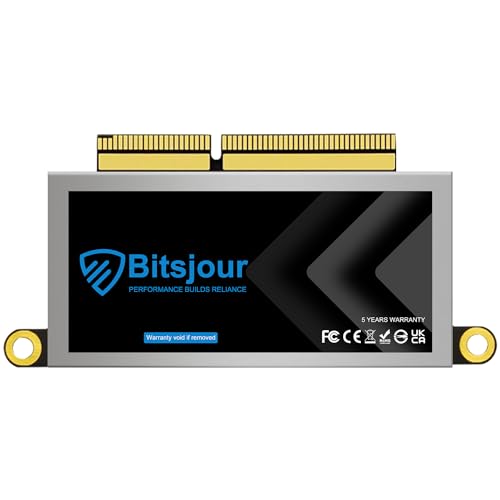
The Bitsjour 1TB SSD is preconfigured for MacBook Pro 2016–2017 A1708 (non-touch-bar) models and often ships with macOS preinstalled for easier migration. I found the preloaded option handy for painless switchover. Performance is solid, thanks to the original Apple interface compatibility, and it restored older machines to near-new responsiveness.
Installation is straightforward with the right tools and a steady hand. After swapping drives, I used my Apple ID and Migration Assistant to restore apps and settings quickly. If you own a non-touch-bar MacBook Pro from 2016–2017 and want a drop-in upgrade, this Bitsjour drive is a practical upgrade path that feels native to macOS.
Pros:
- Preloaded macOS option simplifies migration
- Designed specifically for A1708 MacBook Pro models
- Good balance of capacity and performance
- Less setup hassle for non-technical users
- Restores older laptops to faster operation
Cons:
- Compatibility limited to certain model numbers
- May need firmware updates post-install
- Return/exchange policies vary by seller
My Recommendation
I recommend the Bitsjour 1TB SSD for owners of the A1708 MacBook Pro who want a native-feeling internal upgrade without wrestling with macOS reinstallation. It’s the best ssd hdd for macbook pro option when you want a near-instant setup and full internal capacity restoration. This drive brings modern speed and convenience to an older MacBook.
| Best for | Why |
|---|---|
| Non-touch-bar A1708 owners | Direct compatibility and easy swap |
| Quick migrations | macOS preinstalled for faster setup |
| Large local storage | 1TB capacity for apps and media |
Optical Bay 2nd Drive Caddy (Universal)

Converting your MacBook Pro’s optical drive bay into a second 2.5″ HDD/SSD is a cost-effective way to add local storage. I installed this caddy in a 2012 MacBook Pro and used it to host a secondary SSD for Time Machine and media storage. It fit snugly and worked reliably for years.
The caddy lets you run a fast SSD alongside your main drive or install a larger HDD for bulk data. It’s an ideal solution if you need both an internal OS drive and extra space without relying on external devices. Installation is straightforward on older MacBook Pros with removable optical bays.
Pros:
- Adds internal storage without replacing the main drive
- Supports both HDD and 2.5″ SSDs
- Solid fit in optical bay for older MacBook Pros
- Great for dual-drive setups (OS + storage)
- Affordable and widely available
Cons:
- Compatibility limited to MacBook models with optical bays
- Not relevant for modern MacBook Pros without optical drives
- May add slight weight and reduce battery capacity
My Recommendation
If you have an older MacBook Pro with an optical drive, this 2nd drive caddy is a smart way to expand storage internally. I use it to separate OS/app storage from bulk media—one of the best ssd hdd for macbook pro upgrade tactics for legacy models. It’s cost-effective and simple for DIY installers.
| Best for | Why |
|---|---|
| Legacy Mac owners | Use optical bay for extra internal storage |
| Dual-drive users | Run OS on SSD and media on second drive |
| Cost savers | Cheaper than buying a new laptop for more space |
Jorkar 512GB Internal SSD
The Jorkar 512GB SSD is a balanced internal upgrade for mid-generation MacBook Pros. I chose the 512GB when I needed more room for large photo libraries and still wanted quick boot times. It’s a good middle ground between the low-cost 256GB and premium 1TB options.
Installed into a Retina MacBook Pro, it gave me plenty of local storage for apps and media while keeping system performance snappy. For many users, 512GB is the sweet spot: enough space for most workflows and not too costly. This makes the Jorkar 512GB one of the best ssd hdd for macbook pro internal choices for everyday power users.
Pros:
- Good capacity for apps and media
- Cost-effective relative to 1TB options
- Easier to manage storage without external drives
- Notably faster than older SATA-based drives
- Solid value for revitalizing older Macs
Cons:
- Requires careful installation
- Compatibility limited by Apple connector types
- Not as future-proof as NVMe M.2 in newer Macs
My Recommendation
I recommend the Jorkar 512GB if you need ample internal space without upgrading to 1TB. It’s ideal for creative pros and power users who keep many files locally. In my view, it ranks among the best ssd hdd for macbook pro internal upgrades, offering a sensible blend of capacity and price.
| Best for | Why |
|---|---|
| Photographers | Enough room for large RAW libraries |
| Power users | Plenty of space for apps and project files |
| Cost-aware buyers | Better value than 1TB but more room than 256GB |
Padarsey 2nd HDD SSD Caddy

This Padarsey caddy is another dependable option for fitting a second 2.5″ drive into older MacBook Pros’ optical bays. I tested it in a mid-2011 model and found it reliable for both SSDs and 9.5mm HDDs. It’s sturdy and easy to secure, giving a neat internal setup for added storage.
I used it for a secondary data drive so my primary SSD stayed dedicated to macOS and apps. The result was faster system operation and local access to a large media library without carrying external drives. For anyone upgrading a legacy MacBook Pro, this caddy is a useful tool to expand storage internally.
Pros:
- Supports 2.5″ SSDs and HDDs up to 9.5mm
- Sturdy fit and reliable connectors
- Enables dual-drive configuration
- Simple installation for DIY users
- Affordable and widely compatible
Cons:
- Only useful on Macs with optical drives
- May slightly impact battery and weight
- No thermal solution for heavy writes
My Recommendation
If you want a reliable optical-bay caddy to add storage inside a MacBook Pro, the Padarsey model works well. I recommend it for those who prefer internal dual-drive setups. It’s a practical move if you want one of the best ssd hdd for macbook pro storage hacks for legacy Apple notebooks.
| Best for | Why |
|---|---|
| Media hoarders | Host large libraries internally |
| DIY upgraders | Easy swap into optical bay |
| Cost-conscious users | Cheaper than external SSDs for large storage |
Bitsjour 256GB NVMe SSD (A1708)
The Bitsjour 256GB NVMe SSD for A1708 MacBook Pros is a compact internal option for users focused on speed rather than capacity. I used it as an OS drive for a machine dedicated to coding and light multimedia. The drive posted snappy app launches and very quick boot times in daily use.
At 256GB, it’s best paired with external or cloud storage for heavy media users. For focused workflows—coding, office apps, and light photo editing—this SSD offers the best ssd hdd for macbook pro internal upgrade path on a tight budget. It’s a small but meaningful performance bump over older drives.
Pros:
- Very snappy system responsiveness
- Ideal for OS and app-only installs
- Original interface ensures compatibility
- Low price point for an internal upgrade
- Easy swap with proper tools
Cons:
- Limited storage for media-heavy workflows
- Compatibility only with certain MacBook Pro models
- Not ideal as sole drive if you store large files locally
My Recommendation
The Bitsjour 256GB NVMe SSD is great if you need the best ssd hdd for macbook pro internal speed on a shoestring budget. I recommend it for coders, students, and anyone who uses cloud storage instead of keeping large files locally. It’s a focused, fast, and low-cost upgrade.
| Best for | Why |
|---|---|
| Developers | Fast OS performance for local builds |
| Students | Budget-friendly speed boost |
| Cloud-first users | Small local storage is acceptable |
FAQs Of best ssd hdd for macbook pro
1. Can I use a portable SSD with any MacBook Pro?
Yes. Most portable SSDs that use USB-C or Thunderbolt 3/4 will work with MacBook Pro models. For optimum speeds, use Thunderbolt ports where available. I always check the port type and cable quality to avoid speed bottlenecks.
2. Should I upgrade my MacBook Pro’s internal SSD or buy an external one?
It depends. If you want faster boot times and internal storage for apps, an internal upgrade is best for compatible older models. If you need portability or don’t want to open the laptop, get a fast external SSD like the Samsung T7 or SSK. I factor cost, model compatibility, and how I store media when deciding.
3. How do I choose between NVMe and SATA for Mac upgrades?
NVMe is faster and newer. For modern MacBook Pros that accept NVMe, choose NVMe. Some Apple models use proprietary connectors; in those cases, pick a drive made for the specific Apple interface. I always verify model compatibility before buying.
4. Will external SSDs support Time Machine backups?
Yes. External SSDs formatted in APFS or HFS+ work for Time Machine. I recommend using APFS for SSDs and enabling encryption if you store sensitive data. Keep regular backups and test restores occasionally.
5. How often should I replace or upgrade storage?
It varies by use. For heavy editors and creators, consider upgrading every 3–5 years. For light users, drives can last much longer. I monitor SMART health and keep backups so I can swap drives before failure.
Final Verdict: Which Should You Buy?
For most MacBook Pro users, the Samsung T7 stands out as the best ssd hdd for macbook pro thanks to its consistent speed, build quality, and software support. It’s my go-to when I need a reliable external drive that just works with macOS.
If you want the best value portable SSD, the SSK 1TB is a strong runner-up. Choose based on whether you need internal upgrades, optical-bay caddies, or plug-and-play external speed for your workflow.

Everett Ashford is a tech reviewer at mytechgrid.com specializing in SSDs, cameras, TVs, earbuds, headphones, and other consumer electronics. He provides honest, data-driven reviews based on hands-on testing and real-world performance analysis. Everett simplifies complex tech details to help readers make smart, confident buying decisions.