For listeners in the United States, headphones sound good when they play music with a balanced tone, low noise, low distortion, and a stable fit. The best pair also suits the way you listen—at home, at work, while traveling, or during exercise. Price alone does not decide sound quality. A well-fitted, well-tuned pair can sound better than a more costly model with a poor seal or harsh tuning.

The short answer: what makes headphones sound good?
Good headphones usually combine these traits:
- A balanced frequency response so bass, mids, and treble work together.
- A secure seal and good fit so bass does not leak away.
- Low distortion and noise so music stays clean.
- Good channel matching so the left and right sides sound alike.
- A source that can drive them well without hiss, clipping, or weak volume.
- Sound that fits your taste and use case, since “good” is not the same for every listener.
A useful way to think about headphones is as a chain:
Recording → music app or file → phone, computer, or amplifier → headphone cable or wireless link → drivers → ear cups and your ears
Any weak part can change the result. A great driver cannot fix a broken cable. A strong amplifier cannot fix a bad seal. A high-resolution file cannot correct a poor headphone fit.
Research from the Harman team found that many listeners tend to prefer a similar broad tonal balance, though personal taste still varies. The work does not prove that one sound suits every person. It does show why neutral or balanced tuning often works well as a starting point. Harman’s headphone research explains this approach in detail.
Frequency response is the biggest factor
Frequency response describes how loudly headphones play different pitches. It is often the first thing that shapes what you hear.
The audible range is commonly described as about 20 hertz to 20 kilohertz, though the useful range differs by age, hearing, volume, and equipment. Frequency is measured in hertz, or Hz:
- Bass: roughly 20–250 Hz
- Midrange: roughly 250 Hz–2 kHz
- Upper mids and treble: roughly 2–20 kHz
These ranges overlap. They are not hard borders.
What bass does
Bass gives music weight and impact. It carries the kick drum, bass guitar, low piano notes, and deep movie effects.
Too little bass can make music feel thin. Too much bass can cover detail in vocals and instruments. A small boost may sound warm and fun, while a large boost may sound slow or muddy.
What the midrange does
The midrange carries much of the information that makes speech and vocals clear. Guitars, pianos, horns, and many strings also live here.
If the midrange is too low, voices may sound distant. If it is too high, vocals can sound nasal or tiring. A good pair does not need a perfectly flat response, but it should avoid large, unwanted peaks and dips.
What treble does
Treble adds brightness, edge, air, and detail. Cymbals and consonants such as “s” and “t” are strongly affected by this area.
Too little treble can make headphones sound dull. Too much can cause sharpness, hiss, or listening fatigue. Small changes in the upper midrange and treble can be very noticeable because the human ear is sensitive there.
Why the graph is not the whole story
A frequency-response chart helps, but it cannot predict your full experience. Head shape, ear shape, pad material, clamping force, and measurement method all affect the result.
The same headphone may sound different on two people. Over-ear models can also change sound when the ear cup shifts by a few millimeters. Treat a graph as useful evidence, not a final verdict.
Fit and seal can change the sound more than the driver
A poor fit often removes bass and makes headphones sound weak, even when the drivers are capable.
This matters most with closed-back over-ear headphones and in-ear headphones. If air leaks around an ear pad or ear tip, low frequencies may lose strength. The result can sound thin, bright, or unbalanced.
Check these points:
- The ear pads should surround your ears without pressing on the ear itself.
- Glasses can break the seal around over-ear pads.
- Hair can create small gaps.
- Ear tips should fit snugly but should not cause pain.
- The left and right sides should sit at similar angles.
- Pads should not be crushed, cracked, or badly worn.
For in-ear models, ear tips are especially important. A larger tip is not always better. The correct size is the one that seals the ear canal without pressure or discomfort.
Open-back and closed-back designs
Open-back headphones let air pass through the ear cups, while closed-back headphones block more outside sound.
Open-back models often create a more open presentation. They can sound natural in a quiet room, but they leak sound and provide little isolation. Closed-back models work better in shared rooms and during travel, but their ear-cup design can affect bass and reflections.
Neither design is automatically better. Choose based on your room, privacy needs, and listening habits.
Signs that fit is the problem
Fit may be the main issue if:
- Bass changes when you press the ear cups against your head.
- One side sounds louder than the other.
- The sound improves when you adjust the headband.
- In-ear bass appears only after you push the tips farther in.
- The headphones sound good with one person but not another.
Before buying a new amplifier or changing music files, fix the fit first.
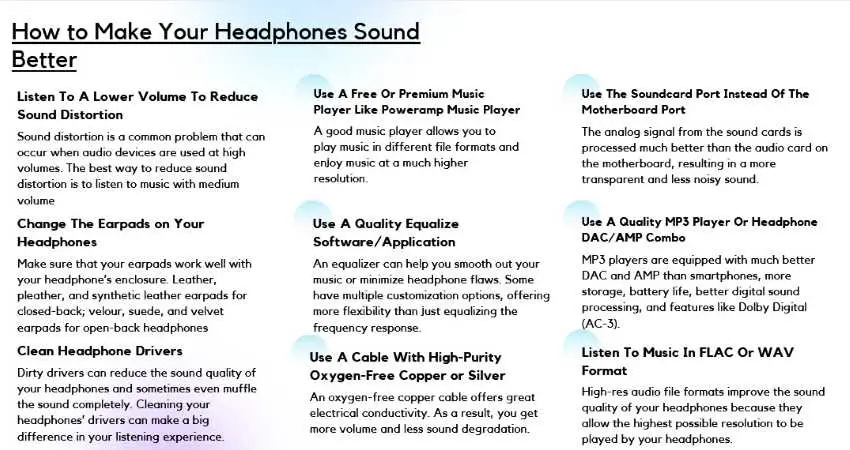
Low distortion keeps music clean
Distortion adds unwanted changes to the original signal. Some distortion is easy to hear. Some is not. The amount and type matter.
Common forms include:
- Harmonic distortion: adds tones related to the original note.
- Intermodulation distortion: creates extra tones when several signals play together.
- Clipping: occurs when the system runs out of level and cuts off the waveform.
- Mechanical distortion: comes from driver movement, vibration, or enclosure problems.
High distortion may make bass sound rough or voices sound strained. It can also reduce clarity when music becomes loud or complex.
Most modern headphones have low enough distortion for normal listening. This means distortion is important, but it is not always the first specification to compare. A headphone with slightly lower distortion may still sound worse if its frequency response or fit is poor.
Loudness and distortion
Headphones can distort more at very high volume. Bass-heavy music can also demand more driver movement. If sound becomes harsh when you raise the volume, lower it first. The cause could be distortion, clipping, a poor recording, or hearing-related fatigue.
Do not use maximum volume as a quality test. It can damage hearing and may make any headphone sound worse.
Noise, isolation, and active noise cancellation affect clarity
Lower background noise can make headphones seem clearer because you hear more of the music.
Passive isolation comes from the physical design of the ear cups or ear tips. Active noise cancellation, or ANC, uses microphones and electronic processing to reduce outside sound.
ANC works best with steady low sounds, such as:
- Airplane engine noise
- Bus and train rumble
- Air-conditioning systems
- Office ventilation
It is usually less effective against sudden sounds and nearby speech. Some ANC systems can also create a faint pressure sensation or a small change in tone. That effect differs by model and listener.
Noise does not always make a headphone technically better. It changes the listening environment. A pair with strong isolation may sound more detailed on a loud train because outside sound masks fewer musical details.
The driver type matters, but its design matters more
A driver converts an electrical signal into movement that creates sound. Driver type can influence performance, but the driver label alone does not tell you whether headphones will sound good.
Dynamic drivers
Dynamic drivers use a diaphragm, voice coil, and magnet. They are common in headphones and can produce strong bass with a natural sense of impact.
Their performance depends on the diaphragm, magnet system, damping, enclosure, and tuning. Two dynamic headphones can sound very different.
Planar magnetic drivers
Planar magnetic drivers use a thin diaphragm with conductive traces and magnetic force across a wider surface. They can offer low distortion and strong control, but results vary by model.
Some planar headphones need more power than common portable headphones. Check the maker’s specifications and real measurements before assuming a special amplifier is required.
Electrostatic drivers
Electrostatic headphones use an electrically charged diaphragm between plates. They can offer a distinct presentation and very fast response, but they need special drive electronics and are less common.
The practical lesson is simple: driver type is a design clue, not a sound-quality score.
The source and amplifier should match the headphones
A phone, computer, or amplifier only needs enough clean output for the headphones you use.
Important terms include:
- Impedance: electrical resistance, measured in ohms.
- Sensitivity: how loud headphones become from a given amount of power or voltage.
- Output power: how much electrical energy the source can provide.
Low-impedance headphones are not always easy to drive. Sensitivity also matters. A high-impedance model with good sensitivity may play well from a laptop, while a low-impedance model with poor sensitivity may need more output.
Signs that the source is struggling
A source may be a poor match if:
- You cannot reach a comfortable volume.
- Bass becomes weak or compressed at higher levels.
- You hear clipping when music peaks.
- The output has a constant hiss.
- The sound changes when you move the volume control.
A headphone amplifier can help when the source lacks clean power or has audible noise. It cannot improve every headphone. If the headphones already play cleanly at a safe level, a more expensive amplifier may produce little or no audible change.
Wired and wireless audio
Wireless headphones add a digital link, a battery, and signal processing. These parts can alter the sound, but modern wireless systems can sound very good.
Bluetooth codec support matters only when both the source and headphones support the same codec. A supported codec does not guarantee better sound in every setting. Wireless processing, equalization, ANC, and battery level may have a larger practical effect.
Equalization can improve headphones more than a hardware upgrade
Equalization, or EQ, changes the level of selected frequency ranges. It can correct a tonal problem without replacing the headphones.
For example:
- Reduce a sharp treble peak if “s” sounds hurt.
- Add a small bass lift if music feels thin.
- Lower muddy upper bass if vocals lack clarity.
- Use a gentle overall change rather than extreme boosts.
EQ cannot fully repair poor distortion, a broken seal, channel imbalance, or damaged hardware. Large boosts can also cause clipping. If you raise one band by 6 decibels, lower the main preamp level by about 6 decibels to leave room for that boost.
A simple process works well:
- Listen to familiar tracks.
- Identify one problem.
- Change one frequency range.
- Use small steps.
- Compare at the same loudness.
- Keep the change only if it helps across several recordings.
Matching volume matters. A louder version often seems better even when it is not.
Recording quality and mastering still matter
Headphones reproduce the signal they receive, including flaws in the recording.
A poorly mastered song may sound harsh, compressed, muddy, or unusually loud. A high-quality headphone can reveal those flaws more clearly. That does not mean the headphone is defective.
Compare several recordings you know well. Use different genres and production styles. If only one album sounds harsh, the recording may be the cause. If every recording has the same problem, inspect the headphones, fit, source, and EQ.
Lossless files can preserve the source signal, but they do not automatically make a recording sound better. If a recording was mastered poorly, a larger file will not fix it.
How to judge headphones in a useful way
Use a short, repeatable listening test instead of relying on one song or one specification sheet.
A practical listening method
- Choose familiar music. Use voices, bass, drums, and acoustic instruments.
- Set a safe, comfortable level. Do not compare one pair while it plays louder.
- Check the fit. Adjust the headband, pads, or ear tips.
- Listen for tonal balance. Ask whether bass, vocals, and treble work together.
- Check detail without chasing brightness. More treble is not always more detail.
- Listen for fatigue. Sharp sound may become unpleasant after a few minutes.
- Test several recordings. One track can mislead you.
- Use the headphones for your real task. Travel, gaming, calls, mixing, and quiet music need different traits.
A simple decision table
| Your main need | Features to prioritize | Main trade-off |
|---|---|---|
| Quiet home listening | Balanced tuning, comfort, low distortion | Open-back models leak sound |
| Air travel | Strong isolation or ANC, stable fit | ANC can alter tone and needs battery power |
| Office use | Comfort, microphone quality, limited leakage | Open sound may disturb nearby people |
| Mixing or editing | Predictable response, low distortion, reliable fit | Neutral sound may seem less exciting |
| Exercise | Secure fit, sweat resistance, easy controls | Small designs may offer less isolation |
| Gaming | Clear mids, comfort, useful imaging | Wide sound does not always improve accuracy |
The best headphones are the ones that meet your main need without creating a larger problem.

Common mistakes that make headphones seem worse
Many sound complaints come from setup rather than poor hardware.
Mistake 1: Choosing by price
A higher price may pay for better materials, features, comfort, or quality control. It does not guarantee a preferred sound.
Mistake 2: Ignoring the seal
A loose fit can remove bass. This is common with glasses, worn pads, and the wrong ear tips.
Mistake 3: Confusing brightness with detail
Extra treble can make small sounds stand out. It can also make music tiring and unnatural.
Mistake 4: Buying an amplifier first
If the headphones already reach a clean, safe level, an amplifier may not solve the problem. Check fit, frequency balance, and the recording first.
Mistake 5: Comparing at different volumes
The louder pair often seems more exciting. Match levels as closely as you can.
Mistake 6: Treating frequency graphs as exact truth
Different measurement systems and ear shapes affect graphs. Use them to spot broad trends, not to predict every part of your experience.
Mistake 7: Listening too loudly
Loud sound can cause temporary ringing and permanent hearing damage. The National Institute on Deafness and Other Communication Disorders advises reducing exposure to loud noise and using hearing protection when needed. If you notice ringing, pain, muffled hearing, or a sudden change in hearing, stop the exposure and seek medical advice. NIDCD guidance on noise-induced hearing loss.

How to improve headphone sound step by step
Start with the safest and simplest checks:
- Clean the connection. Make sure the plug, cable, or wireless link is secure.
- Check the fit and seal. Adjust the headband or change ear tips.
- Turn off unwanted sound modes. Compare ANC, transparency, bass boost, and spatial audio.
- Try another recording. This separates a track problem from a headphone problem.
- Check left-right balance. Your device should not favor one channel.
- Match the volume. Avoid judging sound when levels differ.
- Try gentle EQ. Make one small change at a time.
- Check the source. Look for clipping, hiss, or a weak output.
- Inspect wear. Replace damaged pads or cables when appropriate.
- Replace the headphones only if the problem remains.
If one side is much quieter after you check the cable, source, and fit, the issue may be a damaged driver, blocked ear tip, or hearing imbalance. Test with another device and, if the difference follows you rather than the headphones, consider a hearing check.
Frequently asked questions
Are expensive headphones always better?
No. Cost can reflect materials, research, comfort, wireless features, or brand positioning. Sound quality depends more on tuning, fit, distortion, and your use case.
Do more drivers make headphones sound better?
Not by themselves. Multiple drivers can divide frequency work, but the crossover design, tuning, and fit decide the result. A single well-designed driver can sound better than a poorly integrated multi-driver system.
Do headphones need to be “burned in”?
There is no strong general reason to expect a dramatic, reliable sound change from playing new headphones for many hours. Your own adjustment to the sound and fit may be more noticeable. Judge them after a normal period of use, not after an arbitrary burn-in timer.
Is a wider soundstage always better?
No. A wide presentation can help with games, films, and some music. It may also make vocals feel distant or reduce the sense of focus. Imaging accuracy and tonal balance matter more than width alone.
Can headphones damage hearing?
Yes, if you listen at unsafe levels or for long periods. Lower the volume, take breaks, and move away from loud environments when possible. Do not use headphones to overpower traffic, machinery, or other dangerous sounds.
Key takeaways
- Balanced frequency response is the main foundation of good headphone sound.
- Fit and seal can change bass and overall balance more than many hardware upgrades.
- Low distortion, low noise, and good channel matching support clean playback.
- Driver type matters less than the full design.
- A headphone amplifier helps only when the source cannot provide clean, sufficient output.
- EQ can fix modest tonal problems, but it cannot repair poor fit or damaged hardware.
- The best sound is personal and depends on your music, room, comfort, and hearing.
- Safe listening levels matter more than chasing small differences in specifications.
Conclusion
Headphones sound good when their tuning, fit, electronics, and use match your needs. Start with the seal and the recording. Then check frequency balance, distortion, noise, and source power. Use EQ for small problems, and replace hardware only when simpler fixes fail.
The next practical step is to choose three familiar songs, set a safe and equal volume, adjust the fit, and listen for balance rather than sheer loudness.

Everett Ashford is a tech reviewer at mytechgrid.com specializing in SSDs, cameras, TVs, earbuds, headphones, and other consumer electronics. He provides honest, data-driven reviews based on hands-on testing and real-world performance analysis. Everett simplifies complex tech details to help readers make smart, confident buying decisions.