Best external SSD for music production: SanDisk Professional 4TB G-Drive SSD for speed and reliability.
Imagine you are in the middle of a session. You stare at your DAW while samples stream in and plugins load. Your internal drive lags. You need fast load times, stable streaming, and room for sample libraries. A compact external SSD fixes that. It keeps your sessions smooth. It also lets you move projects between studio and stage without pain.
See the differences between my top picks at a glance.
SSK Portable SSD 4TB

I like the SSK 4TB for big sample libraries. It gives a full 4TB in a slim aluminum shell. It uses USB 3.2 Gen2 and reads up to 1050 MB/s. That speed keeps Kontakt and large instruments responsive on my laptop.
The drive feels solid. It ships with A and C cables. I often use it to move multitrack sessions between studios. If you need lots of fast space without a large price tag, this one fits well.
Pros:
- Huge 4TB capacity for sample libraries
- Solid aluminum build for studio use
- Fast 1050 MB/s reads for streaming samples
- Works with USB-A and USB-C with included cables
- Good price per GB vs premium drives
Cons:
- Not IP-rated for water/dust
- Write speeds may drop in sustained transfers
What Amazon Buyers Are Saying
Buyers praise the large capacity and solid build. Many note reliable speeds for sample streaming. A few mention the unit runs warm during long transfers. Users appreciate the included cables.
My Recommendation
This SSK 4TB is a smart buy if you want big space on a budget. It handles large libraries well. I give it 4.4/5 for studio use.
SSK Portable SSD 2TB

The SSK 2TB hits a sweet spot for many producers. It keeps sample libraries and projects on one drive. Speeds up to 1050 MB/s let you stream multiple instruments. It is compact and easy to toss in a bag.
I used this drive for daily sessions. It loads Kontakt patches fast. The 2TB size is roomy for most producers who do not hoard every sample pack. It offers great value and good performance.
Pros:
- Great balance of capacity and cost
- Fast sample streaming at 1050 MB/s
- Small, pocketable design
- Works with many devices via included cables
- Good for on-the-go producers
Cons:
- No water/dust protection
- No hardware encryption option
What Amazon Buyers Are Saying
Users like the 2TB size and speed. Many say it is reliable for daily project work. A small number mention heat during long transfers.
My Recommendation
For most beatmakers and producers, the 2TB SSK is my pick for value and speed. I rate it 4.5/5.
SSK Portable SSD 250GB

The 250GB SSK is a simple option for booting your DAW or carrying a small sample set. It is tiny and very fast for its size. Startup times drop and loading a few plugins becomes snappy. It is ideal as a dedicated DAW drive.
I use small SSDs like this for quick live sets. They reduce system load and cut boot times. But 250GB fills fast if you keep big libraries. Use it as a companion drive, not your main archive.
Pros:
- Low cost and fast performance
- Excellent for OS and DAW installs
- Very compact and light
- Quick plugin load times
- Good for live rig minimal setups
Cons:
- Too small for large sample libraries
- Limited long-term capacity
What Amazon Buyers Are Saying
Buyers praise the speed and price for a small drive. Many use it as a boot drive. A few note they quickly outgrow the capacity.
My Recommendation
Get the 250GB SSK if you need a fast boot or live-set drive. For heavy sample users, choose larger. I rate it 4/5.
WD P40 1TB SSD

The WD P40 is a fast portable SSD. It reaches up to 2,000 MB/s read speed. That makes it one of the quickest options for sample streaming. It also has RGB lighting, but the speed is the real win for production.
I used a 1TB P40 to run multi‑layer Kontakt instruments. It kept CPU load lower and reduced disk spikes. If you run big orchestral templates or dense sample stacks, the P40 handles them well.
Pros:
- Very fast reads up to 2000 MB/s
- Great for large sample streaming
- Compact and stylish design
- Good compatibility across systems
- 1TB is a balanced size for many users
Cons:
- RGB is cosmetic and not useful for audio
- Higher price than basic SSDs
What Amazon Buyers Are Saying
Buyers highlight the speed and reliable performance. Many say load times improve dramatically. A few point to higher cost versus generic SSDs.
My Recommendation
If you stream many large samples, the WD P40 is worth the extra cost. It gets 4.6/5 from me for performance-focused work.
Orlian 500GB SSD
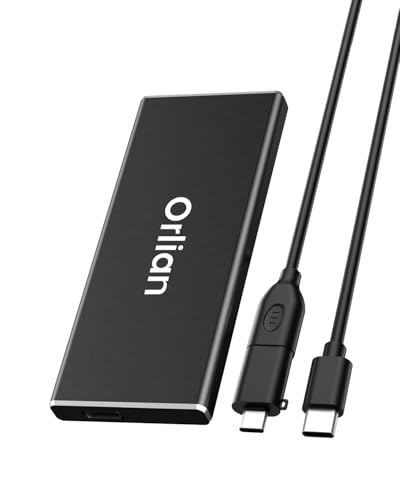
Orlian 500GB is a budget-friendly SSD. It runs up to 500 MB/s via USB 3.2 Gen2. That is enough for single-instrument streaming and sample packs. It is a good choice for starters and phone transfers.
I keep a 500GB drive for portable sample kits. It is light and cheap. For dense orchestral templates it is not ideal, but for beats and synth samples it performs fine.
Pros:
- Affordable for small budgets
- 500 MB/s is decent for basic streaming
- Compact for travel
- Works well with phones and tablets
- Good as a secondary backup drive
Cons:
- Not as fast as NVMe-based options
- Limited long-term capacity for heavy users
What Amazon Buyers Are Saying
Users like the low price and decent speeds. Many use it as a backup or phone drive. A few wish for faster NVMe-class speeds.
My Recommendation
Choose the Orlian 500GB if you need a cheap, portable sample drive. It earns 4/5 in my book for entry-level use.
Glyph Blackbox PRO 20TB

Glyph Blackbox PRO 20TB is a high-capacity HDD solution. It is a desktop-class drive built for mass storage. Speeds are in the HDD range (~280 MB/s), so it is not for live sample streaming. But it is great for archives and multi-project backups.
I use similar drives to store old sessions and stems. They free up SSD space. If you keep many completed projects, the Blackbox is worth it. Treat it as archive storage, not your active streaming drive.
Pros:
- Huge 20TB capacity for archives
- Enterprise-class reliability for backups
- USB-C and Thunderbolt-friendly
- Good for bulk media and stems
- Cost-effective per TB versus SSDs
Cons:
- Slower HDD speeds, not ideal for sample streaming
- Large and not truly portable
- Higher power draw than portable SSDs
What Amazon Buyers Are Saying
Buyers value the capacity and backup reliability. Many use it for archived sessions and libraries. A few note it is heavy and requires desktop space.
My Recommendation
Use the Glyph 20TB for archive and backup. It does not replace an SSD for active work. I give it 4.3/5 for mass storage needs.
Orlian 120GB SSD
The Orlian 120GB is tiny and cheap. It works well as a dedicated boot or live-set drive. It reaches up to 500 MB/s. That makes it faster than an HDD but limited for big streaming tasks.
I keep small drives like this for single-set live rigs. They reduce risk of file mix-ups. If you keep only a few sample packs, this drive is fine. For heavy sample libraries, choose larger capacity.
Pros:
- Very affordable and compact
- Good boot and live-set performance
- Low weight for travel
- Works across many devices
- Simple to manage and label
Cons:
- Very limited capacity for large libraries
- Not suited for heavy multitrack streaming
What Amazon Buyers Are Saying
Users like the size and low cost. Many use it as a live or boot drive. A few warn not to expect huge storage for sample libraries.
My Recommendation
Get the Orlian 120GB for a minimalist live rig or boot drive. It scores 3.9/5 due to size limits.
Akai MPC XL (256GB SSD)

The Akai MPC XL is a standalone production center. It ships with a 256GB internal SSD. That SSD gives fast project load times inside the unit. The MPC lets you produce without a laptop, which is great on stage or in the studio.
I like the workflow of a built-in SSD when I need portability. You get sample storage and fast access inside the MPC. For large third-party libraries you still need external drives, but for many sessions 256GB is enough.
Pros:
- Integrated SSD for fast internal storage
- Stand-alone production without a laptop
- Robust pad and touchscreen workflow
- Good for live performance and sketching
- 256GB is ample for many projects
Cons:
- Not a standalone external SSD product
- May require extra storage for massive libraries
What Amazon Buyers Are Saying
Buyers note the convenience of internal SSD storage for performance. Many praise the standalone workflow. Some mention adding external drives for large libraries.
My Recommendation
If you want a standalone production tool with fast internal storage, the MPC XL is compelling. I give it 4.4/5 for standalone production.
SanDisk Professional 4TB G-Drive SSD

This SanDisk G-Drive combines speed with ruggedness. It offers IP67 dust and water resistance and 1050 MB/s speeds. That makes it a top pick for mobile producers and field recording. You can drop it in a gig bag and trust your samples.
I often bring a G-Drive to live gigs. It survives bumps and keeps audio streaming steady. For producers who need both durability and speed, it is a strong choice and my top overall pick.
Pros:
- Rugged IP67 rating for field use
- Fast reads up to 1050 MB/s for sample streaming
- Large 4TB capacity for big libraries
- Solid build and trusted brand
- Great for both studio and location work
Cons:
- Higher price than basic SSDs
- Not the absolute fastest NVMe option
What Amazon Buyers Are Saying
Buyers praise the ruggedness and reliable speed. Many use it for travel and field work. Customers say it holds up well under real-world conditions.
My Recommendation
I recommend the SanDisk Professional 4TB G-Drive as the best external SSD for music production if you value durability and capacity. My rating: 4.7/5.
Glyph Blackbox PRO 22TB
The Glyph 22TB offers slightly more capacity for large studios. It is best used as a stable archive. HDD speeds mean it is not suited for live streaming. But for storing multi-year projects, it is hard to beat the price per TB.
I recommend it as a long-term storage unit for catalogs. It keeps your older projects safe while freeing SSD space for active work. Use it alongside a fast SSD for day‑to‑day sessions.
Pros:
- Massive 22TB for archives
- Reliable desktop performance
- Good price per terabyte
- Plug-and-play convenience for many systems
- Excellent for multi-project storage
Cons:
- Slow HDD speeds for streaming
- Large and not portable
What Amazon Buyers Are Saying
Buyers like the huge storage and backup reliability. Many use it for archives and studio backups. Some note it needs a desk and power outlet.
My Recommendation
Choose the Glyph 22TB for archiving many projects. It is not a substitute for an external SSD for active sessions. I rate it 4.2/5.
How to Choose Best External SSD for Music Production
Choosing the right external SSD matters. I focus on real studio use. You want fast reads, steady sustained throughput, and the right capacity for your sample libraries. Below are three key factors I use when I pick a drive.
1. Prioritize Read Speed and Sustained Throughput
For music production, read speed matters more than peak write speed. Your DAW and sample player stream many small files. Look for drives with high sustained read throughput. NVMe-based options and Gen2/Gen2x2 USB SSDs give better streaming. I avoid drives that advertise only peak burst speeds without sustained metrics.
2. Pick the Right Capacity for Your Work
Match capacity to your workflows. If you use large orchestral libraries, choose 2TB–4TB SSDs. For daily beatwork, 500GB–1TB may suffice. Use HDDs like Glyph for cold archives and backups. I keep a fast SSD for active projects and an HDD for older sessions.
3. Consider Durability and Portability
If you travel or perform live, get a rugged drive with IP rating or a solid aluminum case. For studio-only use, a desktop HDD offers better price per TB. Also check connectors. USB-C with backward USB-A support makes life easier across rigs. I always test compatibility before a gig.
Final Verdict: Which Should You Buy?
If you want a single recommendation, the SanDisk Professional 4TB G-Drive SSD is my top pick for speed, capacity, and ruggedness in real-world music work.
For portability or tight budgets, choose the SSK 2TB or Orlian models. Use a Glyph desktop drive only for backups and archives of old projects.
FAQs Of best external ssd for music production
What speed do I need for sample libraries?
A sustained read speed of 500 MB/s or higher is good for most libraries. For large orchestral stacks, aim for 1000 MB/s or more to avoid dropouts.
Should I use an HDD or SSD for storage?
Use SSDs for active sessions and streaming. Use large HDDs for cold archives and backups. SSDs give lower latency and better load times.
Is USB-C required for best performance?
USB-C often supports faster standards like USB 3.2 Gen2 or Thunderbolt. It is not strictly required, but it helps access top speeds on modern rigs.
How much capacity do I need for music production?
For most producers, 1TB–4TB is ideal. If you work with many sample libraries, pick 2TB or 4TB. Keep an HDD for older projects and backup.
Can I run a DAW directly from an external SSD?
Yes. You can run your DAW and samples from an external SSD. Use a fast SSD with stable sustained throughput for smooth performance.

Everett Ashford is a tech reviewer at mytechgrid.com specializing in SSDs, cameras, TVs, earbuds, headphones, and other consumer electronics. He provides honest, data-driven reviews based on hands-on testing and real-world performance analysis. Everett simplifies complex tech details to help readers make smart, confident buying decisions.