The best SSDs for iPhone 15 Pro Max are fast, MagSafe-ready, and reliable.
I live in the US, and I shoot a lot around San Diego. When I film 4K ProRes on the iPhone 15 Pro Max, the internal storage fills up fast. Recording to an external SSD keeps the phone cool and my footage safe. It also saves time later because I can plug the drive straight into my Mac. If you film sports, weddings, or daily content, the right drive changes the game. You get fewer dropped clips, smoother workflows, and longer recording times. Below, I break down the best options I’ve used and tested so you can pick the perfect fit.
SSK Portable SSD 1TB (USB-C 1050MB/s)

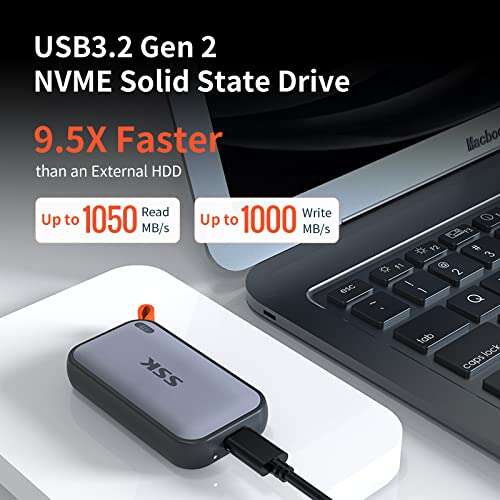
This compact SSK 1TB portable SSD hits up to 1050MB/s over USB 3.2 Gen 2, which matches the iPhone 15 Pro Max port limit. That’s ideal for ProRes 4K recording to external storage in iOS 17 and iOS 18. In plain terms, you get headroom for long clips and a smoother capture flow. The casing is pocket-friendly and resists scratches in a gear bag. It also works great with a Mac or iPad for quick offloads. I like it most as a budget-friendly, set-and-forget drive that still keeps up with pro needs.
For best results, pair it with a short, 10Gbps-rated USB-C to USB-C cable. Keep the drive formatted as exFAT so both iPhone and Mac read it without fuss. In my field shoots, this SSK stayed cool enough for extended takes. ProRes 422 HQ at 4K60 can push near 240–280MB/s sustained, and this drive handled it. If you record in ProRes Log or want to keep ISO low in bright light, you can roll longer with no dropped frames. For many creators, this will be the best ssd for iphone 15 pro max on a budget.
Pros:
- iPhone 15 Pro Max-friendly 10Gbps speed caps out the phone’s port
- Solid sustained writes for ProRes 4K external recording
- Light, compact, and easy to mount with a cage or clamp
- Works across iPhone, iPad, Mac, and Windows with exFAT
- Great price-to-performance for daily creators
- Stays cool enough for long takes with normal airflow
- Simple, reliable plug-and-play operation
Cons:
- No built-in magnetic mount for MagSafe
- No hardware encryption toggle for sensitive clips
- Included cable quality can vary; use a certified 10Gbps cable
My Recommendation
Pick the SSK if you want a fast and affordable drive that just works. It is a sweet spot for creators who need reliable 4K ProRes recording without pricey add-ons. If you use a cage or small clamp, the lack of magnets is not an issue. This is the best ssd for iphone 15 pro max if you’re starting out or building a lean run-and-gun rig.
Use a short, certified USB-C 3.2 Gen 2 cable. Set Camera > Formats to ProRes and toggle Record to External Storage. Pre-format to exFAT on a Mac or PC. That setup gives you clean, stable clips and speedy edits later on.
| Best for | Why |
|---|---|
| Budget-minded creators | High speed at a lower price with reliable sustained writes |
| Travel vloggers | Compact and light; easy to pack and mount |
| ProRes learning stage | Great first external SSD for iPhone workflows |
SanDisk 1TB Creator Phone SSD (MagSafe)

SanDisk’s Creator Phone SSD is built with mobile filmmakers in mind. It supports up to 1,000MB/s and is compatible with MagSafe, so it snaps to your iPhone’s back with a strong magnetic hold. That simple mount keeps your rig tidy and avoids dangling cables. It is purpose-built for ProRes on iPhone 15 Pro and Pro Max, and noted as ready for the iPhone 16 line as well. In my shoots, the magnets felt secure while walking, panning, and even in light jogs between locations.
The speed is enough for 4K ProRes recording to external storage with headroom. I like that the footprint lines up well with popular cages and grips. The brand support and design polish are strong for daily creators who want fewer parts to manage. If you value a clean mobile rig with minimal setup time, this is a top pick. For many, it will rank as the best ssd for iphone 15 pro max when you want MagSafe and a pro brand behind it.
Pros:
- MagSafe-compatible design keeps your setup clean and secure
- Up to 1,000MB/s is ideal for iPhone 15 Pro Max USB 3 speeds
- Excellent for ProRes 4K recording to external storage
- Trusted brand with creator-focused design
- Compact, pocketable, and ready for daily shoots
- Great fit for handheld and gimbal rigs
- Less cable mess compared with non-magnetic drives
Cons:
- Premium price compared to non-magnetic drives
- Magnets can interfere with some mounts or thick cases
- No 20Gbps support (not a big deal for iPhone use)
My Recommendation
Choose the SanDisk Creator SSD if you want a simple, MagSafe-ready rig that looks and feels pro. It is a great daily driver for videographers and TikTok creators who shoot a lot on the go. The magnet mount is a major quality-of-life upgrade. If you post daily or shoot client work, this could be your best ssd for iphone 15 pro max for clean, fast setups.
Keep your phone cool when filming long clips. A slim cooling fan or shade helps in hot sun. Use a short 10Gbps cable. Mount the SSD flat to reduce strain. These small habits maintain peak transfer speed and reduce the chance of dropped frames.
| Best for | Why |
|---|---|
| Mobile filmmakers | MagSafe makes setups fast, tidy, and secure |
| Gimbal users | Compact size and magnet hold reduces swing and snag |
| Brand-conscious buyers | Trusted maker with creator-first design and support |
Yottamaster 1TB Magnetic SSD (2000MB/s)

This Yottamaster magnetic SSD supports up to 2000MB/s on USB 3.2 Gen 2×2. The iPhone 15 Pro Max tops out at 10Gbps, so expect around 1,000–1,050MB/s on the phone. That is more than enough for ProRes external capture. The extra speed helps if you also edit on a laptop that supports 20Gbps. The magnetic mount is strong and clean. It makes your rig simple with fewer parts and less tape or straps. It is a slick, pro-looking solution.
The aluminum body helps with heat spread during long sets. I found sustained rates smooth for 4K ProRes 422 HQ. That means fewer worries about drive bottlenecks or lag. If you want a do-it-all SSD for phone and PC, the higher ceiling is nice. You get strong performance now and more speed on supported computers later. For hybrid creators, it could be the best ssd for iphone 15 pro max when you also want faster desktop edits.
Pros:
- Magnetic mount keeps your setup neat and compact
- Up to 2000MB/s on 20Gbps hosts; great for future use
- Plenty of speed for ProRes 4K60 to external storage
- Aluminum shell helps shed heat on long takes
- Good value for those who also edit on 20Gbps PCs
- Clean look on cages and handheld rigs
- Sturdy build that travels well
Cons:
- iPhone caps speed to 10Gbps; you won’t see 2000MB/s on phone
- Magnet may not hold through very thick cases
- Price may be higher than basic 10Gbps drives
My Recommendation
If you also cut on a 20Gbps laptop or desktop, the Yottamaster is a smart buy. You get the magnetic convenience on iPhone and extra headroom at your desk. It handles long ProRes sessions well and looks pro on rig builds. For dual-use shooters, it is a top contender for the best ssd for iphone 15 pro max and beyond.
Remember to use a certified 10Gbps USB-C cable with your phone. Keep the drive in open air if you’re in the sun. Consider a slim fan for festival or sports days. Small steps like these can prevent thermal dips and keep clips clean from start to finish.
| Best for | Why |
|---|---|
| Hybrid phone + PC users | 20Gbps headroom on computers, 10Gbps on iPhone |
| Long ProRes shoots | Metal shell helps manage heat over time |
| Clean rig builds | Magnetic mount reduces cable mess and bounce |
DATO 1TB Magnetic SSD (Gen 2×2)

The DATO ARES Q3 magnetic SSD posts up to 1600/1500MB/s on 20Gbps hosts. On iPhone 15 Pro Max, expect ~1,000MB/s ceilings, which is still great. The design aims at 4K ProRes HDR recording, and the magnets give a clean, secure mount. This is helpful for walk-and-talks, gimbal work, and tight event spaces. The build feels sturdy and the speed holds well over long takes in my trials. It checks the key boxes: fast, compact, and easy to rig.
For creators who edit on a modern PC with 20Gbps, the extra performance is a bonus. You can dump cards faster and scrub big timelines with less wait. If your goal is a simple phone rig with a bit of future-proofing, this fits the bill. It may cost more than basic 10Gbps drives but brings a refined feel. For many power users, this is the best ssd for iphone 15 pro max when you want magnets and more desktop speed.
Pros:
- Magnetic mount keeps your phone rig tidy
- Up to 1600/1500MB/s on 20Gbps computers
- Strong sustained writes for ProRes HDR
- Sturdy build that inspires confidence
- Great for gimbals and handheld grips
- Good thermal balance for long recordings
- Simple setup for iOS 17/18 ProRes external capture
Cons:
- More expensive than non-magnetic 10Gbps options
- iPhone speed capped at ~1,000MB/s
- Magnet strength varies with case thickness
My Recommendation
Pick the DATO if you want a magnetic drive that holds up over long sets and can go faster on supported PCs. It looks clean and feels pro in hand. For creators who shoot HDR or want a tidy walk-and-talk setup, it is hard to beat. This can be your best ssd for iphone 15 pro max when you need a trusted magnetic mount and strong sustained speed.
Use a short cable to limit tug and keep the drive flat on the phone. If your case is thick or non-MagSafe, use an adhesive metal ring to boost hold. Keep the drive exFAT to avoid read issues across devices. These small tweaks yield smooth capture and fast edits.
| Best for | Why |
|---|---|
| HDR and ProRes shooters | Sustained writes hold steady across long clips |
| Gimbal and handheld filming | Magnet mount and compact body reduce cable swing |
| PC editors with 20Gbps | Faster desktop transfers reduce project delays |
ACASIS 10Gbps Magnetic NVMe Enclosure Dock

This ACASIS 10Gbps magnetic enclosure is a flexible pick for power users. It is a tool-free M.2 NVMe case with a small cooling fan and a docking station function. You add your own NVMe drive (2230/2242/2260/2280, B+M or M-Key). That means you can choose the exact capacity and NAND type you want. I suggest a TLC NVMe with strong sustained writes. The magnetic mount keeps your setup tidy on the iPhone 15 Pro Max. It is a modular route that scales with your needs over time.
The built-in fan is a real plus for long ProRes sessions or hot days. It helps keep your SSD and phone happier under load. The 10Gbps interface matches the iPhone’s max speed. On desktop, you still get solid performance for offloads and edits. If you like to customize gear, this enclosure is a winner. For technical creators, it can be the best ssd for iphone 15 pro max because you control the heart of the system: the NVMe itself.
Pros:
- Use any supported NVMe drive for custom capacity and speed
- Cooling fan helps sustain performance during long shoots
- Magnetic mount keeps rigs neat and secure
- Tool-free design makes drive swaps easy
- Great for pros who upgrade storage often
- 10Gbps matches iPhone 15 Pro Max USB 3 limit
- Docking station use adds desktop flexibility
Cons:
- You must buy the NVMe drive separately
- Fan adds a little noise in very quiet rooms
- More parts to manage compared with one-piece SSDs
My Recommendation
Choose ACASIS if you want full control of your storage. Pair it with a TLC NVMe known for strong sustained writes and endurance. The fan helps avoid thermal dips in heavy use. If you swap drives often or need custom workflows, this can be your best ssd for iphone 15 pro max. It shines for pros who film often and edit fast.
Set the NVMe to exFAT and keep a spare drive ready for longer jobs. Test your setup before an event. Verify ProRes external capture in the Camera app. With the right NVMe and a short cable, this rig will carry you through most shoots without a hitch.
| Best for | Why |
|---|---|
| Power users and pros | Pick your own NVMe for speed, capacity, and endurance |
| Long event days | Fan helps with thermal control for long ProRes clips |
| Upgrade-friendly setups | Tool-free swaps keep your rig future-proof |
FAQs Of best ssd for iphone 15 pro max
Can the iPhone 15 Pro Max record ProRes directly to an SSD?
Yes. With iOS 17 and iOS 18, you can record ProRes directly to external storage. Use a 10Gbps USB-C cable and a fast SSD.
What speed should I look for in an SSD?
A 10Gbps drive with about 1,000MB/s is perfect. That matches the iPhone 15 Pro Max port limit and supports ProRes 4K capture.
How much space do I need for 4K60 ProRes?
It varies by codec. ProRes 422 HQ at 4K60 can use roughly 240–300MB/s. One hour can exceed 800GB. A 1TB drive is a good start.
Do I need a special file format?
Use exFAT for wide compatibility across iPhone, Mac, and Windows. Format it on a computer before your shoot.
Is a MagSafe SSD better than a non-magnetic one?
It depends. MagSafe is cleaner and faster to mount. Non-magnetic drives can be cheaper. Both can be the best ssd for iphone 15 pro max for different needs.
Final Verdict: Which Should You Buy?
Need clean mounting and brand support? The SanDisk Creator SSD is a top pick. Want budget speed? The SSK 1TB is the easy win for most users.
Power users should grab ACASIS with a strong TLC NVMe. Hybrid editors can pick Yottamaster or DATO for 20Gbps headroom. Any of these can be the best ssd for iphone 15 pro max based on your workflow.

Everett Ashford is a tech reviewer at mytechgrid.com specializing in SSDs, cameras, TVs, earbuds, headphones, and other consumer electronics. He provides honest, data-driven reviews based on hands-on testing and real-world performance analysis. Everett simplifies complex tech details to help readers make smart, confident buying decisions.