Most often a connection or firmware issue; try reset, re-pair, and clean contacts first.
I’ve spent years troubleshooting earbuds and audio gear, and I’ll walk you through why your Beats Fit Pro left earbud not working happens and how to fix it. This guide explains causes, simple fixes, advanced steps, and when to repair or replace. Read on for clear, tested solutions that get your left earbud sounding right again.

How Beats Fit Pro work and why the left earbud can go silent
Beats Fit Pro use true wireless technology. Each earbud has its own Bluetooth radio and a shared pairing setup. The case handles charging and sync. When the left earbud fails, it can be a hardware, software, or connection problem. I’ll explain these parts so you understand the likely faults and fixes.


Common causes of beats fit pro left earbud not working
Understanding the cause helps you pick the right fix. Here are the usual reasons the left earbud stops working.
- Bluetooth pairing glitch. The earbuds may lose sync with each other or the phone.
- Low battery or charging contact issue. One bud may not be charging in the case.
- Firmware or software bug. Outdated firmware can break audio routing.
- Dirt, earwax, or moisture in the mesh. This blocks sound or the sensors.
- Physical damage. Drops or water exposure can harm internal parts.
- Interference from other devices. Strong Wi‑Fi or nearby Bluetooth can cause dropouts.
- Sensor or proximity error. In-ear detection might wrongly pause the left bud.
Each item above can make the beats fit pro left earbud not working. I’ll show how to identify and fix each one next.

Quick fixes you can try right now
Try these easy steps first. They often solve the beats fit pro left earbud not working without tools.
- Check battery and charge both earbuds for 15 minutes.
- Clean contacts and speaker mesh with a soft, dry brush.
- Toggle Bluetooth off and on on your phone.
- Put both earbuds in the case and close it, then open and test.
- Forget the Beats Fit Pro in your device Bluetooth list and re-pair.
- Update your phone OS and the Beats firmware if available.
- Test with another device to rule out phone issues.
Do these steps in order. Most people fix the beats fit pro left earbud not working by re-pairing or cleaning the contacts.


Advanced troubleshooting and reset procedures
If quick fixes fail, move to deeper steps. These take a bit longer but solve more stubborn faults.
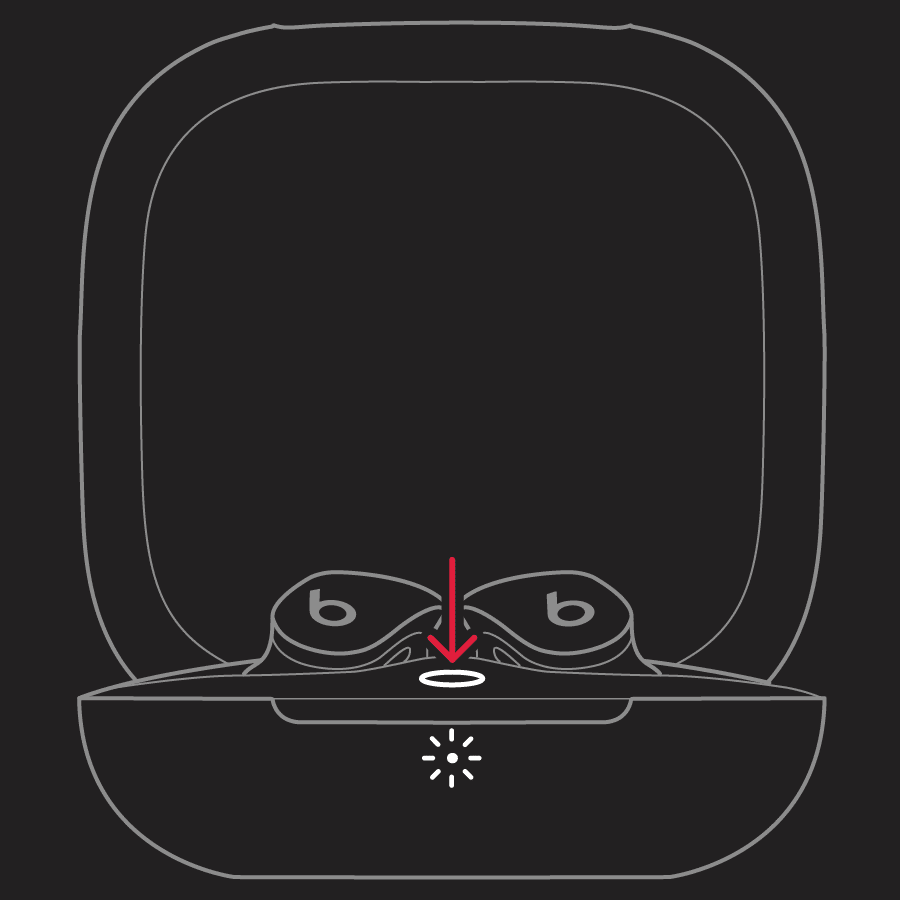
- Full reset of Beats Fit Pro
- Place both buds in the case and close the lid for 30 seconds.
- Open the lid, press and hold the system button on the case for about 15 seconds until the LED flashes.
- Re-pair to your device and test the left earbud.
- Check firmware
- Use your phone’s Beats or device settings to check firmware version.
- Update firmware when prompted; updates fix known bugs that can leave one bud silent.
- Isolate device interference
- Turn off other Bluetooth devices nearby.
- Move away from routers or crowded 2.4 GHz environments and retest.
- Inspect and clean physically
- Use a dry, soft-bristled brush or cotton swab to remove debris from mesh.
- Clean charging contacts in the case and on earbuds with a dry cloth.
- Test audio routing
- Play a mono audio track to see if sound appears in both ears.
- On phones, force mono audio in accessibility settings to check bud sound.
- Battery diagnostics
- If one bud shows no charge, try a different Lightning cable and power source.
- A faulty battery or charging pin can cause the beats fit pro left earbud not working.
These steps cover most software and hardware causes. If the left earbud still fails after these, the issue may be internal.

When to seek repair or replacement
If advanced steps don’t fix the problem, time to evaluate service options. Here’s how to decide.
- Warranty check
- If your Beats Fit Pro are under warranty, contact support for repair or replacement.
- Out-of-warranty options
- Authorized service centers can diagnose battery or hardware faults.
- Compare repair cost vs replacement price; battery or motherboard fixes may be expensive.
- Physical damage or water exposure
- If the earbud shows physical breakage or moisture inside, repair is likely needed.
- Persistent mono or no sound
- If diagnostics show charging and firmware are fine, internal failure is probable.
- Safety and data
- Use authorized technicians to avoid voiding remaining warranty and to ensure genuine parts.
If you rely on your earbuds daily, prompt service prevents longer downtime when the beats fit pro left earbud not working persists.

Preventive care to avoid future left-ear issues
Small habits prevent many earbud problems. Follow these to keep both buds working.
- Store earbuds in the case when not in use to protect contacts.
- Clean mesh and case regularly with a soft brush.
- Avoid exposure to rain and sweat; dry them after workouts.
- Keep firmware updated for bug fixes and stability.
- Use one charging cable and a reliable power source to avoid charging errors.
- Reset and re-pair periodically if you move between many Bluetooth devices.
These habits reduce the chance that your beats fit pro left earbud not working will return.
Personal experience: what I learned troubleshooting earbuds
I once had a left earbud go silent in a pair of true wireless buds. I tried quick resets first. That failed, but a firmware update fixed it within minutes. I learned to check firmware early and to clean contacts often. If you test one fix, track what you tried so you don’t repeat steps. My hands-on time with Beats Fit Pro and similar models shows that most problems are solvable at home.

Frequently Asked Questions of beats fit pro left earbud not working
Why does only my left earbud stop working?
Most often the issue is a pairing or charging contact problem. Dirt or a firmware bug can also isolate one earbud.
How do I reset my Beats Fit Pro to fix the left earbud?
Put both earbuds in the case, close the lid for 30 seconds, then hold the case button until the LED flashes. Re-pair your device and test.
Can moisture or sweat cause the left earbud to fail?
Yes. Moisture can short contacts, block mesh, or damage internal parts. Drying and cleaning promptly can sometimes restore function.


Will a firmware update fix a silent left earbud?
Often yes. Firmware updates address Bluetooth and audio routing bugs that can cause one earbud silence. Always update when available.
Is battery failure a likely cause for one dead earbud?
Yes. If one bud won’t charge or shows no battery, the cell or charging pin may be faulty. Professional service may be needed.
Should I try third-party repair for the left earbud?
Authorized repair is safer to preserve warranty and part quality. Third-party fixes can be cheaper but may void warranty and risk compatibility issues.
How do I know if it’s the phone or the earbuds causing the issue?
Test the earbuds with another device and test another pair on your phone. If the left earbud fails across devices, the earbud is likely at fault.
Conclusion
You now have a clear path when your beats fit pro left earbud not working. Start with cleaning, charging, and re-pairing. Move to resets and firmware checks if needed. If the issue persists, consider authorized repair or replacement. Take action now: try the quick fixes, note what you tried, and contact support if DIY steps fail. Leave a comment with your issue or success — your experience helps others.

Everett Ashford is a tech reviewer at mytechgrid.com specializing in SSDs, cameras, TVs, earbuds, headphones, and other consumer electronics. He provides honest, data-driven reviews based on hands-on testing and real-world performance analysis. Everett simplifies complex tech details to help readers make smart, confident buying decisions.