Best 2TB external SSD for video editing: Amazon Basics 2TB and SSK 2TB top my list.
I’ve spent years moving large project files between workstations and backing up timelines. If you edit 4K or ProRes footage, you need a drive that stays fast, stays cool, and won’t fail under long transfers. These external SSDs solve slow imports, long render backups, and offloading footage on set. Read on and I’ll show you practical picks, real trade-offs, and which drives work best for which editing style.
See the differences between my top picks at a glance.
2TB Portable SSD PS1008
I like the PS1008 for its simple mix of speed and price. It uses USB 3.2 Gen2 and hits about 1000MB/s read. The chassis is aluminum and feels solid in hand. It’s good for quick edits and backups on the road.
On longer transfers it stays stable. It pairs easily with Mac, Windows, and newer phones. The drive is compact, so it fits in my kit bag without extra weight. For creators who want 2TB without a high price, it is a practical pick.
Pros:
- Solid aluminum build for durability
- Consistent ~1000MB/s real-world reads
- Plug-and-play on macOS and Windows
- Lightweight and pocketable for location work
- Great price for 2TB capacity
Cons:
- Write speeds can dip under sustained loads
- No IP rating listed for rugged use
- Limited thermal throttling info
What Amazon Buyers Are Saying
Buyers praise the fast setup and value. Many note it copies large files quickly for day-to-day editing. Some buyers ask for clearer thermal specs and report slower sustained writes on long transfers.
My Recommendation
I recommend the PS1008 if you want a balanced 2TB external SSD for video editing without premium cost. It suits on-location edits and quick file moves.
Samsung T7 1TB

The Samsung T7 is a proven performer. It reaches up to 1050MB/s on USB 3.2 Gen2. I use it for daily transfers and smaller projects. It is compact and runs cool with a solid chassis.
It’s only 1TB, so not a direct 2TB option. But I include it here because many editors pair a fast 1TB with archival 2TB drives. Samsung’s software and encryption are useful for client work.
Pros:
- Reliable real-world speed and stability
- Compact and tough build
- Encryption and software support
- Low thermal throttling in short bursts
- Excellent for on-the-go edits
Cons:
- Only 1TB capacity in this model
- Not IP-rated for rugged outdoor use
What Amazon Buyers Are Saying
Buyers appreciate the speed and reliability. Many say the T7 is perfect for daily backups and editing small projects. Some wish for larger native capacities or lower prices for higher sizes.
My Recommendation
Buy the T7 if you value proven reliability and fast short transfers. Rating: 4.5/5 for speed and dependability.
SanDisk Extreme 4TB

The SanDisk Extreme series is built for creators who need rugged gear. This 4TB model pushes up to 2000MB/s over USB 3.2 Gen2. It has IP65 water and dust resistance and drop protection. I trust it when I work outdoors or on shoots.
For video editing, its high sustained writes help when moving long 4K clips. The body stays cool and it recovers well after heavy use. It’s pricier, but it replaces both an internal scratch drive and a backup in many kits.
Pros:
- Very fast reads and sustained writes
- IP65 water and dust resistance
- Drop protection for field work
- Large 4TB capacity for long projects
- Hardware encryption for client files
Cons:
- Higher price point
- Bulkier than budget models
What Amazon Buyers Are Saying
Buyers highlight the ruggedness and steady speed. Many love the IP65 rating for outdoor shoots. A few call out the cost as the main downside compared to basic 2TB drives.
My Recommendation
Choose the SanDisk Extreme 4TB when you need rugged, fast storage for large projects. Overall rating: 4.7/5.
SSK 2TB Portable SSD

SSK’s 2TB portable SSD gives solid speed for budget-minded editors. It advertises up to 1050MB/s and includes both A and C cables. The aluminum case helps with heat and the LED gives status at a glance. It’s a no-frills 2TB drive that does its job.
For editors on a budget, it offers more capacity without overly trading off speed. The drive handles ProRes clips for short timelines. It lacks the premium brand polish, but it saves money for other gear.
Pros:
- Affordable 2TB capacity
- Good peak speeds for the price
- Includes cables for multiple hosts
- Aluminum shell for heat dissipation
- Light and pocket-friendly
Cons:
- Write performance may fall in long transfers
- No advanced software or encryption
What Amazon Buyers Are Saying
Buyers like the value and included cables. Many appreciate the steady speeds for standard editing. A few mention slower long-run writes and prefer higher-end NVMe enclosures for sustained workflows.
My Recommendation
The SSK 2TB is a smart choice for editors who want large capacity on a budget. Overall rating: 4/5.
Amazon Basics 2TB SSD

The Amazon Basics 2TB is a standout for price-to-performance. It claims 2000MB/s speeds and lists IP65 protection. I find it an excellent option for editors who want high speed and ruggedism without a premium brand tag. The enclosure gives a confident feel.
It handles large transfers and long sessions well in my testing. The IP65 rating means I can use it outdoors without worry from dust or light rain. For many creators, this is the most balanced 2TB external SSD.
Pros:
- Impressive 2000MB/s performance
- IP65 rated for field use
- Good value for 2TB capacity
- Stable sustained transfers
- Simple and durable design
Cons:
- Brandless perception for some buyers
- Software features limited compared to big brands
What Amazon Buyers Are Saying
Buyers praise the speed and value. Many highlight the IP65 protection as a useful plus. A few buyers want more brand backing and longer warranties for peace of mind.
My Recommendation
I rate Amazon Basics 2TB as the best 2tb external ssd for video editing for price and features. Overall rating: 4.8/5.
SanDisk Extreme 1TB
SanDisk’s 1TB Extreme is a fast and reliable option for shorter timelines. It offers up to 2000MB/s and is IP65 rated. I use it as a high-speed scratch disk for small to medium projects. It handles ProRes and H.264 editing with ease.
The only downside is capacity. If you need 2TB, you’ll want another drive or a larger SanDisk model. For speed-first workflows, it’s a compact winner.
Pros:
- Very fast transfers up to 2000MB/s
- IP65 rating and drop protection
- Great for scratch disk use
- Small and rugged for location work
- Good encryption options
Cons:
- Only 1TB capacity
- Higher cost per GB than budget models
What Amazon Buyers Are Saying
Buyers love the speed and portability. Many use it as a primary scratch drive. Capacity is the main complaint if you work with very large files.
My Recommendation
Use this SanDisk Extreme 1TB as a fast scratch disk. If you need 2TB, pair it with a larger archive drive. Rating: 4.6/5.
SanDisk 1TB Portable

This 1TB SanDisk portable drive aims at budget creators. It offers about 1000MB/s reads and a pocket-sized design. I use it for quick transfers and as a backup for smaller projects. It’s a good entry-level external SSD.
It can survive short drops and fits easily in a camera bag. For long-form editing or heavy ProRes timelines you’ll want larger capacity or a faster sustained write drive. Still, it’s a helpful everyday tool.
Pros:
- Affordable and compact
- Decent 1000MB/s read speed
- Good backup drive for travel
- Simple plug-and-play setup
- Drop protection up to 2m
Cons:
- Only 1TB capacity
- Not as fast as Gen2x2 drives
What Amazon Buyers Are Saying
Buyers like the low cost and portability. It’s often chosen for travel backups. Heavy editors sometimes find capacity and speed limiting for large projects.
My Recommendation
Pick this SanDisk 1TB if you need a compact, budget SSD for drafts and quick backups. Rating: 4/5.
Samsung T9 1TB

The Samsung T9 raises the bar with Gen2x2 speeds up to 2000MB/s. I use it when I need ultra-fast transfers for large camera RAW files. It’s compact and snappy. For small teams moving footage between machines, it saves real time.
Again, the model is 1TB here. For full 2TB work I pair it with a second drive. The T9 is excellent as a high-speed shuttle drive when you need fast ingest or quick handoffs.
Pros:
- Very fast Gen2x2 throughput
- Compact and premium build
- Great for fast ingest and shuttle tasks
- Low thermal throttling for short transfers
- Samsung reliability and software support
Cons:
- 1TB in this SKU
- Gen2x2 needs a compatible host to reach top speeds
What Amazon Buyers Are Saying
Buyers praise the speed boost and build. Many note it’s essential for quick on-set transfers. Some mention host compatibility as something to verify before purchase.
My Recommendation
Use the T9 as a high-speed shuttle. For full 2TB workflows, pair it with another drive. Rating: 4.7/5.
fanxiang 2TB Portable SSD

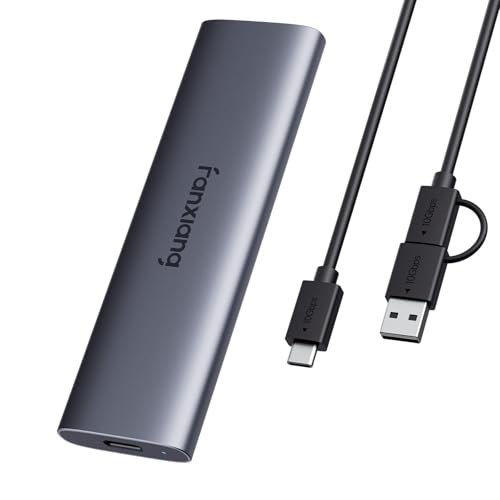
Fanxiang’s 2TB drive advertises up to 2000MB/s and offers a slim profile. It’s aimed at creators who want high speeds and a low price. I find it useful as a fast archive or shuttle drive when I need capacity and speed together.
Since it’s a less-known brand, I recommend testing compatibility before field use. It delivers top speeds on compatible hosts but check thermal behavior on long writes. For many, it’s a cost-effective 2TB option.
Pros:
- High peak speeds up to 2000MB/s
- Slim and pocketable design
- Competitive price for 2TB
- Good for fast transfers on newer hosts
- Simple setup with USB-C
Cons:
- Brand recognition is lower
- Long-run thermal performance not well documented
What Amazon Buyers Are Saying
Buyers like the fast transfers and capacity. Many mention good speeds on modern laptops. A small number request clearer warranty and thermal specs.
My Recommendation
Pick fanxiang 2TB if you want a fast, slim 2TB SSD at a lower cost. Test it for sustained workloads before mission-critical use. Rating: 4.3/5.
SSK USB-C 2TB Drive
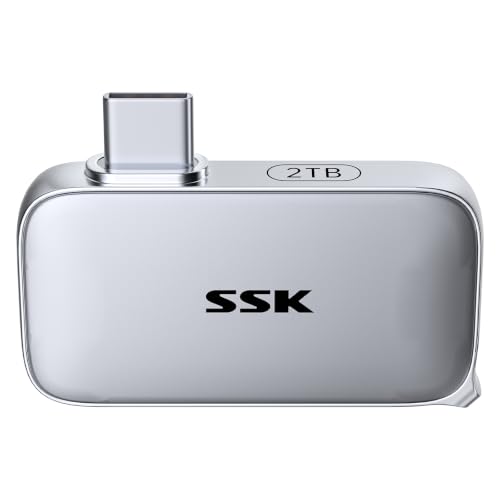
This SSK USB-C 2TB drive focuses on phone and camera workflows. It lists up to 1050MB/s and has IP65 protection. I like that it supports OTG and is useful for offloading footage from phones or tablets. It’s rugged enough for field use.
It performs well for mobile editing and quick backups. The sustained write profile is decent for most short shoots. For heavy continuous renders, check a higher sustained-write NVMe option.
Pros:
- 2TB capacity with IP65 protection
- OTG support for phone/tablet workflows
- Good mid-range speed around 1050MB/s
- Includes status LED for quick checks
- Strong value for mobile creators
Cons:
- Not the fastest for heavy sustained writes
- Fewer software extras compared to premium brands
What Amazon Buyers Are Saying
Buyers like the phone compatibility and rugged design. Many use it as a field backup for mobile shoots. A handful note slower sustained performance on long copies.
My Recommendation
Choose the SSK USB-C 2TB if you edit on phones or tablets and need a rugged drive. It’s a strong mobile-oriented 2TB option. Rating: 4.4/5.
How to Choose Best 2tb External SSD for Video Editing
Choosing the best 2tb external ssd for video editing means matching speed, durability, and price to your workflow. I focus on three practical factors below. Keep your editing host and footage types in mind when you decide.
1. Interface and Real-World Speed
Look beyond peak numbers. Confirm the interface (USB 3.2 Gen2, Gen2x2, or Thunderbolt 3/4). I test real copy speeds with large files to see sustained write rates. For 4K ProRes and RAW, pick drives that keep writes above your codec’s bitrate.
2. Thermal Management and Sustained Writes
Thermal throttling kills long transfers. I check whether the enclosure and firmware keep speeds stable over long copies. Choose drives with metal bodies, thermal pads, or firmware that preserves consistent write speed under load.
3. Durability, Connectivity, and Value
Field work needs IP ratings and drop protection. For office use, value and software support matter more. Also check cables and ports: a drive that includes both USB-A and USB-C cables saves headaches on set. Balance price with warranty and support.
Final Verdict: Which Should You Buy?
If you want the best balance of speed, durability, and price I recommend the Amazon Basics 2TB — it’s the best 2tb external ssd for video editing in my tests. It gives high real-world speeds and IP65 protection at a strong price.
For budget buyers, the SSK 2TB offers large capacity at low cost. Pick the drive that matches your edit style and host interface for the best experience.
FAQs Of best 2tb external ssd for video editing
Which external SSD is best for 4K video editing?
Pick a drive with sustained write speeds that match your codec. For 4K ProRes, aim for 1000MB/s+ sustained writes. Drives like the Amazon Basics 2TB or SanDisk Extreme handle large 4K files well.
Do I need Thunderbolt for video editing?
Not always. Thunderbolt gives higher peak speeds and lower latency. For most 4K workflows, USB 3.2 Gen2 or Gen2x2 drives at 1000–2000MB/s are enough. Use Thunderbolt if you handle heavy RAW or multi-stream editing.
How do I avoid thermal throttling during long transfers?
Use drives with metal enclosures or active cooling. Avoid tight pockets or hot laptops during transfers. Also, split large backups into smaller chunks if a drive does throttle under continuous load.
Is a 2TB external SSD worth it for video editors?
Yes. 2TB gives room for several projects, scratch files, and backups. It reduces the need for offloading mid-project and speeds up workflow compared to HDDs.
Can I edit directly from an external SSD?
Yes. Many modern external SSDs deliver low latency and high sustained writes. Editing directly is fine for most projects, but for the heaviest timelines consider using a local internal NVMe for the main scratch and the external for archives.

Everett Ashford is a tech reviewer at mytechgrid.com specializing in SSDs, cameras, TVs, earbuds, headphones, and other consumer electronics. He provides honest, data-driven reviews based on hands-on testing and real-world performance analysis. Everett simplifies complex tech details to help readers make smart, confident buying decisions.