Quick answer
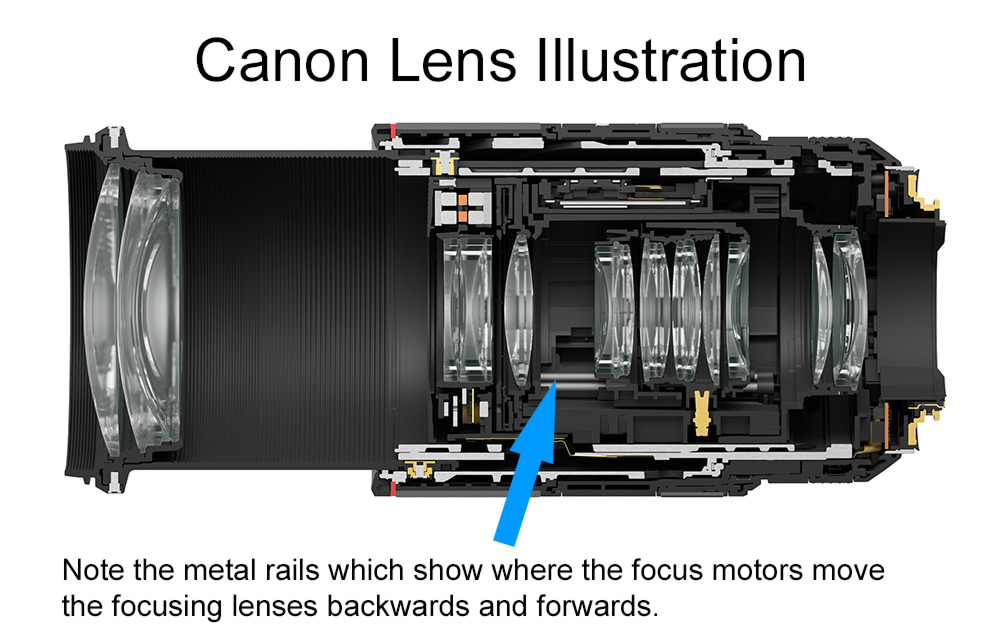
A Canon camera works by letting light pass through a lens and reach a sensor. The sensor turns that light into an electrical signal. The camera then uses a processor to measure color, brightness, focus, and detail before saving the image to a memory card.
In the United States, Canon sells several camera types, including DSLR, mirrorless, compact, and cinema cameras. They share the same basic idea, but the path that light takes inside the camera differs by design.
A simple way to picture the process is:
Light → lens → shutter → image sensor → DIGIC processor → memory card
The lens controls how much of the scene the camera sees. The aperture controls the opening inside the lens. The shutter controls how long light reaches the sensor. The sensor records the image, while Canon’s DIGIC processor turns the raw signal into a usable photo or video file.

What happens when a Canon camera takes a photo?
A Canon camera takes a photo through a chain of physical and digital steps. Each part affects the final image.
1. The lens gathers light
Light from a subject enters the front of the lens. Glass elements inside the lens bend and focus that light toward the camera sensor.
The lens affects:
- Focal length: How wide or close the view appears
- Aperture: How much light enters
- Focus distance: Which part of the scene looks sharp
- Image quality: How much detail and distortion the lens produces
A 24mm lens shows more of a scene than an 85mm lens. A lens set to f/2 lets in more light than the same lens set to f/8.
2. The camera measures the scene
Before taking the picture, the camera checks the light in the frame. Its metering system estimates the brightness needed for a good exposure.
Canon cameras may use different metering modes, such as:
- Evaluative metering: Measures many areas of the frame
- Partial metering: Measures a smaller central area
- Spot metering: Measures a very small part of the scene
- Center-weighted average metering: Gives more importance to the center
Evaluative metering is a useful starting point for most scenes. Spot metering can help when a small subject is much brighter or darker than its background.
3. Autofocus finds sharp detail
The autofocus system looks for detail and contrast, or it uses phase information to judge whether the lens needs to move forward or backward.
Modern Canon mirrorless cameras often use Dual Pixel CMOS AF. This system uses special pixels on the sensor to detect focus while the camera shows the scene on the screen or electronic viewfinder.
Depending on the model, autofocus may track:
- People
- Faces
- Eyes
- Animals
- Vehicles
- Moving subjects
- General objects
Autofocus performance depends on the camera model, lens, light level, subject movement, and selected focus settings. No autofocus system can track every subject perfectly.
4. The shutter controls exposure time
The shutter controls how long the sensor receives light.
A fast shutter speed, such as 1/1000 second, can freeze a bird in flight. A slow speed, such as 1/15 second, lets in more light but may show blur from camera shake or subject movement.
Canon cameras can use:
- mechanical shutters: Physical curtains open and close
- Electronic first curtain shutters: One curtain is simulated electronically
- Electronic shutters: The sensor starts and ends the exposure without moving curtains
Each shutter type has limits. Electronic shutters can be quiet and fast, but some moving subjects may show distortion, often called rolling shutter. The exact behavior depends on the camera and shooting conditions.
5. The sensor records the light
The image sensor is a grid of tiny light-sensitive pixels. Most Canon interchangeable-lens cameras use a CMOS sensor.
Each pixel measures the amount of light that reaches it. The camera combines these measurements to create the image.
Canon cameras commonly use two sensor sizes:
| Sensor type | Practical effect |
|---|---|
| Full-frame | Usually offers a wider view with the same lens and strong low-light potential |
| APS-C | Makes a lens appear more zoomed in and often allows a smaller camera body |
For example, a 50mm lens on many Canon APS-C cameras gives a view similar to about 80mm on a full-frame camera because of the crop factor. This does not turn the lens into a different physical lens. It changes how much of the image the sensor captures.
6. The DIGIC processor creates the file
The sensor produces raw data. A Canon DIGIC image processor then works with that data to create a JPEG, HEIF, or other supported file.
The processor may handle:
- Color interpretation
- Noise reduction
- Sharpening
- Exposure adjustment
- Lens correction
- Face and subject detection
- Video encoding
- File compression
A JPEG is processed inside the camera. A RAW file keeps much more original sensor data for later editing, although it is still not a completely untouched record of the scene.
7. The camera saves the image
The finished file is saved to a memory card. Many Canon cameras use SD cards, while some professional models support other card types.
A photo file contains more than the picture. It may also include metadata such as:
- Shutter speed
- Aperture
- ISO
- Lens information
- Date and time
- Focal length
- GPS data, if supported and enabled
How do Canon DSLR and mirrorless cameras differ?
The main difference is the way each camera sends light to the viewfinder.
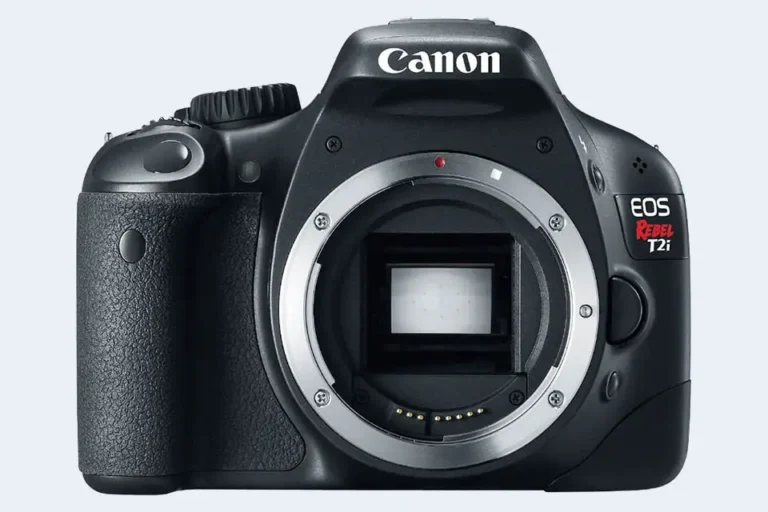
Canon DSLR cameras
A Canon DSLR uses a mirror and an optical viewfinder.
The light path is:
Lens → mirror → focusing screen and prism → your eye
When you press the shutter button, the mirror flips up. The shutter opens, light reaches the sensor, and the image is recorded.
A DSLR viewfinder shows the scene through the lens without displaying a digital screen. This gives a direct optical view.
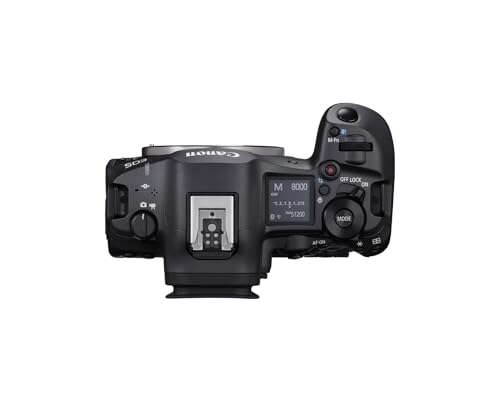
Canon mirrorless cameras
A Canon mirrorless camera does not use a reflex mirror or optical prism. Light travels directly from the lens to the sensor.
The image sensor sends a live feed to:
- The electronic viewfinder
- The rear screen
- The autofocus system
- The exposure preview system
An electronic viewfinder can show a preview of brightness, white balance, focus, and other settings before the photo is taken. It also uses battery power because the screen or viewfinder must remain active.
Main difference at a glance
| Feature | Canon DSLR | Canon mirrorless |
|---|---|---|
| Mirror | Yes | No |
| Optical viewfinder | Usually | No |
| Electronic viewfinder | Usually not | Common |
| Live sensor feed | Used in Live View | Used most of the time |
| Body design | Often larger | Often smaller, model dependent |
| Lens mount | EF or EF-S on many models | RF or RF-S on newer models |
| Battery use | Often lower during optical viewing | Often higher during live viewing |
Neither design is automatically right for every photographer. A DSLR may suit someone who prefers an optical viewfinder and long battery life. A mirrorless camera may suit someone who wants live exposure previews, advanced subject tracking, or a newer RF lens system.
What do the main Canon camera settings do?
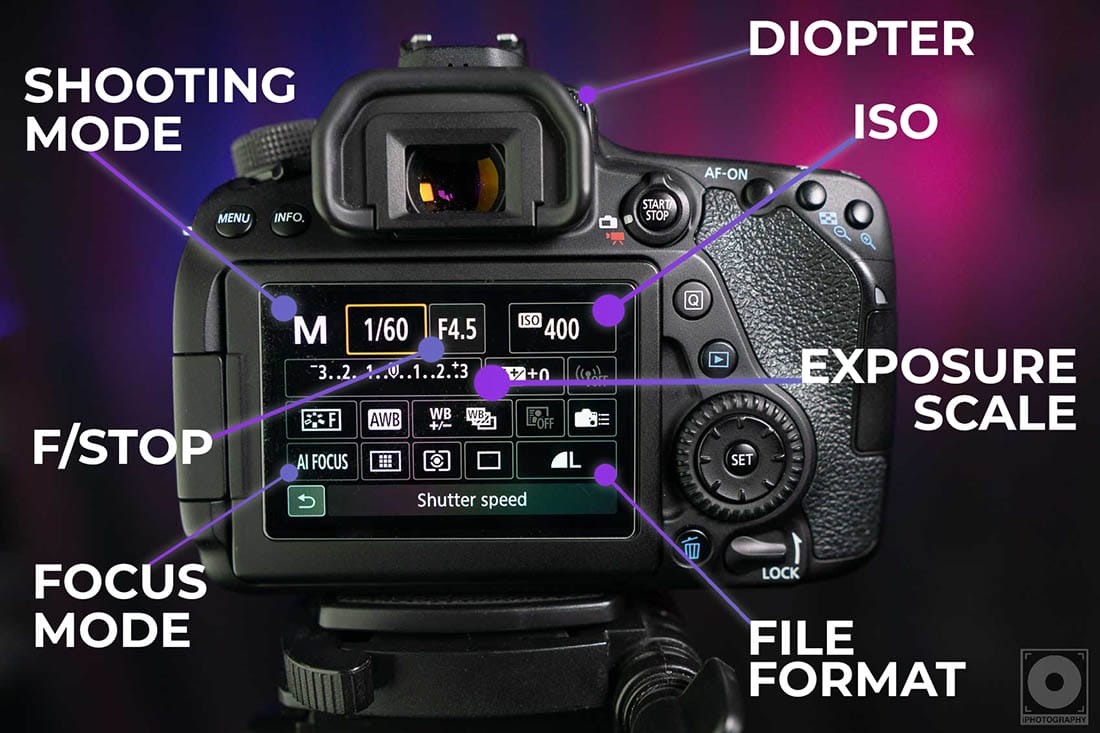
The exposure settings control the balance between brightness, motion blur, and background blur.
Aperture
Aperture is the adjustable opening in the lens. It is written as an f-number, such as f/1.8, f/4, or f/11.
The lower the f-number, the wider the opening.
- Wide aperture: More light and a softer background
- Narrow aperture: Less light and more of the scene in focus
A portrait may look good at f/2.8 because the subject stands out from the background. A landscape may need f/8 or f/11 to keep more of the scene sharp.
A very narrow aperture does not always produce more detail. Diffraction can reduce fine detail at extremely small openings.
Shutter speed
Shutter speed controls the length of the exposure.
- Fast speed: Freezes movement but lets in less light
- Slow speed: Lets in more light but can create blur
As a basic handheld guide, many photographers start near 1 divided by the lens’s focal length. This is only a starting point. Image stabilization, camera technique, subject movement, and sensor size also matter.
ISO
ISO changes how strongly the camera amplifies the recorded signal.
- Low ISO: Cleaner files in good light
- High ISO: Brighter images in low light, with more visible noise
A high ISO does not add light to the scene. It increases the signal level after the sensor records the light.
Use the lowest ISO that gives you the shutter speed and aperture you need. A sharp photo with some noise is often more useful than a clean but blurry photo.
White balance
White balance helps the camera make colors look natural under different light sources.
Common options include:
- Auto white balance
- Daylight
- Shade
- Cloudy
- Tungsten
- Fluorescent
- Custom white balance
RAW files allow you to adjust white balance later with more flexibility. JPEG files keep the camera’s selected white balance more permanently.
Exposure compensation
Exposure compensation tells the camera to make an automatic exposure brighter or darker.
For example, snow can look gray if the camera sees a large bright area and reduces exposure. A positive exposure compensation value can help. A dark subject against a bright background may need the opposite adjustment.
Exposure compensation usually works in program, aperture-priority, and shutter-priority modes. The exact behavior depends on the Canon model.
How does a Canon camera focus?
Canon cameras focus by adjusting the lens until the selected subject appears sharp.
Autofocus modes
Common autofocus choices include:
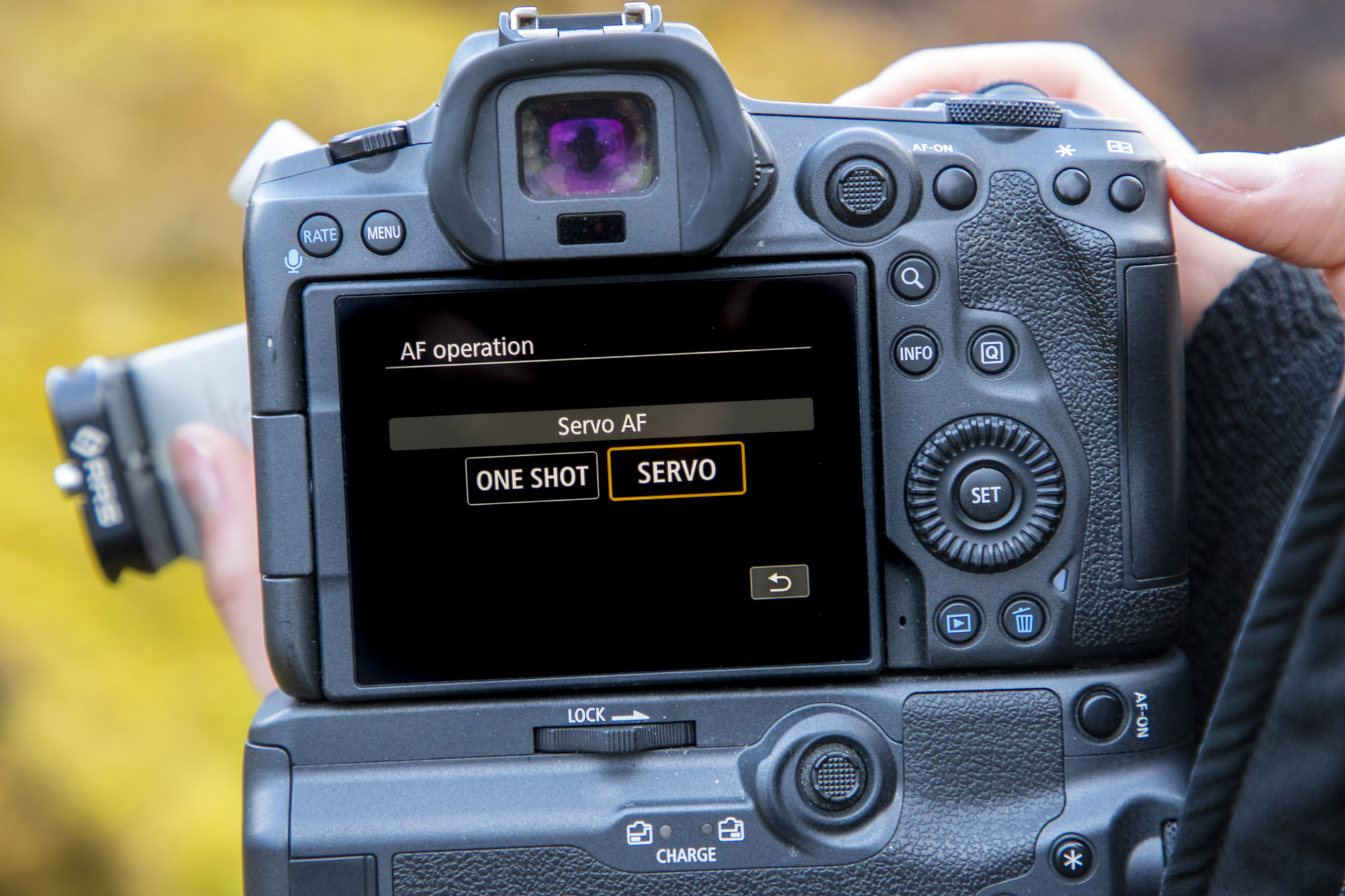
- One-Shot AF: Designed for subjects that stay still
- Servo AF: Designed for moving subjects
- Single AF point: Gives you direct control over the focus area
- Zone AF: Uses a group of focus areas
- Automatic selection: Lets the camera choose from a wider area
For a still object, One-Shot AF can work well. For a runner, pet, or bird, Servo AF is usually more suitable.
Phase detection and contrast detection
Phase detection estimates the direction and amount of focus movement. It can be fast because the camera knows whether the lens is focused in front of or behind the subject.
Contrast detection checks whether edges look sharp. It can be accurate, but it may need to move the lens back and forth to find the sharpest point.
Many current Canon mirrorless cameras combine advanced on-sensor phase detection with subject recognition. Older cameras and some compact models may use different systems.
Why autofocus may fail
Autofocus can struggle when:
- The scene is very dark
- The subject has little contrast
- The subject is behind a fence or glass
- The subject moves unpredictably
- The focus area is placed on the wrong object
- The lens is too close to the subject
- The camera is set to an unsuitable autofocus mode
If focus misses, first move the focus area onto a clear edge or high-contrast detail. Then check the AF mode and tracking settings before changing more complex options.
How does a Canon camera record video?
Canon cameras record video by capturing a sequence of still frames at a chosen frame rate.
Common frame rates include 24, 30, and 60 frames per second in the United States. Video standards and available settings vary by camera model and recording mode.
The camera must manage several tasks at once:
- Read the sensor
- Focus the lens
- Control exposure
- Process the image
- Compress the video
- Write data to the memory card
- Manage heat and battery use
Frame rate and shutter speed
A common starting point is to set the shutter speed near twice the frame rate. For example, video recorded at 30 frames per second may use about 1/60 second. This creates a level of motion blur that often looks natural.
This is a guideline, not a rule. Bright outdoor scenes may need a neutral-density filter if you want to keep a wide aperture and a preferred shutter speed.
Video autofocus
Servo autofocus can keep adjusting focus during recording. Face and eye detection can help with people, but focus may still shift if another object crosses the frame.
Manual focus can be useful when the camera must stay focused at a fixed distance. It also avoids unwanted focus changes during a shot.
File size and card speed
High-resolution video and high frame rates create large files. A memory card must meet the camera’s speed and capacity requirements.
Check the specific Canon manual before recording important work. A card that works for still photos may not support every video mode.
What is the difference between Canon RAW and JPEG files?
A JPEG is a processed and compressed image. A RAW file keeps more sensor information for editing.
JPEG files
JPEG files are:
- Smaller
- Easy to share
- Ready to view
- Processed by the camera
- Less flexible for major exposure changes
RAW files
RAW files are:
- Larger
- Better suited to detailed editing
- More flexible for recovering some highlight and shadow detail
- Dependent on compatible editing software
- Not usually ready for direct sharing
RAW does not fix poor focus, severe motion blur, or badly clipped highlights. It gives you more editing room, not unlimited recovery.
Many photographers use RAW when they plan to edit and JPEG when they need quick delivery. Some Canon cameras can record both at once, but this uses more storage space.
What do Canon camera modes mean?
Canon shooting modes change how much control the camera gives you.
| Mode | What you control | Useful for |
|---|---|---|
| Auto | Little or nothing | Quick snapshots |
| Program AE | ISO and other settings, with automatic exposure pairs | General shooting |
| Aperture Priority | Aperture | Portraits and depth of field |
| Shutter Priority | Shutter speed | Sports and motion |
| Manual | Aperture and shutter speed | Full control and consistent exposure |
| Bulb | Exposure length beyond normal limits | Long exposures, model dependent |
Aperture Priority
Aperture Priority is often a good bridge from automatic to manual control. You choose the aperture, and the camera selects a shutter speed.
Watch the shutter speed as light falls. If it becomes too slow, raise ISO or open the aperture.
Shutter Priority
Shutter Priority helps when motion matters most. You choose the shutter speed, and the camera selects the aperture.
If the lens reaches its widest aperture and the scene is still too dark, the image may be underexposed. The camera may also flash an exposure warning.
Manual mode
Manual mode gives direct control over aperture and shutter speed. Auto ISO can still be used on some Canon cameras if you want manual control of motion and depth of field while letting the camera manage sensitivity.
Manual mode is useful when the light stays stable or when you need several images to have the same exposure.
How do you take a first photo with a Canon camera?
Follow these steps for a basic test.
- Charge the battery and insert it correctly.
- Insert a compatible memory card and format it in the camera if it is new or has been used in another device. Back up important files first.
- Attach a compatible lens with the camera turned off.
- Remove the front lens cap.
- Set the mode dial to Auto, P, Av, or A, depending on your camera.
- Turn on autofocus on the lens if you want the camera to focus.
- Look through the viewfinder or use the screen.
- Place the focus area over your subject.
- Press the shutter button halfway to focus and measure exposure.
- Press the button fully to take the photo.
- Review the image on the screen.
- Check focus and brightness, then adjust the composition or settings.
A successful test photo should save to the card, show the intended subject, and display useful exposure information during playback.
If the camera does not take a photo, check the battery, card, lens connection, focus mode, card lock switch, and any self-timer setting. If the camera reports an error or becomes unusually hot, stop using it and consult the manual or Canon support.
What affects Canon image quality?
Image quality depends on the whole system, not just the camera body.
The largest factors are often:
- Focus accuracy
- Shutter speed
- Lens quality
- Light direction and softness
- Exposure
- ISO
- Camera movement
- Subject movement
- File type
- Editing technique
A costly camera can still produce a soft image if the shutter speed is too slow. A basic Canon camera can produce a sharp image when the light, focus, lens, and settings work together.
Dynamic range
Dynamic range describes how much detail a camera can record from dark areas to bright areas in one image.
A scene with a bright sky and dark foreground may exceed the sensor’s range. You may need to:
- Change the angle
- Use a graduated filter
- Expose for the highlights
- Combine multiple exposures
- Add light to the foreground
Image stabilization
Some Canon lenses include optical image stabilization. Some Canon camera bodies also include in-body image stabilization.
Stabilization can reduce blur caused by camera movement at slower shutter speeds. It does not stop a moving person, animal, or vehicle from creating motion blur.
Lens compatibility
Canon lens mounts are not interchangeable in every direction.
- EF lenses were made for many Canon DSLR cameras.
- EF-S lenses were made for Canon APS-C DSLR cameras.
- RF lenses were made for Canon EOS R mirrorless cameras.
- RF-S lenses were made for Canon APS-C EOS R mirrorless cameras.
Adapters can allow some older lenses to work on newer bodies. Compatibility depends on the mount, camera, lens, adapter, autofocus support, and lens features. Check the exact Canon compatibility information before buying or attaching equipment.
Common mistakes when using a Canon camera
Using a slow shutter speed
A photo may look sharp on the camera screen but appear blurry at full size. Raise the shutter speed, use stabilization, or support the camera.
Choosing the wrong focus area
The camera may focus on a nearby object instead of the subject. Use a smaller focus area or place the focus point carefully.
Expecting ISO to add real light
ISO brightens the recorded signal. It cannot restore detail that the sensor never received.
Blocking the lens or flash
A finger, strap, filter, or lens cap can partly block the image. Check the front of the lens before troubleshooting the camera.
Ignoring exposure warnings
Blinking highlights may show areas with little or no recoverable detail. Use the histogram and highlight warnings when the scene has strong contrast.
Removing dust incorrectly
Do not touch the sensor with a finger or use household air. Use only cleaning tools and methods approved for your camera, or ask a qualified camera service center for help.
Formatting the wrong card
Formatting erases files. Copy photos to a computer or backup drive first. Then format the card in the camera when appropriate.

Frequently asked questions
Does a Canon camera need a lens to work?
A Canon interchangeable-lens camera needs a compatible lens to form a normal image. The camera may turn on without a lens, and some models can take photos with certain release settings enabled, but no useful image will form without suitable optics.
Why does my Canon photo look dark?
The exposure may be too low, the subject may be backlit, or the camera may be metering a bright part of the scene. Try positive exposure compensation, a wider aperture, a slower shutter speed, or a higher ISO. Check the shutter speed before using a slower setting handheld.
Why is my Canon camera not focusing?
The camera may be in the wrong autofocus mode, the focus point may be over a low-contrast area, the lens may be set to manual focus, or the subject may be too close. Check the lens switch, move the focus point, add light, and consult the manual for the model-specific minimum focus distance.
Is mirrorless better than a Canon DSLR?
Neither is always better. A Canon mirrorless camera may offer a live exposure preview, electronic viewfinder, and newer subject-detection features. A DSLR may offer an optical viewfinder and longer battery life during viewfinder use. The better choice depends on your subjects, lenses, budget, and preferred controls.
Can a Canon camera take photos without a memory card?
Some Canon cameras may allow limited operation without a card, depending on settings. They cannot save normal photos permanently without storage. Check the camera’s release and card settings before an important shoot.
How can I learn my exact Canon camera?
Find the model name on the camera body, battery compartment, or startup screen. Then download the matching manual from Canon USA Support. Menus, autofocus features, file formats, card limits, and lens compatibility can differ greatly between models.
Conclusion
A Canon camera works by collecting light through a lens, controlling that light with the aperture and shutter, recording it on a sensor, processing it with a DIGIC processor, and saving the result as a file.
To use one well, learn three controls first:
- Aperture controls light and background blur.
- Shutter speed controls exposure time and motion blur.
- ISO controls signal amplification and image noise.
Start with Aperture Priority or Program mode. Review your photos at full size. Pay close attention to focus and shutter speed. Once those basics feel familiar, move to Manual mode and adjust the camera to match the scene rather than relying on guesswork.

Everett Ashford is a tech reviewer at mytechgrid.com specializing in SSDs, cameras, TVs, earbuds, headphones, and other consumer electronics. He provides honest, data-driven reviews based on hands-on testing and real-world performance analysis. Everett simplifies complex tech details to help readers make smart, confident buying decisions.