Most Bluetooth headphones are found by checking their last connected location, using a tracking app, or following Bluetooth signal clues.
Losing Bluetooth headphones is frustrating, especially when they were just in your hand. I have tested several recovery methods with earbuds, over-ear sets, Android phones, and iPhones, and the best approach depends on whether the headphones are powered on, charged, and still within Bluetooth range. This guide explains how to find your Bluetooth headphones step by step, including what to do when the battery is dead or the headphones are inside their charging case.
Check the Last Place You Used Your Headphones
The fastest way to find your Bluetooth headphones is to retrace your recent movements. Think back to the last moment you used them, not the last moment you remember seeing them.
Start with places where headphones often disappear:
• Bedside tables and nightstands
• Desk drawers and office chairs
• Coat pockets and backpack compartments
• Car seats and center consoles
• Gym bags and lockers
• Couch cushions and blankets
• Kitchen counters and bathroom shelves
• Laundry baskets and jacket pockets
Walk through your recent routine in reverse order. Check each place slowly. Small earbuds can blend into dark fabric, carpet, or furniture.
When I help troubleshoot a missing pair, I often find that the owner searched the room but skipped the items they carried. Empty every pocket, open every bag, and check under loose clothing. A phone flashlight can help because its angled beam makes small earbuds easier to spot.
See If Your Phone Still Detects the Headphones
Your phone can tell you whether the headphones are nearby and powered on. It cannot always show the exact location, but a live Bluetooth connection is a useful clue.
On an iPhone
Open Settings, then select Bluetooth. Look for your headphones under My Devices.
If the status says Connected, the headphones are close enough for your iPhone to communicate with them. Play audio at a safe volume, then listen in quiet areas such as under furniture, inside a car, or between couch cushions.
If the headphones show Not Connected, they may be out of range, switched off, inside a closed charging case, or out of battery.
On an Android phone
Open Settings, choose Connected Devices or Connections, and select Bluetooth. The exact menu name can vary by phone brand and Android version.
Look for the headphones in the list of paired devices. A Connected label suggests they are close and active. If the phone shows a saved device but cannot connect, move slowly around the area while checking for a connection.
Bluetooth range is often about 30 feet in open space, but walls, metal, furniture, and other wireless signals can reduce it. Treat Bluetooth as a proximity clue rather than a precise GPS tool.
Use the Headphone Brand’s Tracking App
Many modern headphones work with a brand app that can show the last known location or play a sound. This is often the most reliable way to find your Bluetooth headphones when the model supports tracking.
Common examples include:
• Apple Find My for compatible AirPods and Beats models
• Google Find My Device for supported earbuds
• Samsung SmartThings Find for Galaxy Buds
• Bose app features for some Bose headphones
• Sony and JBL apps for selected models
Open the correct app and check the map or device list. You may see the last location where the headphones connected to your phone. This location is helpful, but it may not be live.
A last known location means the app recorded where the headphones were connected. It does not prove they are still there. Someone may have moved them, or the location may reflect your phone rather than the headphones themselves.
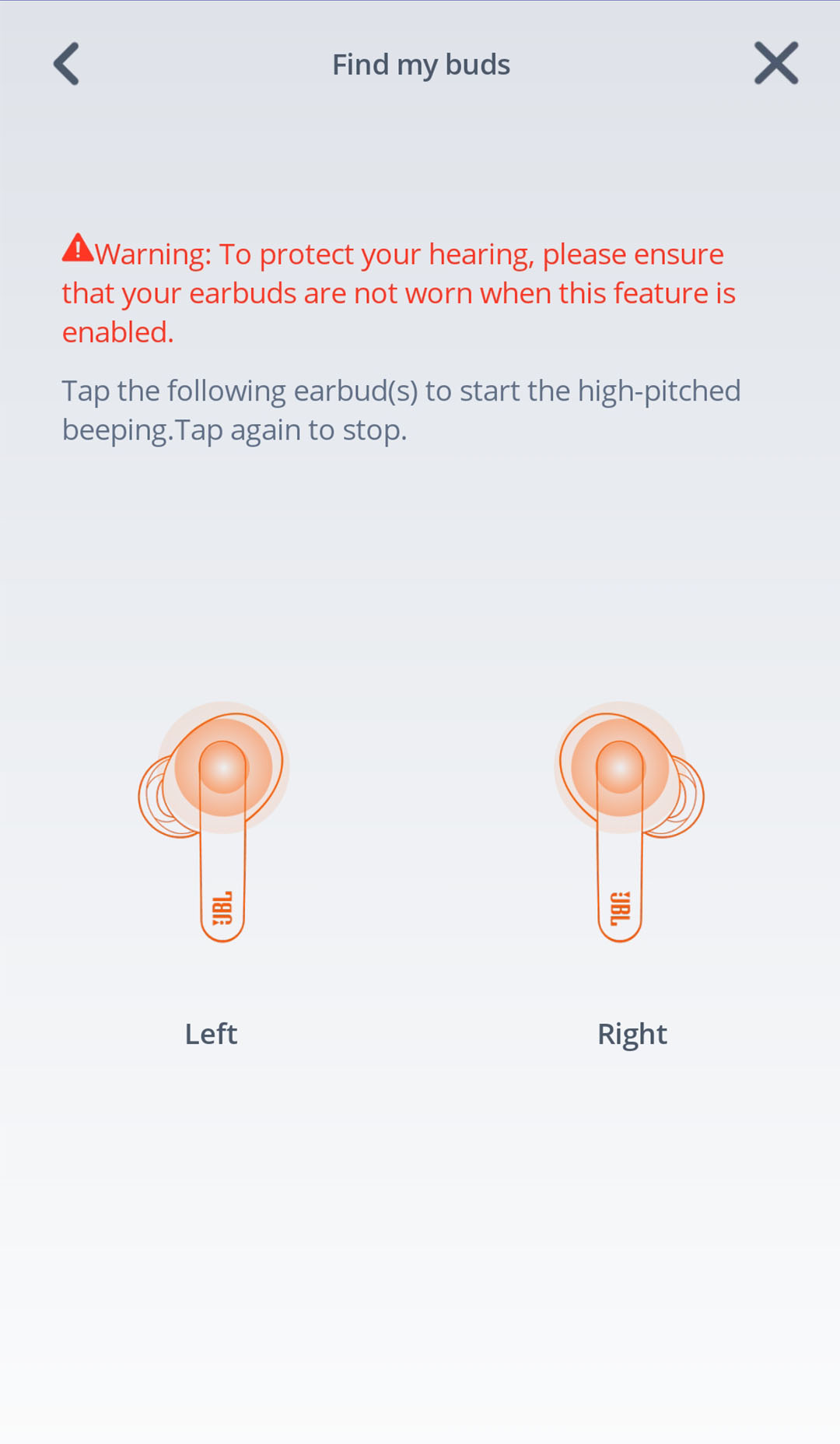
If the app offers a Play Sound option, use it only when the headphones have enough battery and are not sealed inside the case. Start with a low volume and listen carefully. Some earbuds make a short tone, while others play a louder repeating sound.
Try a Bluetooth Finder App
A Bluetooth finder app can help locate headphones that are still broadcasting a signal. These apps measure signal strength as you move closer or farther away.
The basic process is simple:
- Install a trusted Bluetooth scanner from your phone’s official app store.
- Turn on Bluetooth and location services if the app requests them.
- Open the scanner and identify your headphones by name.
- Walk around the room slowly.
- Move toward a stronger signal.
- Check drawers, bags, furniture, and nearby rooms.
Signal strength is not a perfect distance meter. A strong reading can still pass through a wall, while metal or thick furniture can weaken the signal. Use the result like a warm-and-cold game: stronger usually means closer, and weaker usually means farther away.
Avoid apps that ask for unrelated personal data or make unrealistic promises. A Bluetooth scanner cannot find headphones that are turned off, out of range, or completely dead.

Make the Headphones Play Sound
If your headphones are connected, playing sound is one of the simplest ways to find your Bluetooth headphones. Choose a steady sound instead of music with soft parts.
You can use:
• A ringtone
• A loud podcast
• An alarm sound
• A spoken navigation command
• A test tone from a trusted app
Raise the volume carefully. Do not place earbuds in your ears while testing, because a loud sound can cause discomfort or hearing damage.
Search one area at a time. Turn off the television, fan, and other noise sources. Pause after each sound so you can listen for a faint tone under cushions or clothing.
Some earbuds cannot play sound when they are inside their charging case. In that situation, the phone may show the case location only if the model has special tracking hardware. Otherwise, you must rely on the last known connection and a physical search.
:max_bytes(150000):strip_icc()/BluetoothPairingAndroid-6349b2b6c2eb4635acb84b5ea943778e.jpg)
Find Headphones That Are Offline or Dead
Learning how to find your Bluetooth headphones is harder when they are offline. Bluetooth tracking needs power, so a dead battery stops live connections and sound alerts.
Use these steps:
- Check the last known location in the brand app.
- Revisit every place where the headphones connected.
- Search all bags, pockets, and cases.
- Look beneath furniture and inside car seats.
- Ask anyone at home whether they moved them.
- Check lost-and-found areas if you used them in public.
- Review your day using photos, messages, receipts, or calendar events.
If the headphones were lost outside your home, contact the store, gym, workplace, airport, or transit office as soon as possible. Give staff the brand, color, model, and case description.
Do not depend on a map pin as proof of an exact location. GPS data may come from your phone, the charging case, or the last connection point. It can also be delayed.

Search the Charging Case and Small Spaces
Earbuds often become separated from their charging case. Search both items as separate objects.
Check:
• Between mattress edges and bed frames
• Under car seats and floor mats
• Inside cup holders
• Between couch cushions
• In hoodie pockets
• Inside reusable shopping bags
• Under desks and filing cabinets
• Near charging cables and power outlets
Use a flashlight held close to the floor. Change your viewing angle as you search. A white earbud may reflect light, while a black earbud may disappear in shadow.
A useful method is to divide the room into small zones. Search one zone completely before moving to the next. This prevents repeated searching and helps you remember which areas are already clear.
In my own testing, rushed searches caused the most mistakes. People often scan a room from standing height, even though earbuds usually fall below eye level. Kneeling down and checking edges can make a major difference.

Check Whether Someone Else Moved Them
Headphones may not be lost at all. A family member, coworker, roommate, or child may have moved them to a safe place.
Ask simple questions:
• Did you see my headphones near the couch?
• Did you move anything from the desk?
• Did you find earbuds in the car?
• Did you put a small case somewhere for safekeeping?
Also check shared charging areas. Someone may have plugged the headphones in or placed them beside another electronic device.
If you lost them at work or school, ask reception, security, cleaning staff, or the lost-and-found desk. Describe the exact color and case shape. “Black earbuds” may not be enough, but “black earbuds in a blue silicone case” is more useful.
Use a Physical Search Plan
A planned search is more effective than walking around and hoping to notice the headphones. Start with the most likely location and expand outward.
Follow this order:
- Check your clothes and pockets.
- Search the bag you carried.
- Inspect your desk, bed, couch, and charging area.
- Check the car and places you visited.
- Use Bluetooth detection in the likely rooms.
- Review the last known location.
- Contact lost-and-found services.
Keep your phone connected to Bluetooth during the search. If the headphones connect suddenly, stop moving and listen for sound.
Mark each searched area mentally or with a short note. This may seem excessive, but it prevents the common mistake of checking the same cushion five times while ignoring the laundry room.
Understand the Limits of Bluetooth Tracking
Bluetooth is useful, but it is not the same as GPS. Most Bluetooth headphones do not have their own GPS chip. They usually depend on a nearby phone, a tracking network, or a brand app.
Several factors affect tracking:
• Battery level
• Distance from your phone
• Walls and floors
• Metal objects
• Headphone model
• Charging case design
• Phone permissions
• App settings
• Recent connection history
Some tracking systems use a network of nearby devices to report a compatible product’s location. This can help in public places, but it may not work in quiet areas with few participating devices.
Privacy settings also matter. If Bluetooth, location access, or background app permissions are disabled, the tracking record may be incomplete. Check these settings before you lose your headphones, not after.
Prevent Losing Your Bluetooth Headphones Again
Once you find your Bluetooth headphones, create one storage habit. A fixed location works better than relying on memory.
Try these habits:
• Keep the headphones in the same case after every use.
• Store the case in one pocket of your bag.
• Turn on Find My or the brand’s tracking feature.
• Charge the headphones before leaving home.
• Add a bright case or visible keychain.
• Avoid placing earbuds on beds, couches, or clothing.
• Name the headphones clearly in your Bluetooth settings.
• Check the last known location feature before traveling.
A bright case does not improve tracking technology, but it makes physical searches easier. A small colored tag can also help you identify the case quickly in a crowded bag.
The best prevention is consistency. Think of the case as a parking space for your headphones. If they always return to the same place, losing them becomes far less likely.
Frequently Asked Questions About How to Find Your Bluetooth Headphones
Can I find Bluetooth headphones if they are turned off?
Usually, you cannot track them live when they are powered off or have a dead battery. You can still check the last known location, retrace your steps, and search likely places.
Can I find my Bluetooth headphones without a tracking app?
Yes, you can check your phone’s Bluetooth settings and see whether the headphones connect nearby. You can also search manually, play audio if they connect, and use a trusted Bluetooth scanner.
How far away can Bluetooth headphones be found?
Bluetooth often works up to about 30 feet in open space, but walls and objects can reduce that distance. The real range depends on the headphone model, phone, battery, and surroundings.
Can I track earbuds inside their charging case?
It depends on the model. Some newer products can report the case or earbud location, while many standard cases block communication or do not include tracking hardware.
Why do my headphones show a last known location?
The app records the place where the headphones last connected to your phone or a compatible tracking network. The headphones may still be there, but the map does not guarantee their current location.
Can someone else connect to my lost Bluetooth headphones?
A person may be able to connect if the headphones are in pairing mode and nearby. Many headphones reconnect automatically to the last paired device, but Bluetooth security varies by model.
Conclusion
The most effective way to find your Bluetooth headphones is to combine technology with a careful physical search. Check the last known location, review your phone’s Bluetooth list, use the manufacturer’s tracking app, follow signal strength, and search pockets, bags, cars, furniture, and charging areas.
Remember that Bluetooth is a clue, not a perfect map. Tracking may fail when the headphones are out of range, inside a case, switched off, or out of battery. Once you recover them, enable tracking and choose one storage place so the next search is much easier. Explore your headphone brand’s tracking options today, and share your best finding tip in the comments.

Everett Ashford is a tech reviewer at mytechgrid.com specializing in SSDs, cameras, TVs, earbuds, headphones, and other consumer electronics. He provides honest, data-driven reviews based on hands-on testing and real-world performance analysis. Everett simplifies complex tech details to help readers make smart, confident buying decisions.