Clean connections, replace broken wires, and reset Bluetooth; test each step until sound returns.
I’ve fixed dozens of earbuds for friends and clients. I know common failures, safe repair steps, and when to stop and replace parts. This guide will walk you through how to fix a earbud step by step, whether it’s wired or wireless. Read on for practical tips, simple tools, and troubleshooting tricks you can trust.
Common earbud problems and why they happen
Earbuds fail in a few predictable ways. Knowing the cause makes repair faster. Here are common problems you will see when learning how to fix a earbud.
- Audio plays only on one side.
- Usually a broken wire, dirty jack, or balance settings.
- No sound at all.
- Could be a dead battery, loose connection, or internal damage.
- Intermittent sound or crackling.
- Often a frayed cable or dirty contacts.
- Microphone not working.
- Faulty inline controls or damaged mic element.
- Bluetooth pairing issues.
- Software glitches, low battery, or firmware errors.

Tools, parts, and safety you need
Prepare simple gear before you try to fix a earbud. Use safe, low-cost items and avoid risky methods.
- Tools to have
- Small Phillips screwdriver or Torx driver for cases.
- Precision tweezers.
- Soldering iron with a fine tip (if you plan to solder).
- Multimeter for continuity checks.
- Cotton swabs and isopropyl alcohol for cleaning.
- Replacement wires, earbuds tips, or driver units as needed.
- Safety tips
- Work in bright light and a clean space.
- Use low heat when soldering to avoid melting plastic.
- Disconnect power and fully dry parts before testing.
- Wear eye protection for soldering work.

Step-by-step: How to fix a wired earbud
Wired earbuds often fail at the cable or jack. Follow these steps to diagnose and repair.
- Check the source
- Try the earbud with another phone or player.
- Test another headset on the same device to rule out device issues.
- Inspect the cable and jack
- Look for visible cuts, kinks, or exposed wires.
- Wiggle the cable near the plug and earpieces to find dead spots.
- Clean the jack and connectors
- Use compressed air or a cotton swab lightly moistened with isopropyl alcohol.
- Clean both the device jack and earbud plug.
- Test continuity
- Use a multimeter set to continuity.
- Check left, right, and ground wires by probing plug terminals and driver leads.
- Repair or replace the cable
- If a break is near the plug, cut, strip, and resolder new connections.
- Use heat-shrink tubing to protect splices.
- If the cable is frayed along the length, replacing the cable can be easiest.
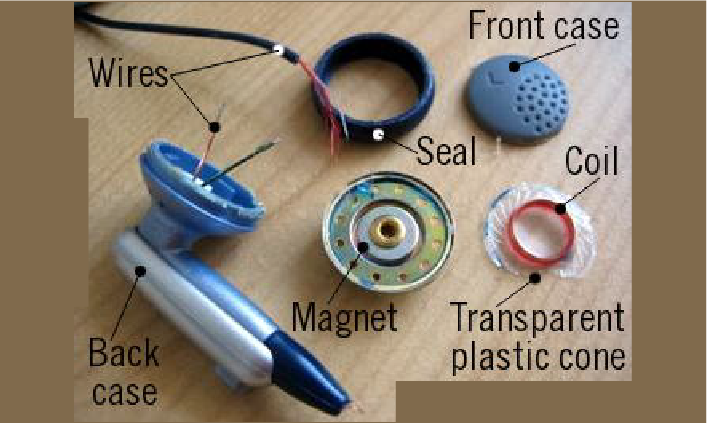
- Replace drivers if needed
- Open the housing carefully.
- Swap the tiny driver unit if you have a compatible replacement.
Personal tip: I once fixed a pair by resoldering a broken left channel near the plug. The fix took 20 minutes and saved a good pair of earbuds.
Step-by-step: How to fix a wireless earbud
Wireless earbuds add batteries and electronics. You can still fix many issues at home.
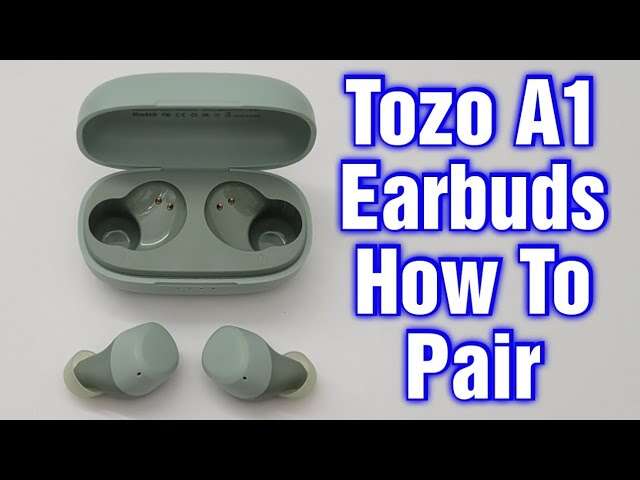
- Soft reset and firmware
- Turn earbuds off, reset them, and update firmware if available.
- This often fixes pairing and sound issues.
- Check battery and charging case
- Clean charging contacts in case and earbuds.
- Try different USB cables and power bricks.
- Replace the case battery only if you are experienced.
- Clean and inspect earbuds
- Remove ear tips and clean mesh grills with a soft brush.
- Use isopropyl alcohol on a swab to remove earwax deposits.
- Test each earbud independently
- Place one earbud into the case and connect the other to test.
- Swap sides in your app if it supports channel swapping.
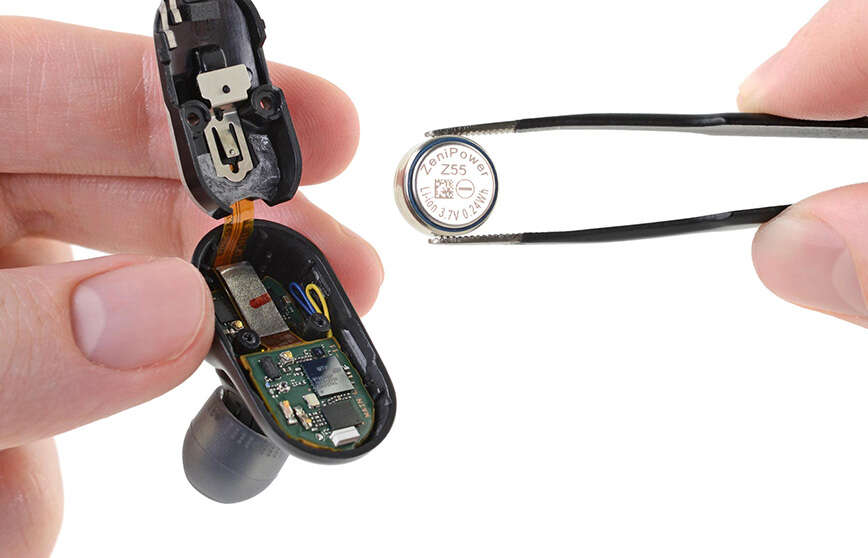
- Repair internal wiring or replace battery
- Open the shell only if you have small tools and steady hands.
- Reconnect tiny wire ribbons or replace micro-batteries if feasible.
- Seek pro help for complex faults
- If the amp or Bluetooth module fails, professional repair or replacement is usually best.
I once revived a dead wireless earbud by cleaning corrosion on the contact pins. It sounded like new after careful cleaning and a reset.

Cleaning, maintenance, and prevention
Good care prevents many fixes. Clean and store earbuds to extend life.
- Daily care
- Wipe tips and body with a dry cloth after use.
- Avoid wrapping cables tightly around devices.
- Weekly cleaning
- Remove foam or silicone tips and wash them in mild soapy water.
- Dry fully before reassembly.
- Monthly check
- Inspect the cable near the plug and earpiece for wear.
- Open the case and clean charging contacts with isopropyl alcohol.
- Storage tips
- Store earbuds in the case or a soft pouch.
- Avoid leaving them in very hot or humid places.

When to replace parts or get professional help
Some fixes are simple. Others are better left to specialists.
- Replace parts if
- The driver is blown and replacements are available.
- Wires are frayed beyond simple splicing.
- The battery no longer holds charge.
- Seek pro repair when
- The device is under warranty; you risk voiding it by opening.
- The Bluetooth module or board is damaged.
- You lack soldering skills for micro-solder work.
- Cost vs value
- If repair costs approach half the price of new earbuds, buy new.
- High-end earbuds are often worth professional repair.
Troubleshooting checklist: Quick steps to try first
Use this checklist when you need a fast fix for how to fix a earbud.
- Try another device to isolate the problem.
- Swap left and right to see if the fault follows a cable.
- Clean plugs, jacks, and mesh screens.
- Reset wireless earbuds and update firmware.
- Check battery level and charging case function.
- Use a multimeter to find broken wires.
- Replace tips and test sound with fresh tips.

Real-life advice from my repairs
I fix earbuds as a side skill and have learned a few useful lessons.
- Start simple
- Always try cleaning and software resets first.
- Keep spares
- Stock tiny screws, heat-shrink, and spare tips.
- Practice soldering on scrap cables
- If you plan to repair often, practice on cheap headphones.
- Know when to stop
- I avoid opening water-damaged earbuds unless I have replacements ready.
- Backups matter
- I keep an inexpensive spare pair to avoid panic when a favorite pair fails.
Frequently Asked Questions of how to fix a earbud
Why does my earbud only play in one ear?
This usually means a broken wire, a loose solder joint, or a dirty audio jack. Test with another device and check continuity if you can.
How can I clean earbud mesh without damaging it?
Use a dry soft brush and a cotton swab dampened with isopropyl alcohol applied lightly. Avoid pushing debris deeper into the mesh.
Can I fix a wireless earbud battery myself?
Small coin-cell batteries or micro batteries can be replaced if you have skill and the part. Many earbuds have glued shells, so professional help is often safer.
Is it worth repairing cheap earbuds?
Often not. If repair cost or time is close to buying new ones, replacement is the smarter choice. Fixing cheap pairs is good practice but may not save money.
How do I test if a wire inside the cable is broken?
Use a multimeter set to continuity and wiggle the cable while testing left, right, and ground lines. Breaks show as open circuits when bent.
Conclusion
You can fix many common earbud faults with simple tools, careful cleaning, and methodical testing. Start with checks that require no special skills: clean parts, try resets, and test with other devices. If you need to splice wires or replace parts, work slowly and use the right tools. Take small steps, and know when a professional repair or replacement is the best choice. Try the steps in this guide, share your success, or ask a question below — and consider subscribing for more practical repair tips on how to fix a earbud.

Jamie Lee is a seasoned tech analyst and writer at MyTechGrid.com, known for making the rapidly evolving world of technology accessible to all. Jamie’s work focuses on emerging technologies, product deep-dives, and industry trends—translating complex concepts into engaging, easy-to-understand content. When not researching the latest breakthroughs, Jamie enjoys exploring new tools, testing gadgets, and helping readers navigate the digital world with confidence.