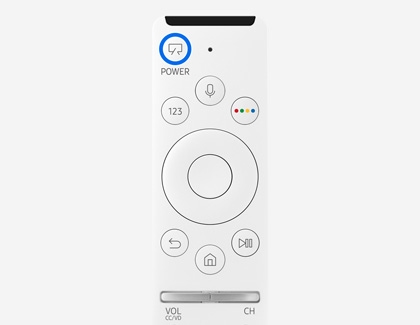
Press and hold the Power button on your Samsung Frame TV remote until the screen turns completely black.
Learning how to turn off Frame TV models can feel confusing because a quick press often activates Art Mode instead of shutting the television down. This guide explains the correct remote, app, and manual methods, plus simple settings that help your TV stay off when you want it to.
How to Turn Off Frame TV With the Remote
The easiest way to turn off Frame TV models is to use the Samsung SolarCell or One Remote that came with the television. The key is to press and hold the Power button, not tap it.
Follow these steps:
- Point the remote toward the TV.
- Press and hold the Power button.
- Keep holding it for about two to three seconds.
- Release the button when the screen turns black and Art Mode stops.
On many Samsung The Frame models, a short press of the Power button switches between regular TV viewing and Art Mode. A long press fully turns off the TV.
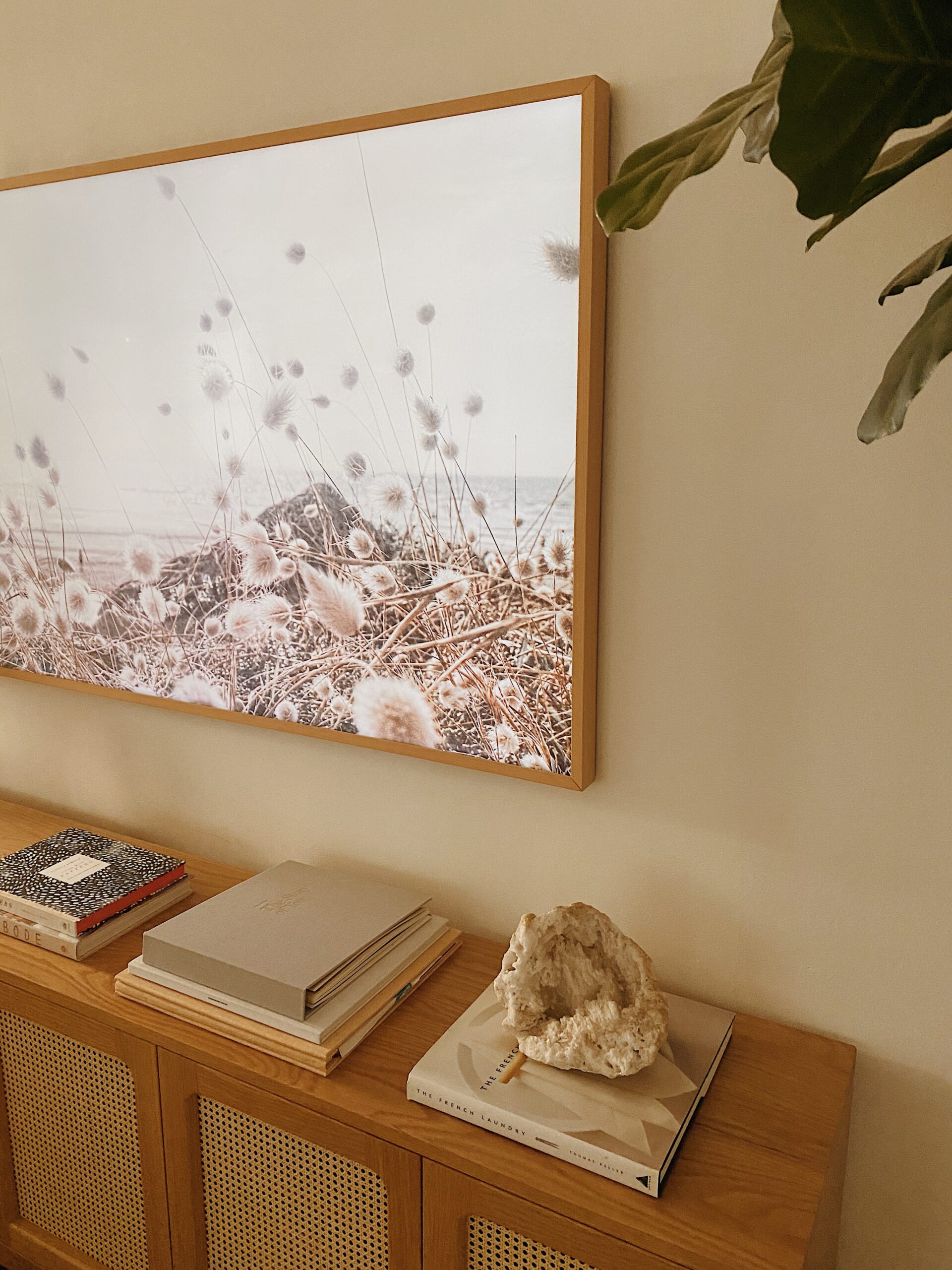
This design helps The Frame look like real wall art when it is not being used. However, it also causes confusion for new owners. If you only tap the button, the TV may appear to stay on because it changes to an artwork display.

Why a Quick Press May Not Turn Off The Frame TV
Samsung The Frame is built to display artwork instead of showing a plain black screen. Because of this feature, the Power button can have two different functions.
A quick press usually does one of these things:
• Switches from TV mode to Art Mode
• Returns from Art Mode to the last TV channel or input
• Activates the screen when the TV is in standby
A press and hold usually turns the television off completely. The exact behavior can vary slightly by model year, remote type, and software version.
If your TV shows artwork after you press Power, it is not necessarily broken. It is likely in Art Mode. The screen may still use electricity, connect to the network, and respond to motion or light sensors.
Think of Art Mode as a picture frame with a screen inside. It looks inactive, but the display is still working. Full power-off mode is different because the screen stops displaying an image.

How to Turn Off Frame TV Using the SmartThings App
You can also control The Frame through Samsung SmartThings. This method is useful when the remote is missing, the batteries are dead, or the TV is mounted in a hard-to-reach place.
To turn off Frame TV through SmartThings:
- Open the SmartThings app on your phone.
- Select your Frame TV from the device list.
- Tap the Power icon.
- Confirm that the screen turns off.
Your phone and TV must be linked to the same SmartThings account. The TV also needs to be connected to Wi-Fi or another active network connection.
The app may show different controls based on your TV model. Some versions let you switch between TV mode and Art Mode, while others only offer basic power control.
If the app cannot find your TV, check these items:
• Make sure your phone and TV use the same Samsung account.
• Confirm that the TV is connected to Wi-Fi.
• Update the SmartThings app.
• Restart the app and try again.
• Check that the TV is not already disconnected from the network.
SmartThings is convenient, but it is not always the fastest option. For daily use, the remote is usually more reliable.

How to Turn Off Frame TV With the TV’s Physical Button
Every Samsung Frame TV has a physical control button. Its location may differ by model, but it is often under the center of the screen or near the lower rear edge.
To use the physical control:
- Find the control button beneath or behind the TV.
- Press it once to open the control menu.
- Move through the menu until you see the power option.
- Select the power option to shut down the TV.
Some models use a small joystick-style button. You may need to press it, move it, or hold it to choose the correct command.
This method works as a backup, but it is less comfortable when the TV is mounted flush against a wall. Avoid pressing hard or reaching behind the panel with a sharp object. The screen is thin, and unnecessary pressure can cause damage.
When I troubleshoot wall-mounted TVs, I recommend using the physical button only when the remote and SmartThings app are unavailable. It is a useful emergency option, not the best everyday method.
How to Turn Off Frame TV From Art Mode
If your Frame TV is already displaying artwork, you can exit Art Mode in several ways. The method depends on whether you want to return to regular TV viewing or shut the television down fully.
To leave Art Mode and return to TV mode:
- Press the Power button once.
- Wait for the television screen to appear.
- Use the Home button if you need to select another input.
To turn off Frame TV completely from Art Mode, press and hold the Power button for a few seconds. The artwork should disappear, and the screen should become fully black.
You can also open the Art Mode menu and look for a power or sleep option. Menu names may change after software updates, so the remote shortcut is usually easier.
If the screen turns black but the TV wakes again, check the motion sensor settings. A person walking by, a change in room light, or a connected device can sometimes wake the display.
How to Keep Frame TV Off Instead of Showing Art
Many owners want The Frame to stay dark when they turn it off. If your TV keeps showing artwork, change the Art Mode settings.
Open the TV settings and look for options related to Art Mode, Display, or Motion Detection. Depending on your model, you may find controls such as:
• Sleep After: Sets a time before the artwork turns off.
• Night Mode: Turns the display off when the room is dark.
• Motion Sensor: Wakes the artwork when movement is detected.
• Brightness: Controls the level of the artwork display.
• Art Mode: Lets you select how the TV behaves when it is not showing regular content.
To reduce unwanted screen activity, try these steps:
- Open the Home menu.
- Select Art Mode.
- Open Art Mode settings.
- Turn off or reduce Motion Detection.
- Enable Night Mode if available.
- Set a short Sleep After time.
The names and choices can differ between Frame TV generations. If you cannot find a setting, use the TV’s search function or check the digital user manual for your exact model number.
Keep in mind that Art Mode and full power-off are not the same. A shorter sleep timer reduces display time, but holding the Power button is still the clearest way to turn off Frame TV completely.

What to Do if The Frame TV Will Not Turn Off
If holding the Power button does nothing, start with simple checks. A weak remote battery is one of the most common causes.
Try the following:
- Replace the remote batteries or charge the SolarCell remote.
- Point the remote directly at the TV.
- Remove objects blocking the TV sensor.
- Press and hold Power for at least three seconds.
- Unplug the TV for about 60 seconds.
- Plug it back in and test the remote again.
- Check for a software update.
If the remote light flashes but the TV does not respond, the remote may need to be paired again. On many Samsung remotes, holding the Return and Play/Pause buttons together for several seconds starts the pairing process. The exact button combination can vary, so check the instructions for your remote.
Do not repeatedly unplug the TV as a normal shutdown method. It is safe as a troubleshooting step when the TV is unresponsive, but regular use is better handled through the remote or TV controls.
You should contact Samsung support or a qualified technician if the TV turns itself back on, shows unusual flashing, smells hot, or fails to respond after a reset. Avoid opening the TV because internal components can hold dangerous electrical charge.
How to Turn Off Frame TV With a Universal Remote
A universal remote can turn off The Frame if it supports Samsung television commands. Program the remote using the correct Samsung code, then test the Power button.
Some universal remotes send only a short Power command. In that case, the TV may enter Art Mode instead of shutting down. Look for a setting that changes the Power command to a long press or full power-off command.
You may also need separate buttons for:
• Power
• Art Mode
• Home
• Source
• Volume
If the universal remote cannot fully control Art Mode, keep the original Samsung remote nearby. The original remote usually provides the most complete control, especially for newer Frame TV models.
This is a common lesson when setting up home theaters: a remote can turn a TV on and off without supporting every special feature. Compatibility does not always mean full functionality.
Should You Unplug The Frame TV?
Unplugging The Frame removes power completely, but it should not be your first choice for everyday use. It can also interrupt software updates, network features, and connected devices.
Unplug the TV only when:
• The television is frozen.
• The remote and physical controls do not respond.
• You need to reset the power system.
• You are leaving home for an extended time.
Before unplugging, turn off the TV normally if possible. Then wait several seconds before disconnecting the power cable.
For longer trips, unplugging the TV can reduce standby power use. However, smart features will not work while the television is disconnected from power.
A power strip with a physical switch can help, but be careful with wall-mounted installations. Make sure the outlet and cable remain easy to reach in an emergency.
Power Use: Art Mode Versus Full Power-Off
Art Mode usually consumes more power than a fully powered-off television because the display remains active. The amount depends on the model, brightness, sensors, network activity, and how long the artwork stays visible.
Samsung designs newer Frame TVs with features that can lower energy use. Brightness sensors and motion detection may dim or turn off the screen when no one is nearby. Still, these features do not always eliminate power use.
For lower energy use:
• Turn off Frame TV fully when you do not need Art Mode.
• Lower the Art Mode brightness.
• Use Night Mode.
• Set a short Sleep After period.
• Disable motion detection in rooms with frequent movement.
• Turn off connected devices that wake the TV.
Energy labels and product specifications provide the most accurate power information for your exact model. Avoid assuming every Frame TV uses the same amount of electricity.
Common Mistakes When Turning Off The Frame TV
The most common mistake is tapping the Power button and assuming the TV is off. On The Frame, that action often switches to Art Mode.
Other mistakes include:
• Holding the button for too little time.
• Using a universal remote with limited Samsung commands.
• Blaming the TV when the remote battery is weak.
• Leaving motion detection enabled in a busy hallway.
• Unplugging the TV after every use.
• Confusing a black artwork image with a fully powered-off screen.
In my experience helping people set up smart TVs, clear button timing solves most Frame TV power problems. Try the long press first, then check Art Mode settings if the display continues to wake.
Also, give the TV a moment to respond. Pressing the Power button many times can create confusing results, especially when the TV is switching between inputs or installing an update.
A Simple Daily Routine for The Frame
Once you know how to turn off Frame TV correctly, daily use becomes simple. Use a short press when you want artwork and a long press when you want the screen fully off.
A practical routine looks like this:
- Watch TV as normal.
- Tap Power once when you want Art Mode.
- Use Art Mode settings to control brightness and sleep time.
- Hold Power for two to three seconds when you want full power-off.
- Use SmartThings only when the remote is unavailable.
This routine gives you control without changing settings each day. It also helps reduce confusion for family members and guests.
If your main goal is to make the television look like framed art, Art Mode is useful. If your goal is to save power or keep the room dark, turn off Frame TV completely.
Frequently Asked Questions About How to Turn Off Frame TV
How do I turn off Samsung The Frame TV completely?
Press and hold the Power button on the Samsung remote for about two to three seconds. A quick press may switch the TV into Art Mode instead of turning it off.
Why does my Frame TV show art when I press the Power button?
A short press often activates Art Mode, which is a key feature of Samsung The Frame. Hold the Power button longer to shut down the display completely.
Can I turn off Frame TV without the remote?
Yes. You can use the SmartThings app or the physical control button on the television. The SmartThings method requires the TV to be connected to your network.
Does Art Mode use electricity?
Yes. Art Mode keeps the display active, so it generally uses more power than a fully powered-off TV. Motion sensors, brightness controls, and sleep timers can reduce its energy use.
How do I stop my Frame TV from turning on by itself?
Check Motion Detection, Night Mode, and connected-device settings in Art Mode. Movement, room light, HDMI devices, or network commands may wake the screen.
Is it safe to unplug The Frame every night?
It is usually better to turn off Frame TV with the remote instead of unplugging it every night. Unplugging is best reserved for troubleshooting, extended absences, or situations where the TV will not respond.
Why will my Frame TV not respond to the Power button?
The remote may have a weak battery, poor pairing, or an obstruction between it and the TV. Replace or charge the remote, try a long press, and restart the TV if it remains unresponsive.
Conclusion
The simplest way to turn off Frame TV models is to press and hold the remote’s Power button for a few seconds. A short press often activates Art Mode, while the SmartThings app and physical TV button offer useful backup options.
If your TV keeps displaying art, adjust Motion Detection, Night Mode, and Sleep After settings. Use full power-off when you want a dark room and lower energy use, and save unplugging for troubleshooting or long periods away.
Try the long-press method today, then explore your Art Mode settings to create the behavior that fits your home.

Everett Ashford is a tech reviewer at mytechgrid.com specializing in SSDs, cameras, TVs, earbuds, headphones, and other consumer electronics. He provides honest, data-driven reviews based on hands-on testing and real-world performance analysis. Everett simplifies complex tech details to help readers make smart, confident buying decisions.