A digital camera looks like a small electronic device with a lens, screen, buttons, and a hand grip.
If you have only seen phone cameras, you may wonder what does a digital camera look like in real life. Most models have a lens on the front, a viewing screen on the back, controls on top, and a battery-powered body. However, the exact shape changes based on the camera type, from tiny point-and-shoot models to large professional cameras with interchangeable lenses.
This guide explains what does a digital camera look like, what each part does, and how to tell one camera style from another. It also covers common features, real-world examples, and simple tips for choosing the right design.

What Does a Digital Camera Look Like?
A digital camera usually looks like a compact box with a lens attached to the front. It has a digital screen on the back instead of film inside, and it stores photos on a memory card or internal storage.
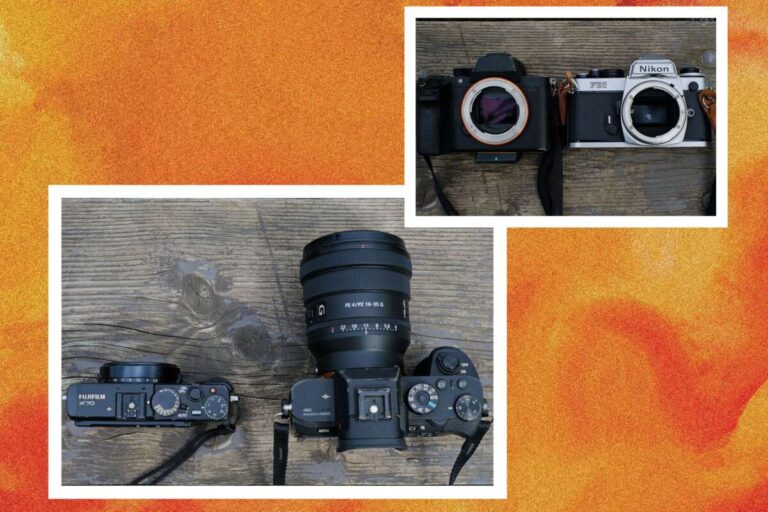
The body may be slim and flat, or it may be large with a deep grip. A basic camera can fit in a pocket, while a professional model may feel closer to a small piece of laboratory equipment.
Most digital cameras include these visible parts:
• Lens: Captures light and creates the image.
• Lens mount: Holds a removable lens on interchangeable-lens cameras.
• LCD screen: Shows photos, menus, and the live view.
• Viewfinder: Lets you look through or at the camera to frame a shot.
• Shutter button: Takes the picture when pressed.
• Mode dial: Changes settings such as portrait, sports, or manual mode.
• Hand grip: Helps you hold the camera steady.
• Flash: Adds light in dark scenes.
• Battery compartment: Holds the rechargeable battery.
• Memory card slot: Stores photos and videos.
The easiest way to understand what does a digital camera look like is to compare it with a small computer built around a lens. The lens gathers light, the sensor records it, and the processor turns it into a digital image.
The Main Types of Digital Cameras
The camera’s shape depends largely on its design and purpose. A camera made for quick family photos looks very different from one built for studio work.
Point-and-shoot cameras
A point-and-shoot camera is small, light, and simple to use. Its lens often extends from the front when the camera turns on. Many models have a built-in flash beside the lens.
The back usually has a large screen and only a few buttons. These cameras are made for travelers, families, and anyone who wants better zoom than a phone without learning complex settings.
DSLR cameras
A DSLR camera has a larger body and a noticeable hand grip. It often has a raised viewfinder housing above the lens. The lens can be removed and replaced with another lens for wide, close, or distant subjects.
When people ask what does a digital camera look like, they often picture a DSLR. Its familiar shape comes from the internal mirror and optical viewfinder system. DSLR models are still useful, though mirrorless cameras now offer a smaller and more modern design.
Mirrorless cameras
A mirrorless camera looks similar to a DSLR but is often thinner and lighter. It does not use the same internal mirror system, so the body can be more compact.
The lens still attaches to the front, and many models include an electronic viewfinder. The back screen may tilt or rotate, which helps with low-angle photos, travel images, and video recording.
Bridge cameras
A bridge camera sits between a point-and-shoot and a DSLR. It has a large fixed lens with a very wide zoom range. The lens cannot be removed, but it can often photograph both a wide landscape and a distant bird.
Its body usually has a large grip, a viewfinder, and many controls. It can look like a DSLR at first glance, but the fixed lens gives it away.
Action cameras
An action camera is very small and often shaped like a short rectangle. It may have one wide lens on the front and a small screen on the rear or side.
These cameras are built for biking, swimming, hiking, and other active use. Their tough body and wide view help record fast movement from unusual angles.
Instant digital cameras
Some instant cameras combine digital features with instant printing. They often have a chunky body, a small lens, a screen, and a paper slot.
They look different from standard digital cameras because they are designed to print a physical photo soon after you press the shutter.

What Does a Digital Camera Look Like From the Front?
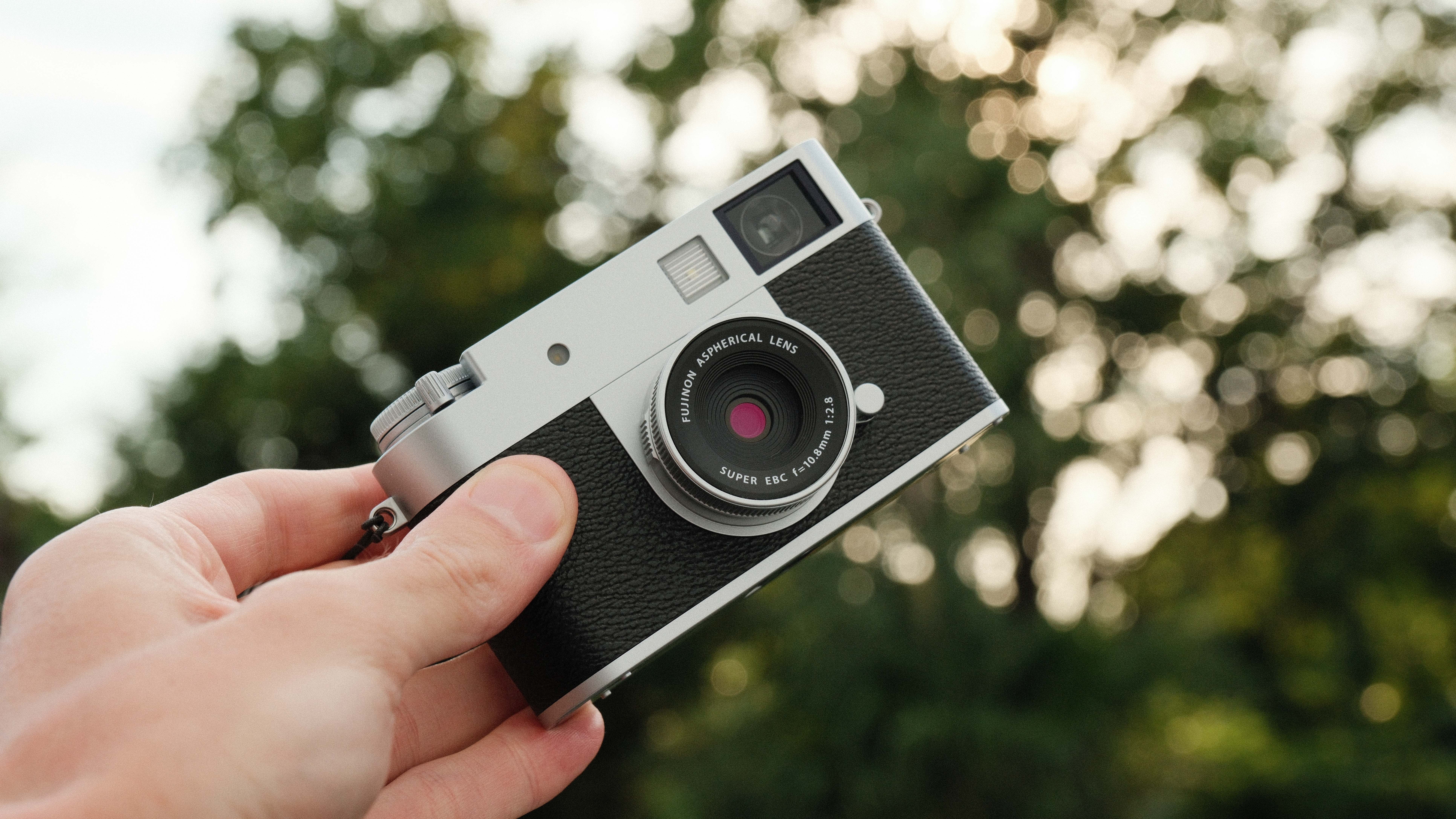
From the front, the lens is usually the most noticeable part. It may be small and flat, or it may be long, wide, and heavy.
A fixed-lens camera has a lens that stays attached to the body. On a DSLR or mirrorless camera, the lens may be wider than the camera body and can be removed by pressing a release button.
The front may also include:
• A built-in flash above or beside the lens.
• A focus-assist light that helps in low light.
• Microphones for recording sound.
• A lens release button on interchangeable-lens models.
• A brand name and model number.
The lens is not just a window. It controls how much of the scene fits into the frame and how much light reaches the image sensor. A wide lens shows more of a room, while a telephoto lens makes faraway subjects appear closer.
A common mistake is to judge a camera only by its body. In practice, the lens often has a greater effect on the camera’s size, weight, and image style.
What Does a Digital Camera Look Like From the Back?
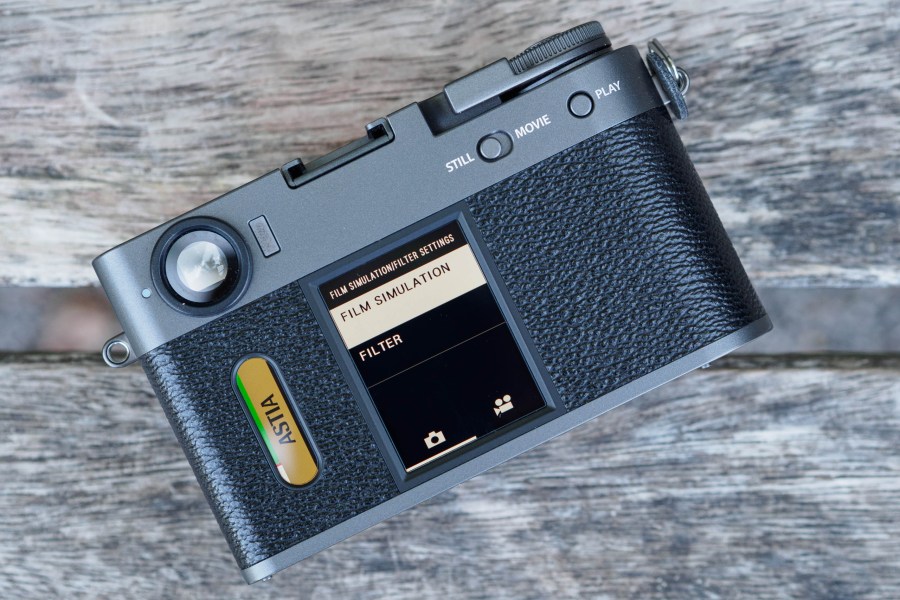
The back of a digital camera usually has a screen surrounded by buttons. The screen displays the scene before you take a photo and shows images after you capture them.
Many cameras use a three-inch LCD screen. Some screens tilt upward, downward, or sideways. This design helps when you hold the camera above your head or close to the ground.
Common rear controls include:
• Menu button: Opens camera settings.
• Playback button: Shows saved photos and videos.
• Direction pad: Moves through menus and images.
• Delete button: Removes unwanted files.
• Magnify button: Zooms in to check focus.
• Control wheel: Changes settings quickly.
• Diopter control: Adjusts the viewfinder for your eyesight.
The screen may be touch-sensitive, much like a phone. However, many serious cameras also keep physical dials and buttons because they are faster to use while wearing gloves or working in bright sunlight.
When learning what does a digital camera look like, remember that the rear controls can vary greatly. A beginner camera may have simple icons, while a professional camera may have many labeled buttons.

What Does a Digital Camera Look Like on Top and Bottom?
The top of a digital camera often contains the shutter button, power switch, mode dial, and control wheel. Larger models may also have a hot shoe for attaching an external flash or microphone.
The shutter button usually sits near the front of the grip. You press it halfway to focus on many cameras, then press it fully to take the photo.
The bottom often contains:
• A tripod socket.
• A battery door.
• A memory card door.
• A label with the camera’s serial number.
The tripod socket is useful for night photos, video, long exposures, and self-portraits. It is usually a small metal thread placed in line with the lens.
Some cameras also have ports on the side. These may include USB, HDMI, microphone, and headphone connections. A rubber cover often protects these ports from dust.
What Does a Digital Camera Look Like Inside?
You cannot see the inside during normal use, but the internal parts explain the camera’s shape. A digital camera contains an image sensor, processor, battery, storage system, and shutter mechanism.
The image sensor is a small electronic panel behind the lens. It receives light and turns that light into digital data. Common sensor sizes include full frame, APS-C, Micro Four Thirds, and smaller compact-camera formats.
The camera processor handles tasks such as:
• Recording image data.
• Applying color and exposure settings.
• Saving photos as JPEG or RAW files.
• Reducing noise.
• Processing video.
• Showing the live image on the screen.
DSLR cameras also contain a mirror that moves during a photo. Mirrorless cameras do not need this mirror. That difference helps explain why mirrorless bodies often look slimmer.
A camera may look simple outside, but its internal system works like a small factory. Light enters through the lens, the sensor records it, and the processor builds the final image.
How Camera Size and Shape Affect Use
Camera design affects comfort, control, and portability. A small camera is easy to carry, but a larger body may offer better grip and longer battery life.
Consider these practical differences:
• Small cameras fit in pockets and bags with little effort.
• Large grips help you hold heavy lenses.
• Bigger buttons are easier to use with cold or wet hands.
• A viewfinder helps you see the scene in bright sunlight.
• A tilting screen makes low and high shots easier.
• Weather sealing can protect the camera from light rain and dust.
During hands-on camera testing, one lesson becomes clear: comfort matters more than appearance alone. A camera may look impressive, but if the grip feels cramped or the buttons are hard to reach, you may avoid using it.
Weight also matters. A heavy body and lens can feel fine for a short walk but tiring during a full day of travel. Before buying, hold the camera if possible and check whether your fingers rest naturally on the grip.
Digital Camera Features You Can Identify by Sight
You can often learn a great deal about a camera without turning it on. Its visible design gives clues about its intended use.
A large lens
A large lens may indicate a strong zoom range, a wide aperture, or a larger image format. It can improve control over depth of field, but it also adds weight and cost.
A viewfinder
A viewfinder helps you frame a shot without relying only on the rear screen. Optical viewfinders are common on DSLRs, while electronic viewfinders are common on mirrorless cameras and bridge cameras.
A hot shoe
A hot shoe is a metal bracket on top of the camera. It allows you to attach a flash, microphone, or other accessory.
A deep grip
A deep grip gives your right hand more support. This is especially useful with large lenses or during long photo sessions.
A rotating screen
A rotating or tilting screen helps with video, portraits, travel photos, and creative angles. It can also make the camera easier to use for people with limited mobility.
Weather protection
Weather-sealed cameras often have covered ports and tight-fitting controls. Sealing does not make a camera waterproof, so you should still avoid heavy rain and submersion.
Digital Cameras Compared With Phone Cameras
A phone camera is built into a thin phone body. Its lens is usually a small circle or square on the back, often joined by two or more lenses.
A standalone digital camera has a separate body, a larger grip, and more direct controls. It may also have a larger sensor and a real optical zoom lens.
Here is a simple comparison:
• Phone camera: Very portable and always connected.
• Point-and-shoot camera: Simple operation with optical zoom.
• Mirrorless camera: Small body with advanced controls and interchangeable lenses.
• DSLR camera: Large body with an optical viewfinder and broad lens choices.
• Bridge camera: Fixed lens with a long zoom range.
Phones use software heavily to improve sharpness, color, and low-light results. Dedicated cameras give the photographer more control over focus, shutter speed, aperture, and lens choice.
Neither option is best for every person. A phone is ideal for quick moments, while a digital camera can offer better handling and more creative control.
What to Check Before Buying a Digital Camera
Understanding what does a digital camera look like can help you choose a model that fits your needs. Do not select a camera based only on megapixels or its appearance.
Use this checklist:
-
Hold the camera to check the grip.
-
Look through the viewfinder if it has one.
-
Test whether the main buttons are easy to reach.
-
Check the screen angle and brightness.
-
Consider the camera and lens weight together.
-
Confirm which memory card it uses.
-
Check battery life and spare battery prices.
-
Review lens availability if the lens is removable.
-
Look for microphone and headphone ports if you plan to record video.
-
Confirm whether the camera supports RAW photos if you want advanced editing.
Megapixels describe image size, not the full level of image quality. Lens quality, sensor size, focus performance, lighting, and photographer skill also matter.
A frequent beginner mistake is buying a large camera and then leaving it at home because it feels heavy. The best camera is often the one you will carry and use regularly.
How to Care for a Digital Camera
A digital camera needs basic care, even when it looks strong. Dust, moisture, heat, and fingerprints can affect its performance.
Follow these habits:
• Keep the lens cap on when the camera is not in use.
• Use a clean microfiber cloth for the lens.
• Store batteries in a cool, dry place.
• Keep the camera in a padded bag.
• Avoid changing lenses in dusty or windy areas.
• Back up photos to another drive or cloud service.
• Do not touch the image sensor.
• Use a dry cabinet or sealed container in very humid areas.
If dust appears inside the camera, do not use household air from your mouth or a strong air compressor. A camera blower made for sensor cleaning is safer, but professional cleaning may be best for stubborn dust.
A simple case can prevent many repairs. Scratches on the screen may not affect the image, but dirt on the lens can reduce contrast and create bright marks in photos.
Frequently Asked Questions About What Does a Digital Camera Look Like
What does a digital camera look like compared with a film camera?
A digital camera often looks similar to a film camera, especially when it has a traditional body and lens. The main difference is that it uses an electronic sensor and memory card instead of film.
Do all digital cameras have removable lenses?
No. Point-and-shoot, bridge, action, and many instant digital cameras have fixed lenses. DSLR and mirrorless cameras usually allow you to change lenses.
What does a digital camera look like for beginners?
A beginner camera is often small or medium-sized, with a simple mode dial, large rear screen, and built-in flash. Entry-level DSLRs and mirrorless cameras may also include automatic modes that make shooting easier.
Why do some digital cameras look so large?
Large bodies provide room for bigger batteries, stronger grips, viewfinders, controls, and heat management. They are also more comfortable with large lenses.
Can a digital camera look like a phone?
Some compact digital cameras are very slim and may look somewhat like a small phone. However, they usually have a raised lens, physical controls, and a dedicated shutter button.
What does a digital camera look like on the back?
The back usually has an LCD screen, menu buttons, a playback button, and a control wheel or directional pad. Advanced models may also have a viewfinder above the screen.
Is a camera with more buttons better?
More buttons can provide faster control, but they can also feel confusing. The better choice depends on your experience, the subjects you photograph, and how much manual control you want.
Conclusion
A digital camera usually has a lens on the front, a screen and controls on the back, a shutter button on top, and a grip for steady handling. Its shape depends on the camera type, with compact models built for ease and mirrorless or DSLR models designed for control and lens changes.
Now that you know what does a digital camera look like, focus on how each visible part supports your needs. Compare the grip, lens, screen, viewfinder, weight, and controls before you buy. Explore camera guides, visit a local retailer, and share your questions or experiences in the comments.

Everett Ashford is a tech reviewer at mytechgrid.com specializing in SSDs, cameras, TVs, earbuds, headphones, and other consumer electronics. He provides honest, data-driven reviews based on hands-on testing and real-world performance analysis. Everett simplifies complex tech details to help readers make smart, confident buying decisions.