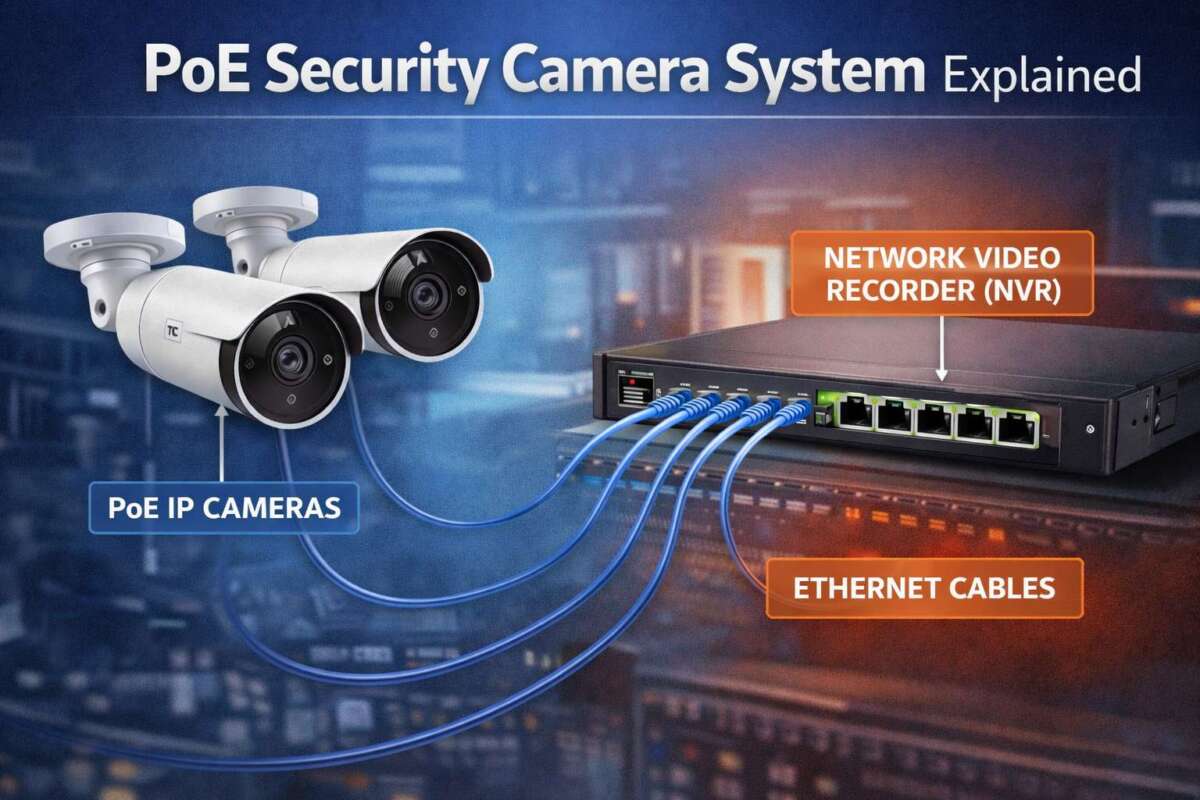
A PoE camera sends video and receives power through one Ethernet cable connected to a network switch.
If you are planning a security system, understanding what is a PoE camera can help you avoid messy wiring and poor equipment choices. Power over Ethernet cameras combine reliable network video with simple installation, but they still need the right switch, cable, and network setup. This guide explains how PoE cameras work, their benefits and limits, and how to choose one with confidence.
What Is a PoE Camera?
A PoE camera is a network security camera that receives electrical power and sends video data through the same Ethernet cable. “PoE” means Power over Ethernet. Instead of using one cable for power and another for data, the camera uses a single cable, usually Cat5e or Cat6.
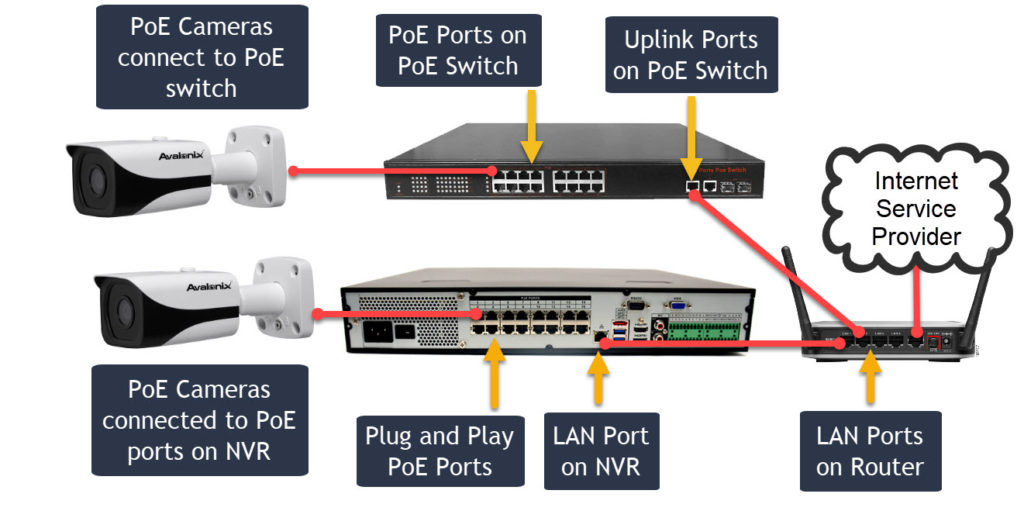
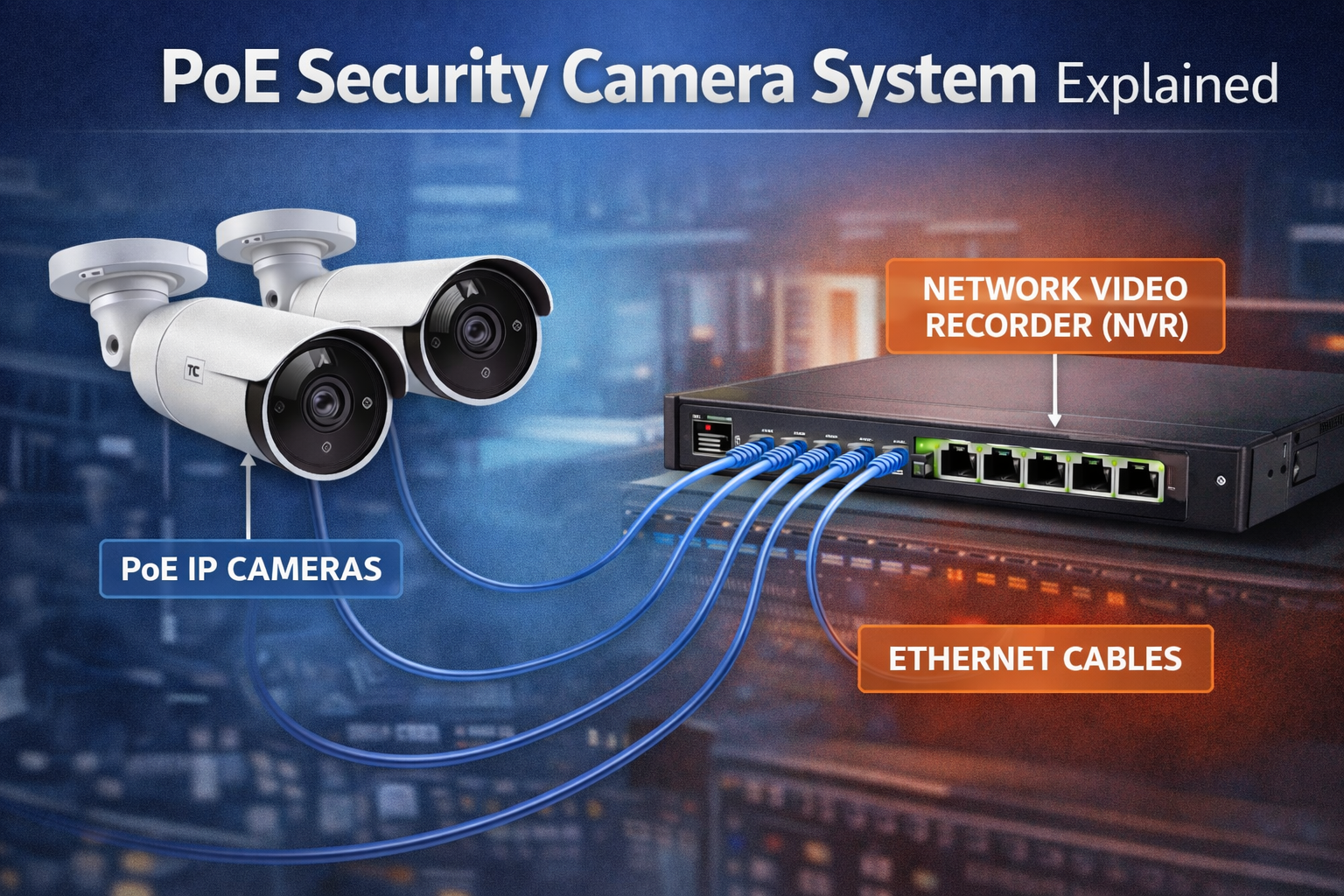
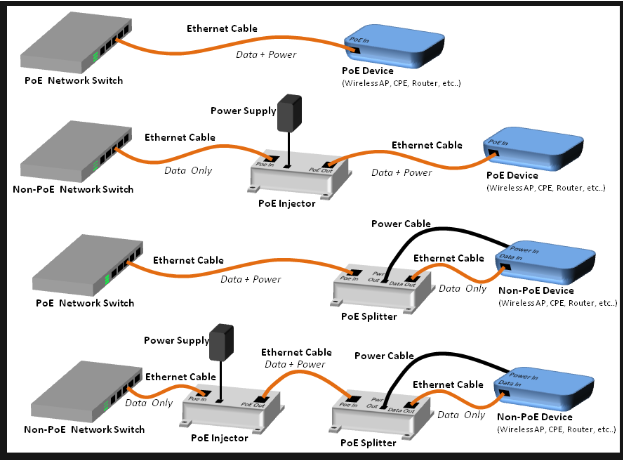
The Ethernet cable connects the camera to a PoE network switch, PoE injector, or network video recorder with built-in PoE ports. The camera then sends live video to the recorder, computer, or mobile app through the network.
This setup is much like using one highway for two types of traffic. Power travels to the camera, while video and control data travel back through the same path.
How Does a PoE Camera Work?
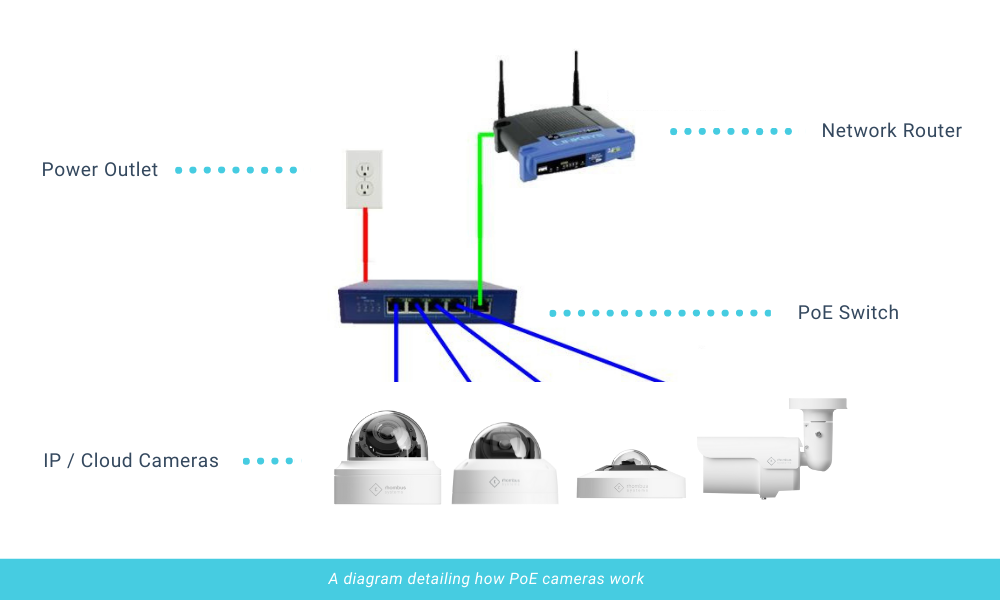
A PoE camera system has several key parts. Each part has a specific role in delivering power, video, storage, and remote access.
The PoE camera
The camera captures video with an image sensor and lens. Many models also include infrared night vision, motion detection, a microphone, a speaker, and weather protection.
The camera converts the video into digital data. It then sends that data through the Ethernet cable to a recorder or network device.
The Ethernet cable
The cable carries both power and data. Cat5e cable is often enough for standard security cameras, while Cat6 can offer better performance in new installations.
For most home and small business systems, the maximum recommended Ethernet cable distance is about 328 feet, or 100 meters. Longer runs may need a PoE extender, fiber link, or another network design.
The PoE switch or injector
A PoE switch supplies power to compatible devices. It also connects the cameras to your local network.
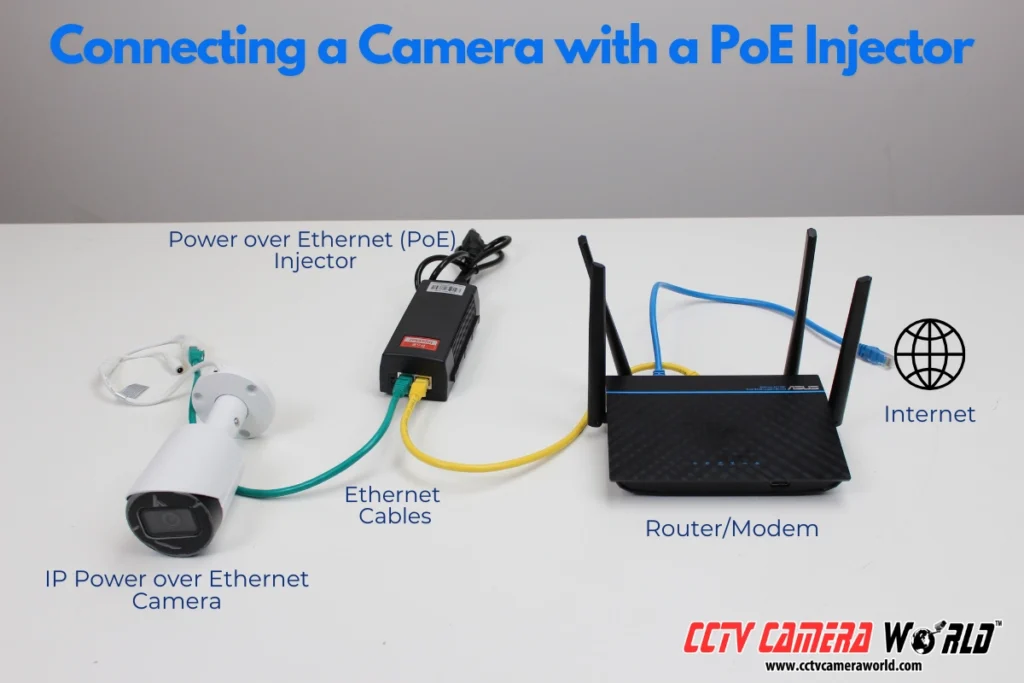
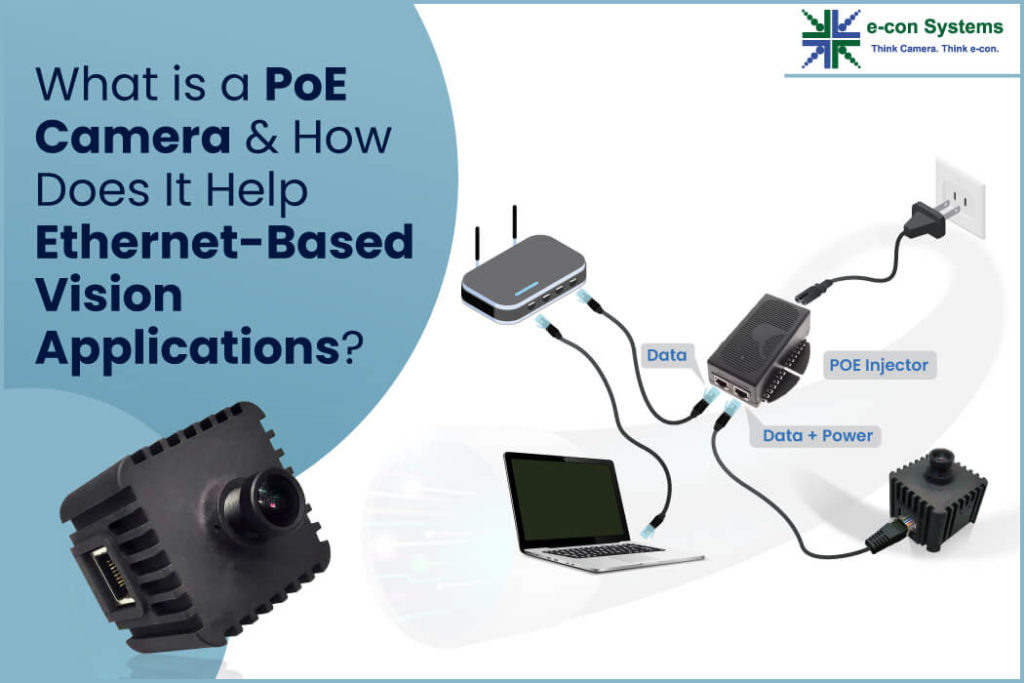
A PoE injector adds power to the Ethernet cable when your existing router or switch does not support PoE. An injector is useful for one or two cameras, while a PoE switch is usually better for larger systems.
The NVR or cloud platform
A network video recorder, or NVR, stores recorded footage. Some NVRs have built-in PoE ports, making them a convenient choice for a complete camera system.
Other cameras record to a microSD card, cloud service, computer, or third-party video management system. Check compatibility before buying.

PoE Camera Standards Explained
Not every PoE device uses the same power level. The main standards help ensure that a camera and power source work safely together.
IEEE 802.3af PoE
The 802.3af standard can provide up to 15.4 watts from the power source. After cable loss, the powered device receives less power.
This level is often enough for basic indoor cameras and some outdoor cameras with infrared lighting.
IEEE 802.3at PoE+
The 802.3at standard can provide up to 30 watts from the source. It supports devices that need more power, such as cameras with strong infrared lights, heaters, or motorized zoom lenses.
IEEE 802.3bt PoE
The 802.3bt standard supports higher power levels. It may be useful for advanced cameras with pan, tilt, zoom, heating, cooling, bright lighting, or other features.
Always check the camera’s power requirement and the switch’s total PoE budget. A switch may have enough ports but not enough total wattage to run every camera at full power.
Passive PoE
Passive PoE is different from standard IEEE PoE. It may send power without checking whether the connected device can safely accept it.
This creates a risk of damaging equipment. For most home and business systems, use standards-based active PoE unless the manufacturer clearly requires passive PoE.
Main Benefits of a PoE Camera
The biggest appeal of a PoE camera is the simpler installation. However, the advantages go beyond fewer cables.
One cable for power and data
A single Ethernet cable reduces clutter. It also makes it easier to install a camera on a wall, ceiling, pole, or soffit.
With a traditional camera, you may need a power adapter near the camera. That can be hard to protect outdoors. A PoE camera keeps the power source in a safer indoor location, such as a network closet.
Reliable wired connection
Wi-Fi cameras can work well, but walls, distance, interference, and crowded networks can affect them. A PoE camera uses a wired connection, which normally provides a more stable video stream.
This matters when you need continuous recording or clear footage during busy network periods.
Centralized power
A PoE switch lets you manage several cameras from one location. You can often restart a camera by turning its PoE port off and on.
Some business-grade switches also show power use, link status, and network errors. These tools can make troubleshooting much easier.
Easier expansion
You can add cameras by running new Ethernet cables to the switch. A larger switch or an additional switch can expand the system when the original setup reaches its limit.
Better support for advanced features
Many PoE cameras support high-resolution video, infrared night vision, wide dynamic range, two-way audio, and motorized movement. A wired connection can provide the bandwidth these features need.

Limitations of PoE Cameras
A PoE camera is not perfect for every property. Knowing its limits can prevent surprise costs and installation problems.
Cable installation takes planning
You must route Ethernet cable from each camera to a switch, injector, or NVR. Running cable through walls, attics, crawl spaces, or outdoor conduit may require tools and planning.
If you rent your home or cannot access the walls, a Wi-Fi camera may be easier.
Distance can limit placement
Standard copper Ethernet runs should generally stay within 100 meters. Cable quality, connectors, electrical interference, and environmental conditions can reduce real-world performance.
For a detached garage or large property, you may need a network extender, point-to-point wireless bridge, or fiber connection.
The network becomes important
A PoE camera depends on the network for video transport. If the switch fails, the cable is damaged, or the NVR stops working, recording may stop.
A good system uses surge protection, backup power, secure passwords, and regular firmware updates.
Initial equipment costs can be higher
A PoE switch, NVR, cable, connectors, and installation tools may cost more at the start than a basic Wi-Fi camera kit. The long-term value can still be strong because wired systems often offer better stability and centralized control.
Cybersecurity requires attention
A PoE camera is a network computer with an image sensor. Change default passwords, install firmware updates, use strong Wi-Fi and network passwords, and avoid exposing the camera directly to the public internet.
PoE Camera vs. Wi-Fi Camera
Both camera types can protect a home or business, but they suit different situations.
| Feature | PoE camera | Wi-Fi camera |
|---|---|---|
| Power | Ethernet cable or separate power source | Usually a wall adapter or battery |
| Network connection | Wired | Wireless |
| Video stability | Usually strong and consistent | Depends on signal quality |
| Installation | Requires cable routing | Often faster to install |
| Distance | Limited by cable and network design | Limited by wireless range |
| Maintenance | Centralized through a switch | Each camera needs local power |
| Best use | Homes, businesses, warehouses, and large systems | Apartments, rentals, and simple installations |
A Wi-Fi camera is not automatically worse. It can be a smart choice for a small space where running cable is difficult. A PoE camera is usually the better choice when you want steady recording, multiple cameras, and long-term reliability.
PoE Camera vs. Analog Security Camera
Analog cameras use coaxial cable to send video to a digital video recorder, or DVR. They may also need separate power cables.
A PoE camera uses Ethernet and connects to an NVR or network video system. This makes it easier to send video across a modern network and integrate with computers, phones, access control systems, and other devices.
Analog systems can still be useful when upgrading an older coaxial installation. However, a PoE camera often offers a cleaner path for new installations.
What You Need for a PoE Camera System
Before buying a PoE camera, make sure you have the equipment needed to power, connect, and store video.
A basic system may include:
• One or more PoE cameras
• Cat5e or Cat6 Ethernet cable
• A PoE switch, PoE injector, or PoE NVR
• A network router
• An NVR, memory card, computer, or cloud recording plan
• A monitor or mobile app for viewing
• Surge protection and an uninterruptible power supply for added resilience
The NVR’s storage size matters. A four-camera system recording continuously at high resolution may use much more storage than a system recording only motion events.
Video compression also affects storage. Modern codecs can reduce file size, but the result depends on resolution, frame rate, scene movement, and camera settings.
How to Choose the Right PoE Camera
Choosing the right model starts with the location and the job. Do not select a camera based only on megapixels.
Consider the viewing area
Choose a lens that matches the scene. A wide lens covers more space but may show less detail at a distance. A narrow lens provides more detail in one direction but covers less area.
For a driveway, entrance, hallway, or cash register, the best lens choice may be different.
Check night vision performance
Look for infrared range, low-light performance, and image samples taken at night. A camera may advertise a long infrared range, but nearby walls, rain, fog, and reflective surfaces can affect the result.
Color night vision may require visible light. It is not the same as true low-light performance.
Review weather protection
Outdoor cameras should have a suitable IP rating. The first number relates to protection from solid objects and dust. The second relates to water resistance.
A weather rating does not mean the camera can handle every climate. Use proper cable glands, drip loops, and outdoor-rated cable where needed.
Look for useful smart features
Common features include:
• Motion zones
• Person and vehicle detection
• Line crossing alerts
• Wide dynamic range
• Two-way audio
• Privacy masking
• Local storage
• Remote viewing
Smart alerts can reduce false alarms, but no detection system is perfect. Test the settings before relying on them for critical protection.
Check compatibility
A camera may support ONVIF, a common standard for communication between network video products. Even so, features may vary between brands.
Confirm compatibility between the camera, NVR, switch, mobile app, and storage system before purchasing.
PoE Camera Installation: A Practical Guide
Installing a PoE camera is often straightforward when you plan first. The following process works for many home and small business systems.
-
Mark the camera locations. Aim for useful views, not simply the highest possible mounting point.
-
Check the cable path. Avoid sharp bends, hot surfaces, water entry points, and areas where the cable can be crushed.
-
Measure each cable run. Leave extra cable at both ends for service and future adjustments.
-
Run the Ethernet cable. Use cable rated for the environment, especially when running it outdoors or through walls.
-
Terminate or connect the cable. Poor connectors are a common cause of intermittent video and power problems.
-
Connect the camera to a PoE port. If the switch does not provide PoE, use a compatible injector.
-
Add the camera to the NVR or software. Set a strong password and update the firmware.
-
Adjust the view during the day and at night. Check faces, entrances, license plates, glare, and blind spots.
-
Test recording and alerts. Confirm that the system records when expected and sends notifications correctly.
A mistake I often see in camera installations is placing every camera too high. Height can protect the device from tampering, but excessive height may make faces and package labels too small. A slightly lower, well-protected position often produces more useful evidence.
Common PoE Camera Problems and Fixes
Even a well-designed system can have problems. Most are easy to trace if you test one part at a time.
The camera has no power
Check the Ethernet cable, connector, PoE port, and switch power budget. Try a short known-good cable directly beside the switch.
If the camera works with the short cable, the long cable run or its termination may be the problem.
The camera powers on but shows no video
Confirm the camera’s IP address and login details. Check whether the NVR supports the camera’s video format and resolution.
A network connection does not always guarantee full recording compatibility.
The video drops out
Look for damaged cable, loose connectors, electrical interference, overheating, or a switch with too little power. Excessive bandwidth use can also affect performance.
Check switch logs if available. They may show link errors or repeated disconnections.
Night images look washed out
Nearby walls, windows, and reflective objects can bounce infrared light back into the lens. Move the camera, adjust the angle, or reduce the infrared strength if the software allows it.
Clean the lens and check for protective film that was left in place.
Remote viewing does not work
First confirm that local viewing works. Then check the router, internet connection, app settings, and account security.
Avoid opening unnecessary ports on the router. Secure cloud access or a properly configured virtual private network is usually safer.
PoE Camera Security and Privacy Tips
A security camera protects your property, but it also collects personal information. Treat the system with the same care as any connected device.
• Change the default administrator password immediately.
• Use a long, unique password for each major account.
• Install firmware updates from the manufacturer.
• Turn on multi-factor authentication when available.
• Limit camera access to trusted users.
• Use privacy masks for neighboring windows or private areas.
• Keep the NVR and switch in a secure location.
• Use a UPS so short power cuts do not stop recording.
• Review local laws about audio recording and camera placement.
Audio can create stricter privacy rules than video in some areas. When in doubt, disable audio or seek local legal advice before recording conversations.
Frequently Asked Questions About What Is a PoE Camera
What does PoE mean on a security camera?
PoE means Power over Ethernet. It allows a compatible Ethernet cable to carry both electrical power and network data to the camera.
Does a PoE camera need Wi-Fi?
No. A PoE camera normally uses a wired Ethernet connection instead of Wi-Fi. You may still use Wi-Fi on your phone or computer to view the camera through the local network or internet.
Can I connect a PoE camera directly to a router?
You can connect it directly only if the router has a compatible PoE port. Most regular routers do not provide PoE, so you will need a PoE switch, PoE injector, or PoE NVR.
How far can a PoE camera be from the switch?
A standard Ethernet cable run is generally limited to about 100 meters, or 328 feet. Longer distances may require an extender, fiber connection, or another network link.
Can a PoE camera work without an NVR?
Yes. Some cameras can record to a microSD card, computer, NAS device, or cloud platform. An NVR is useful when you want centralized storage and management for several cameras.
Is a PoE camera better than a wireless camera?
It depends on the installation. A PoE camera usually provides a more stable connection and works well for larger systems, while a wireless camera may be easier for renters or small spaces where cable installation is difficult.
Can any Ethernet cable power a PoE camera?
A suitable Ethernet cable can carry PoE when connected to compatible equipment. Cat5e or better is a common choice, but cable quality, length, connectors, and outdoor rating still matter.
Conclusion
A PoE camera sends power and video through one Ethernet cable, creating a clean and reliable security system. It can offer stable video, centralized power, easy expansion, and strong support for features such as night vision and smart detection.
Before buying, check the PoE standard, power budget, cable distance, storage method, weather rating, network compatibility, and privacy controls. With careful planning and proper cable installation, a PoE camera system can provide dependable protection for a home, office, shop, or larger property. Explore compatible cameras and switches for your space, then share your installation questions or experience in the comments.

Everett Ashford is a tech reviewer at mytechgrid.com specializing in SSDs, cameras, TVs, earbuds, headphones, and other consumer electronics. He provides honest, data-driven reviews based on hands-on testing and real-world performance analysis. Everett simplifies complex tech details to help readers make smart, confident buying decisions.