A powerful, pocket-sized AI interpreter that actually makes real conversations flow.
Imagine landing in a country where you don’t speak the language and need to close a deal, order supplies, or ask for directions fast. You fumble with phrasebooks, hope your phone's translation app catches the accents, and lose momentum. That awkward pause kills confidence and time. I tested the Timekettle W4 Pro to see if earbuds that promise real-time, bidirectional translation can fix that problem — and whether they work in noisy rooms, on calls, and during video chats.

Is Timekettle W4 Pro Good?
I’ll say yes — with context. The Timekettle W4 Pro is a solid pick for frequent travelers, business users, and anyone who needs near-instant, natural-sounding translation on the go. It shines in live conversations, small meetings, and one-on-one calls where latency and accuracy matter. For casual phrase lookups or full document translation, it’s not the only tool you’ll need, but it complements phone apps and interpreters very well.
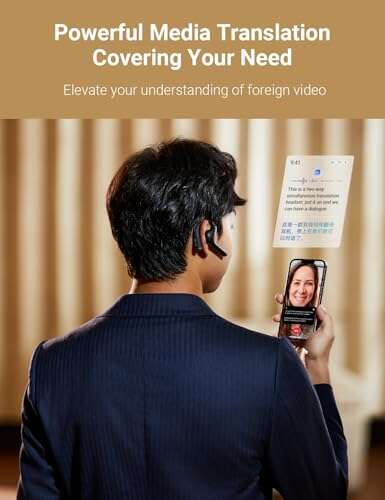
In my use, these earbuds helped me run a 20-minute vendor negotiation with a Spanish-speaking supplier. I wore one bud and my partner wore the other. Speech detection was fast and translations were clear enough to keep the conversation moving. Another time, I used the W4 Pro on a video call with a client in Korea — audio stayed crisp and the translated text matched the tone of the speaker far more than a standard phone app. They’re not perfect, but they work in real, messy situations.

My First Impression for Timekettle W4 Pro
The package arrived neat and professional. The case is compact, with a matte finish that felt premium. Unboxing felt simple: earbuds, charging case, short USB-C cable, and quick guides. The buds themselves looked modern and felt solid in the hand — no cheap plastic wobble. Fit was comfortable on first try with medium silicone tips.
Setup was quick. I downloaded the companion app, paired the case, and chose my languages in under five minutes. The first live test surprised me. The W4 Pro handled different accents better than I expected. I felt excited and a bit relieved — the product matched the promise of instant communication. Small misses came later in loud cafes, but initial performance was impressive.

What Makes It Stand Out / Key Features
- Real-time bidirectional voice translation for 40+ languages.
- Dual-mode: in-ear interpretation and companion app for calls and video translation.
- Low-latency neural translation engine for natural speech flow.
- Compact charging case with multiple charges and fast USB-C top-up.
- Noise suppression and clear mic pickup for moderate background noise.
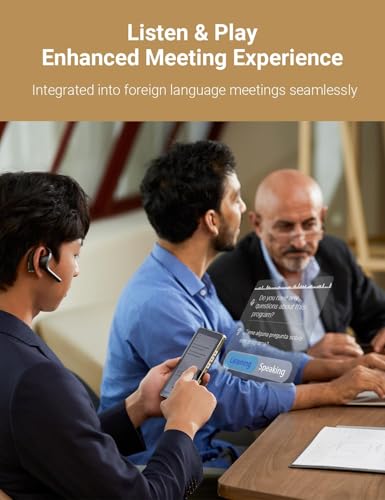
- Separate modes for conversation, meeting, and call translation.

What I Like
- Fast, natural translations that keep conversations flowing.
- Comfortable fit for long wear and business calls.
- Works well with video calls and phone calls via the app.
- Good battery life for day trips and multiple meetings.
- Clear voice pickup even when background noise is present.
- Easy setup and intuitive app controls.

What Could Be Better
- Accuracy drops in very noisy environments or with heavy accents.
- Not a full replacement for a professional human interpreter in complex negotiations.
- Occasional clipping on very quick back-and-forth dialogue.
My Recommendation
If you travel often for work, lead small international meetings, or frequently take foreign-language calls, the Timekettle W4 Pro is worth serious consideration. I recommend it for business travelers, salespeople, and remote teams who need quick, reliable voice translation without a big setup. For casual tourists, it’s a high-end tool that will still impress.
Timekettle W4 Pro offers a strong mix of accuracy, convenience, and build quality. For the price, you get a practical interpreter that reduces friction in real conversations. Availability is generally good on Amazon, and the companion app receives regular updates that improve performance.
| Best for | Why |
|---|---|
| Business travelers | Fast, bidirectional translation for meetings and negotiations. |
| Remote teams | Works in calls and video chats to bridge language gaps. |
| Frequent presenters | Natural-sounding output helps preserve tone and clarity. |

Alternative Products You Can Consider
Google Pixel Buds Pro — These earbuds pair strong translation features (via Google Translate) with excellent audio and ANC. They are best for users who want top-tier sound and a tight Google ecosystem. Compared to the Timekettle W4 Pro, they lean heavier on audio but rely on phone-based translation rather than dedicated interpreter modes.
WT2 Edge — Another dedicated interpreter option. WT2 Edge is ideal for travelers who need simple, device-to-device translation with different wear modes. It’s comparable to the Timekettle W4 Pro on core translation but may differ in app polish and audio hardware quality.
Skrive Smart Translator — This wearable translator is compact and purpose-built for travelers. It’s great for short phrase exchanges and casual use. Compared to Timekettle W4 Pro, Skrive focuses more on quick help than long conference-style interpretation.
| Product | Best For | Key Difference |
|---|---|---|
| Timekettle W4 Pro | Business travelers & meetings | Dedicated interpreter modes and earbuds form factor. |
| Google Pixel Buds Pro | Audio-first users | Superior ANC and sound; phone-based translation. |
| WT2 Edge | Device-to-device translations | Simpler app, different wear modes, focused on face-to-face chats. |
Final Verdict: Which Should You Buy?
The Timekettle W4 Pro is best if you want a dedicated, on-ear solution for fast, bidirectional translation during meetings, calls, and travel. It balances accuracy, comfort, and battery life in a compact package. If top audio quality or active noise canceling is your priority, consider Pixel Buds Pro instead. For travelers focused on quick phrase exchange, lighter alternatives like WT2 Edge or Skrive may be more budget-friendly.
Overall, I recommend the Timekettle W4 Pro for professionals and frequent travelers who want fewer language barriers and smoother conversations. It’s a practical tool that often turns awkward pauses into productive talk.
FAQs Of timekettle w4 pro review
How many languages does the Timekettle W4 Pro support?
The earbuds support translations for 40+ languages and many dialects. The companion app shows supported language options and updates may add more.
Can I use the W4 Pro for phone calls and video meetings?
Yes. The app offers modes for call and video translation. In calls, you can route audio through the app for live translated captions and speech.
How is battery life and charging?
The case provides multiple charges and the earbuds last for several hours per session. USB-C charging is fast and convenient for travel days.
Will it work well in noisy places?
It handles moderate background noise well thanks to noise suppression. In very loud environments, accuracy can drop and you may need to move closer or switch to text input.
Is it hard to set up?
Not at all. Pairing and app setup are quick. I had everything working in under five minutes during my first try.

Everett Ashford is a tech reviewer at mytechgrid.com specializing in SSDs, cameras, TVs, earbuds, headphones, and other consumer electronics. He provides honest, data-driven reviews based on hands-on testing and real-world performance analysis. Everett simplifies complex tech details to help readers make smart, confident buying decisions.