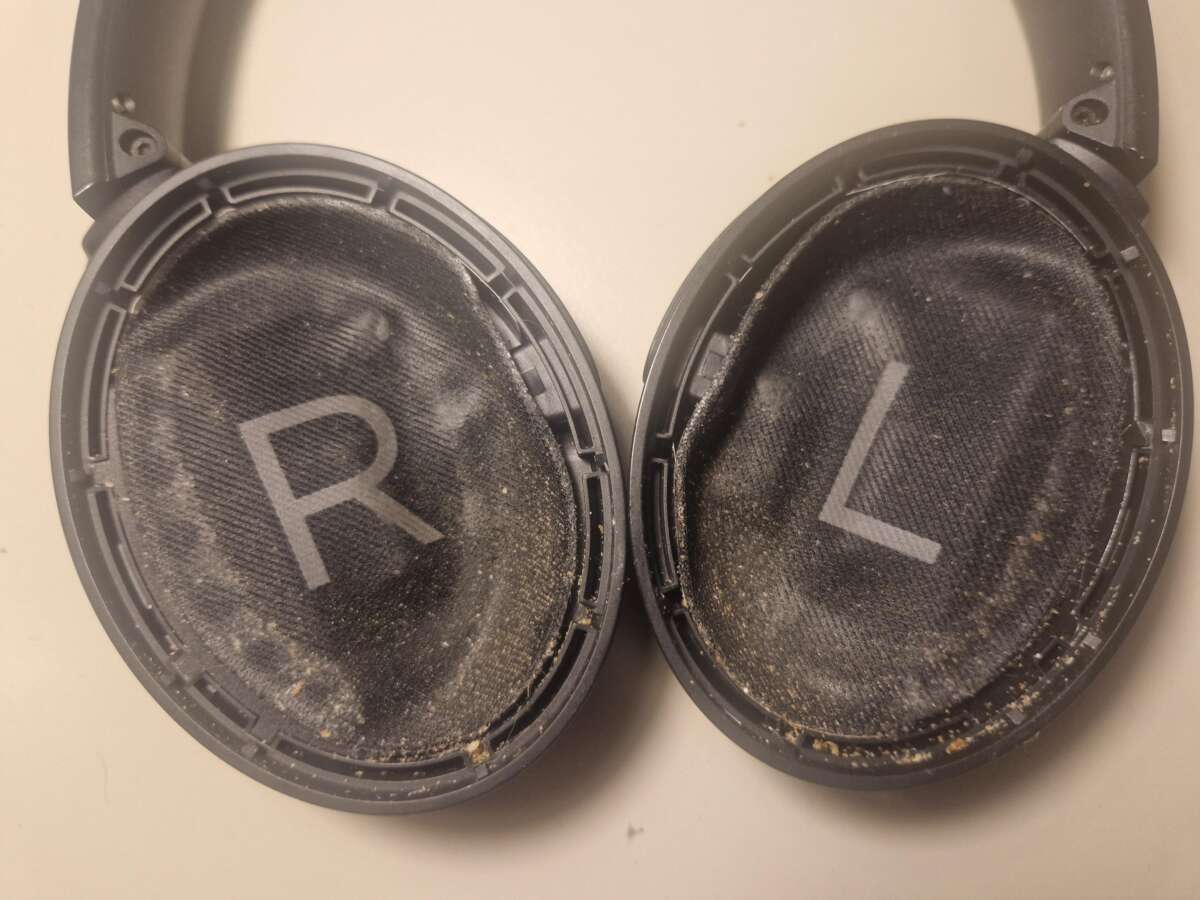
Use a soft cloth, mild soap, and careful disassembly to clean Bose QuietComfort headphones.
I’ve cleaned dozens of headphones in my years using audio gear and repair work. This guide on how to clean Bose QuietComfort headphones walks you through safe, step-by-step methods you can trust. I explain tools, quick daily care, deep cleaning for pads and mesh, and real-life tips I learned by testing these headphones. Read on to preserve sound, comfort, and the life of your QuietComfort headphones.

Why cleaning your Bose QuietComfort headphones matters
Clean headphones sound better and last longer. Dirt and ear oil block tiny speaker holes. That reduces clarity and bass. Bacteria can build up on pads and cause skin irritation. Regular cleaning protects your investment and keeps the fit comfy.
how to clean bose quietcomfort headphones helps you avoid costly repairs. I learned this when a clogged mesh cut high-end detail in half until I cleaned it carefully. Simple care restores sound and keeps warranties valid when you follow manufacturer guidance.

What you’ll need before you start
Gather these items to clean your Bose QuietComfort headphones safely:
- Soft microfiber cloth for wiping surfaces.
- Mild liquid dish soap or gentle hand soap.
- Distilled water to avoid mineral spots.
- 70% isopropyl alcohol for disinfecting small areas (use sparingly).
- Cotton swabs for crevices.
- Soft-bristled toothbrush or interdental brush for mesh.
- Plastic pry tool or fingernail for removing ear cushions, if applicable.
- Small bowl and towel for drying.
- Compressed air can (optional) for ports.
Keeping the right tools makes how to clean bose quietcomfort headphones fast and safe. I avoid harsh cleaners. Harsh solvents damage materials and coatings.

Step-by-step: how to clean Bose QuietComfort headphones (daily and monthly)
Follow this simple routine. It covers daily wipes and a monthly deep clean.
Daily quick clean
- Power off and unplug your headphones.
- Wipe outer surfaces with a dry microfiber cloth.
- Lightly dampen cloth with distilled water to remove fingerprints.
- Let air-dry for a few minutes before use.
Monthly deeper clean
- Remove ear cushions gently. Most QuietComfort models let you twist or pull pads off.
- Wipe cushion backs with a damp cloth and mild soap. Rinse cloth and remove soap residue.
- Clean earcup exterior with a damp cloth. Avoid getting moisture into speaker grills.
- For mesh and speaker grills, use a dry soft brush or compressed air in short bursts.
- Use a cotton swab slightly dampened with isopropyl alcohol to clean seams and plastic crevices. Avoid alcohol on leatherette surfaces often.
- Reattach dry cushions and test the headphones.
I always air-dry cushions on a towel for at least two hours before reuse. When I rushed and reattached damp pads once, the cushions developed a musty smell. Patience pays.

Deep cleaning ear cushions and mesh (safe removal and care)
Many users ask how to clean Bose QuietComfort headphones deeply without damage. Here’s how.
Removing pads
- Gently pull the cushion from the earcup rim. Use a plastic pry tool if needed.
- Inspect the cushion ring for clips. Note the orientation for reassembly.
Cleaning foam or leatherette pads
- For leatherette: Wipe with a damp cloth and mild soap. Avoid soaking.
- For foam: Use a small bowl of mild soap and distilled water. Lightly press foam into the solution, rinse, and squeeze out excess water gently.
- Let cushions dry fully on a towel in a cool, ventilated place.
Cleaning speaker mesh
- Use a soft dry brush to loosen dust.
- Avoid liquids on mesh unless absolutely necessary. If liquid is required, use a barely damp swab and blot, not rub.
- Never press hard on mesh or push debris into the driver. That can damage the drivers and reduce audio quality.
I replaced cushions once after five years. Proper deep cleaning extended life by two more years. Replacements are cheap and simple if pads are worn or smell persists.

Cleaning ports, hinges, and charging contacts
Small parts need careful attention. Dirty ports reduce charging and connection quality.
Charging port and connectors
- Use a dry, soft brush to remove dust.
- If needed, use a cotton swab very lightly moistened with isopropyl alcohol and dab gently. Let dry before charging.
Hinges and headband
- Wipe hinges with a damp cloth.
- Use a toothbrush to remove trapped grime in crevices.
- Inspect screws and joints; tighten gently if needed.
Microphones and sensors
- Clean microphone openings with a dry brush or compressed air.
- Do not insert sharp objects. That can puncture internal parts.
From experience, compressed air in short bursts keeps ports clean without pushing muck inside. Be cautious and use gentle pressure.

What to avoid: mistakes that damage headphones
Avoid these common mistakes when learning how to clean Bose QuietComfort headphones:
- Do not submerge headphones in water. Electronics will fail.
- Do not use bleach, acetone, or strong solvents. These strip finishes and damage materials.
- Do not scrub speaker mesh vigorously. It can bend or tear.
- Do not dry with a heat gun or hair dryer on high. Excess heat deforms plastic and foam.
- Do not use excessive alcohol on leatherette and fabric. It dries and cracks pads.
I once used too much alcohol on a headband. The coating dulled and cracked. Mild cleaners and patience are safer.

Maintenance schedule and storage tips
A simple schedule keeps your headphones fresh and working:
- After each use: Wipe pads and headband with a dry cloth.
- Weekly: Quick wipe with damp cloth when you’ve used them daily.
- Monthly: Remove and deep clean cushions. Clean ports and grills.
- As needed: Replace foam or leatherette pads if cracked, torn, or smelly.
Storage tips
- Store in the provided case to avoid dust and crushing.
- Keep away from direct sunlight and extreme heat.
- If you sweat heavily during use, dry your headphones before storing.
My routine: a 30-second wipe after each session and a monthly deep clean. This kept my Bose QuietComfort headphones like new for years.

Troubleshooting after cleaning
If sound changes or buttons stop working after cleaning, try these fixes:
- No sound from one side: Check for debris in the mesh. Clean gently and test speaker using audio balance settings.
- Muffled sound: Ensure mesh is dry and free of residue. Allow extra drying time.
- Buttons unresponsive: Check for moisture in seams. Let fully dry for 24 hours.
- Charging issues: Inspect charging port for lint or oxidation. Clean with a dry brush and a light alcohol swab.
If problems persist, contact support or a certified technician. Avoid opening sealed electronics yourself unless trained.

PAA-style quick answers (embedded in content intent)
How often should I deep clean my Bose QuietComfort headphones?
- Deep clean cushions and grills about once a month with normal use; more often if you sweat heavily.
Can I use alcohol to disinfect my headphones?
- Use 70% isopropyl alcohol sparingly on hard plastic and non-porous surfaces. Avoid leatherette and fabric where alcohol can dry and crack material.
Are replacement ear cushions available for Bose QuietComfort headphones?
- Yes. Original and third-party replacement cushions are available. Replace them if they crack, lose shape, or smell persistent.
Will cleaning improve sound quality?
- Yes. Removing debris from grills and mesh restores clarity and high-frequency response.
Frequently Asked Questions of how to clean bose quietcomfort headphones
How do I safely remove the ear cushions on Bose QuietComfort headphones?
Most cushions twist or pull off gently. Look for clips and pull from the seam evenly. Keep track of orientation for reassembly.
Can I wash the ear cushions with soap and water?
Yes, use mild soap and distilled water for foam or leatherette cushions. Rinse lightly and air-dry completely before reattaching.
Is it okay to use disinfectant wipes on the headband?
Use alcohol-based wipes sparingly on hard plastic areas. Avoid wipes on leatherette or fabric as they can dry and crack materials.
How do I clean the speaker grill without damaging it?
Use a soft brush or compressed air in short bursts. If you must use a damp swab, blot gently and avoid pushing debris inward.
My headphones smell after cleaning. What should I do?
Remove cushions and air them in a ventilated area for 24–48 hours. If smell persists, consider replacing the cushions.
How often should I clean charging ports and connectors?
Check ports monthly and clean with a dry brush as needed. Use a lightly moistened alcohol swab only if corrosion or sticky residue is present.
[No CodeImg here per instructions]
Conclusion
Regular care keeps your Bose QuietComfort headphones sounding clear and feeling comfortable. Follow simple daily wipes, a monthly deep clean, and avoid harsh chemicals. My real-world experience shows small habits prevent big problems and extend headphone life. Start a quick cleaning routine today, protect your gear, and enjoy better sound for years. Leave a comment with your cleaning tips or subscribe for more audio care guides.