Use the Bose Music app or your headphone controls to switch ANC levels and modes quickly.
I’ve spent years testing ANC headphones and helping people solve audio problems. This guide shows exactly how to change noise cancelling on Bose headphones, step by step. You’ll learn app controls, on-device buttons, model differences, troubleshooting tips, and real-world tricks I use myself. Read on to master your Bose ANC and get the quiet you want fast.

Why change noise cancelling on Bose headphones?
People change ANC to match their environment. A plane needs full ANC. A café might need partial ANC or awareness mode. Knowing how to change noise cancelling on Bose headphones gives you control of sound, battery life, and safety. I’ll explain the simple steps and the logic behind each option so you can pick the best setting every time.
Quick step-by-step: How to change noise cancelling on Bose headphones
Follow these short steps for most modern Bose models. These work for QuietComfort, 700, and newer Bose Wireless and Sport models.
- Use the Bose Music app. Open it, pick your headphones, then tap Noise Control or Noise Cancelling.
- Adjust the slider or preset labels. Choose full ANC, low ANC, or Awareness/Transparency.
- Use on-headphone controls. Press or hold the ANC or Action button to cycle modes.
- Save custom settings (if available). Some models let you save presets in the app.
- Update firmware if options are missing. Firmware fixes can add controls and improve ANC.
This list covers the common paths. If your model differs, keep reading for model-specific steps and tips.

Using the Bose Music app to change noise cancelling on Bose headphones
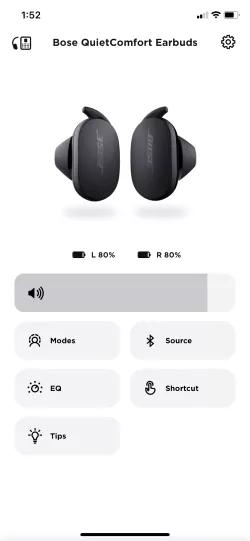
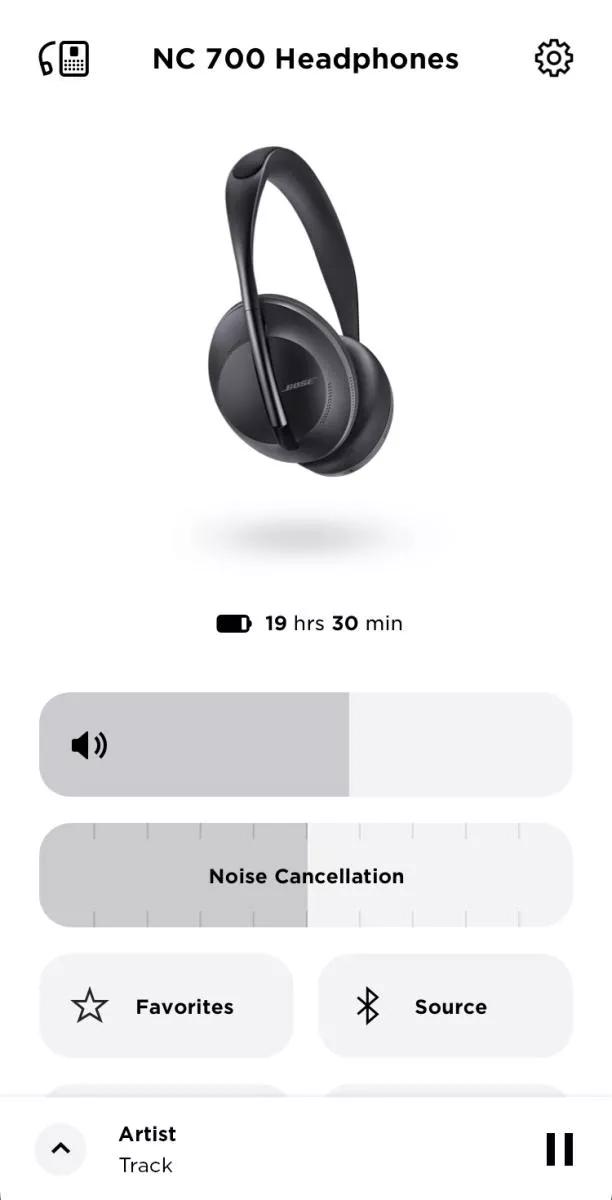
Open the Bose Music app for the smoothest control. The app shows a clear Noise Control screen. Move the slider or tap presets to set ANC. The app labels often read Noise Cancelling, Off, and Aware or Conversation Mode.
App steps I use every day:
- Connect headphones via Bluetooth.
- Open Bose Music and select your device.
- Tap Noise Control or Noise Cancelling.
- Move the slider or pick a preset.
- Test by pausing and listening for ambient sound changes.
Benefits of the app:
- Precise control with a slider for small changes.
- Firmware updates keep ANC tuned.
- Some models let you create and save custom profiles.
If you want to change noise cancelling on Bose headphones without the app, skip to the headphone controls section. The app is best for fine-tuning and updates.
Using headphone controls to change noise cancelling on Bose headphones
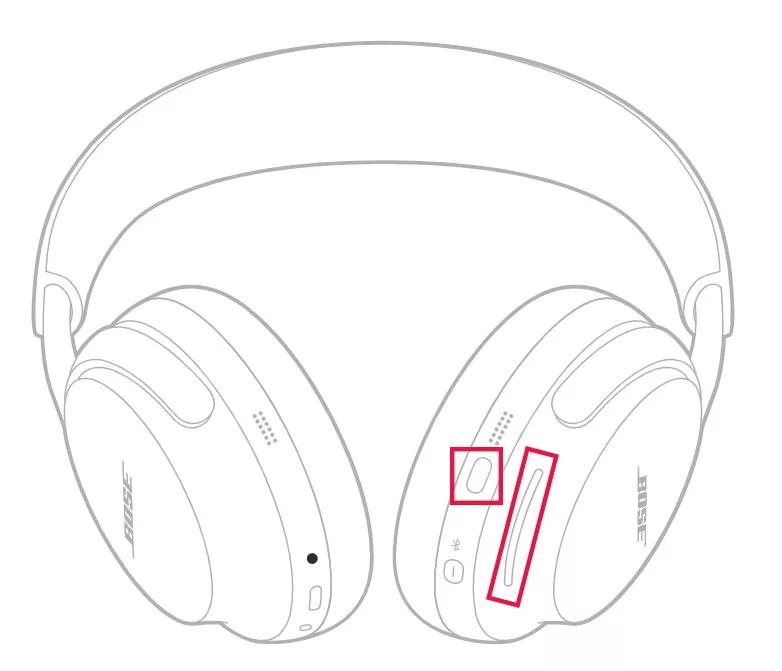
Not everyone wants the app. Headphone buttons work well and are faster when you’re on the move. Controls vary by model. Common patterns include:
- Single button toggle. Press the ANC or Action button once to cycle modes.
- Hold and adjust. Press and hold for a few seconds to switch to Awareness/Transparency.
- Touch controls. Swipe or tap the earcup and follow voice prompts.
Simple example for quick use:
- Double-press the action button to switch from ANC to Aware.
- Hold the power or action button to turn ANC off entirely.
- Listen for the voice prompt that confirms the mode change.
I recommend learning your model’s button pattern. It helps during travel or quick changes without unlocking your phone.

Model differences and what to expect
Bose models differ in ANC flexibility and controls. Know which features apply to your pair.
- QuietComfort series (QC45, QC35 II): Simple ANC on/off plus Aware mode. App offers limited slider control.
- Noise Cancelling Headphones 700: Multi-level ANC with detailed app slider. Touch controls on earcups.
- Sport Earbuds and QuietComfort Earbuds: ANC with transparency mode and in-app adjustments.
- Older budget models: May only have a single ANC on/off toggle.
If you search how to change noise cancelling on Bose headphones for a specific model, check the app and the quick start guide. Firmware updates can also change how settings work. I once found extra ANC levels added after an update. That was a welcome fix.
Tips, troubleshooting, and best practices
Small changes make big differences. These tips come from testing and daily use.
- Fit matters. A tight seal helps ANC work better. Try different ear tips for earbuds.
- Charge battery. Low battery can reduce ANC effectiveness on some models.
- Update firmware. New firmware can add controls or fix ANC bugs.
- Reset or factory reset. If controls act odd, reset the headphones and reconnect.
- Re-pair Bluetooth. Sometimes a fresh connection clears app-control issues.
PAA-style questions (quick answers):
- Can I change ANC without the app? Yes. Use the paired headphone buttons or touch controls. Many models cycle modes without the app.
- Will ANC drain battery fast? Yes. Higher ANC levels use more power, so choose lower ANC to extend playback.
- Is ANC safe to use all day? Mostly yes. Take breaks to relieve ear fatigue and stay aware in busy places.
If something still feels wrong, test ANC in a quiet room and then in a noisy spot. The difference will tell you if the headphones work as expected.

Frequently Asked Questions of how to change noise cancelling on bose headphones
How do I switch ANC levels on the Bose Music app?
Open Bose Music, select your headphones, then tap Noise Control or Noise Cancelling. Move the slider or pick a preset to change ANC levels quickly.
What button toggles noise cancelling on Bose Headphones 700?
Use the Action or NC button on the right earcup to cycle ANC modes. The 700 also supports touch gestures and voice prompts to confirm changes.
Can I customize noise cancelling levels per device?
Yes. The Bose Music app stores settings per paired device and may allow custom presets on supported models. Save settings in the app for fast recall.
Why can’t I change ANC on my Bose headphones?
Check battery level and firmware. Also confirm you are connected to the Bose Music app or that your model supports adjustable ANC. Older models may have only on/off control.
Does changing ANC affect call quality?
It can. Strong ANC reduces background noise for listening but some ANC settings may alter microphone pickup. Use awareness mode or a call setting if voice clarity drops.
How do I reset noise cancelling settings to default?
Open the app and look for a reset option, or perform a factory reset on the headphones per the quick start guide. Re-pairing after reset will return settings to default.
Will firmware updates change ANC behavior?
Yes. Firmware updates can improve ANC performance, add new ANC levels, or change how controls behave. Keep your headphones updated for best results.
Conclusion
You can change noise cancelling on Bose headphones fast from the Bose Music app or using on-headphone controls. Learn your model’s controls, keep firmware updated, and adjust ANC to match your environment. Try different settings during travel, work, and quiet time to find what works best for you. Take control of your listening and make noise work for you. If this guide helped, leave a comment, subscribe for more tips, or try the app settings now to tune your ANC.

Everett Ashford is a tech reviewer at mytechgrid.com specializing in SSDs, cameras, TVs, earbuds, headphones, and other consumer electronics. He provides honest, data-driven reviews based on hands-on testing and real-world performance analysis. Everett simplifies complex tech details to help readers make smart, confident buying decisions.