Pair the airplane's Bluetooth transmitter or use a Bluetooth audio adapter to connect your headphones.
I’ve spent years testing travel gear and helping travelers get clear sound on flights. This guide explains how to connect bluetooth headphones to airplane screen step by step. You’ll learn which planes support direct pairing, when to use a Bluetooth adapter, simple pairing steps, and quick fixes if audio drops. Read on for practical tips, real-world examples, and the exact tools I use on flights.

How airplane screens and Bluetooth work
Airline screens use an in-flight entertainment (IFE) system. Some IFE systems include a built-in Bluetooth transmitter. Many older or budget systems only offer wired headphone jacks. If the screen has Bluetooth, you can pair your Bluetooth headphones like any other device. If it does not, you can add a small Bluetooth adapter to the headphone jack to send audio to your headphones.
Key points:
- Aircraft with newer IFE often support Bluetooth audio.
- Many airlines block pairing to reduce interference or conserve battery.
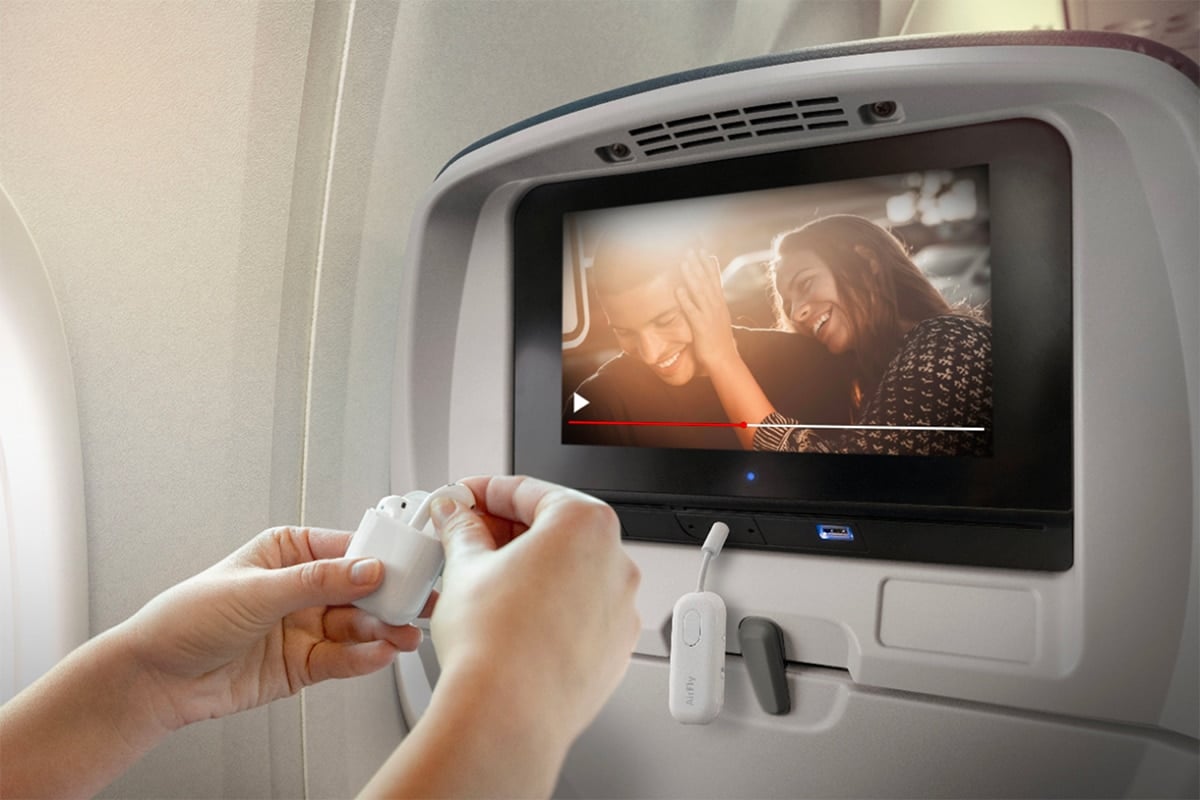
- A Bluetooth audio adapter acts as a bridge when Bluetooth is not built-in.
Two quick questions travelers ask:
- Do all planes support Bluetooth? No. Many still only have wired outputs.
- Can two Bluetooth headphones connect at once? Only if the IFE or adapter supports dual-pairing.

Can you connect bluetooth headphones to airplane screen?
Short answer: sometimes. Most modern widebody jets and some narrowbodies have Bluetooth IFE. However, many flights still require a Bluetooth adapter. Policies vary by airline and aircraft.
Things to check before you board:
- Airline website or booking notes for IFE features.
- Aircraft model; newer planes are likelier to have Bluetooth.
- Crew instructions about using Bluetooth devices in flight.
If you need to know how to connect bluetooth headphones to airplane screen, plan ahead. Bring a compact Bluetooth adapter if you're unsure. This saves time and avoids frustration during boarding.

Step-by-step: how to connect bluetooth headphones to airplane screen
Follow these clear steps for both built-in Bluetooth and adapter methods.
If IFE supports Bluetooth:
- Turn on airplane mode on your phone. Leave Bluetooth on if the crew allows.
- Power on your Bluetooth headphones and enable pairing mode.
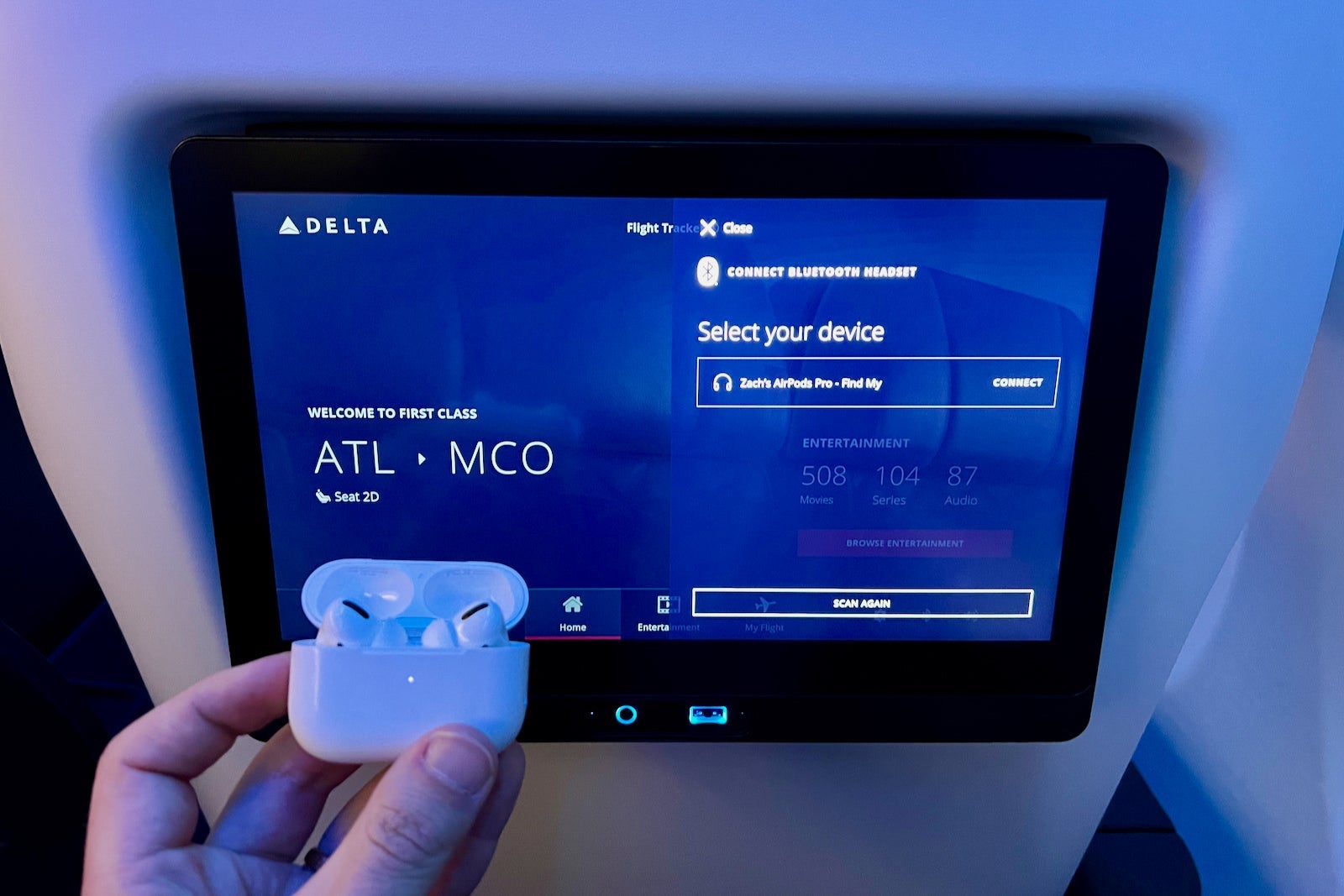
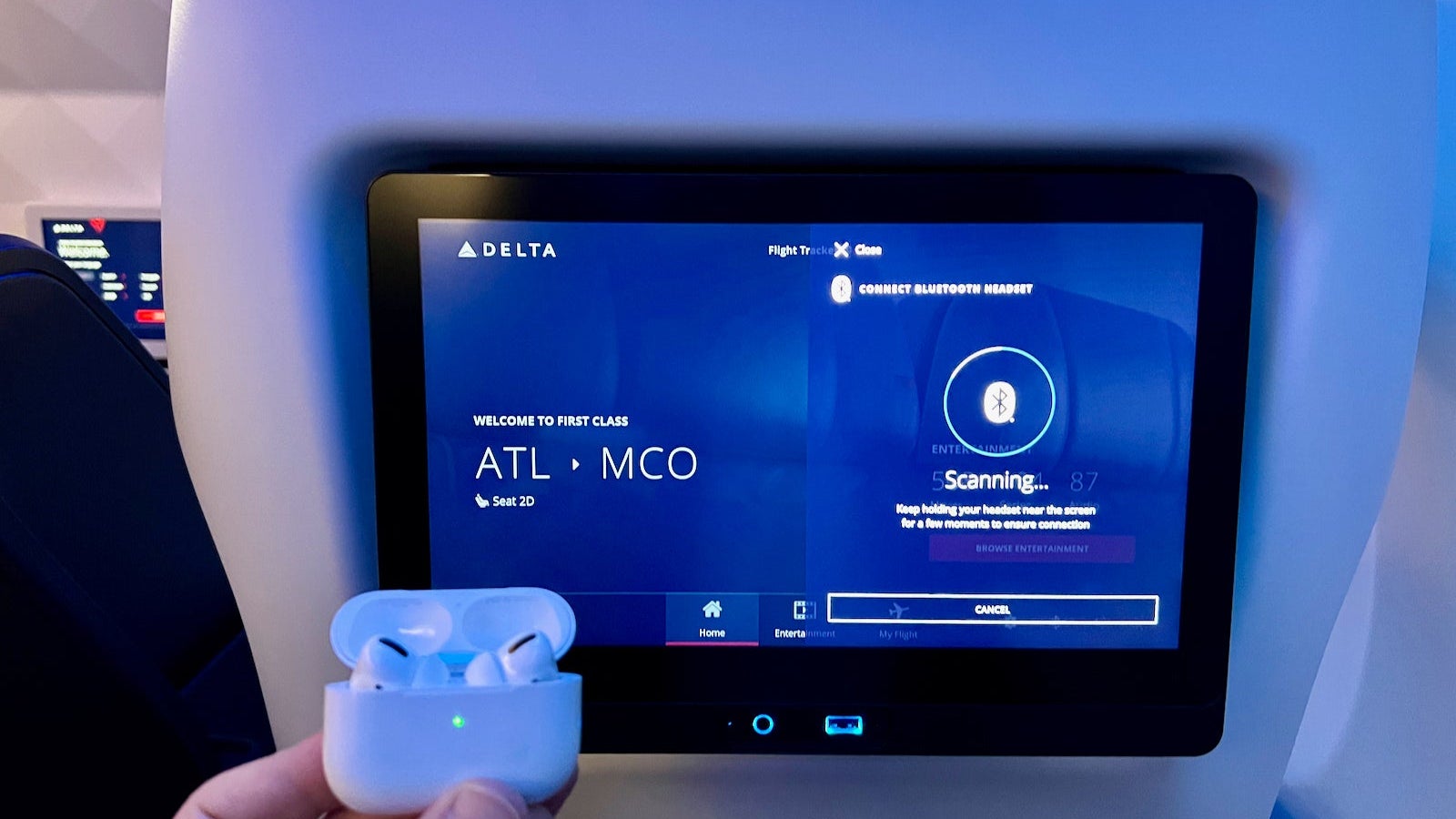
- On the seatback screen, open the audio or Bluetooth settings.
- Select your headphone name from the device list and pair.
- Test audio and adjust volume from the screen or headset.
If IFE does not support Bluetooth (use adapter):
- Buy a compact Bluetooth audio transmitter with low-latency support (aptX Low Latency preferred).
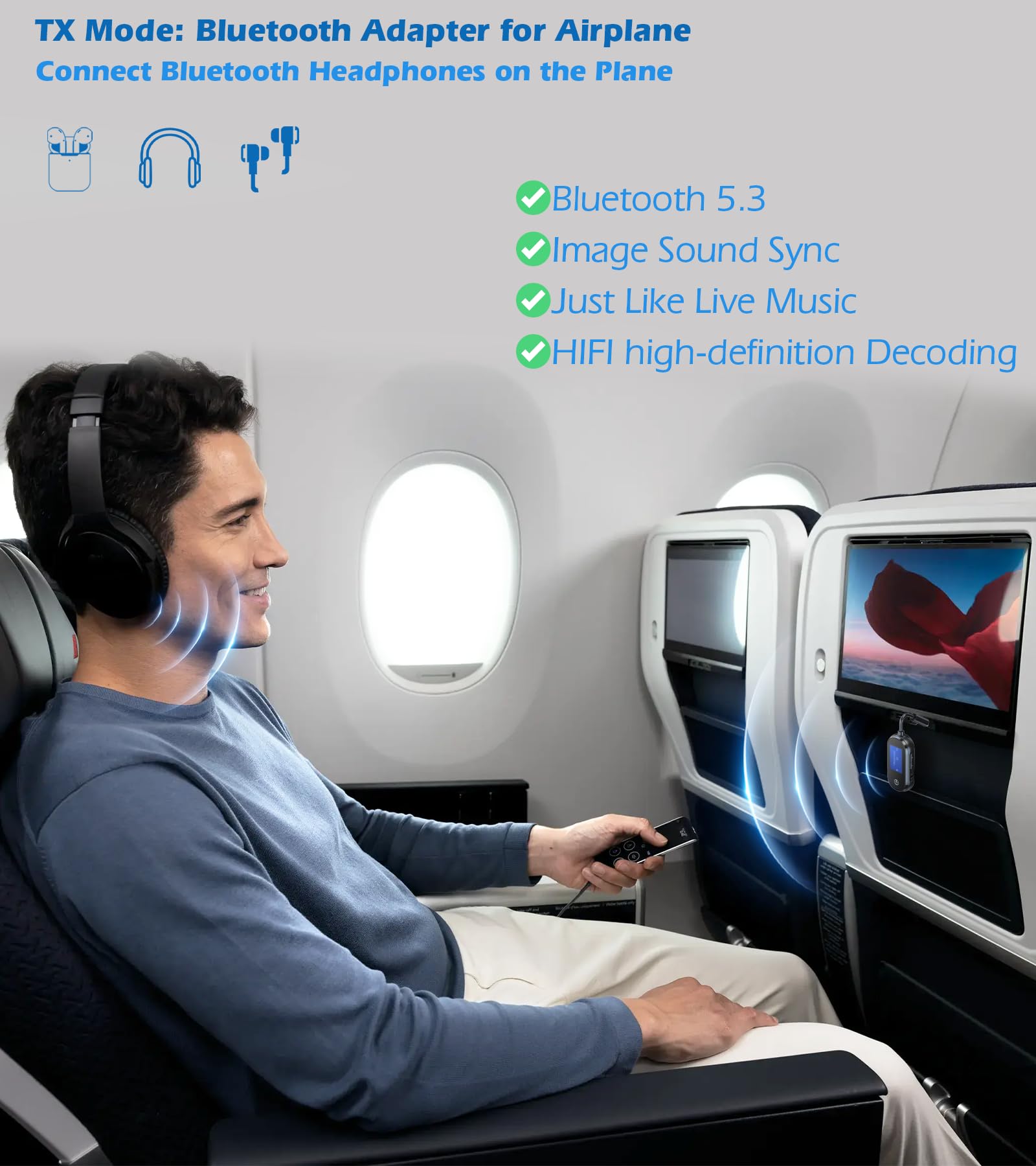
- Plug the transmitter into the seatback headphone jack or into the airplane’s 3.5mm port.
- Power on the transmitter and set it to pairing mode.
- Put your Bluetooth headphones in pairing mode and connect.
- Confirm audio plays through your headphones.
Practical tips:
- Carry a small USB power bank if the transmitter needs power.
- Use wired earphones as a backup when pairing fails.
- Label or remember your adapter’s pairing name to avoid confusion.

Best adapters and headphones for flights
Choose devices that prioritize low latency and ease of use. Low latency keeps audio in sync with video. Small size and battery life matter too.
What to look for in an adapter:
- Low-latency codecs like aptX Low Latency.
- Dual-pairing if you want to share audio with another headset.
- Simple one-button pairing and compact form.
- Rechargeable battery with at least 8–10 hours run time.
What to look for in headphones:
- Reliable Bluetooth connection and low latency.
- Comfortable fit for long flights.
- Good battery life and in-flight controls.
- Consider models with multipoint pairing if you switch devices often.
Personal pick from testing: a pocket-sized aptX Low Latency transmitter plus comfortable over-ear Bluetooth headphones make the smoothest flight setup.
Troubleshooting common issues
Issue: Screen won’t find headphones
– Ensure the headset is in pairing mode and close to the screen or adapter.
- Turn off other nearby Bluetooth devices to reduce interference.
Issue: Audio lags or is out of sync
- Use a low-latency adapter and headphones that support aptX Low Latency.
- If lag persists, switch to wired headphones.
Issue: Bluetooth disconnects mid-flight
- Check battery levels of headset and adapter.
- Move the adapter slightly or re-pair devices.
- Some airline systems limit Bluetooth time; ask crew if needed.
Issue: Adapter produces static or low volume
- Verify the adapter is fully plugged into the headphone jack.
- Use the screen’s audio settings to increase volume.
- Try a different adapter if problems persist.
Safety, policy, and etiquette
Airlines set policies on Bluetooth use. Crew may ask you to turn off wireless transmitters during takeoff or landing, though many now allow Bluetooth in flight mode. Always follow crew instructions.
Etiquette tips:
- Use noise-cancelling headphones or keep volume moderate to avoid disturbing neighbors.
- Ask politely before sharing audio with another passenger.
- Keep adapters and cables tidy to avoid cluttering the seat area.
My real-world experience and lessons learned
I often fly for work and tested many setups across airlines. Once I boarded a long flight with a promising IFE, but pairing failed. A pocket Bluetooth transmitter saved the day. Lesson learned: never rely solely on built-in Bluetooth. Bring a small adapter and a backup wired pair. I also found that labeling adapters speeds re-pairing when traveling with family.
Common mistakes to avoid:
- Forgetting to charge adapters and headphones.
- Buying non-low-latency adapters that cause lip-sync issues.
- Assuming every airline allows Bluetooth audio without checking policy.
Frequently Asked Questions of how to connect bluetooth headphones to airplane screen
Can all Bluetooth headphones pair with airplane screens?
Most Bluetooth headphones can pair if the airplane screen or adapter supports standard Bluetooth profiles. However, compatibility varies, and low-latency support is needed for synced audio.
Do I need an adapter to use Bluetooth headphones on planes?
You may need an adapter if the airplane screen lacks a Bluetooth transmitter. A small Bluetooth audio adapter plugs into the headphone jack and enables wireless listening.
Will Bluetooth interfere with aircraft systems?
Modern aircraft systems are well-shielded. Airlines still set policies about wireless use, but Bluetooth use in flight is generally allowed when crew permits and devices are in airplane mode.
How do I avoid audio lag when using Bluetooth?
Choose an adapter and headphones that support aptX Low Latency. Keep the transmitter and headphones close, and avoid cheap adapters that do not prioritize latency.
Can two people use Bluetooth headphones on one screen?
Yes, if the IFE or adapter supports dual-pairing. Some adapters allow two headsets at once. Check the adapter specs before you fly.
Conclusion
You can often connect bluetooth headphones to airplane screen, but success depends on the aircraft, IFE, and tools you bring. Prepare by checking airline features, packing a low-latency Bluetooth adapter, and carrying a wired backup. Small steps yield big comfort: charge devices, label adapters, and practice pairing before boarding. Try these tips on your next flight and enjoy clean, private audio. If this guide helped, consider subscribing for more travel tech tips or share your in-flight setup in the comments.

Everett Ashford is a tech reviewer at mytechgrid.com specializing in SSDs, cameras, TVs, earbuds, headphones, and other consumer electronics. He provides honest, data-driven reviews based on hands-on testing and real-world performance analysis. Everett simplifies complex tech details to help readers make smart, confident buying decisions.