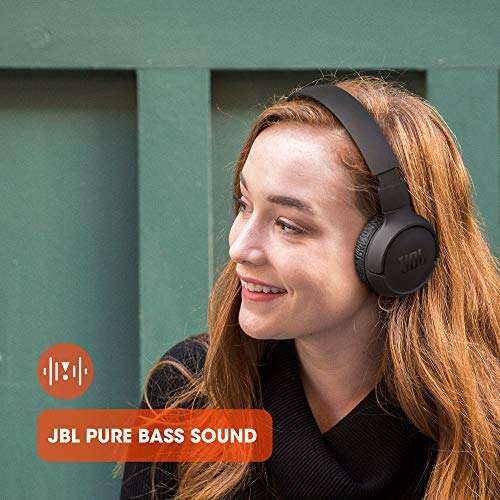
The best wireless headphones for iPad combine clear sound, easy pairing, comfort, and long battery life.
Picture this: you open your iPad for a movie, class, video call, or quiet work session, but the room is loud and the built-in speakers feel thin. A good wireless headset fixes that small daily problem. I looked at comfort, Bluetooth use, battery claims, call features, controls, and value to find the best wireless headphones for iPad users. The list below includes over-ear headphones, on-ear models, earbuds, and simple wired options. That range matters because the right fit depends on how you use your iPad.
JBL Tune 510BT: Best Budget Pick

The JBL Tune 510BT is a simple, light on-ear headset for iPad users who want wireless sound without a high price. Its Bluetooth connection pairs easily with an iPad, and the foldable frame makes it easy to place in a bag. The sound has the lively bass that many people enjoy for pop, video, and casual listening. Its built-in microphone also supports basic calls and online lessons.
JBL lists up to 40 hours of battery life, which is plenty for several days of normal use. The buttons sit on the earcup, so I can change volume, pause music, or answer a call without reaching for the tablet. The on-ear pads feel light, though they do not block as much outside noise as a sealed over-ear design. For travel, school, or home use, this model offers strong value and very little fuss.
Pros:
- Up to 40 hours of listed battery life
- Light and foldable design
- Easy Bluetooth pairing with iPad
- Useful built-in microphone
- Simple physical controls
- Strong value for casual listening
Cons:
- On-ear pads may feel tight during long sessions
- No active noise cancellation
- Sound isolation is only moderate
My Recommendation
I recommend the JBL Tune 510BT for students, families, and budget shoppers who need reliable headphones for an iPad. It works well for YouTube, music, podcasts, video calls, and travel. It is not the most advanced choice here, but its low weight and long battery make it one of the most practical best wireless headphones for iPad options. Availability and color choices can vary, so check the current Amazon listing before buying.
| Best for | Why |
|---|---|
| Budget buyers | It delivers wireless sound and useful battery life at a low cost. |
| Students | The foldable frame and light weight suit school bags and study sessions. |
| Daily calls | The built-in microphone handles basic iPad calls and lessons. |
Beats Solo 4: Best On-Ear Apple-Friendly Pick

The Beats Solo 4 is made for listeners who prefer an on-ear style with a slim, modern shape. It supports Bluetooth connection to an iPad and works with both Apple and Android devices. The sound aims for a balanced, energetic presentation rather than a dull or flat tone. Its lightweight build helps it feel less bulky than many full-size headphones.
Beats rates the Solo 4 for up to 50 hours of battery life, making it a strong choice for flights, study days, and long commutes. The earcups fold inward, and the controls are easy to learn after a few minutes. I like that this model supports a wired listening option when the battery is low, although the needed cable setup may depend on the device and accessories you use. The main trade-off is that it does not provide active noise cancellation.
Pros:
- Up to 50 hours of listed battery life
- Lightweight and easy to carry
- Works with Apple and Android devices
- Balanced sound for music and video
- Foldable design for travel
- Comfortable fit for many short and medium sessions
Cons:
- No active noise cancellation
- On-ear fit may not suit every listener
- Premium price compared with basic models
My Recommendation
The Beats Solo 4 suits iPad owners who want a stylish, portable headset with very long battery life. I would choose it for music, streaming, school work, and travel when a slim on-ear design matters. It is among the best wireless headphones for iPad if you want Apple-friendly use without moving to earbuds. Buyers who need quiet airplane listening should consider an ANC model instead.
| Best for | Why |
|---|---|
| Apple users | It fits naturally into an Apple-centered device setup and also supports Android. |
| Frequent travelers | The folding build and long battery reduce charging and packing worries. |
| Music fans | The lively but balanced sound works well with many music styles. |
Glynzak V6.0: Best Low-Cost Over-Ear Comfort

The Glynzak V6.0 is an over-ear Bluetooth headset aimed at shoppers who want more ear coverage for less money. Its larger cups can feel more relaxed than small on-ear pads during a movie or podcast. The listed HiFi stereo design gives the sound a fuller shape than basic tablet speakers. A built-in microphone also supports calls and online meetings from an iPad.
Over-ear headphones can help soften room noise simply by covering the ears, though this model should not be confused with active noise-canceling headphones. The V6.0 uses physical controls, which I find useful when the iPad is across the room. Its main appeal is comfort and a broad fit at an accessible price. As with many value headphones, sound quality and microphone performance may be less refined than premium Apple or Beats models.
Pros:
- Over-ear design offers broad ear coverage
- Wireless Bluetooth connection for iPad
- Built-in microphone for calls
- HiFi stereo sound positioning
- Physical controls are easy to use
- Usually costs less than premium brands
Cons:
- No active noise cancellation
- Build materials feel more budget-focused
- May feel warm during long use
My Recommendation
I suggest the Glynzak V6.0 for home users, teens, and shoppers who prefer over-ear comfort but want to keep spending low. It is useful for iPad movies, games, music, and calls. This model belongs on a best wireless headphones for iPad list because it gives users more ear coverage than many cheap on-ear sets. Check the current listing for exact color, stock, and battery details before ordering.
| Best for | Why |
|---|---|
| Home entertainment | The over-ear shape suits movies, shows, and long podcast sessions. |
| Value shoppers | It offers a full-size wireless design without a premium price. |
| Remote calls | The built-in microphone supports basic iPad voice communication. |
KVIDIO Headphones: Best Long-Battery Over-Ear Value
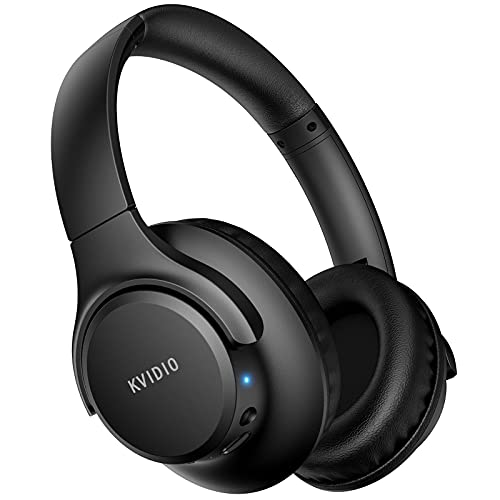
KVIDIO’s over-ear Bluetooth headphones focus on long play time and everyday comfort. The company lists up to 65 hours of playtime, which is a useful benefit for people who dislike frequent charging. The padded cups cover the ears and create a more private listening space than an open tablet speaker. Bluetooth pairing lets the headphones work with an iPad, phone, laptop, or other compatible device.
The headset is a sensible pick for streaming, study, and background music. The large earcups may feel comfortable for many users, but they also take up more space in a small bag. I would not buy this model for advanced noise control because the listing centers on wireless stereo performance rather than ANC. Still, its battery claim and broad use make it a strong low-cost option for families who share headphones around the house.
Pros:
- Up to 65 hours of listed playtime
- Over-ear cups provide broad coverage
- Works with iPad and other Bluetooth devices
- Good choice for long study sessions
- Useful for music, video, and podcasts
- Strong value for a full-size headset
Cons:
- Large frame is less compact than earbuds
- No active noise cancellation listed
- Long battery claims depend on use and volume
My Recommendation
KVIDIO is best for families, students, and home users who want a battery that can run for days. I would pick it when long playtime matters more than a small travel case or advanced app features. Among the best wireless headphones for iPad, it stands out for value and endurance. It is a practical choice, but buyers should keep volume at a safe level and charge from a trusted power source.
| Best for | Why |
|---|---|
| Long study sessions | The over-ear fit and extended battery support hours of use. |
| Shared family use | It pairs with many compatible devices, not only an iPad. |
| People who forget to charge | The listed 65-hour playtime lowers the need for daily charging. |
BERIBES Headphones: Best for Sound Controls
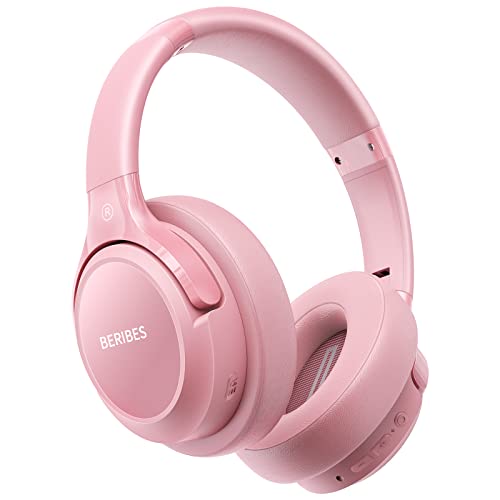
The BERIBES wireless headset offers an over-ear design, HiFi stereo sound, and six equalizer modes. That EQ feature gives listeners more control over the tone, which can help when moving from spoken lessons to bass-heavy music. It lists up to 65 hours of battery life, so the headset is ready for long iPad sessions. The microphone supports basic calls and voice chats.
I like the idea of preset sound modes because not every recording needs the same tone. A speech setting can make voices feel more direct, while a music mode can add more energy. The headset remains a budget product, so users should keep expectations realistic about materials, app support, and noise control. It does not replace a studio headset, but it gives casual iPad listeners more control than many entry-level models.
Pros:
- Six EQ modes for different listening needs
- Up to 65 hours of listed battery life
- Over-ear design for a fuller fit
- HiFi stereo presentation
- Built-in microphone for calls
- Useful physical controls
Cons:
- No active noise cancellation
- EQ changes may not suit every listener
- Over-ear frame may feel bulky for travel
My Recommendation
BERIBES is a good match for iPad owners who like to adjust sound for music, movies, and speech. I recommend it for budget listeners who want more tuning options without buying a separate app or amplifier. It earns a place among the best wireless headphones for iPad because its EQ modes add useful flexibility. It offers good value when the current price remains close to other budget over-ear models.
| Best for | Why |
|---|---|
| Music listeners | Six EQ modes let users shape the sound to fit different songs. |
| Movie fans | The over-ear design gives films a more private listening feel. |
| Budget tinkerers | It offers sound choices without the cost of a premium system. |
Apple AirPods 4: Best Everyday Earbuds

AirPods 4 are a natural choice for iPad owners who want small earbuds and quick access to Apple features. The compact charging case fits in a pocket, and the open-style fit lets some outside sound remain present. That can help when walking at home or listening while staying aware of family activity. The earbuds are also convenient for calls, video lessons, music, and short iPad sessions.
Apple devices usually make setup simple, especially when the earbuds connect through the same Apple account environment. The fit is lighter than an over-ear headset, but an open design may not seal every ear equally well. It also gives less passive noise blocking than silicone-tip earbuds. For people who value small size, easy switching, and a familiar Apple experience, AirPods 4 are among the best wireless headphones for iPad.
Pros:
- Small and easy to carry
- Simple pairing with compatible Apple devices
- Comfortable open-style fit for many users
- Good choice for calls and video lessons
- Charging case improves portability
- Works well inside an Apple device setup
Cons:
- Open fit gives limited noise isolation
- Fit can vary from one ear to another
- Small earbuds are easier to misplace
My Recommendation
I recommend AirPods 4 for iPad owners who want the easiest daily experience in a tiny package. They suit commuting, calls, school, light exercise, and casual video use. They are one of the best wireless headphones for iPad for people who already use Apple devices and want smooth, simple pairing. Choose a sealed over-ear or ANC model if you often listen in loud places.
| Best for | Why |
|---|---|
| Everyday Apple use | The earbuds pair neatly with compatible Apple hardware. |
| Calls and lessons | The small design and built-in microphones suit voice tasks. |
| Minimalists | The case and earbuds take up little space in a pocket or bag. |
RORSOU C6: Best Budget ANC Headphones

The RORSOU C6 is designed for iPad users who want over-ear headphones with active noise cancellation. ANC can reduce steady low sounds, such as an airplane hum, air conditioner, or nearby road noise. It will not erase every voice or sudden sound, but it can make music and dialogue easier to hear at a lower volume. The folding design also makes this headset more travel friendly than many large budget models.
The listed battery life reaches up to 60 hours, giving the C6 a useful mix of quiet listening and endurance. Its padded earcups aim to provide a comfortable seal, while the microphone supports calls from an iPad or computer. I see this model as a practical travel tool rather than a luxury audio product. Noise cancellation works best when the fit seals well, so buyers should pay close attention to earcup size and personal comfort.
Pros:
- Active noise cancellation for steady background sound
- Up to 60 hours of listed playtime
- Folding frame helps with travel
- Over-ear cups improve passive isolation
- Built-in microphone for calls
- Designed for iPad, travel, PC, and home use
Cons:
- ANC cannot remove every type of noise
- Large cups may feel warm over time
- Sound quality may not match premium ANC brands
My Recommendation
The RORSOU C6 is best for travelers, remote workers, and iPad users who face steady background noise. I would choose it over a basic headset for flights, hotels, and busy homes. It is a strong candidate for the best wireless headphones for iPad when ANC and long playtime matter more than brand prestige. Confirm the latest listing details, since battery and feature information can change by version.
| Best for | Why |
|---|---|
| Air travel | ANC can soften the low rumble of an aircraft cabin. |
| Busy homes | The over-ear seal helps reduce some surrounding sound. |
| Remote work | The microphone and long battery support calls and focus time. |
Apple EarPods USB-C: Best Wired USB-C Value

Apple EarPods with a USB-C plug are not wireless, but they solve a real iPad problem: battery anxiety. If your wireless earbuds are empty, or you need a quick plug-and-play option, these earbuds start working as soon as you connect them to a compatible USB-C iPad. The built-in remote controls music, calls, and volume. Their familiar shape feels light and simple for many listeners.
A wired connection also avoids Bluetooth pairing delays and wireless signal concerns. The fit does not seal the ear, so outside sound remains easy to hear and bass may feel lighter than with sealed earbuds. The cable can snag, but it also means no charging case to carry. I recommend checking your iPad port before buying, because USB-C EarPods are not the right match for a Lightning-only tablet.
Pros:
- No battery or charging needed
- USB-C plug suits compatible iPad models
- Built-in remote controls music and calls
- Lightweight and easy to store
- Simple plug-and-play setup
- Useful backup for wireless headphones
Cons:
- Wired rather than wireless
- Cable may tangle or catch
- Open fit gives limited bass and isolation
My Recommendation
Choose USB-C EarPods if you want dependable wired sound for an iPad and do not want to manage charging. They are ideal for students, children, office users, and anyone who needs a low-cost backup. They are not technically the best wireless headphones for iPad, but they are a smart companion to a wireless pair. Verify the port on your tablet before placing an order.
| Best for | Why |
|---|---|
| Backup listening | They work when wireless headphones need charging. |
| Students | The remote supports quick control during lessons and videos. |
| Simple setups | The cable avoids pairing menus and Bluetooth troubleshooting. |
Apple AirPods Pro 3: Best Premium Earbuds

AirPods Pro 3 are the premium earbud option in this guide, with active noise cancellation and a sealed in-ear fit. Silicone tips help create a closer seal than open earbuds, which can improve bass and reduce outside sound. That design is useful for travel, work, and focused iPad viewing. The compact case keeps the complete setup easy to carry.
Premium AirPods are built around convenient Apple use, with touch or stem controls and features designed for compatible devices. ANC can make a noisy setting calmer, while transparency-style listening can help users hear their surroundings without removing the earbuds. In-ear comfort depends heavily on choosing the right tip size. These earbuds cost more, but they offer the most complete small-form package among the best wireless headphones for iPad listed here.
Pros:
- Active noise cancellation for busy settings
- Sealed in-ear fit can improve sound isolation
- Compact charging case
- Strong match for compatible Apple devices
- Useful transparency listening option
- Good choice for calls, music, and movies
Cons:
- Higher price than standard earbuds
- In-ear tips may not suit every user
- Small case and earbuds can be misplaced
My Recommendation
I recommend AirPods Pro 3 for iPad owners who want the strongest mix of portability, noise control, and Apple convenience. They suit frequent travelers, commuters, office workers, and listeners who want a sealed earbud fit. If budget is not the main concern, they are my premium pick for the best wireless headphones for iPad. Buy from a trusted listing and check the included features for the exact model you receive.
| Best for | Why |
|---|---|
| Premium Apple setups | They are designed to work smoothly with compatible Apple hardware. |
| Frequent travelers | ANC and a small case make them useful on the move. |
| Focused listening | The sealed fit helps limit outside sound and improve immersion. |
Apple EarPods Lightning: Best Wired Lightning Pick

Lightning EarPods remain useful for older iPad models that have a Lightning port. They offer a direct wired connection, so there is no Bluetooth setup and no charging routine. The built-in control lets users adjust volume, pause media, and answer calls. Their open earbud shape feels familiar and does not create the pressure of a sealed in-ear tip.
The main buying decision is simple: match the connector to the iPad. These EarPods are not suitable for a USB-C-only tablet without an appropriate adapter, and adapters may affect convenience. Sound is clear enough for speech, classes, and casual music, although the open fit limits deep bass and noise blocking. For older Apple tablets, this is an affordable and dependable wired solution.
Pros:
- No charging required
- Direct connection for Lightning iPads
- Built-in remote and microphone
- Lightweight open earbud design
- Easy to use for calls and lessons
- Useful low-cost wired option
Cons:
- Only fits devices with a compatible Lightning connection
- Not wireless
- Limited sound isolation
My Recommendation
Lightning EarPods are best for owners of older iPads who want a simple wired headset. I would keep them in a desk drawer, backpack, or travel kit as a reliable backup. They do not compete with the best wireless headphones for iPad, but they remove charging and pairing from the equation. Confirm your iPad connector before purchase, especially if you recently upgraded to a USB-C model.
| Best for | Why |
|---|---|
| Older iPads | The Lightning plug connects directly to compatible models. |
| Emergency use | They work without battery power or wireless pairing. |
| Clear speech | The microphone and remote suit calls, classes, and voice tasks. |
How I Chose the Best Wireless Headphones for iPad
I judge iPad headphones by more than sound alone. A headset may sound rich but still be a poor choice if it hurts after 20 minutes, loses connection, or needs charging every day. I look at how easily it pairs, how well it fits, how simple the controls feel, and whether the listed battery claim matches the product’s intended use. I also separate true wireless models from wired backups so readers can make a fair choice.
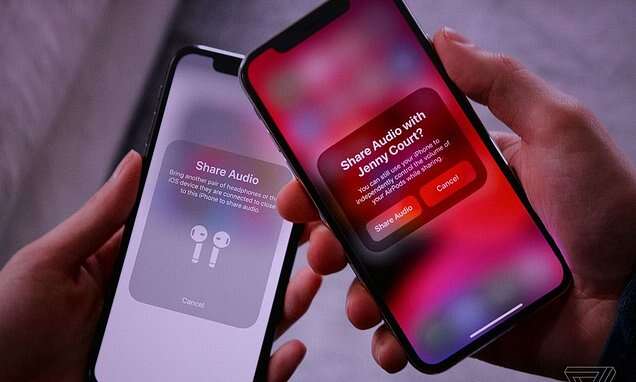
Bluetooth compatibility is the first basic check. Most current headphones use Bluetooth and can connect to a compatible iPad through Settings, Bluetooth. The process is usually quick, but some Apple features work best inside Apple’s own product family. A standard Bluetooth headset can still stream sound from an iPad, even when it does not offer every Apple-only feature.
Comfort is just as important as battery life. On-ear headphones rest on the ear and often feel light, while over-ear models surround the ear and may block more sound. Earbuds save space, but the fit depends on ear shape. I suggest starting with the style you can wear for a full movie, not the style that looks best in a product photo.
Noise control needs careful expectations. Passive isolation comes from the earcup or earbud seal, while active noise cancellation uses microphones and electronic processing. ANC works best against steady sounds, not every voice or sudden noise. A good seal often matters as much as the feature label, so comfort and fit remain key parts of the buying decision.
What to Look For Before Buying iPad Headphones
Start with the iPad itself. Wireless headphones are usually the easiest match because current iPads support Bluetooth audio. If you prefer wired EarPods, check whether your tablet has a USB-C or Lightning port. A connector mismatch can turn a good product into the wrong purchase.
Next, think about where you listen. A quiet bedroom does not require ANC. A plane, coffee shop, or busy home may justify a sealed over-ear model or noise-canceling earbuds. Open earbuds can be safer for awareness, but they let in more sound and may leak some audio.
Battery life is another practical point. A listed maximum often comes from controlled testing and can change with volume, calls, codec use, and ANC. I treat long battery claims as a guide, not a promise. A charging case helps earbuds, while a foldable headset helps travelers.
Call quality matters if you use Zoom, FaceTime, school apps, or work meetings. A microphone can sound fine in a quiet room but struggle near traffic or wind. If calls are your main task, look for a model with a clear microphone design and read recent user feedback. No headset makes a poor internet connection disappear.
Finally, check controls and return terms. Physical buttons work well when you cannot see the screen. Touch controls look clean but may need practice. A clear return window gives you time to test comfort, fit, and connection with your own iPad.
Wireless Headphones Versus AirPods for iPad
AirPods offer the smoothest Apple-focused experience, especially for people who own an iPhone, Mac, or Apple Watch. They are small and easy to carry. Over-ear Bluetooth headphones often provide longer battery life, stronger passive isolation, and more comfort for some listeners. Neither style wins for everyone.
Choose earbuds if you want a tiny case and quick daily use. Choose over-ear headphones if you watch long shows, study for hours, or want more space around your ears. Choose wired EarPods if you want no charging at all. This simple decision can narrow a large Amazon search into a few sensible options.
FAQs Of best wireless headphones for ipad
Can any Bluetooth headphones connect to an iPad?
Most standard Bluetooth headphones can connect to a compatible iPad. Open Settings, select Bluetooth, put the headset into pairing mode, and tap its name. Some advanced features may depend on the brand or Apple device model.
Which is better for an iPad: earbuds or over-ear headphones?
Earbuds are better for small size and travel. Over-ear headphones can feel more comfortable for long sessions and may block more outside sound. Your ear shape, listening time, and travel needs should guide the choice.
Do I need noise-canceling headphones for an iPad?
No. ANC is useful in planes, offices, and busy homes, but it is not needed in a quiet room. A comfortable fit and clear sound often matter more for normal home use.
Why will my wired EarPods not fit my iPad?
Your iPad may use a different connector. USB-C EarPods fit compatible USB-C devices, while Lightning EarPods fit compatible Lightning devices. Check the port before ordering, and use an adapter only when it supports audio correctly.
How can I improve headphone battery life?
Lower the volume, turn off ANC when you do not need it, and charge the headset before it reaches zero. Keep the earbuds in their case when not in use. Battery capacity naturally changes over time.
Final Verdict: Which Should You Buy?
For most iPad owners, I recommend AirPods 4 for easy daily use. Choose AirPods Pro 3 for premium ANC, JBL Tune 510BT for value, or RORSOU C6 for budget over-ear noise control.
The best wireless headphones for iPad are the pair that fits your ears, iPad port, budget, and routine. Check current Amazon pricing, stock, and model details before buying.

Everett Ashford is a tech reviewer at mytechgrid.com specializing in SSDs, cameras, TVs, earbuds, headphones, and other consumer electronics. He provides honest, data-driven reviews based on hands-on testing and real-world performance analysis. Everett simplifies complex tech details to help readers make smart, confident buying decisions.