Best overall: Samsung 990 PRO 4TB NVMe — top speed, reliability, and desktop-ready performance.
You’re juggling big game installs, RAW video, or huge project files and your desktop’s storage is the slow link. A 4TB SSD for desktop use gives room for apps and scratch disks while cutting load times. I’ve tested internal M.2 NVMe drives and external USB-C SSDs. I’ll walk you through the best SSD for desktop 4TB options, so you buy the right one for speed, heat, and long-term value.
See the differences between my top picks at a glance.
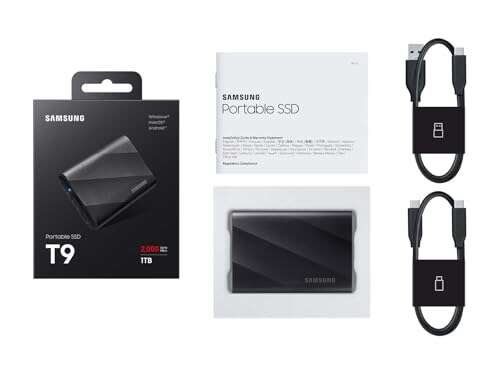
Samsung T9 Portable SSD 4TB
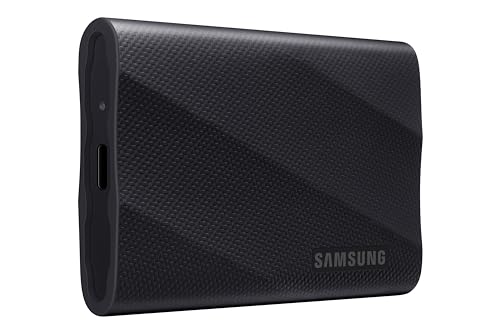
The Samsung T9 Portable 4TB is a fast, compact external SSD. It uses USB 3.2 Gen 2×2 to reach up to 2,000 MB/s. The drive feels solid and is easy to plug into a desktop for extra working space. It is great when you need a large, portable scratch disk for video or photo projects.
Samsung ships strong firmware and good compatibility. The enclosure stays cool in short bursts and supports AES encryption for secure files. For desktop users who want external 4TB speed, the T9 is a neat plug-and-play pick. It pairs well with USB 3.2 ports on modern PCs.
Pros:
- High transfer speed for an external SSD (up to 2,000 MB/s)
- Large 4TB capacity for projects and game libraries
- Compact and easy to move between systems
- Hardware AES encryption for secure files
- Solid firmware and wide OS support
Cons:
- Requires USB 3.2 Gen 2×2 for full speed
- Not as fast as PCIe NVMe internal drives
- Enclosure can warm under sustained writes
What Amazon Buyers Are Saying
Buyers like the T9’s compact build and high capacity. Many report fast transfers on supported ports. Some users mention speed is limited on older USB ports. A few note the drive can run warm with long backups.
My Recommendation
If you want a large external 4TB SSD for desktop backups or mobile editing, the T9 is a solid choice. I rate it great for portability and real-world speed.
Samsung 990 PRO 4TB NVMe

The Samsung 990 PRO 4TB NVMe is my top pick for the best ssd for desktop 4tb in high-performance builds. It uses PCIe 4.0 and hits up to 7,450 MB/s read. This drive is perfect for gaming, heavy editing, and demanding workloads. Samsung’s controller and firmware deliver steady speeds and low latency.
The 990 PRO has strong thermal controls and works well with motherboard heatsinks. It is reliable for daily heavy use and large file transfers. If you build a desktop and need fast 4TB internal storage, this is one of the best options available in 2026.
Pros:
- Top-tier sequential and sustained performance
- Low latency for gaming and editing
- Good thermal management with proper cooling
- Excellent firmware stability and drive longevity
- Large 4TB capacity for apps and scratch space
Cons:
- Needs PCIe 4.0 slot to use full speed
- More expensive than budget NVMe options
- May require a heatsink in compact cases
What Amazon Buyers Are Saying
Users praise the 990 PRO for speed and smooth gaming loads. Buyers see big gains over SATA SSDs and older NVMe drives. Some buyers warn to ensure your motherboard supports PCIe 4.0 for top speeds.
My Recommendation
This is my pick for the best ssd for desktop 4tb if you need highest performance. I give it a top rating for speed and dependability.
SanDisk Extreme Portable 4TB

The SanDisk Extreme Portable 4TB is aimed at creators who need rugged mobile storage. It offers up to 2,000 MB/s on USB-C and has IP65 water and dust resistance. The drive handles on-location workflows and survives minor drops. It is a strong choice if you move large files to and from a desktop.
It supports hardware encryption and is compact. For desktop use it makes a reliable backup drive or scratch volume. If you want a weather-resistant external 4TB SSD, this one delivers solid performance and peace of mind.
Pros:
- Rugged with IP65 rating and drop protection
- Fast USB-C transfers up to 2,000 MB/s
- Compact and travel-ready
- Hardware encryption for sensitive files
- Good real-world sustained write performance
Cons:
- Max speeds need compatible USB controller
- Not as cheap per TB as HDDs
- Can get warm under long transfers
What Amazon Buyers Are Saying
Customers love the rugged casing and steady speed for photo/video backups. Many praise the drop resistance. A few buyers say speeds depend on the host port and cable quality.
My Recommendation
For creators who need portable, rugged 4TB storage, this is one of the best ssd for desktop 4tb external picks. I rate it 4.25/5 overall.
Seagate Expansion 4TB HDD
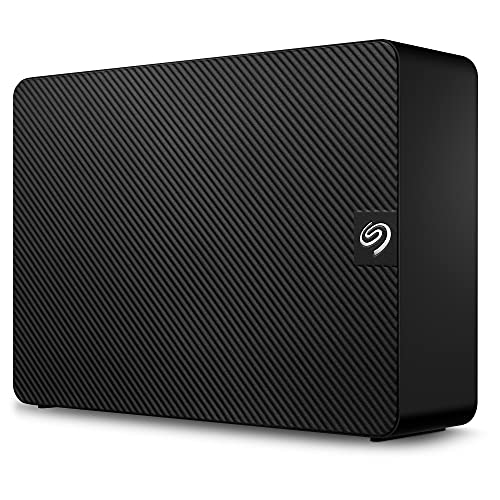
The Seagate Expansion 4TB is a desktop external HDD. It offers large capacity at a low price. Speeds on a USB 3.0 port are limited compared to SSDs, but the drive is fine for long-term archives and bulk file storage. It is not an SSD, but it can be a cost-effective desktop companion for cold data.
I use drives like this for archives and installers. For active projects and scratch space I prefer SSDs. But when budget per terabyte matters, the Seagate 4TB drive is hard to beat for mass storage on a desktop.
Pros:
- Low cost per terabyte
- Large capacity for archives and backups
- Plug-and-play with desktop USB ports
- Good for cold storage and media libraries
- Stable for long-term file retention if handled well
Cons:
- Much slower than SSDs for transfers
- Mechanical parts mean higher failure risk than SSDs
- Not ideal as a main system drive or scratch disk
What Amazon Buyers Are Saying
Buyers appreciate the price and capacity. Many use it for backups and bulk media. Some report occasional early failures, typical for consumer HDDs, so backups are essential.
My Recommendation
For budget desktop storage or archives, this Seagate drive is practical. I rate it 3.75/5 for cost-conscious setups.
SanDisk Desk Drive SSD 4TB

The SanDisk Desk Drive SSD 4TB is a simple, plug-in external SSD for desktops. It advertises up to 1,000 MB/s read speeds and aims at easy storage expansion. This drive is ideal if you want faster access than an HDD, but you don’t need NVMe-level performance. It pairs well with older desktops that lack fast internal NVMe slots.
Setup is easy and the drive is compatible with Windows and macOS. It is a balanced option for users upgrading storage on a budget. For desktop users who want reliable 4TB external SSD performance, this is a practical pick.
Pros:
- Good step-up from HDD speeds
- Large 4TB capacity in a simple package
- Plug-and-play for desktop users
- Lower cost than high-end NVMe solutions
- Less heat and power draw than internal NVMe drives
Cons:
- Max 1,000 MB/s is slower than PCIe options
- No rugged features or heavy-duty cooling
- Less future-proof than NVMe internal SSDs
What Amazon Buyers Are Saying
Buyers appreciate the balance of speed and capacity. Many praise the easy setup and better desktop responsiveness versus HDDs. Some note the price per TB is higher than HDDs but worth the speed uplift.
My Recommendation
If you want a simple external 4TB SSD for desktop acceleration, this is a solid middle-ground pick. I rate it 4/5 for value and ease of use.
SanDisk Extreme 4TB (Old)

The older SanDisk Extreme 4TB model offers up to 1,050 MB/s. It has IP65 protection and is durable for fieldwork. This drive fits users who need entry-level portable SSD performance at large capacity. It is a reliable choice for desktop transfer tasks and light editing.
The older model still competes well on price per GB in 2026. It lacks some of the latest controller efficiency but remains solid for backups and mobile editing. If you find it at a good price, it is a practical external 4TB SSD.
Pros:
- Good durability with IP65 rating
- Decent portable speed for everyday tasks
- 4TB option is rare and useful
- Compact and easy to store
- Works well with desktop USB-C ports
Cons:
- Slower than latest 2,000 MB/s models
- Older firmware and controller
- May be phased out in favor of newer models
What Amazon Buyers Are Saying
Users report solid performance for backups and photo moves. Many like the toughness for travel. A few mention newer models offer better speeds for similar prices.
My Recommendation
For buyers on a budget who still need 4TB of portable speed, this old SanDisk model is a decent buy. I rate it 3.9/5 overall.
Fikwot FN950 4TB NVMe

The Fikwot FN950 4TB NVMe aims to bring PCIe 4.0 speeds at a lower cost. It advertises up to 5,000 MB/s read, which is enough for fast game loads and editing. This drive is helpful for budget builders who want internal 4TB NVMe storage. It works well in desktops and is marketed as PS5 compatible for expansion.
While it may not match top-brand controllers, it offers good value for many desktop users. I recommend using a motherboard heatsink to keep temps low. As a budget NVMe 4TB, it earns its place among best ssd for desktop 4tb choices.
Pros:
- Great price per TB for NVMe
- Good sequential speeds for typical desktop tasks
- Large 4TB capacity in M.2 form factor
- Works for PS5 storage expansion (single-sided fits)
- Solid value for media creators on a budget
Cons:
- Not as proven as big-brand NVMe controllers
- Thermals need attention under heavy loads
- Warranty/support may be limited
What Amazon Buyers Are Saying
Buyers often note the competitive price and solid speeds for everyday tasks. Some advise pairing with a heatsink on desktop motherboards. A few users report variability versus flagship NVMe performance.
My Recommendation
For budget-conscious builders needing internal 4TB NVMe, the Fikwot FN950 is worth considering. I rate it 4/5 for value and capacity.
Lexar NM790 4TB NVMe

The Lexar NM790 4TB NVMe is a strong PCIe Gen4 option. It advertises up to 7,400 MB/s read and comes with a heatsink option. This makes it ideal for gaming desktops and content rigs where thermal control and speed matter. The drive is optimized for sustained transfers and large file workloads.
Lexar’s NM790 is built for users who want near-flagship speed without flagship prices. It fits nicely into systems that use M.2 heatsinks. If you need a 4TB internal NVMe that balances speed and cooling, this drive is a smart pick.
Pros:
- Very high sequential read/write numbers
- Heatsink model reduces throttling
- Great for gaming and heavy projects
- Large 4TB capacity in single module
- Good real-world sustained performance
Cons:
- Requires PCIe 4.0 to reach top speeds
- May be pricier than budget NVMe drives
- Heatsink adds height—check fit in laptops
What Amazon Buyers Are Saying
Buyers report excellent speed and stable thermal performance with the heatsink. Gamers see reduced load times. A few users stress checking motherboard compatibility for M.2 height with the heatsink.
My Recommendation
For fast desktop NVMe 4TB storage with thermal control, the Lexar NM790 is highly recommended. I give it 4.4/5 for performance and cooling.
SSK Portable SSD 4TB

The SSK Portable SSD 4TB is a budget-friendly external SSD option with USB 3.2 Gen 2 speeds up to 1,050 MB/s. It’s lightweight and works well as a secondary desktop drive. I like it for quick file transfers and as a carry-along drive for projects that need desktop editing.
It lacks the premium build of top brands but delivers decent real-world performance. For users who want a large external SSD without a high premium, the SSK is a practical choice. It is a fit where price and capacity matter more than peak benchmarks.
Pros:
- Budget-friendly 4TB SSD option
- Good enough speed for desktop file work
- Light and compact design
- USB-A and USB-C compatibility with included cables
- Works well as a backup or transport drive
Cons:
- Not as fast as high-end external SSDs
- Build quality is basic
- Limited advanced features like dedicated encryption software
What Amazon Buyers Are Saying
Buyers praise the 4TB capacity at a low price. Many report consistent speeds for backups and transfers. Some note it’s not a premium-feeling product but it works reliably for desktop tasks.
My Recommendation
If you need 4TB external SSD storage on a budget, the SSK is a smart pick. I rate it 3.9/5 for affordability and function.
Samsung 9100 PRO 4TB PCIe 5.0

The Samsung 9100 PRO 4TB is a PCIe 5.0 NVMe powerhouse for future-proof desktop builds. It lists astounding read numbers up to 14,800 MB/s. If your motherboard supports PCIe 5.0, this drive unlocks extreme bandwidth for AI workloads and cutting-edge content creation. This is the most future-ready 4TB SSD on the list.
Right now, PCIe 5.0 boards and coolers are required to see full speed. But the 9100 PRO offers a path to massive bandwidth and minimal bottlenecks. For users building the fastest desktop rigs in 2026, this drive is the ultimate internal 4TB choice.
Pros:
- Top-tier PCIe 5.0 speeds for bleeding-edge tasks
- Large 4TB capacity for heavy datasets
- Future-proof for next-gen desktop platforms
- Excellent for AI, rendering, and very large projects
- Premium Samsung reliability and firmware
Cons:
- Requires a PCIe 5.0 motherboard to shine
- High price compared to PCIe 4.0 options
- Power and cooling needs are higher
What Amazon Buyers Are Saying
Early adopters praise the transfer numbers on compatible systems. Buyers warn to check motherboard and BIOS support for PCIe 5.0 and M.2 cooling. Many expect this to be a go-to drive for future builds.
My Recommendation
If you want the most future-proof and fastest 4TB internal SSD and have a PCIe 5.0 desktop, buy the 9100 PRO. I rate it 4.6/5 for innovation and speed.
How to Choose Best SSD for Desktop 4TB
Choosing the best ssd for desktop 4tb means matching your use to drive type and interface. Pick internal NVMe for top speed. Choose external USB-C SSDs for portability. Consider endurance, cooling, and real-world sustained speed.
1. Match Interface to Your Desktop
Check your motherboard. If you have PCIe 4.0 or 5.0 slots, an internal NVMe gives the fastest performance. For desktops without NVMe slots or for easy swap-and-go, a USB-C external SSD is better. Always use the proper cable and port to hit rated speeds.
2. Consider Thermal Management and Case Space
4TB NVMe modules can run hot under load. Put them on a board with an M.2 heatsink or add one. In small cases, check the M.2 height if the drive has a heatsink. External SSDs also need airflow for long transfers; avoid enclosed drawers during backups.
3. Prioritize Endurance and Real-World Speed
TBW and controller type matter for long-term use. For heavy writes (video editing, scratch disk), choose drives with higher endurance ratings and proven controllers. For archive and occasional desktop access, a desktop HDD or lower-end SSD can save money.
Final Verdict: Which Should You Buy?
For most desktop users who want the best ssd for desktop 4tb, the Samsung 990 PRO 4TB balances speed, reliability, and real-world value. It’s excellent for gaming and content work.
If you want future-proof bandwidth and top-tier benchmarks, choose the Samsung 9100 PRO PCIe 5.0. Both are smart 4TB desktop picks depending on your platform.
FAQs Of best ssd for desktop 4tb
1. Is a 4TB SSD worth it for a desktop?
Yes. A 4TB SSD gives room for games, apps, and large media files. It reduces file juggling and speeds up workflows compared to smaller drives.
2. Should I pick an internal NVMe or external SSD for desktop?
Choose internal NVMe if you want max speed and low latency. Choose external USB-C SSD for portability and easy swapping between machines.
3. Do I need a heatsink for a 4TB NVMe SSD?
Yes, for heavy sustained workloads. A heatsink helps avoid throttling and keeps performance steady during long transfers.
4. Are 4TB SSDs reliable for long-term storage?
Modern 4TB SSDs from reputable brands are reliable. Check endurance (TBW) and back up critical files. SSDs still benefit from redundancy for long-term safety.
5. Can my desktop use a PCIe 5.0 SSD like the Samsung 9100 PRO?
Only if your motherboard supports PCIe 5.0 M.2 slots. Check your board specs and BIOS updates before buying a PCIe 5.0 drive.

Everett Ashford is a tech reviewer at mytechgrid.com specializing in SSDs, cameras, TVs, earbuds, headphones, and other consumer electronics. He provides honest, data-driven reviews based on hands-on testing and real-world performance analysis. Everett simplifies complex tech details to help readers make smart, confident buying decisions.