Best 360 camera for virtual tours: Ricoh Theta X offers sharp images, smooth workflow, and dependable range.
Imagine you're listing a property or building a museum tour and want viewers to feel like they're really there. You need crisp, full-dome photos, easy stitching, and a workflow that gets tours online fast. The right 360 camera removes headaches like mismatched exposure, clunky file handling, and time-consuming stitching—so you can deliver pro virtual tours that attract buyers and visitors.
Insta360 X5 Bundle

I used the Insta360 X5 for low-light walkthroughs and found it impressively bright. The 8K capture and waterproof body let me shoot outdoors and inside without swapping gear. Files are easy to handle in Insta360’s suite, and the invisible selfie stick helps when I need smooth interiors without visible tripod stalks.
The X5 gives reliable stabilization and smart HDR for tricky windows and lamp-lit rooms. Battery life is strong for long sessions, and the replaceable lens makes field repairs simple. If you want a modern action-style 360 that doubles for virtual tours, it holds up well.
Pros:
- 8K capture for high-res tour images and frames
- Waterproof body lets you shoot outdoors confidently
- Strong low-light performance for interiors
- Invisible selfie stick effect removes support artifacts
- Replaceable lens reduces downtime from damage
Cons:
- Larger files need fast storage and transfer
- Learning curve for fine-tuning HDR settings
- Accessory ecosystem can get costly
My Recommendation
I recommend the Insta360 X5 for creatives who want rugged versatility. I chose it when I needed waterproof reliability and broad dynamic range. It matches well for outdoor real estate shoots and adventurous property tours. The X5 works as a reliable every-day 360 camera that also handles rough conditions.
| Best for | Why |
|---|---|
| Outdoor shoots | Waterproof and rugged build |
| Adventurous tours | 8K capture and stabilization |
| Quick field repairs | Replaceable lens design |
Ricoh Theta Z1

The Ricoh Theta Z1 remains a top choice for studio-quality virtual tours. Its two 1.0-inch back-illuminated sensors produce clean 23MP images with low noise. I found its HDR and manual exposure controls especially useful for bright windows and dark corners, producing balanced 360 panoramas straight out of the camera.
Internal storage and high-speed wireless transfer speed up my workflow. The Z1’s image quality still rivals many newer models in 2026 for static interiors. If you value pure photographic quality for the best 360 camera for virtual tours, the Z1 is a strong pick.
Pros:
- Large 1.0-inch sensors for clean images
- Excellent HDR merging for tough lighting
- Compact body that fits on a standard tripod
- Good support for RAW capture and pro workflows
- Solid internal memory and fast transfers
Cons:
- Limited video capabilities compared to action cams
- Older battery life; extra batteries advised
- Higher price point for photographers
My Recommendation
I pick the Ricoh Theta Z1 for photographers and real estate pros who need the best image fidelity. I use it when I want minimal post-processing and top still quality for listings or museums. For those seeking the best 360 camera for virtual tours with a focus on photos, the Z1 is ideal.
| Best for | Why |
|---|---|
| High-quality stills | Large sensors and RAW support |
| Real estate pros | Great HDR for interior/exterior balance |
| Studio tours | Low noise in controlled lighting |
Ricoh Theta X
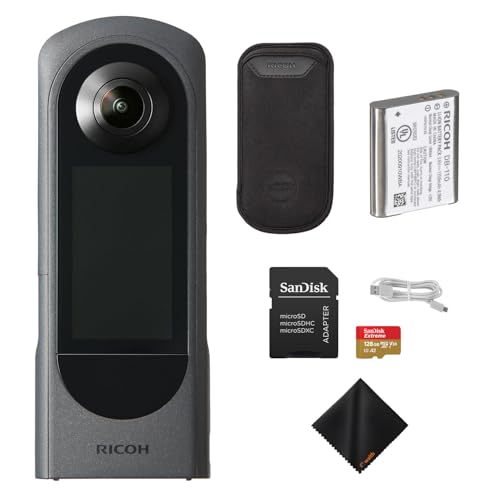
The Ricoh Theta X improves on usability with a touchscreen and longer battery life. I like its 5.7K video and dual 48MP sensor set for crisp panoramas. The standalone operation and plugin support speed up getting a virtual tour online without tethering to a phone.
For fast-paced shoots, Theta X reduces downtime with quick startup and easy exposure bracketing. I often use it when clients want fast delivery and great image detail. The Theta X is a reliable contender for the best 360 camera for virtual tours when you need balance between speed and quality.
Pros:
- Touchscreen for quick on-site adjustments
- Longer battery life for multiple shoots
- Dual 48MP sensors for detailed images
- Good video capture for walkthrough snippets
- Fast export workflow via USB-C
Cons:
- Larger files need more storage space
- Touchscreen can be finicky with gloves
- Price is mid-high for casual users
My Recommendation
I recommend Theta X for busy pros who need speed and quality. I bring it to back-to-back property shoots and appreciate the battery life and touchscreen. It’s one of my go-to tools when I want a fast turnaround for the best 360 camera for virtual tours.
| Best for | Why |
|---|---|
| Quick turnarounds | Fast startup and export |
| High-detail tours | 48MP sensors for clarity |
| On-site edits | Built-in touchscreen controls |
Insta360 X3

The Insta360 X3 is a compact and versatile 360 camera that I use for quick interior tours and social-ready walkthroughs. Its 5.7K active HDR video and FlowState stabilization keep motion smooth while preserving details. The touchscreen is easy for framing and quick checks between rooms.
For web-based tours and social embedding, the X3 exports web-friendly files and has excellent AI editing tools. I find it handy when I need a light kit that’s fast and gives good results without a big tripod setup. It’s a solid budget-friendly option for the best 360 camera for virtual tours creators on the move.
Pros:
- 5.7K video with Active HDR for balanced footage
- FlowState stabilization for smooth walkthroughs
- Compact and easy to carry between locations
- AI tools speed up editing and reframing
- Good battery life for short sessions
Cons:
- Not as high-res as flagship 8K models
- Less ideal for large commercial installations
- Touchscreen small for precise adjustments
My Recommendation
I recommend the Insta360 X3 for solo shooters and mobile agents. I use it for quick, publish-ready tours where I need speed and decent quality. If you want a compact pick that helps you make the best 360 camera for virtual tours on a budget, the X3 is a smart choice.
| Best for | Why |
|---|---|
| Mobile agents | Compact and light for on-the-go shoots |
| Social tours | AI editing and web-friendly exports |
| Budget-conscious pros | Strong value for features |
Asteroom 360 Kit

The Asteroom 360 kit is a different approach: it’s a hardware and app system geared to real estate. I liked the dedicated rotator and fisheye lens attachment for consistent, tiled captures. It leans on your phone for processing but gives a repeatable capture method that reduces stitching errors.
Asteroom’s kit is ideal for agents who want a guided workflow and templated tour output. I used it for multiple listings and found that the rotator and tripod deliver even spacing and consistent horizons. It’s an efficient path to publish-ready tours for those focused on volume.
Pros:
- Complete kit tailored to real estate tours
- Rotator ensures consistent spaced captures
- Fisheye lens delivers wide coverage per shot
- Phone-based workflow keeps costs lower
- Fast capture method for many rooms
Cons:
- Requires compatible phone and case accessory
- Dependent on phone processing power
- Less flexible for creative, non-real-estate shoots
My Recommendation
I recommend the Asteroom 360 kit for high-volume real estate agents. I used it when I needed quick, repeatable captures across many listings. If your workflow prioritizes consistent output and speed, this system helps produce professional virtual tours and supports tools for the best 360 camera for virtual tours workflow.
| Best for | Why |
|---|---|
| High-volume listings | Rotator and kit speed capture |
| Consistent tours | Repeatable, even spacing per room |
| Cost-conscious agents | Phone-based workflow lowers costs |
DJI Osmo 360 Essential

The DJI Osmo 360 Essential is built around high-resolution imaging and a strong imaging sensor. I appreciated the 8K native 360° video and 1-inch imaging, which deliver detail-packed panoramas. The extended battery life and invisible stick kit make long shoots smoother.
For professional tours, the Osmo 360’s stability and image quality are standout features. I used it for mixed indoor/outdoor sites and found it reliable in varied light. If you’re aiming for a high-end presentation, this model gives pro-level files for virtual tours and large-screen displays.
Pros:
- 1-inch imaging for superior detail
- Native 8K 360° video for high-res output
- Extended battery kits for long sessions
- Invisible selfie stick kit for clean shots
- Robust build and professional outputs
Cons:
- Higher cost tailored to pro users
- Large files need strong post workflows
- Accessory dependence for full feature set
My Recommendation
I recommend the DJI Osmo 360 Essential for studios and pro content creators. I choose it when I need the best detail and long shooting windows. For those who demand the best 360 camera for virtual tours on large displays and premium listings, this is a top option.
| Best for | Why |
|---|---|
| Studio-quality tours | 1-inch sensor and 8K video |
| Long shoots | Extended battery options |
| Large displays | High-res files suit big screens |
DJI Osmo 360 Adventure

The Osmo 360 Adventure bundle is for pro shooters who need endurance. With three batteries and 105GB built-in storage, I can shoot long tours without pausing. The waterproofing and rugged build make it practical for mixed environments like waterfront homes and outdoor venues.
Image quality mirrors the Essential model, with strong dynamic range for interiors. I like the Adventure kit when clients want day-long captures or multi-location shoots. When uptime is key, this combo keeps you shooting and publishing fast as part of the best 360 camera for virtual tours workflow.
Pros:
- Extended battery capacity for full-day shoots
- Built-in storage reduces need for memory swaps
- Waterproof and ruggedized for varied sites
- High-res native 8K capture
- Consistent performance in mixed weather
Cons:
- Heavier kit to transport between sites
- Higher upfront bundle cost
- Large file sizes require fast drives
My Recommendation
I recommend the Osmo 360 Adventure for teams that shoot all day. I use it on multi-property days where charging access is limited. It’s a dependable option for pros who want the best 360 camera for virtual tours with minimal downtime.
| Best for | Why |
|---|---|
| All-day shoots | Extra batteries and built-in storage |
| Outdoor venues | Rugged and waterproof design |
| Multi-site teams | Reduces gear swap interruptions |
GoPro MAX

The GoPro MAX is a rugged 360 and action hybrid that I turn to for dynamic tours with motion. Its 5.6K spherical video and 16.6MP photos are solid for web tours and social highlights. I rely on its waterproofing and strong stabilization for shoots that include stairs, balconies, and small outdoor walks.
GoPro’s ecosystem and mounts make it easy to get creative angles. I’ve used MAX for property promos and short tour clips embedded on listing pages. For those who value durability and stabilization, it’s a practical contender in the list of best 360 camera for virtual tours options.
Pros:
- Rugged, waterproof design for tough shoots
- Reliable stabilization for moving walkthroughs
- Good integration with GoPro mounts and accessories
- Simple workflow for social and web clips
- Dual-mode for 360 and single-lens capture
Cons:
- Lower still resolution than some prosumer models
- Limited manual control for advanced photographers
- Batteries run fast under heavy use
My Recommendation
I recommend the GoPro MAX for rugged shoots and quick promo clips. I use it when I need stability and mount flexibility. For agents who want a durable choice among the best 360 camera for virtual tours, the MAX is a practical and familiar tool.
| Best for | Why |
|---|---|
| Rugged environments | Waterproof and durable design |
| Motion-heavy tours | Excellent stabilization |
| Accessory lovers | Vast mount ecosystem |
Ricoh Theta X Bundle

This Ricoh Theta X bundle adds extra battery and a 128GB card—handy for back-to-back shoots. I found the extra DB-110 battery eliminates mid-day interruptions. The included cleaning cloth and memory card make it a ready-to-go kit for clients who want a single purchase solution.
The Theta X hardware gives the same great capture as the standalone model but with less downtime. I recommend the bundle to power users who want the best 360 camera for virtual tours without juggling accessories. It’s practical and cost-effective for pro use.
Pros:
- Extra battery for longer field use
- 128GB card included for immediate storage
- Same 5.7K and 48MP capture as Theta X
- Cleaning accessories help maintain lens clarity
- Good value compared to buying parts separately
Cons:
- Bundle weight increases gear to carry
- May duplicate accessories you already own
- Still requires careful storage of raw files
My Recommendation
I recommend the Theta X bundle for pros who want fewer interruptions. I rely on the extra battery and card during full-day sessions. The bundle makes it easy to operate as the best 360 camera for virtual tours when you need consistent uptime and minimal fuss.
| Best for | Why |
|---|---|
| Full-day sessions | Extra battery and ample storage |
| Pro packages | Ready-to-go kit for shoots |
| Minimal setup | All essentials included |
Samsung Gear 360
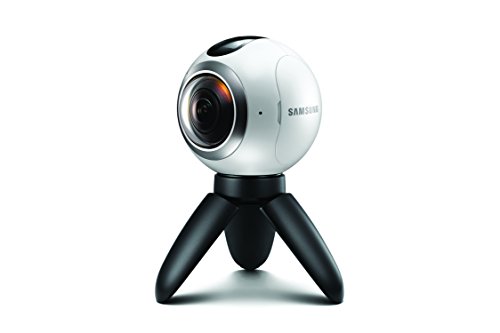
The Samsung Gear 360 is a budget-minded option that I still find useful for quick tours. It has a straightforward capture process and is compact for travel. While not the latest tech in 2026, its ease of use makes it a training tool or backup camera for many small agents.
If you’re starting out and want to learn 360 capture basics, the Gear 360 keeps things simple. I use it as a secondary camera on team shoots for informal shots or to capture quick angles. It’s a practical starter choice among the best 360 camera for virtual tours options when budgets are tight.
Pros:
- Very affordable and easy to use
- Compact and travel-friendly
- Simple workflow for beginners
- Great as a backup or practice camera
- Lightweight for quick on-site shots
Cons:
- Lower resolution than modern models
- Limited low-light performance
- Older platform with limited updates
My Recommendation
I recommend the Samsung Gear 360 for beginners or budget-minded agents. I chose it when teaching teams the basics of shooting tours. If you need an inexpensive way to learn how to produce the best 360 camera for virtual tours, this is a friendly, low-cost start.
| Best for | Why |
|---|---|
| Beginners | Simple capture and low cost |
| Backup camera | Compact and travel-friendly |
| Training | Easy to learn on the job |
FAQs Of best 360 camera for virtual tours
What makes a 360 camera great for virtual tours?
A great tour camera gives even exposure, sharp stitching, and high resolution. It should handle HDR to balance windows and interiors. Easy file transfer and a stable tripod workflow also matter. I always favor models that speed up editing and reduce retakes.
Do I need 8K for virtual tours?
Not always. 8K helps for large prints and very detailed zooming. For typical web tours, 5.7K or detailed 48MP stills often suffice. I choose 8K when my tours will be shown on big displays or heavily zoomed by clients.
How important is battery life on tour shoots?
Very important. Longer battery life reduces downtime between rooms. I bring spare batteries or bundles like the Osmo Adventure to avoid pauses. For full-day shoots, battery planning is essential for smooth delivery.
Can I use an action 360 camera for real estate tours?
Yes. Action 360 cameras like Insta360 and GoPro MAX work well for dynamic tours. They give stabilization and are great for mobile shooters. For high-detail stills, though, pro models like Ricoh Theta series may be better.
Which camera is best for beginners?
For beginners I suggest a simple, affordable camera like the Samsung Gear 360 or Insta360 X3. They offer easy workflows and let you learn without big investment. I recommend starting simple and upgrading when you need more quality.
Final Verdict: Which Should You Buy?
The Ricoh Theta X stands out as the best 360 camera for virtual tours for most pros—great balance of detail, battery life, and workflow. It gives clean images and quick delivery for listings and exhibitions.
No matter your budget, match the camera to your workflow: choose rugged Insta360 or GoPro for motion, Ricoh Theta for image-first tours, and Asteroom for high-volume real estate. Buy the best 360 camera for virtual tours that fits your needs and workflow.

Everett Ashford is a tech reviewer at mytechgrid.com specializing in SSDs, cameras, TVs, earbuds, headphones, and other consumer electronics. He provides honest, data-driven reviews based on hands-on testing and real-world performance analysis. Everett simplifies complex tech details to help readers make smart, confident buying decisions.