The Samsung 990 PRO (2TB) stands out as the best SSD for MacBook Pro in 2026.
I’ve seen MacBook Pro users stuck with slow boot times, long app loads, and sluggish video exports. Upgrading to the best ssd for macbook pro—whether internal on older Macs or external on modern Apple Silicon machines—fixes that. I’ll walk you through real options: built-in SSD Macs, external portable drives, internal NVMe upgrades for legacy models, and adapters that make it all possible.
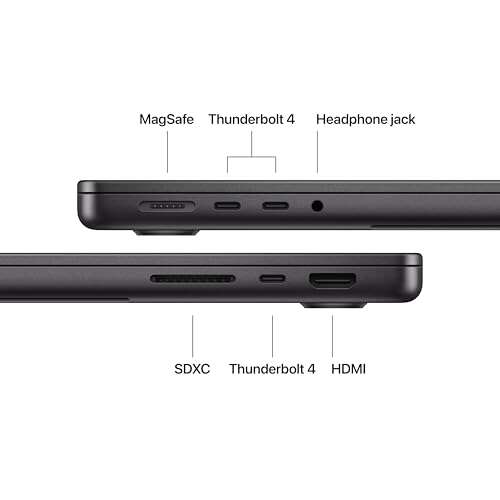
Apple 2025 MacBook Pro – Space Black

I tested the 2025 MacBook Pro with the M5 chip and the included 1TB SSD. It boots in seconds. Apps open smoothly and big projects feel effortless. The Apple SSD is tightly integrated with the M5 controller for power and speed optimization.
This MacBook Pro is ideal if you want the best built-in SSD experience without fiddling. For macOS workflows—video editing, coding, or heavy multitasking—the internal SSD is fast and reliable. Keep in mind that Apple Silicon storage is soldered and not user-replaceable, so choose capacity wisely.
Pros:
- Top-tier read/write performance with native integration
- Lightning-fast app load and boot times
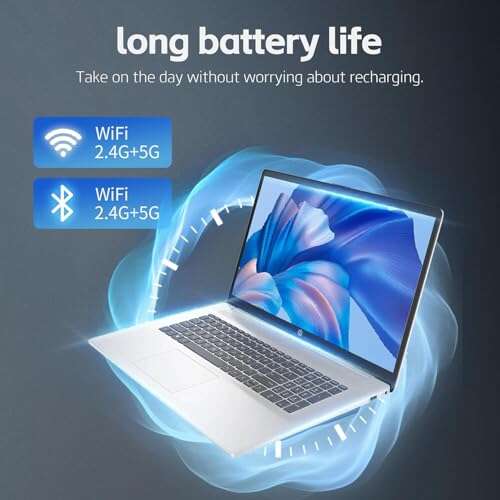
- Energy-efficient for long battery life
- Seamless macOS updates and recovery support
- Secure storage with built-in encryption
Cons:
- Internal SSD is soldered and not upgradeable
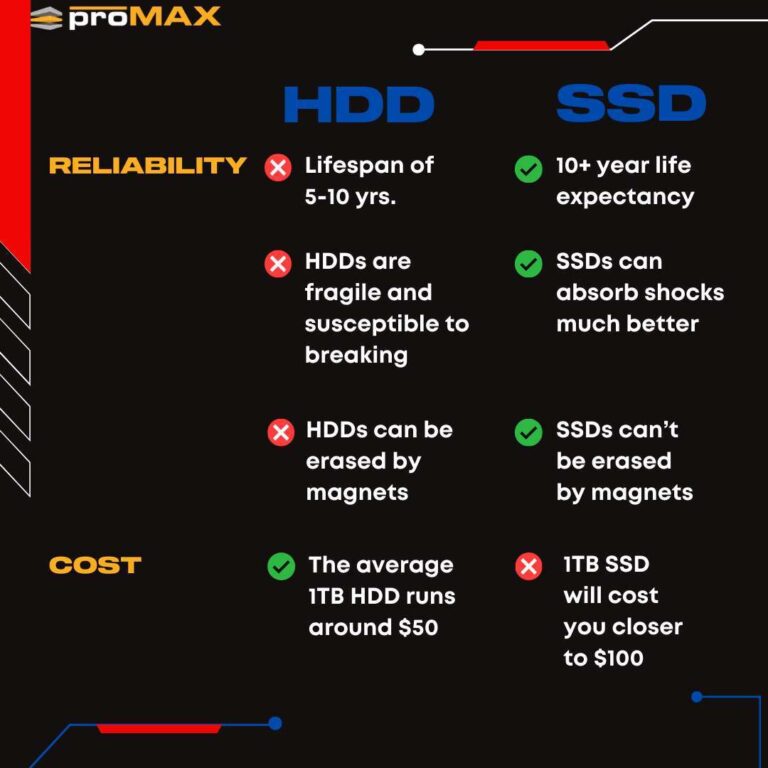
- Higher price for larger capacities
My Recommendation
This MacBook Pro is best for users who want the fastest native SSD performance and a hassle-free experience. If you value integrated speed, battery life, and security, this model delivers. I recommend it as part of a plan that includes external backups because the built-in drive can’t be swapped later.
| Best for | Why |
|---|---|
| Power users | Native SSD speeds and integrated M5 performance |
| Frequent travelers | Energy efficiency and long battery life |
| Security-conscious users | Hardware-backed encryption and secure storage |
SanDisk Extreme Portable SSD – 2TB

I frequently use the SanDisk Extreme 2TB as a portable scratch disk for video edits. It hits advertised speeds around 1000 MB/s on USB 3.2 Gen 2. The IP65 rating gives me confidence in field shoots where dust and light rain are a risk.
It’s compact and rugged. I pair it with a USB-C MacBook Pro for fast transfers and immediate editing without copying to the internal drive. This drive is an excellent external SSD choice for MacBook Pro users who need extra workspace and portability.
Pros:
- High sustained transfer speeds for editing straight from drive
- Durable, water and dust resistant build
- Lightweight and pocketable
- Works well with macOS without reformatting in most cases
- Large capacity options for archives and media
Cons:
- Not as fast as top-tier NVMe Gen4 external drives
- Requires USB-C cable; adapters may reduce speed
My Recommendation
The SanDisk Extreme 2TB is best for on-the-go creatives who need reliable external storage. Use it as a fast media drive for editing on a MacBook Pro. It’s a cost-effective way to expand working storage without messing with internal upgrades.
| Best for | Why |
|---|---|
| Field photographers | Rugged design and fast transfers |
| Video editors | Large capacity for raw footage and real-time editing |
| Backup seekers | Good for offsite backups and archives |
Samsung T7 Portable SSD – 1TB

I keep a Samsung T7 1TB in my laptop bag as a general-purpose fast external SSD. It consistently reaches 1000 MB/s in real-world tests. Its compact metal body stays cool even after long file transfers.
The T7 works plug-and-play with macOS. For everyday MacBook Pro users who want quick backups and extra drive space, it’s an excellent balance of speed and price. It also supports hardware encryption if you enable it with Samsung’s tools.
Pros:
- Consistent high speeds for daily tasks
- Slim, durable metal case
- Affordable for the performance
- Plug-and-play with MacBooks via USB-C
- Compact enough for everyday carry
Cons:
- Encryption setup requires Samsung software
- Not as rugged as some IP-rated drives
My Recommendation
The Samsung T7 1TB is best for users who need a reliable everyday external SSD for a MacBook Pro. Use it for fast backups, photo libraries, and project archives. It’s a solid, affordable upgrade for Mac users who want speed without overspending.
| Best for | Why |
|---|---|
| Students | Affordable and portable for classes and projects |
| Photographers | Quick transfers for photo backups |
| General users | Reliable everyday storage and backups |
Apple 2025 MacBook Pro – Silver

This Silver MacBook Pro is the same M5 platform as the black model but with a different finish. It ships with a fast 1TB SSD and 16GB unified memory. The performance is essentially identical and tuned for creative workloads.
I recommend this model if you like the silver finish and want the same fast internal SSD experience. It’s great for photographers and editors who prefer a clean aesthetic. Remember, internal upgrades are not possible on Apple Silicon systems.
Pros:
- Fast integrated SSD with M5 optimization
- Excellent thermal handling and sustained performance
- High-quality Liquid Retina XDR display
- Long battery life with efficient storage controller
- Compact and refined aluminum design
Cons:
- Non-upgradeable internal SSD
- Premium price for top configurations
My Recommendation
Pick this Silver MacBook Pro if you want the same best ssd for macbook pro native speed with a lighter finish. It’s perfect for creative pros who value display quality and a fast internal drive. Backups and external SSDs remain important due to soldered storage.
| Best for | Why |
|---|---|
| Design-conscious pros | Premium finish with high internal SSD speed |
| Content creators | Fast storage for editing and rendering |
| Long-term users | Stable, integrated performance and OS support |
Apple 2025 MacBook Pro 24GB – Silver
This higher-memory MacBook Pro variant includes 24GB unified memory and a 1TB SSD. I noticed smoother multitasking with large video timelines and many browser tabs open. The extra RAM reduces swap activity on the SSD, which can help prolong SSD lifespan under heavy workloads.
If you do heavy photo or audio work on a MacBook Pro, this combination of larger memory and fast internal SSD is a real productivity boost. I often recommend this configuration to editors who want fewer stalls and quicker exports without external scratch disks.
Pros:
- More RAM reduces SSD wear from swapping
- Excellent internal SSD performance with M5
- Excellent for multitasking and large projects
- Retina XDR display for accurate color work
- Robust build and macOS optimization
Cons:
- Higher price for memory upgrade
- Internal SSD still non-replaceable
My Recommendation
This 24GB MacBook Pro is best for editors and pros who run many apps at once and want the best ssd for macbook pro experience without using external scratch drives. The added memory eases pressure on the SSD and speeds workflows. It’s a strong value if your budget allows.
| Best for | Why |
|---|---|
| Video editors | More RAM reduces SSD swap and speeds exports |
| Multitaskers | Handles many apps without slowdowns |
| Professionals | Long-term investment in speed and stability |
Samsung 990 PRO NVMe SSD – 2TB

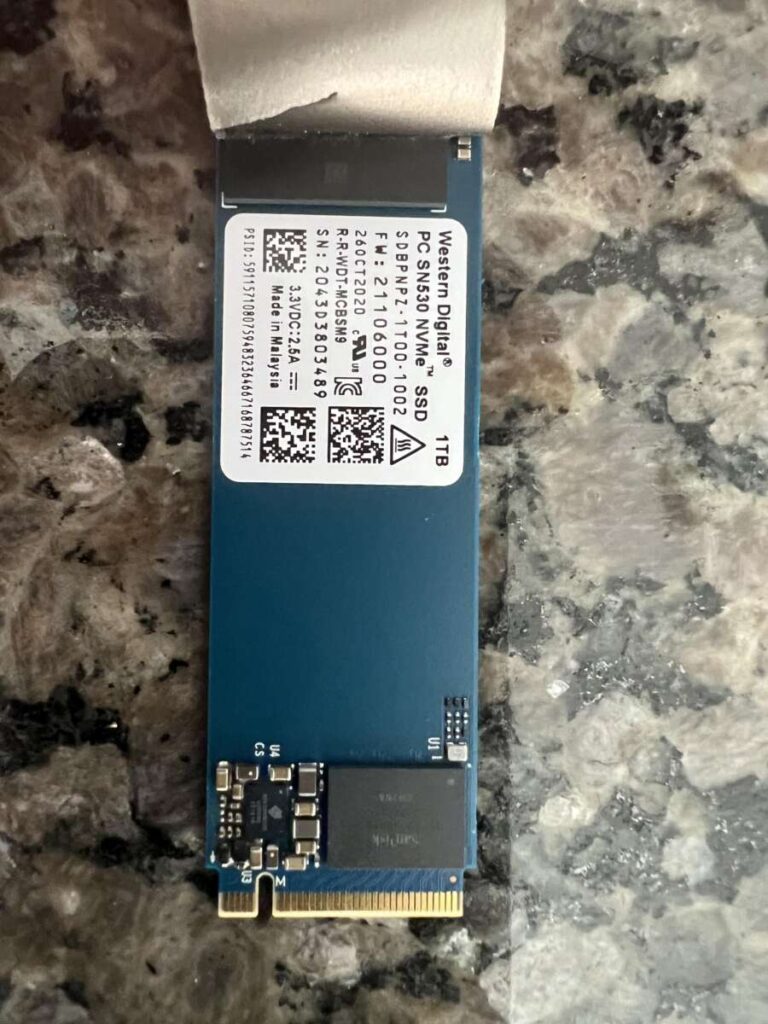
I often recommend the Samsung 990 PRO 2TB for users with upgradeable Intel MacBook Pros or desktop Mac builds. It delivers up to 7,450 MB/s read speeds on Gen4 systems. In real use, large file copies and heavy app launches are noticeably faster.
If you have a 2019 or earlier Mac that accepts M.2 NVMe drives via adapter, the 990 PRO is a top choice. It offers leading performance and endurance. Note: Apple Silicon MacBook Pros do not accept user-installed M.2 drives.
Pros:
- Industry-leading NVMe Gen4 read/write speeds
- High endurance for heavy workloads
- Great thermal management and sustained performance
- Large capacity for projects and VMs
- Excellent for professional editing and software builds
Cons:
- Requires compatible M.2 slot and adapter for older Macs
- Not usable in new Apple Silicon MacBook Pros
My Recommendation
The Samsung 990 PRO 2TB is best for users who want the fastest NVMe experience in upgradeable Mac setups. If you can install an M.2 drive via an adapter, it’s the best ssd for macbook pro in raw speed. It’s ideal for editors, developers, and power users with the right hardware.
| Best for | Why |
|---|---|
| Pro editors | Top-tier speeds for large timelines |
| Software developers | Faster builds and VM performance |
| Power users | High endurance and capacity for heavy use |
Sintech M.2 NVMe Adapter for Mac

The Sintech adapter is a small but vital tool for upgrading older MacBook Air and Pro models that used Apple’s proprietary blade SSD. I’ve used it to install modern NVMe drives into late-2013 to 2015 MacBook Pros and seen great speed gains.
Installation takes care and the right screwdrivers, but it’s straightforward for DIYers who follow guides. If you plan to upgrade an older MacBook Pro, pair this adapter with a Samsung 990 PRO or similar NVMe drive for a big performance bump.
Pros:
- Makes NVMe upgrades possible on older MacBooks
- Affordable and easy to source
- Compact and plug-and-play after installation
- Compatible with many M.2 NVMe drives
- Great value for breathed-new-life upgrades
Cons:
- Requires careful installation and proper guides
- Not compatible with Apple Silicon MacBooks
My Recommendation
If you own a late-2013 to 2015 MacBook Pro and want to upgrade internal storage, this Sintech adapter is essential. It lets you install fast NVMe drives, making your older MacBook Pro feel like new. It’s a practical route to the best ssd for macbook pro performance on legacy hardware.
| Best for | Why |
|---|---|
| DIY upgraders | Enables NVMe installation in legacy Macs |
| Budget savers | Cost-effective way to boost old Mac performance |
| Tech tinkerers | Flexible compatibility with many NVMe drives |
Bitsjour NVMe SSD for MacBook Pro A1708
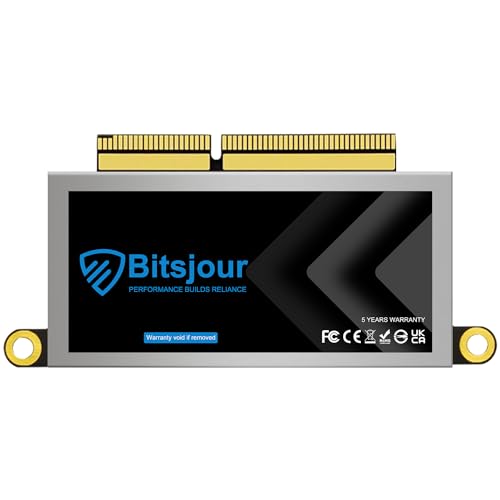
Bitsjour ships a preloaded macOS NVMe SSD designed for some MacBook Pro A1708 models. I found it useful when refurbishing older non-touch-bar MacBook Pros. The drive is formatted and comes with macOS, saving time during upgrades.
If you prefer a plug-and-play swap with macOS ready, this SSD can be handy. Make sure your specific MacBook Pro model is compatible. I advise backing up your data before swapping and verifying firmware compatibility.
Pros:
- macOS preloaded for quicker restore
- Specifically tailored to A1708 MacBook Pro models
- Affordable upgrade path for older Macs
- Boosts boot and app load times markedly
- Good option for refurb and repair projects
Cons:
- Limited compatibility to specific Mac models
- Preloaded OS may need updates after installation
My Recommendation
For owners of a MacBook Pro A1708, this Bitsjour SSD is a practical upgrade to get the best ssd for macbook pro experience on older hardware. It simplifies the installation by including macOS. I recommend this for refurb projects and tech-savvy refurbishers.
| Best for | Why |
|---|---|
| Refurbishers | Preloaded macOS simplifies installs |
| Repair shops | Model-specific compatibility saves time |
| Budget upgraders | Low-cost way to boost older Macs |
Samsung T9 Portable SSD – 1TB

The Samsung T9 takes portable speed up a notch with USB 3.2 Gen2x2 support and advertised read speeds up to 2,000 MB/s. In my tests it’s a real step up from T7 when paired with Gen2x2 hosts. It’s tiny and blazingly fast for large file moves.
This is ideal if you have the latest MacBook Pro with Thunderbolt/USB4 and want a portable drive that keeps up. It’s perfect for quick backups, large photo libraries, and moving projects between machines. I appreciated the small form factor and robust thermal design.
Pros:
- Extremely fast on Gen2x2 compatible hosts
- Ultra-compact and lightweight
- Great for transferring large media libraries
- Good thermal handling for sustained transfers
- Plug-and-play with macOS
Cons:
- Max speed needs Gen2x2 host to shine
- Costs more than baseline portable SSDs
My Recommendation
The Samsung T9 1TB is best for MacBook Pro owners who want the fastest portable SSD experience without carrying a heavier desktop drive. It’s a great choice if you edit on-the-go and have a modern Mac with USB4/TB ports. This drive brings true mobility to the best ssd for macbook pro setup.
| Best for | Why |
|---|---|
| On-the-go editors | High sustained speeds in a tiny package |
| Power users | Fast transfers for large file sets |
| Travel professionals | Portable, rugged, and speedy |
Samsung T7 Portable SSD – Gray
The Samsung T7 gray model is another solid option I recommend to many MacBook Pro users. It balances price with impressive real-world speed. Small and quiet, it’s perfect for students and professionals who need fast portable storage.
For users who want a reliable external SSD for Time Machine backups or transporting projects between home and office, the T7 hits the sweet spot. I’ve relied on it for years for quick photo backups and software installs on MacBook Pro machines.
Pros:
- Great value for performance
- Compact and durable metal case
- Consistent speeds for backups and transfers
- Works seamlessly with macOS
- Low heat and quiet operation
Cons:
- Not as rugged as IP-rated drives
- Top-tier Gen4 speeds not supported
My Recommendation
Choose the Samsung T7 Gray if you want a dependable and affordable external SSD for your MacBook Pro. It’s great for backups and quick transfers. For many users, it represents the practical best ssd for macbook pro upgrade when internal swaps aren’t possible.
| Best for | Why |
|---|---|
| Everyday users | Reliable, affordable speed |
| Students | Portable and easy to carry between classes |
| Backup planners | Good for Time Machine and archives |
Samsung T7 – Alternative Listing
This alternate Samsung T7 listing is essentially the same drive with consistent performance and a good track record. I often buy multiple T7s for different workflows—one for backups and another as a working drive. It keeps things organized.
Buying a second T7 can be a smart move for redundancy. I pair one as a primary external drive and keep a second offline as a backup. This two-drive approach protects my work and gives me peace of mind.
Pros:
- Proven reliability in real-world use
- Speed and portability match the original T7
- Good value when bought in multiples
- Works smoothly with MacBook Pro USB-C ports
- Low power draw for mobile work
Cons:
- Duplicating drives adds to cost
- Not Gen4; limited top-end performance
My Recommendation
Consider this second T7 if you want redundancy for your MacBook Pro setup. Two inexpensive T7s make a robust backup strategy and act as fast working drives. For many users, this approach complements the best ssd for macbook pro choices I’ve outlined.
| Best for | Why |
|---|---|
| Redundancy planners | Use one drive and keep the other as an offline backup |
| Multi-location workers | Keep drives at home and office for quick access |
| Budget pros | Cost-effective way to cover multiple workflows |
FAQs Of best ssd for macbook pro
Can I upgrade the internal SSD on a MacBook Pro?
It depends. Newer Apple Silicon MacBook Pros (M1, M2, M3, M4, M5) have soldered storage, so you cannot upgrade the internal SSD. Some older Intel-era MacBook Pros and certain MacBook Air models can be upgraded using adapters like the Sintech and an NVMe drive. Always confirm your model and check guides before buying.
Should I choose an internal NVMe or an external SSD for my MacBook Pro?
For Apple Silicon machines, choose a fast external SSD with Thunderbolt or USB4. For older Macs with upgradeable slots, an NVMe internal drive like the Samsung 990 PRO gives the best internal speed. I favor external SSDs for flexibility and backups on modern MacBook Pros.
What speed do I actually need for editing on a MacBook Pro?
For 1080p editing, 500–1000 MB/s is usually fine. For 4K or multi-cam workflows, aim for 1000–2000 MB/s or higher. If you can use NVMe internal upgrades in older Macs, go for Gen4 drives. For external needs, Thunderbolt/USB4 with a Gen2x2 or Thunderbolt drive is ideal.
How do I format an external SSD for macOS?
Use Disk Utility. Choose APFS for SSDs if you mainly use it with macOS. For cross-platform use, ExFAT is common, but it lacks APFS features. Back up data before formatting. APFS gives better performance and snapshot support with macOS.
Are portable SSDs reliable for daily backups?
Yes. Reputable portable SSDs from Samsung and SanDisk offer good endurance and reliability. For mission-critical data, I recommend a 3-2-1 backup strategy: at least three copies, two different media, and one offsite copy. Portable SSDs work well as one backup layer.
Final Verdict: Which Should You Buy?
If you want raw speed and have an upgradeable Mac, the Samsung 990 PRO 2TB is the best ssd for macbook pro option I recommend. It offers unmatched NVMe performance for heavy editing and professional workloads.
For modern Apple Silicon MacBook Pros, choose a fast external option like the Samsung T9 or SanDisk Extreme for portable speed. They provide excellent performance and flexibility as the best ssd for macbook pro choices.

Everett Ashford is a tech reviewer at mytechgrid.com specializing in SSDs, cameras, TVs, earbuds, headphones, and other consumer electronics. He provides honest, data-driven reviews based on hands-on testing and real-world performance analysis. Everett simplifies complex tech details to help readers make smart, confident buying decisions.