The best wireless backup camera for iPhone is a magnetic Wi-Fi model with clear video, strong range, and simple setup.
Backing into a tight driveway, hitching a trailer, or checking a blind spot can feel like guessing with your eyes closed. A wireless backup camera gives your iPhone a wider view without forcing you to run long video cables through the vehicle. I looked at image quality, mounting, battery life, weather protection, connection steps, and real-world use. The models below suit cars, trucks, campers, boats, trailers, and RVs. They are not all alike, so I will explain which camera fits each need and where each one falls short.
YEOIZO Magnetic Wireless Backup Camera
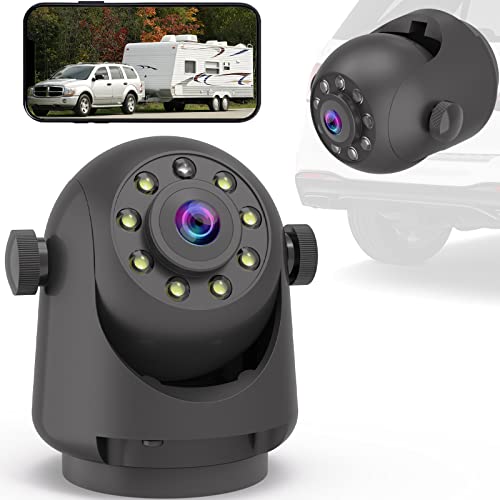
The YEOIZO uses a strong magnetic base, so I can place it on a hitch, trailer frame, truck body, or other metal surface without drilling holes. That makes it useful when I need a camera for a short trip or do not want a permanent install. The wireless design sends the view to an iPhone through a companion Wi-Fi connection. Its small size also makes it easy to move from one vehicle to another.
This camera is a practical choice for drivers who want a fast rear view while backing a trailer or camper. The magnetic mount can save a great deal of install time, while the rechargeable design avoids a constant power cord during use. As with any camera that uses a phone as its screen, the exact range can change when metal, walls, or other signals block the path. I recommend testing the connection before a long trip.
Pros:
- Strong magnetic mounting saves installation time
- Works with iPhone and Android devices
- Rechargeable design reduces wiring work
- Useful for trailers, hitches, campers, and trucks
- Easy to move between vehicles
- Good option for temporary camera placement
Cons:
- Requires a charged battery for wireless use
- Metal or distance may reduce the Wi-Fi signal
- A phone must serve as the viewing screen
My Recommendation
I recommend the YEOIZO to anyone who values quick setup above permanent integration. It fits trailer owners, RV users, and truck drivers who may need to change the camera position often. The magnetic base feels more flexible than a fixed license-plate camera. For shoppers seeking the best wireless backup camera for iPhone for portable use, this model offers a simple and useful starting point.
EWAY Magnetic Wi-Fi Hitch Camera

The EWAY is built for jobs where a normal car camera cannot reach. Its strong magnetic design suits a hitch, gooseneck, horse trailer, boat, travel trailer, or RV. I like this layout because I can put the camera close to the area that matters instead of relying on a camera mounted far away at the rear of the vehicle. The rechargeable battery also keeps the setup free from a long cable run.
Using an iPhone as the monitor makes the EWAY useful for drivers who already carry a phone with a bright display. It can provide a rear or front view during hitching and reversing, which may help reduce blind spots. Still, I would treat it as a driver aid, not a replacement for mirrors or a careful walk-around. A magnetic mount should also be checked before every trip, especially after driving over rough roads.
Pros:
- Designed for large vehicles and trailer use
- Strong magnetic mount supports flexible placement
- Rechargeable battery avoids permanent wiring
- Works with iPhone and Android devices
- Useful for hitching and close backing tasks
- Portable design suits more than one vehicle
Cons:
- Battery runtime depends on use and temperature
- Wireless range may vary with trailer length
- Magnet needs a clean, suitable metal surface
My Recommendation
The EWAY is best for RV owners, horse-trailer users, boat owners, and pickup drivers who need a camera near a hitch or extended load. Its main strength is placement freedom. I would choose it when a fixed rear camera cannot show the hitch clearly. It is a strong contender for the best wireless backup camera for iPhone when large-vehicle use matters more than a built-in dashboard system.
5.8G Magnetic Wireless Backup Camera

This magnetic backup camera focuses on easy connection and fast placement. Its 5.8G Wi-Fi design aims to provide a stable link between the camera and a compatible iPhone. I find that useful when a standard home-style Wi-Fi network is not available near the vehicle. The magnetic body also lets me place the camera where the rear view is most helpful.
The simple setup can appeal to first-time buyers who do not want to remove trim panels or connect to reverse-light wiring. It is a good fit for temporary work, trailer checks, and occasional backing. The phone connection may take a little practice because the iPhone must join the camera’s signal before the viewing app can display video. Once paired, the system should be easier to use on later trips.
Pros:
- 5.8G wireless design aims for a steady connection
- Magnetic installation needs little physical work
- Good fit for temporary or portable use
- Can send video to an iPhone without a separate monitor
- Useful for trailers and hard-to-reach rear areas
- Small form helps with storage between trips
Cons:
- Initial phone pairing may take some learning
- Not a full replacement for factory camera systems
- Signal quality can change around large metal bodies
My Recommendation
I would choose this model for an iPhone owner who wants a portable camera and values connection speed. It works especially well for people who change vehicles or use a camera only on weekends. The 5.8G connection is its main point of appeal, though users should follow the app instructions closely. For many buyers, it may be the best wireless backup camera for iPhone when easy setup and flexible placement come first.
Wi-Fi 1080P Wide-Angle Backup Camera

This Wi-Fi backup camera targets drivers who want a clear 1080P view and a broad rear angle. The wide view can help show more of the area behind a car, SUV, pickup, or van. Its night vision feature is useful when I leave work after sunset or back into a dark driveway. The camera is also designed for outdoor vehicle use, where rain and road spray are common concerns.
Unlike a purely temporary hitch camera, this style can work well as a rear license-plate or body-mounted camera. The iPhone becomes the display, which keeps the cabin free from another screen. I still suggest checking the camera angle during daylight because a wide image can make objects look farther away than they are. Clear video helps, but safe reversing still requires slow speed, mirrors, and direct checks.
Pros:
- 1080P video can show useful rear detail
- Wide-angle view helps cover more space
- Night vision supports low-light reversing
- Suitable for cars, SUVs, pickups, and vans
- Wi-Fi viewing works with an iPhone
- Outdoor design fits normal vehicle conditions
Cons:
- Installation may be less portable than a magnetic model
- Wide views can make distance harder to judge
- Phone setup is still needed before viewing
My Recommendation
This camera is best for drivers who want a broad rear view on a daily-use vehicle. I would consider it for an SUV, pickup, or car that lacks a factory backup camera. It suits buyers who care about night viewing and 1080P detail more than moving the camera from vehicle to vehicle. If those features match your needs, it deserves consideration as the best wireless backup camera for iPhone for everyday rear coverage.
Uzone Magnetic Wi-Fi Backup Camera

The Uzone combines a magnetic mount, rechargeable power, Wi-Fi viewing, and an IP68 waterproof design. That combination makes it especially appealing for outdoor use around campers, boats, trailers, and trucks. I like the added weather protection because a rear camera often faces rain, mud, dust, and spray. The camera can send its view to an iPhone app, so I do not need a dedicated monitor.
The magnetic mount makes it simple to place the unit near a hitch or rear corner. Night vision can help when the sun goes down, although low-light performance always depends on the scene and available light. The battery still needs regular charging, and the wireless signal must travel through or around the vehicle. For best results, I would mount it securely, charge it fully, and test the app before relying on it.
Pros:
- IP68 waterproof design suits outdoor vehicle use
- Rechargeable battery keeps wiring to a minimum
- Magnetic mount allows fast repositioning
- Night vision supports evening and dark-area use
- Works with an iPhone app
- Useful for RVs, boats, trailers, and trucks
Cons:
- Requires routine charging
- App and Wi-Fi setup may take a few steps
- Magnetic mounting does not suit every surface
My Recommendation
I recommend the Uzone to shoppers who expect wet weather and want a flexible camera for a large vehicle. Its IP68 rating is a key advantage for boat ramps, rainy campgrounds, and muddy work sites. It is less ideal for someone who wants a fully wired, always-on camera. For outdoor versatility, it can be the best wireless backup camera for iPhone among portable waterproof options.
RVInWest 1080P Wireless Backup Camera

The RVInWest is aimed at drivers who need a stable rear view for a car, truck, SUV, van, camper, or trailer. Its 1080P resolution can make signs, posts, and nearby objects easier to see than a soft low-resolution feed. A wide viewing angle helps reduce the tunnel effect that can happen with a narrow camera. The waterproof build and night vision also support regular outdoor use.
I see this model as a balanced choice for people who want more than a basic temporary camera. It can fit a vehicle that needs front or rear viewing and uses an iPhone, iPad, or other smartphone as the screen. The wireless link avoids a video cable inside the cabin, but the user must still plan power and mounting carefully. Before driving, I would confirm that the camera stays firm and that the phone has enough charge.
Pros:
- 1080P resolution supports a clearer view
- Wide angle helps reduce rear blind spots
- Night vision is useful after dark
- Waterproof design suits outdoor mounting
- Compatible with iPhone, iPad, and smartphones
- Works for cars, trucks, campers, vans, and trailers
Cons:
- May need more planning for a permanent install
- Wireless performance depends on distance and obstacles
- Phone battery use can rise during long camera sessions
My Recommendation
The RVInWest is best for RV owners and drivers who want a higher-detail view without adding a wired dashboard monitor. I would choose it for a camper, van, or pickup used often, especially when wide coverage matters. It balances video quality, weather protection, and device flexibility. Buyers looking for the best wireless backup camera for iPhone with broad vehicle compatibility should keep this one on their shortlist.
1080P HD Magnetic Backup Camera

This 1080P HD camera is designed around speed. Its one-minute magnetic installation can help when I need a rear view now, not after an afternoon of removing interior panels. The no-wiring approach is also useful for leased vehicles, borrowed trucks, rental equipment, and occasional trailer work. A rechargeable system makes the camera simple to store and bring along.
The main appeal is convenience, but the camera can still provide useful HD video for close backing. I would use it for driveway parking, hitch alignment, campsite setup, and temporary blind-spot checks. Since it does not become part of the vehicle’s factory system, I would not expect the same seamless startup as an integrated camera. Even so, fast installation can be worth more than extra features for many buyers.
Pros:
- One-minute magnetic setup saves time
- No wiring is needed for basic installation
- 1080P HD video offers useful detail
- Portable design works across several vehicles
- Good fit for renters and occasional users
- Simple option for quick trailer checks
Cons:
- Battery requires charging before use
- Temporary placement may need frequent adjustment
- May offer fewer advanced features than a wired system
My Recommendation
I would recommend this camera to anyone who wants the fastest path from the box to a usable rear view. It is well suited to renters, DIY users, weekend travelers, and drivers who do not want to alter a vehicle. Its value comes from speed and simplicity rather than complex controls. If quick installation defines your search for the best wireless backup camera for iPhone, this model is a sensible choice.
What to Look for in an iPhone Backup Camera
Shopping for a wireless backup camera can feel simple until the product pages start using terms such as Wi-Fi, 5G, 5.8G, 1080P, IP68, and wide angle. Those terms matter, but they do not tell the whole story. I judge each camera by how well it handles the basic job: showing a clear, stable view when the driver needs it. A camera that looks impressive in a listing is not useful if the app is hard to open or the mount slips.
iPhone compatibility
First, check the phone requirements. Most wireless cameras create their own Wi-Fi signal, and the iPhone connects to that signal through a dedicated app or browser page. This means the camera may not need your home router, but it can change how the iPhone handles mobile data during use. Follow the maker’s app instructions and check current iOS compatibility before purchase.
Also consider screen size. An iPhone gives a much larger view than a small camera monitor, while an iPad may be easier to read in a large RV. Keep the phone mounted in a safe place that does not block the windshield. I never recommend holding the phone while driving.
Wireless range and signal strength
Wireless range is not the same in every vehicle. A short hatchback may be easy, while a long fifth-wheel trailer can challenge any signal. Metal panels can weaken or reflect radio signals, and crowded areas may add interference. A strong connection matters more than a high number printed on a product page.
For a trailer, place the camera where it has the clearest path toward the phone. Test it while parked before travel. If the image freezes, shows delay, or drops out, move the phone or camera and test again. No wireless system should be treated as perfect in every setting.
Image quality and viewing angle
1080P is a useful target for a backup camera. It can show more detail than basic low-resolution video, especially in daylight. Still, resolution alone does not guarantee a sharp picture. Lens quality, image processing, lighting, and the phone screen all play a role.
A wide-angle lens can show more of the rear area, which helps when backing from a narrow driveway. Yet very wide views can make objects seem small or far away. I prefer a camera with a clear center image and enough side coverage to reveal people, posts, and corners.
Night vision
Night vision helps, but it has limits. Infrared lights can show nearby objects in darkness, while distant areas may remain dim. Headlights, street lamps, rain, and reflective surfaces can also change the picture. I use night vision as extra help, not as permission to reverse quickly.
Before using any camera at night, test it in the place where you normally park. A camera angle that works in daylight may show glare after dark. Small adjustments can make a large difference.
Mounting style
Magnetic cameras are the easiest to move. They work best on clean, flat, magnetic metal. They may not hold well on plastic, aluminum, curved panels, or dirty surfaces. I wipe the surface before attaching the mount and tug the camera gently to confirm it is secure.
Fixed cameras take more work but may provide a more permanent solution. A license-plate mount can look neat, while a temporary magnetic camera suits multiple vehicles. Think about how often you will move the camera before choosing.
Battery life and power
Wireless does not mean power-free. A battery camera still needs charging, and cold weather can reduce battery performance. Long RV trips may require a power bank, spare battery, or charging plan. I prefer to charge the camera the night before use.
If you want a camera that turns on every time you shift into reverse, a wired system may fit better. If you want easy installation, a battery model is often the better trade. The right choice depends on how often you reverse and how much installation work you accept.
Water resistance
A rear camera lives outside, so weather protection matters. Look for a stated rating such as IP67 or IP68, but remember that a rating applies to specific test conditions. It does not mean the camera will survive every impact, pressure wash, or poor installation.
Water resistance is especially important for boat trailers, horse trailers, campers, and trucks. Keep charging ports closed and inspect seals when the product design allows it. A dry storage place can extend the life of a rechargeable camera.
How I Test a Wireless Backup Camera
I start with setup. I note how long it takes to charge, mount, download the app, and connect an iPhone. A camera that needs ten confusing steps may frustrate a new user. Clear instructions and a stable app earn more trust than flashy claims.
Next, I test the image in daylight, shade, and low light. I look for delay, image breaks, glare, and whether the wide view bends straight lines. I also check if a nearby object remains easy to judge. A backup camera should help the driver make a clear decision, not create a new puzzle.
I then test range. I place the camera on a vehicle or trailer and move the phone to the driver’s seat. After that, I test from a greater distance while watching for frozen video or lost connection. I repeat the test near buildings and other vehicles because real parking areas are rarely empty.
Finally, I check mounting and power. I look for a firm magnet, a useful viewing angle, and a battery that suits the expected session. I also consider how easy the camera is to remove and store. These small details often matter more than a long feature list.
Safety Tips for Using an iPhone Backup Camera
A wireless camera is an aid, not a replacement for attention. The National Highway Traffic Safety Administration urges drivers to check around the vehicle and use mirrors when backing. I follow a simple habit: walk around the vehicle first, clear children and pets from the area, then reverse slowly.
Keep the iPhone in a fixed mount. Do not hold it in your hand or look down for long periods. A delayed wireless image can also mislead you, so use mirrors and direct sight checks before moving. If the picture drops, stop the vehicle and reconnect.
Keep the lens clean. Mud, dust, rain drops, and road salt can make a good camera look bad. Check the magnet and mounting surface before every trip. For a trailer or camper, inspect the camera after bumps, sharp turns, and rough roads.
Also, learn the camera’s view. Sit in the driver’s seat and compare the screen with the real space behind you. This helps you understand where the lens ends, how wide the view is, and how objects appear at different distances. Practice in an empty lot before using the system in a busy area.
Best Features at a Glance
| Best for | Why |
|---|---|
| Fast setup | The 1080P HD Magnetic Backup Camera installs quickly without wiring. |
| Large trailers and hitches | The EWAY model offers flexible magnetic placement for long vehicles. |
| Wet outdoor use | The Uzone camera combines a rechargeable design with IP68 protection. |
Wireless Backup Camera vs. Wired Camera
A wired camera usually wins for constant use. It can connect to reverse power and a dedicated display, which may reduce the need to open an app. The downside is installation. Running cables through a vehicle takes time, care, and sometimes professional help.
A wireless camera wins for ease. I can mount it, connect an iPhone, and remove it when the job is done. That makes it useful for trailers, rented vehicles, and people who do not want to change factory wiring. The trade-off is charging and possible signal delay.
For a daily commuter car, a permanent wired camera may feel more natural. For an RV, boat trailer, pickup, or occasional use, wireless often makes more sense. The best wireless backup camera for iPhone is the one that matches your real routine, not just the one with the longest feature list.
Common iPhone Connection Problems
If the app cannot find the camera, first confirm that the camera has power. Then open the iPhone Wi-Fi settings and look for the camera’s network name. Some systems require the phone to stay connected to that network rather than to home Wi-Fi. Read the app directions carefully before changing several settings at once.
If the image freezes, move the phone closer to the camera. Turn off unused wireless devices and test again in an open space. A long trailer, concrete wall, or crowded parking area can affect the connection. Restarting both the camera and app often solves a temporary fault.
If the image is upside down or reversed, check the app controls. Many camera apps allow a mirror or flip setting. Adjust the view while parked, then save the setting before driving. A correctly oriented picture makes the system much easier to trust.
FAQs Of best wireless backup camera for iphone
Can an iPhone work as a backup camera monitor?
Yes. Many wireless cameras create a private Wi-Fi network that connects to an iPhone app. The phone then displays the live camera feed. Use a secure mount and never hold the phone while driving.
Do wireless backup cameras need cellular service?
Usually, no. Many models connect directly to the iPhone through the camera’s own Wi-Fi signal. However, the exact setup depends on the product app, so check the instructions before purchase.
Are magnetic backup cameras safe for trailers?
They can work well when attached to a clean, flat metal surface. Check the mount before every trip and remove dirt beneath the magnet. Do not depend on a magnet if the surface is plastic, aluminum, loose, or badly curved.
Is 1080P enough for a wireless backup camera?
For most normal reversing tasks, 1080P can provide a clear and useful image. Lens quality, lighting, signal stability, and viewing angle matter too. Resolution does not remove the need to check mirrors and blind spots.
What is the best wireless backup camera for iPhone for an RV?
An RV user should look for strong range, weather protection, night vision, and a mount that suits the trailer. The EWAY, Uzone, and RVInWest models are especially worth considering. Always test the signal at the full trailer length before travel.
Final Verdict: Which Should You Buy?
I would choose the EWAY for large trailers and hitch work, the Uzone for wet outdoor use, and the 1080P magnetic model for the fastest setup. For most iPhone users, the best wireless backup camera for iPhone is the one with a stable signal, firm mount, and clear view.
Compare battery needs, weather protection, range, and app support before ordering. A good wireless backup camera can make parking and hitching feel less like a guess and more like a guided task.

Everett Ashford is a tech reviewer at mytechgrid.com specializing in SSDs, cameras, TVs, earbuds, headphones, and other consumer electronics. He provides honest, data-driven reviews based on hands-on testing and real-world performance analysis. Everett simplifies complex tech details to help readers make smart, confident buying decisions.