SSD speed matters for gaming mainly by reducing load times, improving texture streaming, and making your system feel more responsive.
The real answer to “does SSD speed matter for gaming” depends on your games, hardware, and budget. A modern NVMe SSD can be much faster than a SATA SSD, but that extra speed does not always increase frame rates. This guide explains where SSD speed helps, where it does not, and how to choose the right drive without wasting money.
What SSD speed means for gaming
SSD speed describes how quickly a drive can read and write data. Read speed matters most for gaming because games constantly load files such as maps, textures, sound effects, shaders, and saved data.
Manufacturers usually list speed in megabytes per second, or MB/s. Typical figures look like this:
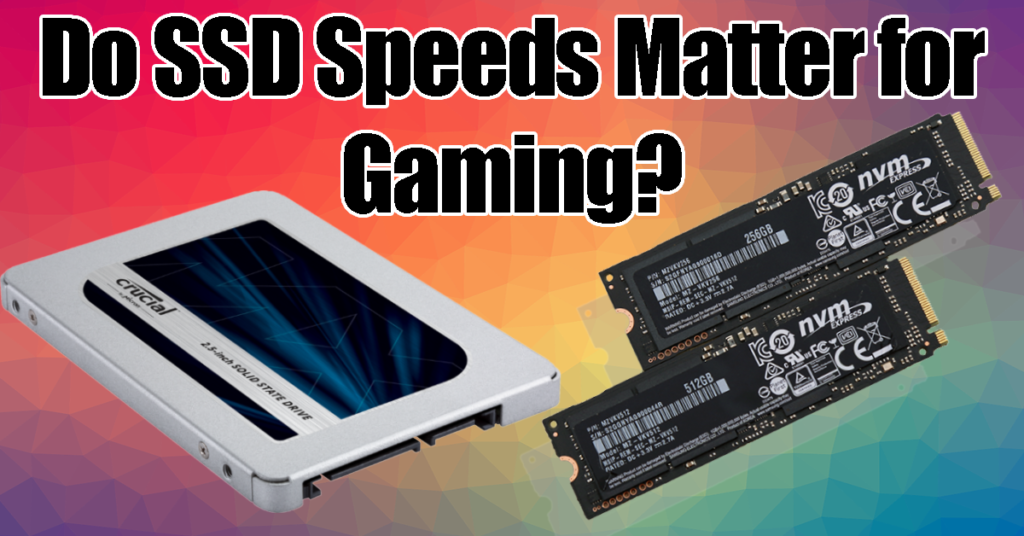
• SATA SSD: Around SATA III limit of 500 to 550 MB/s
• PCIe 3.0 NVMe SSD: Around 2,000 to 3,500 MB/s
• PCIe 4.0 NVMe SSD: Around 5,000 to 7,500 MB/s
• PCIe 5.0 NVMe SSD: Around 10,000 MB/s or more
These numbers look huge, but gaming does not always use the full peak speed. A game may read many small files rather than one large file. This makes random read performance, latency, controller quality, and software support important too.
Think of an SSD as a kitchen pantry. A faster drive can bring ingredients to the cook sooner, but the cook, recipe, and oven still limit the final meal. Your CPU, GPU, memory, game engine, and operating system all affect the result.
Does SSD speed matter for gaming performance?
Does SSD speed matter for gaming if your goal is higher FPS? Usually, no. Your graphics card and processor have a much greater effect on average frame rates, 1% lows, and visual settings.
An SSD mainly affects how quickly the game can access data. It does not directly make your GPU render more frames. Moving a game from a hard drive to an SSD can make a major difference, but moving from a good SATA SSD to a premium PCIe 5.0 model often produces a smaller change.
SSD speed can still affect the gaming experience in several ways:
• Faster level and map loading
• Shorter time when launching a game
• Less waiting during fast travel
• Smoother texture and asset streaming in some games
• Faster shader cache creation
• Better system response while games run
In my own storage comparisons, the biggest jump was always from a hard disk drive to any decent SSD. The change from SATA SSD to NVMe SSD was noticeable in file transfers and some load screens, but it was rarely dramatic during normal play.
How SSD speed affects game loading times
Game loading time depends on more than advertised sequential read speed. The game must find files, decompress them, process them through the CPU, and send them to the right parts of memory and the graphics card.
This is why a drive rated at 7,000 MB/s will not load every game twice as fast as a drive rated at 3,500 MB/s. The game engine may become the main limit before the SSD reaches its maximum speed.
The type of loading also matters:
• Startup loading reads menus, settings, and core files.
• Level loading brings a large group of assets into memory.
• Fast travel loads a new area while the game pauses.
• Streaming loads small assets while you move through the world.
Open-world games can benefit more from faster storage because they stream large amounts of data during play. Games such as Microsoft Flight Simulator, Cyberpunk 2077, Starfield, and Ratchet & Clank: Rift Apart can place greater demands on storage than a small indie game.
Still, capacity and drive health matter. A nearly full SSD may slow down, and a low-quality drive can perform poorly during long writes. Keep about 10% to 20% of the drive free when possible.
SSD speed and gaming FPS
Does SSD speed matter for gaming FPS? In most cases, it has little or no direct effect on average FPS. Your GPU renders frames, while your CPU prepares game instructions and simulation data.
An SSD can affect FPS indirectly when a game streams assets during movement. If the storage system cannot deliver data quickly enough, you may see texture pop-in, brief pauses, or stutter. This is more common with an old hard drive than with a modern SSD.
The key performance terms are:
• Average FPS shows the general frame rate.
• 1% low FPS shows performance during slower moments.
• Frame time measures how long each frame takes to render.
• Stutter appears when frame times become uneven.
A fast SSD may improve consistency in a poorly optimized game, but it cannot fix a weak GPU, limited RAM, overheating, or bad game code. If your game runs at 45 FPS because your graphics card is overloaded, buying a faster SSD will not turn it into a 90 FPS experience.
For smoother gameplay, upgrade in this order when appropriate:
-
Check whether the GPU is the main limit.
-
Make sure your system has enough RAM.
-
Update drivers and game patches.
-
Reduce background tasks.
-
Move the game from an HDD to an SSD.
-
Consider a faster NVMe SSD only if storage is still a clear limit.

SATA SSD vs. NVMe SSD for gaming
A SATA SSD connects through the SATA interface. An NVMe SSD uses PCIe lanes and communicates through a protocol designed for fast solid-state storage.
NVMe drives are much faster in benchmark tests. They also offer lower latency and stronger performance for demanding workloads. However, the gaming difference between SATA and NVMe is often smaller than the specification sheet suggests.
A SATA SSD remains a good choice for:
• Older gaming PCs
• Large game libraries
• Budget upgrades
• Secondary storage
• Systems without an M.2 slot
An NVMe SSD is a better fit for:
• New gaming PCs
• PCIe 4.0 systems
• Large open-world games
• Frequent game installation and removal
• Users who also edit video or move large files
Does SSD speed matter for gaming when comparing SATA and NVMe? Yes, but the benefit is usually moderate rather than life-changing. Both are far better than a mechanical hard drive for modern games.
For most players, a reliable 1 TB or 2 TB PCIe 4.0 NVMe SSD offers a strong balance. You do not need the fastest PCIe 5.0 model unless you have a specific workload that can use it.
PCIe 3.0, PCIe 4.0, and PCIe 5.0 SSDs
PCIe generations describe the connection between the SSD and the computer. Newer generations offer more bandwidth, but your motherboard and processor must support them.
A PCIe 4.0 SSD installed in a PCIe 3.0 system usually runs at PCIe 3.0 speeds. A PCIe 5.0 SSD may also work in an older slot, but it will operate at the slower supported speed.
Here is a practical comparison:
• PCIe 3.0 NVMe is fast enough for most games.
• PCIe 4.0 NVMe is an excellent choice for current gaming PCs.
• PCIe 5.0 NVMe offers impressive benchmark results but limited gaming gains today.
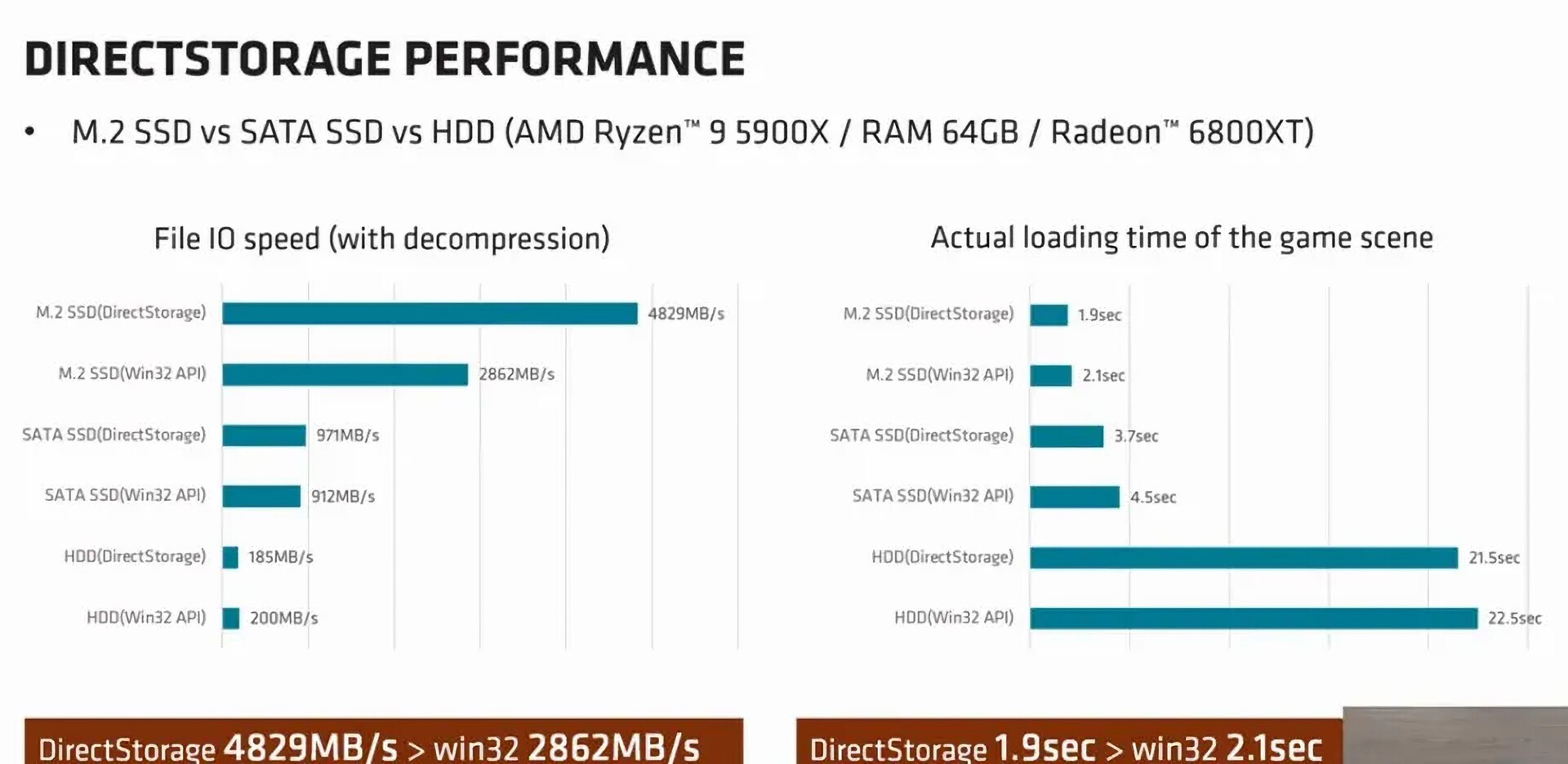
Some newer games use technologies that can take better advantage of fast storage. Microsoft DirectStorage is designed to reduce CPU overhead and move game assets more efficiently from storage to the GPU. Its benefits depend on game support, system design, decompression hardware, and developer implementation.
That last point is important. A fast SSD cannot provide a benefit that the game does not request. Software support will likely improve over time, but current results vary by title.
Hard drive vs. SSD for gaming
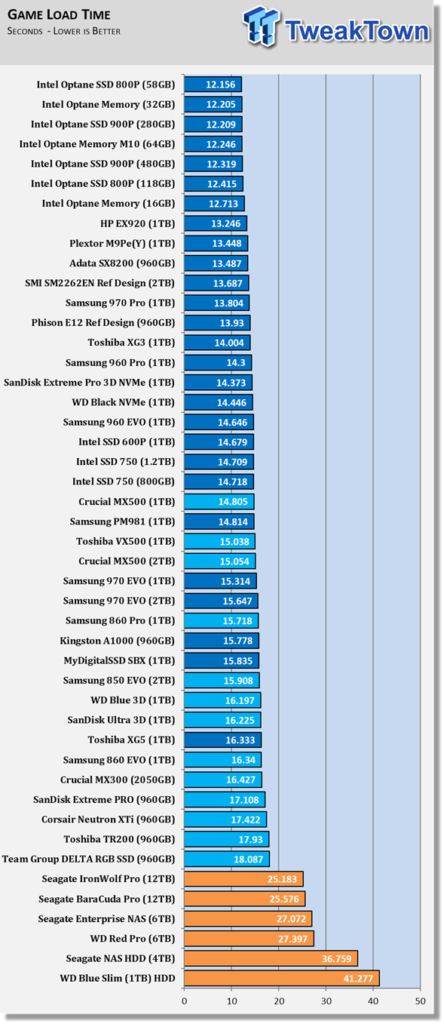
The largest storage upgrade for gaming is replacing an HDD with an SSD. Hard drives use spinning platters and a moving read head. SSDs use flash memory and have no moving parts.
This gives SSDs several advantages:
• Much lower access time
• Faster game startup
• Faster loading screens
• Less noise
• Lower power use
• Better resistance to movement
A hard drive can still store games, movies, backups, and older titles. However, many modern games are built with SSD storage in mind. Some may show long loading screens or texture delays when installed on an HDD.
If you currently use an HDD, do not worry about buying an expensive flagship SSD. A basic SATA SSD can make your PC feel much faster. This is one of the most cost-effective upgrades for an older gaming system.
I have seen people spend heavily on a premium GPU while keeping games on a slow hard drive. In many cases, moving the games to an affordable SSD made the system feel more responsive than a small graphics upgrade would have.
Other factors that matter more than SSD speed
Does SSD speed matter for gaming when your system has another major weakness? It may not be your best upgrade. Gaming performance depends on the complete system.
Consider these factors before buying a faster drive:
Graphics card
The GPU usually controls resolution, ray tracing, texture quality, and frame rate. If GPU usage stays near 95% to 100%, a faster SSD will not solve the problem.
Processor
The CPU affects game simulation, artificial intelligence, physics, and minimum frame rates. Competitive games with high refresh rates often benefit from a stronger processor.
System memory
Most current gaming PCs should have at least 16 GB of RAM. Newer open-world games may run better with 32 GB, especially when you stream, browse, or use other apps while playing.
Cooling
Thermal throttling can reduce CPU and GPU performance. Keep dust away from fans, use a suitable cooler, and check temperatures during demanding games.
Game optimization
Poor optimization can cause stutter even on powerful hardware. Patches, driver updates, shader compilation, and graphics settings may matter more than storage speed.
SSD capacity
A full drive can lose performance and become difficult to manage. More capacity may improve your experience more than a small increase in sequential speed.

How to choose an SSD for gaming
When buying a gaming SSD, look beyond the highest advertised read speed. A good drive should offer reliable performance, enough capacity, strong endurance, and suitable compatibility.
Use this checklist:
• Choose at least 1 TB for a new gaming build.
• Consider 2 TB if you play large modern games.
• Select NVMe if your motherboard supports an M.2 PCIe slot.
• Check whether the drive includes a cache and a reliable controller.
• Read reviews that test sustained performance, not only short benchmarks.
• Check the warranty and total bytes written rating.
• Avoid unknown brands with unclear specifications.
• Confirm that the SSD has suitable cooling.
Some high-speed NVMe drives use a heatsink. This can help maintain performance during long transfers. Gaming loads are usually short, so heat may not be a major issue, but good airflow is still useful.
Do not pay a large premium for a PCIe 5.0 drive only to save a few seconds on occasional loading screens. A balanced PCIe 4.0 model often delivers better value.
How to improve gaming storage performance
You can improve SSD gaming performance without buying a new drive. Small maintenance steps can help the drive and the system work well.
-
Keep free space available. Aim for at least 10% free capacity.
-
Install motherboard chipset and storage drivers.
-
Update your operating system and games.
-
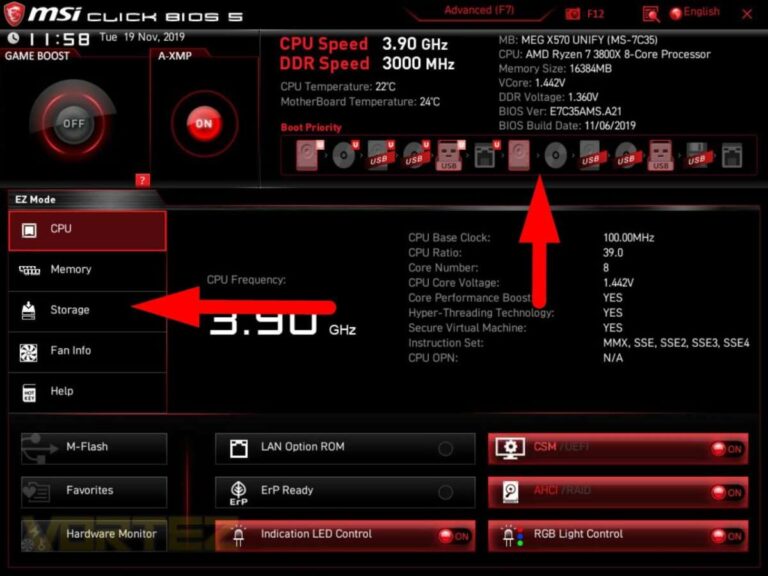
Enable the correct PCIe mode in the motherboard firmware when needed.
-
Check that the SSD is not overheating.
-
Close heavy background tasks during demanding games.
-
Use the operating system’s optimization tool for SSDs.
-
Avoid repeated unnecessary benchmark tests.
Do not manually defragment an SSD like a hard drive. Modern operating systems use trimming and other maintenance features designed for solid-state storage.
If a game stutters, monitor several parts of the system. Check GPU usage, CPU usage, RAM use, drive activity, temperatures, and frame times. This helps identify the real cause instead of guessing.
Common mistakes when upgrading a gaming SSD
A faster SSD can be a poor purchase when the upgrade plan ignores compatibility or real-world needs.
Common mistakes include:
• Buying a PCIe 4.0 drive for a system that supports only PCIe 3.0.
• Choosing speed over capacity.
• Installing the SSD in a slot that shares lanes with another device.
• Ignoring motherboard heatsinks.
• Filling the drive to nearly 100%.
• Expecting higher FPS from a storage upgrade.
• Comparing only advertised sequential read speeds.
• Buying a low-cost drive with weak sustained performance.
Another mistake is assuming that every game benefits equally. Test results can vary based on the engine, file layout, compression, processor, memory, and operating system.
Reliable reviews often show a more useful picture than manufacturer claims. Look for game loading tests, random access results, thermal behavior, and performance after the drive cache fills.
Frequently Asked Questions About Does SSD Speed Matter for Gaming
Does SSD speed increase FPS?
Usually, SSD speed does not increase average FPS because the GPU and CPU render the game. It may reduce stutter or improve asset streaming in some games, especially when replacing a hard drive.
Is NVMe better than SATA SSD for gaming?
NVMe SSDs are faster than SATA SSDs, but the gaming difference is often modest. Both provide a major improvement over a hard drive, so choose based on price, capacity, and system compatibility.
Is PCIe 5.0 SSD speed worth it for gaming?
For most players, PCIe 5.0 speed is not worth a large extra cost. A quality PCIe 4.0 SSD usually offers excellent game loading performance and better value.
Can an SSD fix game stuttering?
An SSD can reduce stuttering caused by slow asset streaming or a hard drive. It cannot fix stutter caused by a weak GPU, insufficient RAM, overheating, shader compilation, or poor game optimization.
How much SSD storage do I need for gaming?
A 1 TB SSD is a practical starting point, while 2 TB gives more room for large games and future updates. Keep some free space to support stable performance and easier system maintenance.
Should I install every game on an SSD?
Install modern open-world and frequently played games on an SSD when possible. Older or rarely played games can remain on a hard drive if loading times are acceptable.
Does SSD speed matter for gaming on a console?
Yes, but the effect depends on the console and game design. Current consoles use fast SSD storage for shorter loading and asset streaming, while supported software determines how much of that speed players actually notice.
Conclusion
Does SSD speed matter for gaming? Yes, but the size of the benefit depends on what you are upgrading from. Moving from a hard drive to an SSD can transform loading times and system response, while moving from a good SATA SSD to a high-end PCIe 5.0 model usually brings smaller gains.
For most PC gamers, a reliable 1 TB or 2 TB PCIe 4.0 NVMe SSD is the sensible choice. Put your budget toward the GPU, CPU, RAM, and cooling when those parts are the real limits. Check your system, compare real game tests, and choose storage that fits your library instead of chasing the biggest benchmark number.
Use these tips before your next upgrade, and explore more hardware guides to build a faster, smoother gaming setup.

Everett Ashford is a tech reviewer at mytechgrid.com specializing in SSDs, cameras, TVs, earbuds, headphones, and other consumer electronics. He provides honest, data-driven reviews based on hands-on testing and real-world performance analysis. Everett simplifies complex tech details to help readers make smart, confident buying decisions.