An SSD usually takes seconds to boot, minutes to install, and hours to clone, depending on the task and drive speed.
The question “how long does SSD take” can mean several things. You may be asking about startup time, SSD installation, data transfer, cloning, formatting, or drive lifespan. This guide explains each case with real time ranges, simple examples, and practical tips based on SSD performance testing and common upgrade work.
How Long Does an SSD Take to Boot?
A modern SSD usually boots Windows in about 10 to 30 seconds. A newer PCIe NVMe SSD can often reach the login screen faster than a SATA SSD, but the full system also affects the result.
The computer must complete several steps before you see the desktop:
- The motherboard runs its startup check.
- The firmware finds the boot drive.
- The operating system loads.
- Startup apps and background services open.
The SSD controls only part of this process. A slow processor, old firmware, too many startup apps, or a crowded system drive can add several seconds.
Typical boot times include:
• SATA SSD: about 15 to 35 seconds
• PCIe 3.0 NVMe SSD: about 10 to 25 seconds
• PCIe 4.0 NVMe SSD: about 10 to 20 seconds
• Older hard disk drive: about 30 seconds to 2 minutes
In everyday use, the difference between a good SATA SSD and a fast NVMe SSD may feel small during boot. You are more likely to notice the NVMe advantage during large file transfers, video work, game installation, and heavy multitasking.

How Long Does SSD Take to Install?
Physically installing an SSD usually takes 10 to 30 minutes. A desktop computer may take less time because it offers more space. A laptop can take longer because the back panel may use small screws or clips.
The hardware installation is only one part of the job. You may also need to initialize the drive, format it, install an operating system, or move files from an old drive.
A normal SSD upgrade may take this long:
• Desktop installation only: 10 to 20 minutes
• Laptop installation only: 20 to 45 minutes
• New drive setup: 10 to 30 minutes
• Clean Windows installation: 30 to 90 minutes
• Full system clone: 30 minutes to several hours
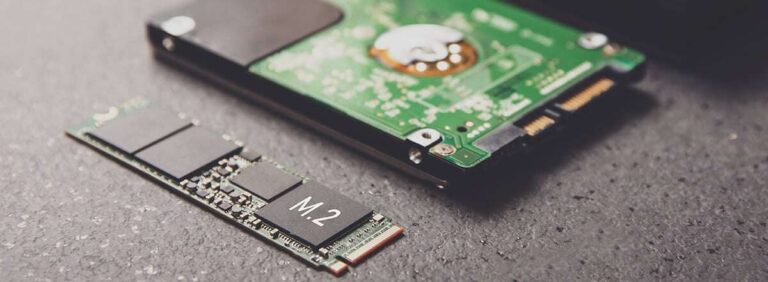
Before you begin, check the drive type. A 2.5-inch SATA SSD uses a data cable and a power cable. An M.2 SSD fits directly into a small slot on the motherboard. An M.2 drive can use either SATA or NVMe technology, so the slot must support the correct type.
One common mistake is buying an M.2 NVMe drive for a laptop that supports only M.2 SATA. The drive may fit physically but still fail to work. Always check the computer manual or the motherboard specifications first.
How Long Does SSD Take to Clone?
SSD cloning can take from 20 minutes to several hours. The main factors are the amount of data, the connection type, the source drive, and the cloning software.
The process copies the old drive to the new one. If the old drive contains 100 GB of data, cloning may finish in 15 to 45 minutes under good conditions. A nearly full 1 TB drive may take two to five hours.
Here are common estimates:
• 100 GB of data: 20 to 60 minutes
• 250 GB of data: 45 minutes to 2 hours
• 500 GB of data: 1 to 3 hours
• 1 TB of data: 2 to 5 hours
• 2 TB of data: 4 to 8 hours
These are estimates, not guarantees. A USB 2.0 enclosure can make cloning much slower. A USB 3.2 connection or a direct motherboard connection is usually much faster.
The amount of used data matters more than the drive’s total capacity. A 1 TB SSD with only 150 GB of files may clone faster than a 500 GB drive that is almost full.
During a clone, avoid opening large programs or disconnecting the drives. A sudden power loss can interrupt the process. For important files, keep a separate backup before you begin.

How Long Does SSD Take to Transfer Files?
An SSD can transfer files in seconds or minutes, but the result depends on file size and drive speed. Large, continuous files move faster than thousands of small files.
For example, copying a 10 GB video may take:
• SATA SSD to SATA SSD: 20 to 60 seconds
• NVMe SSD to NVMe SSD: 5 to 20 seconds
• External USB SSD: 15 to 90 seconds
• SSD to older hard drive: 1 to 3 minutes
Small files take longer because the system must process each file. A folder with 100,000 photos can take much longer than one 100 GB video, even when the total size is the same.
The slowest device often controls the transfer. If you copy from a fast NVMe SSD to a slow external drive, the NVMe drive cannot reach its full speed. The USB port, cable, file system, and thermal limits also affect performance.
For best results, use:
• A USB 3.0 or newer port
• A good-quality USB cable
• An SSD with free storage space
• A direct connection instead of a low-cost hub
• A healthy source drive without errors

How Long Does SSD Take to Format?
Quick formatting an SSD usually takes a few seconds to a few minutes. Full formatting can take much longer because the system checks the storage space.
A quick format removes the file system index. It does not securely erase every old file. This option is suitable when you are preparing a new drive for normal use.
A full format checks the drive for problems. The time depends on the drive size and the operating system. It may take:
• 256 GB SSD: several minutes to about 30 minutes
• 512 GB SSD: 10 to 60 minutes
• 1 TB SSD: 20 minutes to 2 hours
• 2 TB SSD: 40 minutes to several hours
Modern SSDs do not need repeated full formatting. Frequent write-heavy operations add unnecessary wear. If you plan to sell or give away an SSD, use the drive maker’s secure erase tool or follow a trusted operating system method.
Formatting deletes access to your files. Save anything important before starting. A format is not a backup.