To reset Raycon E25 earbuds, place both buds in the open case and hold their buttons for about 30 seconds.
Raycon E25 earbuds can stop pairing, connect to only one side, or behave oddly after switching between phones. I have found that a full reset usually clears these Bluetooth and syncing problems, but only when the old pairing record is removed too. This guide explains how to reset Raycon earbuds E25 safely, what the LED signals mean, and what to try if the reset does not work.

What a Raycon E25 reset does
A reset returns the earbuds to a fresh pairing state. It clears the earbud connection between the left and right sides and removes stored Bluetooth pairing data from the earbuds.
A reset can help when:
• Only one Raycon E25 earbud produces sound.
• The earbuds connect to the wrong phone.
• Your phone sees the earbuds but cannot connect.
• The earbuds keep disconnecting.
• The left and right earbuds fail to sync.
• The earbuds do not enter pairing mode.
A reset does not repair damaged speakers, a weak battery, water damage, or a broken charging case. Think of it as restarting the earbuds’ connection system, not fixing physical damage.
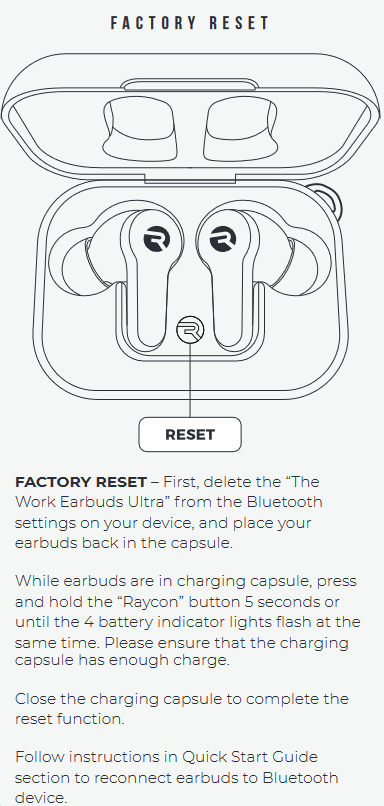
How to reset Raycon earbuds E25
Follow these steps in order. The timing matters, so avoid releasing the buttons too soon.
-
Charge the earbuds and case for at least 15 to 30 minutes. A very low battery can prevent the reset from starting.
-
On your phone, tablet, or computer, open Bluetooth settings.
-
Find the Raycon E25 entry and choose Forget, Remove, or Forget This Device.
-
Turn Bluetooth off on nearby devices that may connect to the earbuds.
-
Place both earbuds inside the charging case.
-
Leave the case lid open.
-
Press and hold the button or touch control on both earbuds at the same time.
-
Keep holding both controls for about 30 seconds.
-
Release both controls, then close the case lid for a few seconds.
-
Open the case and remove both earbuds together.
-
Turn Bluetooth back on and search for available devices.
-
Select the Raycon E25 from the list.
This is the standard process for how to reset Raycon earbuds E25. Some E25 production versions use slightly different LED patterns or button responses. If your earbuds do not respond after 30 seconds, repeat the process after charging the case and cleaning the charging contacts.

How to forget the old Bluetooth connection
Many failed resets happen because the phone keeps using the old Bluetooth record. Resetting the earbuds alone may not be enough.
On an iPhone, go to Settings, Bluetooth, and tap the information icon beside Raycon E25. Select Forget This Device.
On an Android phone, open Settings, Connected Devices, or Connections. Select Bluetooth, tap the gear icon beside Raycon E25, and choose Forget, Unpair, or Remove.
On Windows, open Settings, Bluetooth & devices, and remove Raycon E25. On a Mac, open System Settings, Bluetooth, select the earbuds, and choose Forget This Device.
After removing the old record, restart your phone. This gives the phone a clean Bluetooth scan and often completes the reset process more reliably.

What the LED lights mean during a reset
LED behavior can differ slightly between Raycon E25 versions. Still, the lights can offer useful clues.
• A charging light usually means the case or earbuds are receiving power.
• A flashing light often means an earbud is searching for a Bluetooth connection.
• A steady light may show that an earbud is charging or has an active connection.
• No light can mean a flat battery, dirty charging contacts, or a case that is not supplying power.
Do not rely on one exact color or flash count unless it matches the manual for your specific E25 version. Raycon has released several products with similar names, and LED patterns are not always identical.

If only one Raycon E25 earbud works
A one-sided audio problem often means the earbuds lost their internal stereo connection. It can also happen when one earbud did not charge.
Try this sequence:
-
Put both earbuds in the case.
-
Check that each earbud sits firmly on its charging pins.
-
Clean the metal contacts with a dry cotton swab.
-
Charge the case and earbuds.
-
Forget Raycon E25 in every nearby device.
-
Reset the earbuds using the 30-second method.
-
Remove both earbuds from the case at the same time.
-
Wait for them to sync with each other.
-
Pair them with your phone only after they finish syncing.
A common mistake is pairing one earbud first. That can create a partial connection and make the second earbud seem faulty. When possible, remove both earbuds together and keep the phone close during setup.
If Raycon E25 earbuds will not enter pairing mode
If the earbuds do not appear in your Bluetooth list, check the simple causes first.
• Confirm that airplane mode is off.
• Turn Bluetooth off, wait 10 seconds, and turn it on again.
• Move away from other active Bluetooth devices.
• Restart the phone or computer.
• Make sure the charging case has power.