
To unsubscribe Willow TV, cancel it through the same website, app store, or provider that bills you.
Knowing how to unsubscribe Willow TV is simple once you find the correct billing account. The key is to cancel your subscription where you started it, then confirm that the next renewal is turned off. This guide explains each route, common mistakes, refund limits, and how to verify the cancellation with confidence.
How to unsubscribe Willow TV through the official website
If you joined Willow TV on its website, you usually need to cancel from your Willow TV account. Removing the app from your phone or TV does not stop billing.
Follow these steps:
- Open the official Willow TV website.
- Sign in with the email address linked to your subscription.
- Open your account, profile, or subscription settings.
- Look for options such as Manage Subscription, Billing, or Cancel Plan.
- Select the cancellation option.
- Follow the prompts until the site confirms the request.
- Save the confirmation email or take a screenshot.
The exact menu names may change. Streaming services often update their account pages, so focus on the billing or membership area rather than a specific button name.
If you cannot find a cancel option, check whether another company handles your payment. A subscription billed through Apple, Google, Roku, Amazon, or a cable provider may not appear as cancelable on the Willow TV website.
How to unsubscribe Willow TV on an iPhone or iPad
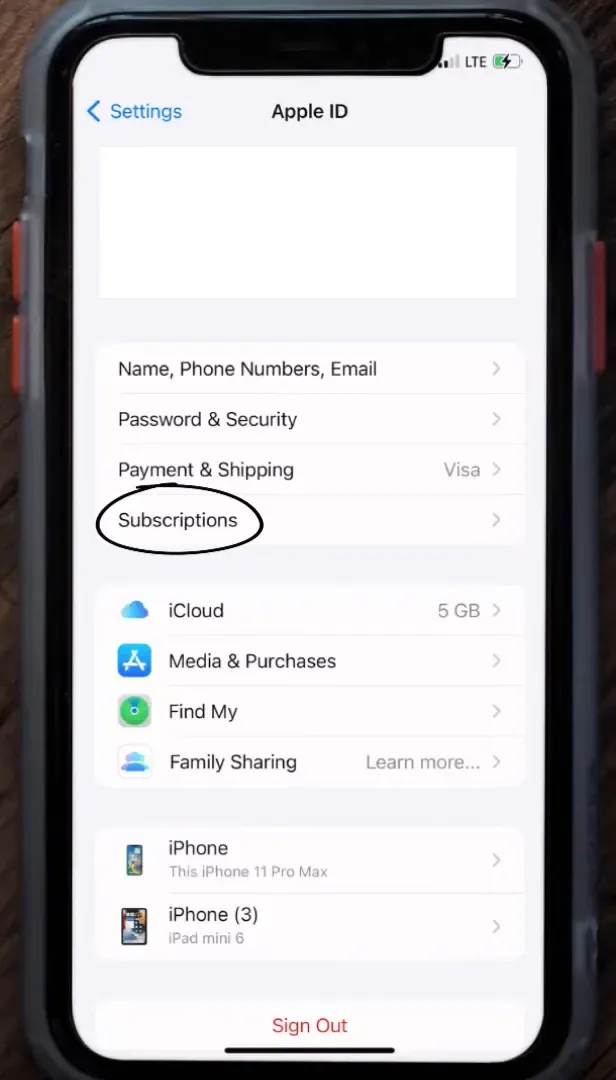
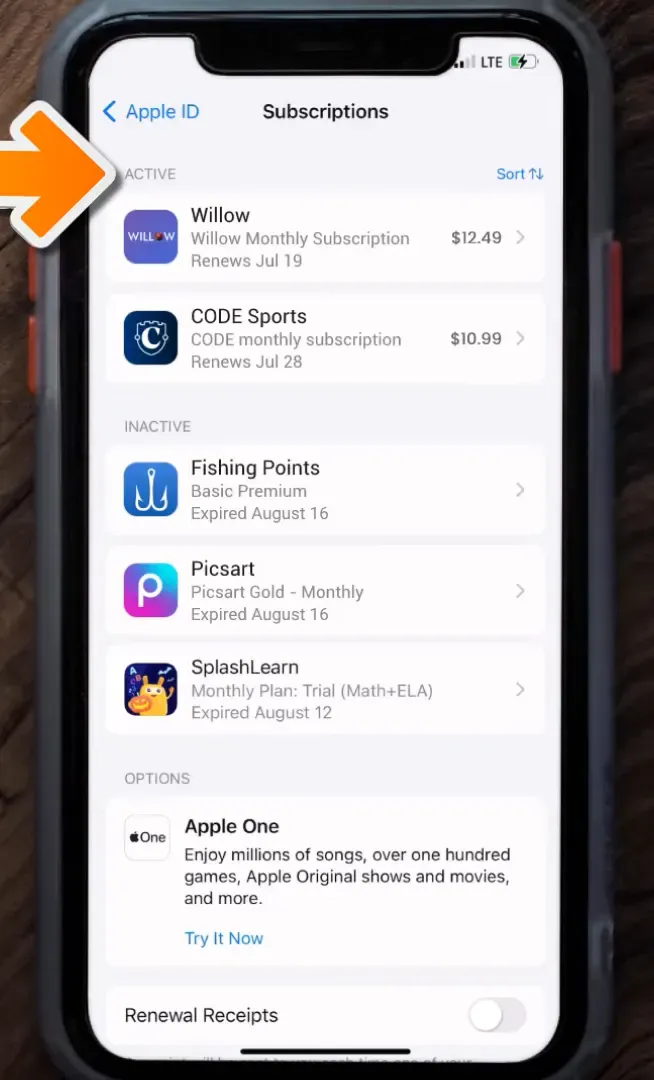
Apple manages subscriptions purchased through the App Store. If you subscribed inside the Willow TV iPhone or iPad app, use your Apple account settings.
- Open Settings on your iPhone or iPad.
- Tap your name at the top.
- Select Subscriptions.
- Find Willow TV in the active subscription list.
- Tap Cancel Subscription or Cancel Free Trial.
- Confirm the cancellation.
You can also check your subscriptions through the App Store by tapping your profile picture and choosing Subscriptions.
If Willow TV does not appear, you may be signed in to the wrong Apple Account. Check your Apple purchase history and email receipts. This is one of the most common reasons people think they canceled Willow TV when the active subscription is actually linked to another account.
Apple normally lets you use the service until the current paid period ends. Cancellation prevents the next renewal, but it may not create an automatic refund for unused days.

How to unsubscribe Willow TV on Android
Google Play handles subscriptions purchased through an Android phone or tablet. To cancel Willow TV through Google Play:
- Open the Google Play Store.
- Tap your profile picture.
- Choose Payments & subscriptions.
- Tap Subscriptions.
- Select Willow TV.
- Tap Cancel subscription.
- Complete the prompts and confirm your choice.
Do not simply uninstall the Willow TV app. Uninstalling removes the app from your device, but it does not cancel an active Google Play subscription.
If you use more than one Google account, switch between accounts and check each subscription list. The receipt may also show which Google account paid for Willow TV.
Google Play may ask why you are canceling. Your answer does not normally affect the cancellation. Keep the confirmation screen or email for your records.
How to unsubscribe Willow TV through Roku
Roku subscriptions can be managed from your Roku device or Roku account. This applies when Roku bills you directly.
To cancel on a Roku device:
- Press the Home button on your Roku remote.
- Highlight the Willow TV channel.
- Press the star button.
- Choose Manage subscription.
- Select Cancel subscription.
- Confirm the cancellation.
You may also manage the subscription through your Roku account online. Sign in and review your active subscriptions.
If you do not see a Manage subscription option, Roku may not be the company billing you. The Willow TV channel can be installed on Roku even when payment is handled by another service.
This distinction matters. The app is only the viewing doorway; the billing company holds the payment key.
How to unsubscribe Willow TV through Amazon
If you subscribed to Willow TV through Amazon, cancellation usually takes place in your Amazon account or through Amazon’s channel subscription settings.
A typical process looks like this:
- Sign in to Amazon.
- Open your account settings.
- Find memberships, subscriptions, or channel subscriptions.
- Select Willow TV.
- Choose the option to turn off automatic renewal.
- Confirm the cancellation.
Amazon’s menus can differ by device and region. Search your Amazon account for subscription settings if you cannot find the channel list.
Check the confirmation date carefully. Some services remain available until the end of the current billing cycle. That is normal and does not mean the cancellation failed.

How to unsubscribe Willow TV through a TV or internet provider
Some viewers receive Willow TV through a television provider, sports package, or internet company. In that case, you must cancel through the provider rather than through the Willow TV app.
Review your latest bill and look for:
• A Willow TV line item
• A sports or international programming package
• A third-party streaming bundle
• A provider name that differs from Willow TV
Then contact the provider through its website, mobile app, phone line, or live chat. Ask the representative to remove Willow TV and stop future renewals.
Write down the date, time, representative name, and confirmation number. These details can help if a later bill includes the channel.
Provider cancellation rules may differ from direct Willow TV rules. Some companies require cancellation before a monthly billing deadline, while others keep the channel active until the end of the current cycle.

How to find who bills your Willow TV subscription
When you are unsure how to unsubscribe Willow TV, start with your payment record. The billing name is often more useful than the app itself.
Check these places:
- Search your email for “Willow TV,” “subscription,” “renewal,” or “receipt.”
- Review your bank or credit card statement.
- Check Apple, Google Play, Roku, and Amazon subscription pages.
- Look at your PayPal automatic payments.
- Review your cable, satellite, or internet bill.
The charge descriptor may not match the brand name exactly. A payment can appear under an app store, payment processor, or provider name.
Once you identify the billing source, use that company’s cancellation steps. This is the most reliable way to unsubscribe Willow TV without wasting time in the wrong account.

What happens after you cancel Willow TV?
In most cases, cancellation turns off automatic renewal. It does not always remove access immediately.
You may continue watching until:
• The end of the monthly billing period
• The end of the annual plan
• The date shown in your cancellation confirmation
• The end of a promotional or trial period
Do not assume that deleting the app means your plan ended. Also, do not assume that an expired payment card canceled the subscription. A service may retry the payment or ask you to update your billing details.
After you unsubscribe Willow TV, check your account page again. It should show a canceled plan, an expiration date, or a message that automatic renewal is off.

How to request a Willow TV refund
Cancellation and refund requests are separate issues. Turning off renewal usually prevents future charges, but it may not refund the most recent payment.
Your refund path depends on who billed you:
• Website billing: Contact Willow TV customer support.
• Apple billing: Use Apple’s purchase refund process.
• Google Play billing: Use Google Play’s refund process.
• Roku billing: Contact Roku or follow its account support process.
• Provider billing: Ask your TV, internet, or wireless provider.
Give support clear details, including the account email, charge date, amount, and transaction number. Avoid sending your full card number.
Refund approval may depend on the provider’s policy, local consumer law, the time since the charge, and whether the service was used. A refund is not guaranteed simply because you canceled after renewal.

Common problems when canceling Willow TV
Many cancellation problems are easy to solve once you know what to check.
The subscription is not visible
You may be using a different email address or account. Search old receipts and check every Apple or Google account you use.
The cancel button is missing
The subscription may be billed by a partner. Review your bank statement and app store accounts before contacting support.
You were charged after canceling
Check the cancellation date and renewal date. If you canceled after the renewal processed, the charge may be valid under the service’s terms, though you can still request a review.
You received no confirmation
Check your spam and promotions folders. If no message arrives, sign in again and capture proof from the account page.
You deleted the app but still see charges
App deletion does not end a subscription. Return to the original billing platform and complete the cancellation there.
One practical lesson is worth remembering: treat cancellation like closing a door. Do not stop at the first screen. Confirm the door is shut, and keep a record showing when it closed.
How to verify that Willow TV is canceled
Verification is the final step in learning how to unsubscribe Willow TV successfully. Use more than one check when possible.
Look for these signs:
- The account says canceled or inactive.
- Automatic renewal is turned off.
- A future renewal date is no longer listed.
- You received a cancellation email.
- Your app store or provider account shows no active Willow TV plan.
Keep your confirmation until at least after the date when the next charge would have appeared. If a charge still arrives, contact the billing company promptly and provide your cancellation evidence.
You can also set a calendar reminder a few days before the old renewal date. This is especially useful for annual subscriptions, which are easy to forget.
How to unsubscribe Willow TV during a free trial
Cancel a free trial before its stated renewal time. Some trials convert to paid plans automatically if you take no action.
For an Apple or Google trial, cancel it in the relevant subscription settings. For a website trial, use the Willow TV account page. For a provider trial, follow that provider’s rules.
Do not wait until the last hour. Time zones, processing delays, and app store rules can create confusion. After canceling, confirm that the trial shows an end date and that no paid renewal is scheduled.
If you want to keep watching until the trial ends, ask whether cancellation ends access at once. Policies can vary by billing platform.
Can you pause Willow TV instead of canceling?
A pause option may not be available for every Willow TV plan or billing platform. If you see a pause feature, review the terms before choosing it.
Pausing may delay billing but keep your account active. It may also have a set duration or restart automatically. If your goal is to stop all future charges, cancellation is usually clearer.
You can also ask customer support whether a seasonal plan or lower-cost option exists. This may help viewers who watch cricket only during certain tournaments.
Frequently asked questions about how to unsubscribe Willow TV
How do I unsubscribe Willow TV if I subscribed on the website?
Sign in to the Willow TV website and open your account or billing settings. Choose the cancellation option, complete the prompts, and save the confirmation.
Does deleting the Willow TV app cancel my subscription?
No. Deleting the app only removes it from your device. You must cancel through Willow TV, Apple, Google Play, Roku, Amazon, or the provider that bills you.
How do I unsubscribe Willow TV if I cannot remember my account email?
Search your email inbox for receipts and renewal messages. You can also review your bank statement or contact support with the charge date and payment details.
Can I get a refund after canceling Willow TV?
A refund is possible but not automatic. Contact the company that processed the payment and ask about its refund policy.
Can I keep watching after I unsubscribe Willow TV?
Often, yes. Many subscriptions remain active until the end of the paid period, but access rules can vary by billing platform and plan.
What should I do if Willow TV charges me after cancellation?
Check your cancellation confirmation and renewal date first. Then contact the billing company and provide your proof of cancellation, such as an email or account screenshot.
Conclusion
The best way to unsubscribe Willow TV is to identify the company that bills you, cancel through that account, and verify the result. Website, Apple, Google Play, Roku, Amazon, and television providers each use different cancellation paths.
Do not rely on app deletion or an expired card. Save your confirmation, watch the next billing date, and contact the correct support team if a charge appears. Follow these steps today, and you can end the subscription with less stress and greater control over your streaming budget.

Everett Ashford is a tech reviewer at mytechgrid.com specializing in SSDs, cameras, TVs, earbuds, headphones, and other consumer electronics. He provides honest, data-driven reviews based on hands-on testing and real-world performance analysis. Everett simplifies complex tech details to help readers make smart, confident buying decisions.