The best endoscope camera for Android combines clear video, easy setup, strong lighting, and a flexible waterproof cable.
A clogged drain, loose car part, or lost item behind a wall can turn a simple job into a frustrating guess. An Android endoscope camera lets you look into tight spaces without taking everything apart. I tested the key features that matter most, including image quality, cable control, lens design, app use, light strength, and phone support. The models below suit home repairs, auto work, plumbing, hobby use, and light inspection tasks. I also explain their limits, because a good buying choice should feel like a tool, not a gamble.
1920P Dual-Lens Endoscope with Light

This 16.4-foot inspection camera offers a useful mix of reach, light, and viewing flexibility. Its 1920P image rating gives it enough detail for common jobs such as checking pipes, engine bays, vents, and wall gaps. The semi-rigid cable helps the camera move forward instead of folding back on itself. That small detail makes a major difference when the path is long or slightly curved.
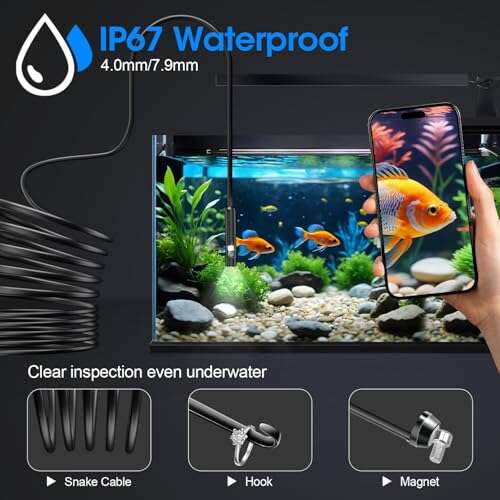
The dual-lens design lets me switch between the forward view and a side-facing view. That helps when I need to inspect a pipe wall or look behind an object without twisting the full cable. Eight adjustable LEDs help brighten dark spaces, while the IP67 design adds protection against dust and brief water exposure. As with most phone scopes, the final image depends on the Android phone, app, and available light.
Pros:
- Dual lenses show both forward and side views
- Long 16.4-foot cable reaches deep spaces
- Eight adjustable LEDs help control glare
- Semi-rigid design offers better cable control
- IP67 protection suits damp inspection areas
- Useful 1920P image detail for home and auto work
Cons:
- The long cable can feel bulky in small jobs
- Phone compatibility may depend on USB-C and app support
- A phone screen is less convenient than a built-in monitor
My Recommendation
This is a strong choice for anyone who wants one tool for many jobs. The dual lens is especially helpful for plumbing, car repair, and HVAC checks. I consider it a leading best endoscope camera for Android option when reach and viewing angles matter more than pocket size. It offers good value for users who want a flexible inspection tool without buying a separate screen.
1920P Dual-Lens Phone Borescope

This dual-lens borescope is built for users who need a simple phone-based inspection setup. It includes a semi-rigid 16.4-foot cable and eight adjustable LED lights. The long lead works well for ducts, drains, crawl spaces, and areas behind appliances. Its 1920P resolution should provide a clearer view than basic low-resolution inspection cameras.
I like the practical balance here. The cable has enough stiffness to guide the lens, but it can still bend around common corners. The two-camera layout saves time because I can inspect the front and side without pulling the cable out. It supports iOS and Android devices, but I would still check the connector and app instructions before ordering.
Pros:
- Dual-lens view reduces the need to reposition the cable
- Long cable supports deeper inspections
- Adjustable LEDs help in dark pipes and cavities
- Works with many Android and iOS phone setups
- Semi-rigid cable improves control over soft cables
- Good fit for home maintenance and vehicle checks
Cons:
- The cable may resist very tight bends
- Image quality can drop on a small phone sensor or weak app
- It may take practice to guide the side lens correctly
My Recommendation
I recommend this model to homeowners who want broad coverage at a reasonable cost. It is a smart pick for drains, wall cavities, and simple mechanical checks. The two lenses add real use, not just a flashy feature. If you want the best endoscope camera for Android for routine repairs, this model deserves a close look.
Acoath 1920P Dual-Lens Endoscope

Acoath’s dual-lens inspection camera focuses on versatility. It pairs a 1920P camera system with eight adjustable LEDs and a 16.4-foot semi-rigid cable. That combination fits many jobs around the house, garage, and workshop. The cable length gives me room to work while keeping the phone away from water, oil, or dust.
The IP67 rating is helpful for damp locations, though it does not mean the entire tool should stay underwater for long periods. The forward lens handles normal viewing, while the second lens can reveal the side of a pipe or the edge of a hidden part. The Android connection is convenient when the app installs correctly and the phone allows camera access. I suggest testing the app at home before taking the camera into a difficult space.
Pros:
- Two lenses improve inspection angles
- 16.4-foot cable reaches far into ducts and pipes
- Eight LEDs offer useful brightness control
- IP67 protection adds confidence around moisture
- Semi-rigid cable is easier to steer than a limp wire
- Suitable for home, auto, plumbing, and workshop tasks
Cons:
- Dual-lens operation may require a short learning period
- Long cables need careful storage to avoid tangles
- Very fine cracks may still need a professional inspection camera
My Recommendation
The Acoath is best for users who want a flexible inspection camera with extra reach. It makes sense for landlords, DIY repair fans, and vehicle owners who inspect several types of spaces. I would choose it when side viewing matters but a built-in display is not needed. It is a well-rounded best endoscope camera for Android choice for practical inspection work.
Kinpthy 1920P Single-Lens Endoscope
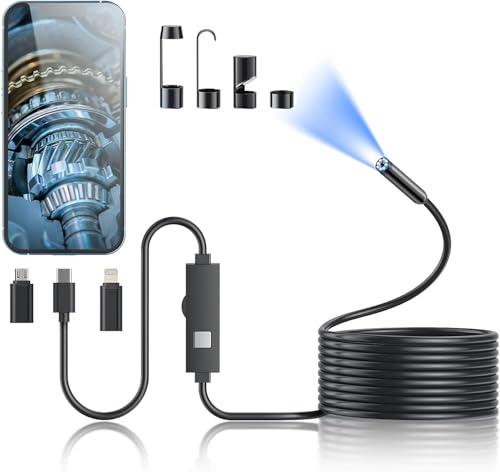
The Kinpthy model takes a simpler approach with one forward-facing lens. That design can be easier for beginners because there is no need to switch between camera views. It still includes a 1920P camera, eight adjustable LEDs, and a 16.4-foot semi-rigid cable. For many users, those core features matter more than a second lens.
A single lens also keeps the inspection head straightforward. I find that useful when checking a drain, looking under a car seat, or finding a small object in a wall gap. The Android connection turns a compatible phone into the viewing screen, which keeps the tool light and easy to carry. It may not show the side view that a dual-lens model provides, but it can offer a lower-cost path into inspection work.
Pros:
- Simple single-lens design is easy to learn
- Long 16.4-foot cable supports deep access
- Eight LEDs improve visibility in dark spaces
- Semi-rigid cable offers steady movement
- 1920P image rating suits common repair tasks
- Often easier to store than a more complex dual-lens tool
Cons:
- No side-facing lens for viewing around corners
- Users must rotate or move the cable to change angles
- Phone and app compatibility still needs checking
My Recommendation
I recommend Kinpthy for first-time buyers and users who want a direct, low-fuss tool. It is best for drains, engine spaces, appliances, and other areas where a forward view is enough. If you do not need side inspection, this can be a sensible best endoscope camera for Android on a tighter budget. Its simple layout may also reduce setup time.
DEPSTECH 2K Dual-Lens Phone Borescope

The DEPSTECH 2K model stands out with a higher stated image resolution than the 1920P options in this group. Its dual-lens layout gives users both a forward view and a second angle for side inspection. Higher resolution can help show small details, but it does not guarantee a perfect image in every setting. Lens cleanliness, light, motion, and the phone display all affect what I can see.
This camera suits users who want more detail for maintenance and inspection tasks. The dual view can help when checking inside a pipe or looking across the surface of a hidden part. I would use it for automotive work, appliance checks, and home projects where a little more image detail can save time. Buyers should confirm the connector, supported Android version, and app requirements before purchase.
Pros:
- 2K image rating may reveal more fine detail
- Dual lenses offer forward and side inspection
- Phone viewing makes photos and video easy to save
- Useful for auto, plumbing, appliance, and hobby work
- Higher resolution can help with small parts and marks
- Dual-view design reduces repeated cable repositioning
Cons:
- Higher resolution may use more phone storage
- Image quality still depends on lighting and phone display
- App or connector issues can interrupt setup
My Recommendation
DEPSTECH is best for Android users who care about extra image detail and flexible viewing. I would choose it for small mechanical parts, wiring checks, and close inspection tasks. It is a strong candidate for the best endoscope camera for Android when resolution is a top priority. It may cost more than basic models, but the added detail can be worthwhile for repeat users.
BAZO 1920P Endoscope with Adjustable LEDs

BAZO is aimed at users who want a clear, basic phone borescope without an overly complex layout. Its 1920P camera and eight adjustable LEDs cover the main needs of many home inspections. Adjustable light matters because shiny metal can reflect a fixed beam and hide the very detail you want to see. Lowering the brightness can sometimes reveal more than turning it all the way up.
This type of camera can help with blocked drains, dropped items, car spaces, and small household repairs. The phone screen gives a familiar way to view the live image, take pictures, and record short clips. I would treat the product as an inspection aid rather than a replacement for professional diagnostic equipment. It can show what is present, but it cannot repair a pipe, test electrical safety, or confirm structural damage.
Pros:
- 1920P resolution fits everyday inspection needs
- Eight LEDs allow better control in dark areas
- Simple phone-based viewing is easy to carry
- Useful for home maintenance and light workshop work
- Adjustable light can reduce glare on metal surfaces
- Usually faster to deploy than a large inspection system
Cons:
- Single-view designs offer less angle coverage than dual-lens models
- Small phone screens may make tiny details hard to judge
- It is not intended for advanced industrial inspection
My Recommendation
BAZO is best for casual DIY users who need a camera for occasional jobs. It is a good match for a first inspection tool, especially when the main goal is to see inside a dark or narrow space. I would place it among the better value options for the best endoscope camera for Android search. Keep expectations realistic, and it should serve well for small repairs.
Dual-Lens 1920P Type-C Endoscope

This dual-lens model uses a Type-C connection and offers an extra 8+1 LED lighting layout. The 1920P camera gives it a useful balance between detail and everyday phone use. Its 16.5-foot semi-rigid cable is slightly longer than many 16.4-foot models, though the difference is small in real use. The main advantage comes from its viewing design and cable reach.
The side lens helps me inspect surfaces that do not sit directly in front of the camera. That feature can save time in a pipe, behind a panel, or inside a vehicle cavity. Type-C is common on newer Android phones, but not every phone supports video input through its USB-C port. I recommend checking OTG support and reading the app directions before starting a job.
Pros:
- Dual lenses provide more useful viewing angles
- 8+1 LED setup offers strong lighting flexibility
- 16.5-foot cable supports deep inspection work
- Type-C connection fits many modern Android phones
- Semi-rigid cable gives better control in open paths
- Useful for plumbing, vehicle, and home repair tasks
Cons:
- Type-C does not ensure compatibility with every Android phone
- Some devices may need OTG enabled
- The extra cable length can be harder to coil
My Recommendation
I recommend this camera to Android users with a modern Type-C phone who want dual-lens coverage. It is especially helpful for people who inspect pipes, ducts, and hidden machine parts often. The lighting system and long cable add practical value. For a compatible device, it can be the best endoscope camera for Android for side-view work.
Anykit 1920P Endoscope Camera

Anykit’s 1920P endoscope camera is designed for straightforward inspection work. It uses a phone as the display, which keeps the kit light and easy to pack. The built-in light helps the lens work in spaces where a normal flashlight cannot reach. This is the kind of tool I would keep in a home repair box or vehicle emergency kit.
A phone scope works best when I move slowly and keep the lens close to the target. Fast cable movement can make the image shake, even when the camera itself has a clear resolution rating. Anykit’s simple design may appeal to users who do not need advanced viewing controls. Before use, I would confirm the phone connection and test the camera app in a well-lit room.
Pros:
- 1920P image quality suits common DIY work
- Compact phone-based setup is easy to carry
- Built-in light helps reveal dark spaces
- Useful for basic plumbing and auto checks
- Simple operation can help new users get started
- Phone storage makes photo records convenient
Cons:
- It may offer less angle control than a dual-lens camera
- Live viewing depends on phone and app compatibility
- Fast movement can make the image difficult to follow
My Recommendation
Anykit is best for homeowners, renters, and casual repair users. It makes sense when you want a handy camera for occasional checks instead of a heavy professional system. I would consider it a practical best endoscope camera for Android for basic tasks and quick diagnosis. Its value depends on the current price and the connector included with the model.
Anykit 1920P Phone Borescope

This Anykit listing offers another 1920P phone borescope format for users who want a simple inspection camera. The built-in light helps the lens see inside cabinets, gaps, pipes, and engine spaces. A phone display is familiar, so most users can learn the basic controls quickly. The camera is most useful when the inspection area is narrow but not so tight that the cable cannot move.
I look for stable cable control when reviewing tools in this category. A semi-rigid lead, when included with the specific kit, can help guide the camera toward the target and hold a useful position. I also advise users to wipe the lens before each job because a small smear can make a good camera look poor. Like other phone scopes, this model should be checked for Android support before purchase.
Pros:
- Clear 1920P format for everyday inspection needs
- Built-in light helps in dark areas
- Phone viewing makes image sharing simple
- Useful for home, garage, and hobby projects
- Easy to carry compared with monitor-based systems
- Can help locate a problem before a repair call
Cons:
- Phone compatibility can vary by Android model
- It may not provide a side view for angled inspection
- Low light, glare, or moisture can reduce image clarity
My Recommendation
This Anykit model suits users who want a practical phone borescope for home use. I would choose it for occasional drain checks, appliance work, and simple automotive inspections. It is a reasonable best endoscope camera for Android option when portability and ease of use matter most. Always verify the exact kit contents because product listings can differ by connector and cable design.
Anykit 1920P Inspection Camera

This third Anykit option follows the same useful idea: a small camera, built-in light, and an Android phone as the screen. The 1920P rating places it in the middle of the common phone borescope range. It should work well for tasks where I need to see inside a tight space without removing a cover. The lightweight format also makes it easier to bring to a job site.
In practice, the best results come from patience. I guide the cable in short movements, adjust the light, and pause before taking a photo. That method helps reduce blur and gives the lens time to settle. Users who need a longer reach or dual-angle view should compare the full specifications before choosing this simpler option.
Pros:
- 1920P image rating supports routine inspections
- Built-in LEDs improve visibility in dark locations
- Lightweight setup is easy to transport
- Works well for quick household checks
- Phone photos can help document a repair issue
- Simple design is less intimidating for beginners
Cons:
- It may lack the extra flexibility of a dual-lens model
- Image detail depends on the phone and viewing app
- Users should confirm the included connector before ordering
My Recommendation
I recommend this Anykit camera for light-duty users who want a tool that stores easily. It is best for quick checks behind furniture, inside vents, and around small machines. It can serve as the best endoscope camera for Android for users who value a compact design over advanced features. For frequent professional work, I would step up to a longer dual-lens or 2K model.
How to Choose the Best Endoscope Camera for Android
Choosing an Android endoscope camera is easier when I focus on the job first. A camera for a sink drain does not need the same reach as one for a vehicle frame or HVAC duct. I start with the cable length, then check the lens design, connector, light, and water rating. That order prevents a common mistake: buying a camera with impressive numbers that does not fit the intended space.
Check Android and OTG Compatibility
Phone support comes first. Many USB endoscope cameras use USB-C, but a USB-C port alone does not guarantee video input. The Android phone may need USB On-The-Go, often called OTG, enabled. Some phones block external camera apps, while others need a specific app from the product maker.
I suggest checking three things before ordering. First, confirm the phone connector. Second, confirm that the phone supports OTG or external USB devices. Third, review the app requirements and recent customer comments. This quick check can prevent the most frustrating problem: owning a good camera that the phone cannot display.
Understand Resolution Claims
Resolution matters, but the number tells only part of the story. A 1920P label may suggest a sharper image than a low-resolution camera, while a 2K or 2560P model may show more detail. Yet the lens size, sensor, light, focus range, and phone screen also shape the final view. A clean lens with good lighting often beats a high number in a dark, wet pipe.
For basic home use, 1920P is often enough. If I inspect small screws, cracks, solder joints, or engine parts, I may prefer the DEPSTECH 2K model. I also keep the camera steady and close to the target. That simple habit improves results more than many buyers expect.
Choose the Right Cable Length
A 16.4-foot cable gives plenty of reach for many home and auto tasks. It can reach through a drain, across a crawl space opening, or deep into a duct. But extra length adds weight and makes storage harder. A long cable can also form loops that push the camera away from the path.
For short jobs, a shorter cable may feel easier to control. For unknown paths, the longer models offer more freedom. I prefer a semi-rigid cable because it acts like a thin guide rod. It bends when needed but does not collapse as soon as it meets light resistance.
Compare Single and Dual Lenses
A single lens points forward. It is simple, easy to understand, and often costs less. It works well when I need to follow one clear path. A single-lens camera can also be slightly easier to clean and position.
A dual-lens camera adds a side view. That helps when the target sits beside the cable rather than in front of it. I can inspect a pipe wall, look behind a panel, or check the side of a machine without pulling the camera back. For plumbing and automotive work, I usually prefer dual lenses because they reduce repeated repositioning.
Look at the LED Controls
Every dark space needs light, but maximum brightness is not always best. Wet pipes and shiny metal can reflect a strong beam and create a white glare spot. Adjustable LEDs let me lower the light and recover surface detail. They also help when the camera moves from a dark cavity into a brighter opening.
Eight adjustable LEDs are common in this group. The Type-C dual-lens model adds an extra light layout. I would not choose only by LED count, though. Light placement, lens quality, and control range matter more than a single number.
Pay Attention to Water Protection
IP67 is a useful protection rating for many inspection tasks. Under the IEC 60529 system, the first number relates to dust protection, while the second relates to water protection under defined test conditions. This does not make every part of the kit safe to submerge. The phone, connector, control box, and cable end may still need protection.
I keep the phone well away from the wet area. After use, I wipe the camera head and cable, then let them dry before storage. Good care protects the lens, connector, and cable jacket. It also helps prevent a small moisture problem from becoming a phone problem.
Use the Camera Safely
An endoscope camera is a viewing tool, not a safety tester. I never use it as proof that a live electrical circuit is safe. I turn off power before looking inside an appliance, panel, or machine. I also avoid hot engines, moving parts, gas lines, and pressurized systems unless the equipment is fully shut down and safe to inspect.
For serious mold, sewer, structural, or electrical problems, I use the camera only as an early look. A trained professional may need better lighting, measurement tools, or a certified inspection system. The best endoscope camera for Android can help me find clues, but it should not replace sound safety practice.
Best For Comparison
| Best for | Why |
|---|---|
| Deep plumbing and duct checks | Long semi-rigid cables provide reach and better control. |
| Side-view inspection | Dual-lens cameras reveal surfaces beside the cable. |
| Simple home repairs | Single-lens 1920P models offer easy setup and useful light. |
FAQs Of best endoscope camera for android
Will any Android phone work with an endoscope camera?
No. The phone must support the camera connector, OTG or external USB devices, and the required app. Check the product listing and your phone settings before buying. Some phones also need OTG turned on manually.
Is 1920P good enough for an Android endoscope camera?
Yes, 1920P is suitable for many home, plumbing, auto, and hobby jobs. Lighting and steady movement matter just as much as the resolution label. Choose a 2K model if you often inspect very small details.
Are dual-lens endoscope cameras better?
They are better when you need to see both ahead and to the side. A single lens is simpler and may cost less. The right choice depends on whether side viewing will save you time.
Can I use an Android endoscope camera in water?
Only if the camera head and cable have the needed water rating. IP67 can help with damp inspection areas, but it does not mean the whole kit is waterproof. Keep the phone and connector dry, and follow the product instructions.
What can I inspect with an Android endoscope camera?
You can inspect drains, vents, engine spaces, appliance gaps, wall cavities, and small machine areas. Do not use it around live power, hot parts, moving machinery, or pressurized systems. Shut down equipment first and use professional help for serious hazards.
Final Verdict: Which Should You Buy?
For most users, I would choose the first 1920P dual-lens model for its reach, side view, adjustable LEDs, and IP67 protection. It is the best endoscope camera for Android for broad home and auto use.
Choose DEPSTECH for more detail, Kinpthy for simple forward viewing, or Anykit for light-duty jobs. Check phone support before ordering, then use the camera slowly and safely.

Everett Ashford is a tech reviewer at mytechgrid.com specializing in SSDs, cameras, TVs, earbuds, headphones, and other consumer electronics. He provides honest, data-driven reviews based on hands-on testing and real-world performance analysis. Everett simplifies complex tech details to help readers make smart, confident buying decisions.