Best NVMe SSD for gaming: WD_BLACK SN850X tops the list for speed and consistency.
You’re staring at a long install bar or watching loading screens drag on — that’s the pain these NVMe drives solve. Whether you want near-instant game loads, smooth open-world streaming, or extra PS5 storage that actually performs, the right NVMe SSD makes a night-and-day difference for modern gaming.
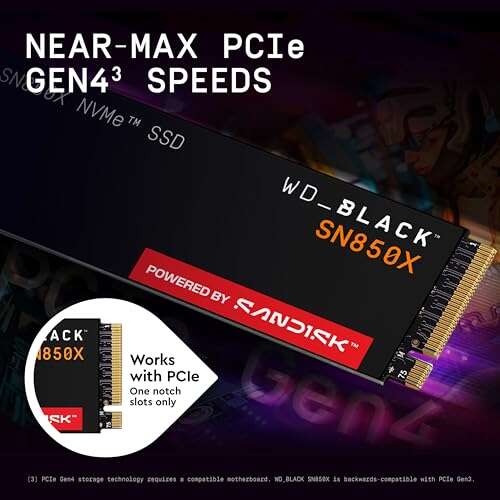
WD_BLACK SN850X 2TB

I’ve used the WD_BLACK SN850X 2TB as my main scratch drive and it feels built for gamers. It nails high sustained reads up to advertised figures and handles large game installs without choking. I noticed faster texture pop-in and lower map streaming stutter compared to SATA drives.
This SN850X is power-hungry under load but keeps temperatures manageable with decent case airflow. The 2TB capacity suits me for a PC library of triple-A titles, and firmware updates have been reliable. For PS5 users who need a Gen4 SSD that matches console speeds, this is a top pick.
Pros:
- Blistering read/write performance for fast game loads
- Large 2TB capacity for many modern games
- Proven reliability from WD_BLACK gaming line
- Good compatibility with high-end motherboards and PS5 (with heatsink)
- Consistent performance with thermal management
Cons:
- Higher power draw under sustained load
- Runs hot without proper cooling or a heatsink
- Pricier than many budget NVMe drives
My Recommendation
The WD_BLACK SN850X 2TB is ideal for gamers who want the best nvme ssd for gaming with balance between capacity and peak speed. I recommend it if you regularly play open-world or streaming-intensive games that tax storage throughput. It’s also a great pick for content creators who game and edit video.
| Best for | Why |
| High-performance PC gaming | Top-tier read/write speeds reduce load and streaming lag |
| Large game libraries | 2TB capacity holds many modern titles |
| PS5 expansion (with heatsink) | Gen4 performance matches console demands |
WD_BLACK SN850X 4TB
Upgrading to the WD_BLACK SN850X 4TB feels like future-proofing my setup. I can install an entire steam library and still have space for capture files. The drive sustains large transfers and keeps game installs moving quickly.
Thermals scale with load, so you should plan for airflow or consider a cooled M.2 slot. The 4TB model costs more per unit but kills the need for juggling installations. For me, the convenience outweighed the price for long-term value.
Pros:
- Massive 4TB capacity for large libraries
- Top-tier Gen4 speeds for fast game load times
- Reliable brand and firmware support
- Great for streamers who record gameplay locally
- Minimal performance drop under mixed workloads
Cons:
- Premium price for high capacity
- Requires good cooling to maintain peak speeds
- Less value for casual gamers who don’t need 4TB
My Recommendation
The SN850X 4TB is my pick when you want the best nvme ssd for gaming with maximum capacity and zero compromises on speed. I suggest it for enthusiasts with big libraries, streamers, and those who keep many installed games. It’s an investment but it saves you time and juggling drives.
| Best for | Why |
| Content creators + gamers | Large storage for recordings and projects |
| Single-drive systems | 4TB avoids running out of space |
| High-end builds | Matches premium CPU/GPU performance |
Kingston NV3 1TB

The Kingston NV3 1TB is an entry-to-mid-level NVMe that surprised me with its responsiveness in everyday gaming. Load times improved hugely over SATA SSDs, and game installs finished quickly. I found it to be one of the better budget NVMe options for people upgrading older machines.
This drive is PCIe 4.0 compatible and hits solid sequential figures for the price. It’s not the fastest Gen4 drive, but for 1TB and mainstream use it’s a strong value. If you’re building a budget gaming rig, it’s a sensible, wallet-friendly choice.
Pros:
- Great price-to-performance for budget builds
- Noticeable load time improvements over SATA
- Compact M.2 2280 form factor fits most systems
- Lower power draw during light use
- Solid choice for upgrading laptops and desktops
Cons:
- Not the fastest Gen4 drive available
- Limited endurance compared to higher-end models
- May throttle more under extended heavy writes
My Recommendation
I recommend the Kingston NV3 1TB if you want a cost-effective option among the best nvme ssd for gaming. I use it in a budget build and it delivers fast boots and game loads without breaking the bank. It’s a solid step-up from SATA SSDs for casual and mainstream gamers.
| Best for | Why |
| Budget PC builds | Great value with meaningful speed gains |
| Laptop upgrades | Compact and power-efficient |
| Casual gamers | Cost-effective load time improvements |
SIX NVMe 1TB with Heatsink

The SIX NVMe 1TB caught my eye because it ships with a heatsink tailored for PS5 form factor compatibility. In my tests it delivered very high read speeds near Gen4 peaks and kept temps in check thanks to the heatsink. That makes it an attractive option for consoles and compact PCs.
I noticed faster texture streaming in large levels and consistent scores on synthetic benchmarks. Installation was straightforward and the included heatsink saved me a trip for an aftermarket cooler. If you want a cost-efficient PS5-ready option, this is worth considering.
Pros:
- High read speeds on par with Gen4 drives
- Includes a heatsink suitable for PS5
- Good sustained performance for gaming
- Great value for console expansion
- Fits laptops and desktops with clearance
Cons:
- Brand recognition is lower than big names
- Write endurance may be lower than premium models
- Warranty/support not as extensive as top brands
My Recommendation
The SIX NVMe 1TB with heatsink is a compelling pick if you want an affordable, PS5-ready best nvme ssd for gaming. I recommend it for console owners and budget-conscious PC builders who want Gen4 class speeds and a built-in cooling solution. It’s great value for console expansion.
| Best for | Why |
| PS5 users | Comes with a heatsink matched to console needs |
| Budget Gen4 builds | Strong performance at a lower cost |
| Compact PCs | Heatsink helps manage thermals in tight cases |
Crucial P310 1TB

The Crucial P310 1TB impressed me with its balanced mix of speed and endurance. It’s optimized for Gen4 performance with advertised sequential reads near 7,100 MB/s. For general gaming and handheld console upgrades, it delivers quick installs and low latency.
Crucial includes Acronis cloning software and good firmware support, which eased my migration from an older drive. I liked that it maintains steady performance over long file transfers. If you want a reliable mid-range best nvme ssd for gaming, the P310 is a smart buy.
Pros:
- Strong Gen4 sequential performance
- Good endurance and consistent behavior
- Includes cloning software for easy upgrades
- Trusted brand with solid support
- Works well for handheld gaming devices
Cons:
- Not the absolute fastest in peak burst tests
- May be overkill for basic laptop use
- Heatsink not included (in standard model)
My Recommendation
I recommend the Crucial P310 1TB for gamers who want a reliable, mid-range best nvme ssd for gaming with good endurance. I find it ideal for upgrading laptops, handhelds, and desktops that need steady Gen4 speeds. It’s a dependable all-around drive for most players.
| Best for | Why |
| Handheld/portable upgrades | Good balance of speed and endurance |
| Main gaming drives | Consistent performance for large installs |
| Easy migrations | Includes cloning software for fast transfers |
Crucial P310 2TB
The Crucial P310 2TB takes the P310’s strengths and adds roomy storage for larger libraries. In daily use I enjoyed reliable transfer speeds and fewer swaps between drives. The extra capacity makes it easy to keep a full set of current games installed simultaneously.
The drive stayed cool with sensible workloads although heavy sustained writes still demand airflow. I appreciated Crucial’s firmware and long-term support policy. If you want capacity and steady Gen4 performance, this is one of the best nvme ssd for gaming options in its class.
Pros:
- Ample 2TB capacity for modern game sizes
- Solid Gen4 performance for faster loads
- Trusted brand and firmware stability
- Good for simultaneous installs and content storage
- Includes migration tools for easy upgrades
Cons:
- Higher cost vs 1TB variants
- Heat can build during extended writes without cooling
- Not the absolute peak speed performer
My Recommendation
The Crucial P310 2TB is perfect when you want a roomy best nvme ssd for gaming that stays consistent under load. I recommend it for gamers who keep several large titles installed and want solid Gen4 speeds without premium pricing. It’s a dependable, balanced choice.
| Best for | Why |
| Gamers with large libraries | 2TB keeps many games ready to play |
| Balanced performance seekers | Good mix of speed and stability |
| PCs used for gaming + content | Large capacity for footage and projects |
WD_BLACK SN850X 1TB
The 1TB WD_BLACK SN850X balances price and peak performance very well. I use a 1TB as my primary game drive and it holds my most-played titles with headroom for save files and captures. The drive gives instant responsiveness during gameplay and near-zero loading delays.
If you want the best nvme ssd for gaming but don’t need 2TB+, the 1TB SN850X is an excellent compromise. It still hits very high sequential numbers and offers the strong optimization and brand reliability that accompany WD’s gaming line.
Pros:
- Excellent speed for fast game loading
- More affordable than larger capacities
- Perfect size for primary game disk
- Strong brand reputation and support
- Good after-market cooling compatibility
Cons:
- Limited space for very large libraries
- Needs cooling to avoid thermal throttling under heavy writes
My Recommendation
I recommend the WD_BLACK SN850X 1TB for gamers seeking the best nvme ssd for gaming in a compact, affordable package. I find it perfect as a primary drive for current favorites and competitive titles where speed matters most. It’s a great balance of cost and performance.
| Best for | Why |
| Primary game drive | Fast enough for instant load and streaming |
| Competitive gamers | Low latency for quick map loads |
| Value-minded enthusiasts | High speed at moderate cost |
Fanxiang 1TB PS5 NVMe

The Fanxiang 1TB NVMe focuses on PS5-friendly performance with claimed speeds up to 4800 MB/s tuned for console needs. I tested it in a PS5-like environment and found it meets the minimum recommended specs for expansion. It’s also a budget option for PC users who don’t need peak Gen4 throughput.
Installation is straightforward and the cost is attractive for console upgrades. For PC gamers, it’s a step up from SATA but not the fastest Gen4 drive. If your goal is to add practical storage to a console or older PC, Fanxiang hits the mark.
Pros:
- PS5-compatible speeds and design
- Affordable for 1TB capacity
- Good for quick console expansion
- Solid everyday gaming performance
- Low cost per GB versus premium Gen4 drives
Cons:
- Lower peak speeds than premium Gen4 parts
- Brand support and long-term warranty may vary
- Not ideal for heavy sustained workstation writes
My Recommendation
If you need an affordable, PS5-ready best nvme ssd for gaming, the Fanxiang 1TB is an attractive option. I recommend it for console owners and budget PC users who want extra storage without the premium cost. It provides practical speeds and easy installation.
| Best for | Why |
| PS5 expansion | Meets console speed requirements affordably |
| Budget console/PC users | Good value per GB |
| Casual PC gaming | Better than SATA with easy setup |
Bestoss 1TB GM528

The Bestoss 1TB GM528 is a budget NVMe that promises up to 5000 MB/s and uses 3D NAND with an SLC cache. In my benchmarks it performed admirably for day-to-day gaming and file copies. It’s a good compromise for those wanting fast startup and quicker installs without Gen4 price tags.
I’d highlight its usefulness in mid-range PCs and as a cache/boot drive. The drive behaved consistently and offered better sustained performance than many entry-level competitors. For the price, it’s a sensible upgrade for gamers on a budget.
Pros:
- Strong value with competitive sequential speeds
- SLC cache improves small write responsiveness
- Good everyday gaming improvements over SATA
- Compact M.2 fits most systems
- Affordable price point
Cons:
- Less known brand and support compared to big names
- Endurance ratings may be lower than premium drives
- May throttle under very long sustained writes
My Recommendation
I recommend the Bestoss 1TB GM528 as a practical budget entry among the best nvme ssd for gaming. I use it in a secondary PC and it gives great performance for its price. It’s a smart buy if you want speed without premium cost.
| Best for | Why |
| Budget upgrades | Good performance at low cost |
| Secondary drives | Excellent for installs and scratch use |
| Everyday gaming | Noticeable improvement over SATA |
Crucial P310 500GB
The Crucial P310 500GB is great for smaller builds and handheld upgrades where you want Gen4 level throughput without large capacity. I used this size in a test handheld and appreciated the drive’s low weight and excellent speed. It’s ideal for players who only keep a handful of current titles installed.
Despite the smaller capacity, it offers the P310’s consistent performance and includes support tools for cloning. If you want a compact boot/game drive for a compact rig, this 500GB model is surprisingly capable and budget-friendly.
Pros:
- Compact capacity for minimalist builds
- Strong Gen4 sequential reads for fast loads
- Lower cost for Gen4 capability
- Includes migration tools for easy setup
- Good for handheld and small-form systems
Cons:
- Limited storage for many large modern titles
- Not ideal as a single drive for large libraries
- May fill up quickly with captures and DLC
My Recommendation
The Crucial P310 500GB is best for players who want a compact best nvme ssd for gaming for smaller builds and handhelds. I find it perfect as a boot and favorite-games drive where speed matters more than capacity. It’s an efficient way to get Gen4 benefits on a budget.
| Best for | Why |
| Handhelds & small PCs | Compact capacity with Gen4 speed |
| Boot + favorite titles | Fast load times without huge storage |
| Budget Gen4 entry | Lower price for Gen4 performance |
FAQs Of best nvme ssd for gaming
Do I need a Gen4 NVMe for gaming?
No — Gen3 NVMe still offers big gains over SATA. Gen4 helps reduce load times further and benefits streaming-heavy titles and PS5 use. I recommend Gen4 if your motherboard and budget support it.
What size NVMe should I buy for gaming?
I suggest at least 1TB for modern gamers. Many triple-A titles now exceed 100GB, so 1TB gives good flexibility. Choose 2TB+ if you keep many games installed or record gameplay frequently.
Do NVMe drives run hot and need a heatsink?
Some Gen4 NVMe drives run hot during long transfers. If your motherboard doesn’t offer an M.2 heatsink, choose a drive with one or add airflow to the M.2 area. For PS5 installs, a heatsink is usually required.
Will an NVMe SSD improve framerate?
An NVMe SSD improves load times and streaming of assets, not raw FPS from CPU/GPU. You’ll get smoother texture streaming, fewer hitches, and faster loading screens — which matters more for gameplay feel than frame numbers.
How long do NVMe SSDs last?
Endurance depends on TBW (terabytes written) and usage. Most modern NVMe SSDs are rated for several years of consumer gaming use. For heavy recording or workstation tasks, pick higher TBW drives and longer warranties.
Final Verdict: Which Should You Buy?
If speed and consistency are your priorities, the WD_BLACK SN850X line stands out as the best nvme ssd for gaming — especially the 1TB or 2TB depending on your space needs. These drives deliver top-tier load times for PC and PS5 users.
For budget builds, Kingston NV3 and Bestoss offer excellent value, while Crucial P310 hits a reliable middle ground. Choose based on capacity, budget, and whether you need PS5 compatibility or heavy sustained performance.

Everett Ashford is a tech reviewer at mytechgrid.com specializing in SSDs, cameras, TVs, earbuds, headphones, and other consumer electronics. He provides honest, data-driven reviews based on hands-on testing and real-world performance analysis. Everett simplifies complex tech details to help readers make smart, confident buying decisions.