To pair Bose Sport Earbuds, turn on Bluetooth, select the earbuds, and follow the voice prompts.
Learning how to pair Bose Sport Earbuds is simple once you know where pairing mode is located. This guide explains the first setup, repeat connections, Bose Music app steps, common fixes, and tips for keeping the connection stable. The steps match the standard Bose Sport Earbuds controls, though menu names may vary slightly by phone.
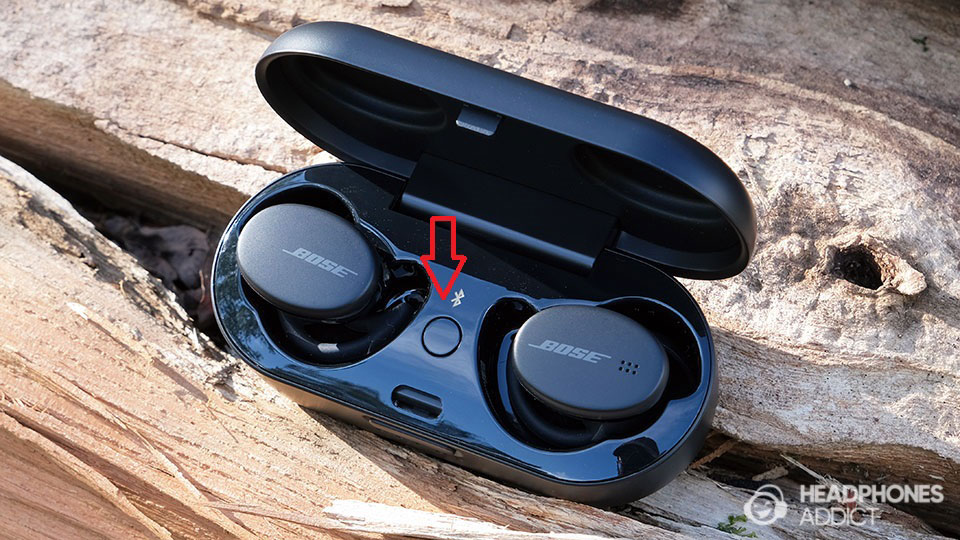
How to Pair Bose Sport Earbuds for the First Time
Bose Sport Earbuds usually enter pairing mode during the first setup. You can connect them to an iPhone, Android phone, tablet, laptop, or another Bluetooth device.
Follow these steps:
- Place both earbuds in the charging case.
- Open the case lid.
- Remove both earbuds.
- Put the earbuds in your ears.
- Open the Bluetooth settings on your device.
- Turn Bluetooth on.
- Look for Bose Sport Earbuds in the list of available devices.
- Tap Bose Sport Earbuds.
- Wait for the connection message or voice prompt.
Your device may show a message asking you to confirm the connection. Select Pair or Connect if needed.
When learning how to pair Bose Sport Earbuds, keep the earbuds close to your phone. A distance of less than 3 feet is best for the first connection. Also, make sure the earbuds have enough battery power.

How to Pair Bose Sport Earbuds in Manual Pairing Mode
Sometimes the earbuds do not appear in the Bluetooth list. In that case, you can place them into pairing mode manually.
- Remove both earbuds from the charging case.
- Put them in your ears.
- Touch and hold the right earbud for about 5 seconds.
- Release the earbud when you hear “Ready to connect.”
- Open your phone or computer’s Bluetooth menu.
- Select Bose Sport Earbuds.
The right earbud controls Bluetooth pairing. Hold the touch surface firmly, but do not tap it several times. A light tap may pause music or change another control instead.
This is one of the most useful steps in how to pair Bose Sport Earbuds because it lets you reconnect them without using the Bose Music app.

How to Pair Bose Sport Earbuds With an iPhone
The iPhone pairing process takes less than a minute in most cases.
- Open Settings on your iPhone.
- Tap Bluetooth.
- Turn Bluetooth on.
- Remove the Bose Sport Earbuds from their case.
- Wait for Bose Sport Earbuds to appear under Other Devices.
- Tap the name.
- Wait until the status changes to Connected.
If you have paired the earbuds before, they may appear under My Devices instead. Tap the information icon beside the earbuds if you need to forget the old connection.
For a smoother setup, keep other Bluetooth headphones away from the phone. This prevents you from selecting the wrong device, especially in a busy place such as a gym or airport.

How to Pair Bose Sport Earbuds With an Android Phone
Android phones use a similar process, but the menu names can differ by brand.
- Open Settings.
- Tap Connected devices, Connections, or Bluetooth.
- Turn Bluetooth on.
- Select Pair new device if that option appears.
- Put the earbuds into pairing mode.
- Tap Bose Sport Earbuds.
- Approve the pairing request.
On some Android phones, you may need to tap Scan or Refresh before the earbuds appear. If you see more than one Bose device, choose Bose Sport Earbuds rather than a speaker or another headset.
The Bose Music app can also guide you through the setup. Install the official app, sign in if requested, and follow the product setup instructions. The app may offer firmware updates and control settings after the first connection.
How to Pair Bose Sport Earbuds With a Computer
You can use Bose Sport Earbuds for music, video calls, and online meetings. The steps vary slightly between Windows and macOS.
Windows
- Open Settings.
- Select Bluetooth & devices.
- Turn Bluetooth on.
- Select Add device.
- Choose Bluetooth.
- Put the earbuds into pairing mode.
- Select Bose Sport Earbuds.
Windows may list the earbuds as connected for audio but not for calls. In a meeting app, choose Bose Sport Earbuds as both the speaker and microphone if available.
Mac
- Open the Apple menu.
- Select System Settings.
- Click Bluetooth.
- Turn Bluetooth on.
- Put the earbuds into pairing mode.
- Select Bose Sport Earbuds.
- Click Connect.
If your computer connects but produces no sound, open the sound settings and choose the earbuds as the output device. This is a common computer setting issue, not usually a pairing failure.

How to Use the Bose Music App
The Bose Music app is useful, but it is not always required for basic Bluetooth pairing. Your phone’s Bluetooth menu can connect the earbuds on its own.
The app can help you:
• Complete product setup
• Check battery levels
• Install firmware updates
• Adjust some product settings
• Manage connected products
• Review touch controls
To use it, download the official Bose Music app from the Apple App Store or Google Play Store. Open the app, select Add Product, and choose the Sport Earbuds option. Keep the earbuds nearby and follow the on-screen steps.
The app cannot fix every connection problem. If the earbuds do not appear in the app, first confirm that they are charged and in pairing mode. Then close and reopen the app.

How to Reconnect Bose Sport Earbuds After Pairing
After the first setup, Bose Sport Earbuds should reconnect to the last device they used. Take them out of the case, turn on Bluetooth, and wait a few seconds.
If they do not reconnect:
• Open the Bluetooth menu on your device.
• Tap Bose Sport Earbuds under saved devices.
• Make sure the earbuds are not connected to another nearby device.
• Turn Bluetooth off and on again.
• Return the earbuds to the case, close the lid, and try once more.
Bose Sport Earbuds generally connect to one Bluetooth device at a time. If you used them with a laptop earlier, the earbuds may try to connect to that laptop instead of your phone.
A practical habit helps here: turn off Bluetooth on devices you are not using. This makes the next connection faster and avoids unwanted switching.
How to Pair Bose Sport Earbuds With a Second Device
You can save the earbuds on more than one device, but they may not actively play audio from multiple devices at once. To add a second device, disconnect the earbuds from the first device or turn its Bluetooth off.
Then:
- Put the earbuds into manual pairing mode.
- Open Bluetooth settings on the second device.
- Select Bose Sport Earbuds.
- Confirm the connection.
If the second device does not find them, remove the earbuds from the first device’s Bluetooth range. A phone in your pocket can still hold the connection while you are trying to pair with a tablet.
This is an important detail when learning how to pair Bose Sport Earbuds. Saving a device and actively connecting to it are not always the same thing.
Bose Sport Earbuds Not Showing in Bluetooth
If Bose Sport Earbuds do not appear, work through these checks in order:
• Charge the earbuds and case.
• Keep the earbuds within a few feet of the device.
• Turn Bluetooth off, wait 10 seconds, and turn it on again.
• Restart the phone, tablet, or computer.
• Remove the earbuds from any nearby device.
• Place the earbuds into manual pairing mode.
• Check for a saved Bose Sport Earbuds entry and select it.
• Update the phone and Bose Music app.
Bluetooth works through a short-range radio connection. Walls, heavy wireless traffic, and other active devices can sometimes affect discovery. The earbuds may also fail to appear if they are already connected elsewhere.
Avoid repeatedly tapping the right earbud. Hold it steadily for about 5 seconds instead. This small change solves many failed pairing attempts.
How to Reset Bose Sport Earbuds
A reset can help when the earbuds connect to the wrong device, fail to enter pairing mode, or behave differently in each ear. A reset removes the current connection memory, so you will need to pair the earbuds again.
Try this general reset process:
- Remove the earbuds from your device’s Bluetooth list.
- Place both earbuds in the charging case.
- Close the case lid.
- Wait about 30 seconds.
- Open the lid.
- Remove the earbuds.
- Enter pairing mode manually.
- Pair them with your device again.
Bose firmware and reset steps can change. If this process does not work, check the current instructions in the Bose Music app or the official Bose support guide for your model.
Resetting should be a later step, not the first one. Most pairing problems come from low battery, an old Bluetooth record, or another nearby device holding the connection.
Common Pairing Mistakes to Avoid
Small mistakes can make how to pair Bose Sport Earbuds seem harder than it is.
• Selecting the wrong Bose product: Several Bose headphones and earbuds may appear in a Bluetooth list.
• Skipping pairing mode: The earbuds must be discoverable before a new device can find them.
• Pairing from inside the app only: Use the phone’s Bluetooth menu if the app cannot detect the earbuds.
• Ignoring the charging case: Low case power can prevent reliable startup.
• Leaving Bluetooth active on an old device: The earbuds may reconnect to it first.
• Holding the wrong earbud: The right earbud controls manual pairing mode.
• Pairing from too far away: Stay close during setup.
In hands-on troubleshooting, the most common mistake is assuming that a visible light always means the earbuds are ready to pair. The light shows status, but the voice prompt is the clearer confirmation that pairing mode is active.
Tips for a More Stable Bluetooth Connection
Once you know how to pair Bose Sport Earbuds, a few habits can improve daily use.
Keep your phone on the same side of your body as the right earbud when possible. Your body can weaken a wireless signal, especially when the phone is in a back pocket.
Keep the earbuds clean and dry. Sweat is common during sports, but moisture around the touch controls or charging contacts can cause problems. Wipe the earbuds with a soft, dry cloth and follow Bose care guidance.
Install firmware updates through the official Bose Music app when they are available. Updates may improve performance, but they do not guarantee that every phone or computer will behave the same way.
For calls, test the microphone before an important meeting. Music may work even when a computer has selected a different microphone.
Frequently Asked Questions About How to Pair Bose Sport Earbuds
How do I put Bose Sport Earbuds into pairing mode?
Remove the earbuds from the charging case and touch and hold the right earbud for about 5 seconds. Release it when you hear “Ready to connect,” then select Bose Sport Earbuds in your device’s Bluetooth settings.
Why are my Bose Sport Earbuds not showing up?
They may already be connected to another nearby device, or they may not be in pairing mode. Turn off Bluetooth on nearby devices, charge the earbuds, and manually enter pairing mode again.
Can I pair Bose Sport Earbuds without the Bose Music app?
Yes. Open your device’s Bluetooth settings, place the earbuds in pairing mode, and select Bose Sport Earbuds. The app is helpful for setup, settings, and updates but is not required for basic Bluetooth audio.
How do I pair Bose Sport Earbuds with a new phone?
Disconnect or forget the earbuds on the old phone, then put the earbuds into pairing mode. Open Bluetooth on the new phone and select Bose Sport Earbuds from the available devices.
Why do Bose Sport Earbuds connect but have no sound?
Your device may still be using its built-in speaker. Open the sound or audio output menu and choose Bose Sport Earbuds as the output device.
Can Bose Sport Earbuds connect to two devices at once?
They can save more than one paired device, but they normally use one active Bluetooth connection at a time. Disconnect the current device before connecting to another one.
Conclusion
How to pair Bose Sport Earbuds becomes easy when you follow the right order: charge the earbuds, enter pairing mode, open Bluetooth, and select the correct Bose product. If the connection fails, check nearby devices, remove old Bluetooth records, and reset the earbuds only when simpler fixes do not work.
Set up your earbuds today, test both music and calls, and keep the Bose Music app available for updates. If this guide helped, explore more device setup tips or share your pairing experience in the comments.

Everett Ashford is a tech reviewer at mytechgrid.com specializing in SSDs, cameras, TVs, earbuds, headphones, and other consumer electronics. He provides honest, data-driven reviews based on hands-on testing and real-world performance analysis. Everett simplifies complex tech details to help readers make smart, confident buying decisions.