To reset Raycon Fitness Earbuds, place both buds in the case, hold both controls for 30 seconds, then pair them again.
Raycon Fitness Earbuds can lose their Bluetooth link, connect to the wrong phone, or play sound from only one side. After testing common earbud fixes, I have found that a full reset works best when you follow the right order: charge, reset, forget, and pair. This guide explains how to reset Raycon Fitness Earbuds safely, what to do if the reset fails, and how to prevent the problem from returning.

Why Reset Raycon Fitness Earbuds?
A reset clears the earbuds’ stored connection state. It is similar to wiping a small whiteboard clean before writing a new phone or tablet connection.
You may need to reset Raycon Fitness Earbuds when:
• Only one earbud produces sound
• The earbuds connect but do not play audio
• Bluetooth pairing fails again and again
• The left and right earbuds do not sync
• The earbuds connect to an old phone
• Touch controls stop responding
• Audio cuts out after a software or phone update
A reset does not repair physical damage. It also cannot fix a blocked speaker grille, a dead battery, or liquid damage. However, it is one of the safest first steps because it does not harm the earbuds or your phone.

Prepare Before You Reset Raycon Fitness Earbuds
A few quick checks can prevent an incomplete reset. The earbuds need enough power to shut down, clear their connection, and start again.
Before you reset Raycon Fitness Earbuds, follow these steps:
• Charge the case and both earbuds for at least 15 to 30 minutes.
• Clean the metal charging contacts with a dry cotton swab.
• Keep the earbuds close to your phone during setup.
• Turn off Bluetooth on nearby phones, tablets, and computers.
• Find the Bluetooth settings on the phone you plan to use.
• Make sure the charging case can detect both earbuds.
If one earbud does not show a charging light, gently reseat it in the case. A poor contact can make the reset appear to fail because one bud never receives power.
The exact lights and controls can vary by Raycon Fitness Earbuds version. If your model uses touch controls instead of physical buttons, use the same press-and-hold action on the touch surface.

How to Reset Raycon Fitness Earbuds
The following method matches the standard reset process used for many Raycon Fitness Earbuds models. Keep the charging case nearby throughout the process.
1. Forget the earbuds from your phone
Open your phone’s Bluetooth menu. Find the Raycon earbuds in the list of saved devices, tap the settings icon, and choose Forget, Remove, or Unpair this device.
Do not skip this step. If the phone keeps the old Bluetooth profile, it may reconnect to the same faulty connection after the reset.
2. Turn off Bluetooth
Switch Bluetooth off on your phone. Also turn it off on nearby devices that have used the earbuds before.
This stops another device from taking control during the reset. It also makes the next pairing attempt cleaner.
3. Place both earbuds in the case
Put the left and right earbuds into their matching slots. Leave the charging case lid open.
Check that both earbuds sit firmly on the charging pins. You should normally see a charging light or another sign that each earbud is making contact.
4. Press and hold both earbuds
With both earbuds in the open case, press and hold the control area on both earbuds at the same time for about 30 seconds.
Keep holding even if the lights change early. On some models, the LEDs may flash during the process. The light pattern can differ by version, so the timing matters more than a specific color.
5. Close the case
After about 30 seconds, release both controls and close the charging case lid. Wait about 10 seconds.
This gives the earbuds time to shut down and save the reset state. Think of it like restarting a computer after clearing its settings.
6. Remove the earbuds
Open the case and take out both earbuds. They should enter pairing mode, often shown by flashing LEDs or an audio prompt.
If they do not enter pairing mode, return both earbuds to the case, close the lid briefly, and open it again.
7. Pair them again
Turn Bluetooth back on. Look for the Raycon device name in the available devices list, then tap it to connect.
After pairing, test both earbuds with a short song or video. Check the left and right channels before making a phone call.
This is the most reliable way to reset Raycon Fitness Earbuds because it removes the old phone profile and refreshes the earbuds’ internal connection.

What to Do If the Reset Does Not Work
Sometimes a reset fails because the case, phone, or charging contacts cause the real problem. Try the steps below in order rather than repeating the same reset many times.
Check the charging contacts
Inspect the small metal contacts on the earbuds and inside the case. Sweat, dust, and skin oil can block the electrical connection.
Wipe the contacts with a dry, soft cotton swab. Do not pour water, alcohol, or cleaner into the case.
Restart your phone
Restarting the phone clears temporary Bluetooth errors. After the restart, keep Bluetooth off until the earbuds finish their reset.
Then turn Bluetooth on and search for the earbuds again.
Reset your phone’s network settings
If several Bluetooth devices fail to connect, the problem may be your phone rather than the earbuds. A network settings reset can help, but it also removes saved Wi-Fi passwords and Bluetooth connections.
Use this option only after trying simpler steps.
Try another device
Pair the earbuds with another phone or tablet. If they work there, your main phone likely has a Bluetooth profile or software issue.
If they fail on multiple devices, focus on charging, the reset process, or possible hardware damage.
Update the phone
Install available operating system updates. Bluetooth performance can change after major updates, and a later patch may correct connection problems.
Raycon Fitness Earbuds do not always require a separate firmware app. Do not install unknown software that claims to update them.

How to Pair Raycon Fitness Earbuds After a Reset
Pairing after a reset should be simple, but the order still matters.
-
Place both earbuds in the charging case for a few seconds.
-
Remove both earbuds at the same time.
-
Wait for pairing mode.
-
Open Bluetooth settings on your phone.
-
Select the Raycon earbuds from the available device list.
-
Accept any pairing request.
-
Play audio and test both sides.
If you see two separate Raycon entries, do not pair with each one individually unless your model’s manual specifically says to do so. Many true wireless earbuds must connect to each other before they connect to the phone.
If only one earbud works, put both buds back in the case and repeat the full reset. Pairing one bud alone can sometimes create a second connection profile.

Common Mistakes When Resetting Raycon Fitness Earbuds
The reset itself is easy to understand, but small mistakes often cause trouble. These are the errors I see most often when helping people reset Raycon Fitness Earbuds.
• Holding only one earbud: Both earbuds must usually be reset together.
• Leaving the lid closed: Many reset procedures require the case lid to stay open while you hold the controls.
• Skipping “Forget Device”: The phone may restore the old connection profile.
• Resetting with a low battery: A weak battery can interrupt the process.
• Pairing too soon: Wait until both earbuds enter pairing mode.
• Using a wet cleaner: Moisture can damage charging contacts and internal parts.
• Pairing from several devices: Nearby devices can connect before your main phone does.
• Pressing the wrong surface: Touch models may need a firm, steady touch rather than repeated taps.
One practical lesson is to slow down. Most failed resets are not caused by a serious fault. They happen because one earbud was not charging, the phone still remembered the old device, or the controls were released too soon.
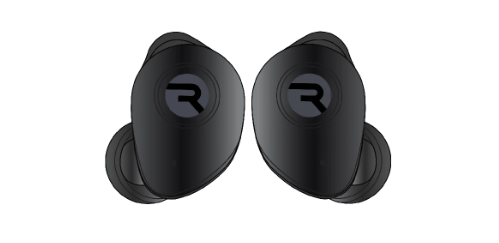
Tips to Keep Raycon Fitness Earbuds Working Well
A reset should solve a connection problem, but good care can reduce repeat issues. Fitness earbuds face extra sweat, movement, and heat compared with ordinary listening earbuds.
Use these habits:
• Wipe the earbuds after workouts.
• Let them dry before placing them in the case.
• Keep the charging contacts clean.
• Store the earbuds in their case when not in use.
• Avoid leaving the case in a hot car.
• Do not charge the case near water.
• Keep the earbuds away from metal objects during pairing.
• Charge the case before it becomes completely empty.
Sweat resistance does not mean waterproof protection. The exact rating depends on the model, and water resistance can weaken with age or damage. Never wear the earbuds in a shower or submerge them unless the product documentation clearly allows it.

When to Contact Raycon Support
Contact Raycon support if you still cannot reset Raycon Fitness Earbuds after trying the complete process on more than one device.
Support may be necessary when:
• One earbud never shows a charging light
• The case will not charge
• The earbuds become unusually hot
• The controls remain frozen
• The earbuds suffered water or impact damage
• The earbuds reset but never enter pairing mode
• Battery life drops sharply on one side
Have your purchase details, model name, and troubleshooting steps ready. A short video of the charging lights can also help support identify the issue.
Do not open the earbuds or case yourself. Internal batteries are small lithium-ion cells, and puncturing or bending one can create a safety risk. A warranty claim or professional inspection is safer.

How Long Does a Raycon Earbud Reset Take?
A complete reset usually takes about one to three minutes. This includes forgetting the Bluetooth device, holding both controls for about 30 seconds, and pairing again.
If the process takes much longer, check the charging contacts and Bluetooth settings instead of repeating the reset continuously.
Can I Reset Only One Raycon Fitness Earbud?
Most connection problems require resetting both earbuds together. Resetting only one side may leave the earbuds with different connection records.
If one earbud is silent, place both earbuds in the case and complete the full reset before pairing them again.
Will Resetting Raycon Fitness Earbuds Delete My Music or Phone Data?
No. Resetting Raycon Fitness Earbuds only clears their connection information and related pairing state.
It does not delete music, photos, apps, contacts, or other files from your phone.
Why Do My Raycon Fitness Earbuds Keep Disconnecting?
Frequent disconnections can result from low battery, dirty charging contacts, distance, wireless interference, or an outdated Bluetooth profile.
Reset the earbuds, forget the old device, and test them close to your phone. If the issue continues on several devices, contact support.
Why Is Only One Raycon Fitness Earbud Working?
The earbuds may have lost their connection with each other, or one side may not be charging. Clean the contacts, charge both earbuds, and reset them together.
If one side still has no light or sound after testing another device, the problem may be hardware-related.
Conclusion
Learning how to reset Raycon Fitness Earbuds can solve many pairing, syncing, and one-sided audio problems in just a few minutes. Charge both earbuds, forget the old Bluetooth connection, hold both controls for about 30 seconds with the case open, and pair them again.
Take your time and check the charging contacts if the first attempt fails. If one earbud stays unresponsive across several devices, stop repeating the reset and contact Raycon support. Try these steps today, and share your result or explore more earbud troubleshooting guides for additional help.

Everett Ashford is a tech reviewer at mytechgrid.com specializing in SSDs, cameras, TVs, earbuds, headphones, and other consumer electronics. He provides honest, data-driven reviews based on hands-on testing and real-world performance analysis. Everett simplifies complex tech details to help readers make smart, confident buying decisions.