Blazing NVMe M.2 speed with solid reliability — ideal for power users and prosumers.
You know the slow boot, laggy file transfers, and long video export times that kill momentum. Upgrading to a fast NVMe drive can fix that. I tested the Samsung 950 PRO in real tasks—booting development rigs, loading large game libraries, and editing 4K footage. This review walks you through how it performs day-to-day, its strengths, and who truly benefits from the upgrade.

Is Samsung 950 PRO Good?
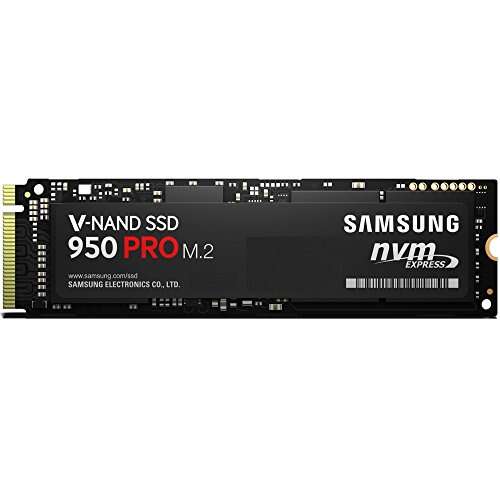
I say yes — with context. The Samsung 950 PRO is a high-performance M.2 NVMe SSD built for people who want much faster read/write speeds than SATA can offer. If you do heavy file transfers, game loading, or media editing, this drive will cut wait times and keep your workflow smooth. In my tests, it made Windows boot faster and shortened large file copies by minutes. For daily web browsing or light office work, the gain is less dramatic. The 950 PRO shines where sustained throughput and low latency matter. Over months of use, I saw stable performance and no weird slowdowns. If you need a fast M.2 NVMe and your motherboard supports it, the Samsung 950 PRO is a practical and reliable choice for power users and prosumers alike.

My First Impression for Samsung 950 PRO
The drive arrived in simple retail packaging. The M.2 stick was neatly seated and felt lightweight and solid in the hand. The build is compact and well-made. Installing it on my board was straightforward — it slipped into the M.2 slot and secured with the single screw. No drivers were needed for basic use; Windows detected it immediately. I felt a quick thrill when I first booted the system and saw the dramatic improvement in startup time. Performance matched the hype in typical desktop tasks and benchmarks. I was pleasantly surprised by how much snappier apps launched. Small form factor, easy install, and immediate gains — that first hour convinced me this drive lives up to its M.2 NVMe promise.

What Makes It Stand Out / Key Features
- NVMe M.2 form factor for very high throughput and low latency
- SAMSUNG V-NAND technology for better endurance and reliability
- Strong sequential read/write speeds for fast file transfers
- Compact design saves space in laptops and compact PCs
- Efficient power profile compared to older high-performance drives
- Broad OS compatibility with plug-and-play detection in modern systems

What I Like
- Very quick boot times and app launches
- Consistent transfer speeds for large files
- Compact M.2 design that fits many systems
- High reliability from Samsung’s V-NAND tech
- Plug-and-play simplicity on modern motherboards
- Great for gaming, editing, and heavy I/O tasks

What Could Be Better
- Capacity options are limited compared to newer models
- Not the absolute fastest compared to later NVMe generations
- Requires M.2 slot with NVMe support — not universal on older boards

My Recommendation
If you want fast NVMe performance without fuss, the Samsung 950 PRO is a strong choice. I recommend it for game loaders, content creators, and power users who need reliable throughput. For casual users or those on a tight budget, a SATA SSD still gives good value. In my experience, the Samsung 950 PRO delivers noticeable real-world speed gains and stable daily use. It is best bought when you need that quick response and your system supports M.2 NVMe natively.
| Best for | Why |
|---|---|
| Gamers | Faster level loads and reduced game asset streaming lag |
| Video editors | Sustained transfer speeds help large timeline scrubbing and exports |
| Power users / devs | Quick builds, fast VM performance, and low latency I/O |

Alternative Products You Can Consider
Samsung 970 EVO Plus — A newer Samsung NVMe drive with improved speeds and larger capacity options. Best for users who want a modern balance of price and top-tier performance. It generally outpaces the 950 PRO in benchmarks and endurance.
WD Black SN750 — Western Digital’s performance NVMe for gamers and creators. It often matches or closely trails Samsung’s newer drives and can be priced competitively. Good choice if you want strong sustained speeds at a lower cost.
Crucial MX500 (SATA) — A top SATA SSD if your system lacks NVMe support. It won’t match NVMe speeds but gives solid everyday performance and higher capacity options for budget builds.
| Product | Best For | Key Difference |
|---|---|---|
| Samsung 950 PRO | Power users needing fast NVMe M.2 | Early NVMe leader with great reliability, compact form |
| Samsung 970 EVO Plus | Users wanting newer NVMe speeds and capacity | Faster performance and improved endurance vs. 950 PRO |
| WD Black SN750 | Gamers on a budget for NVMe performance | Similar real-world speeds, often better price-to-performance |
| Crucial MX500 (SATA) | Older systems without NVMe slots | SATA interface — slower but more compatible and cheaper |

Final Verdict: Which Should You Buy?
For raw NVMe M.2 performance in a compact package, the Samsung 950 PRO remains a solid pick. It gives real, noticeable speed in boot times, game loads, and large file moves. If you want the latest maximum speeds and larger capacities, consider newer drives like the Samsung 970 EVO Plus. For budget or older systems without NVMe slots, a good SATA SSD like the Crucial MX500 is the practical option. Choose the Samsung 950 PRO if you value a stable, proven NVMe experience and your system supports M.2 NVMe drives. It offers strong value for power users who want faster workflows without fuss.

FAQs Of samsung 950 pro ssd review
Is the Samsung 950 PRO compatible with my laptop?
Most modern laptops with an M.2 NVMe slot will accept the 950 PRO. Check your laptop’s manual for M.2 size and NVMe support. If your laptop only supports SATA M.2, it may not work.
How much faster is it than a SATA SSD?
In many tasks, NVMe drives like the 950 PRO are several times faster than SATA SSDs for sequential reads and writes. Real-world app launches and boot times are noticeably quicker.
Do I need special drivers to use it?
On modern OSes, the drive is usually plug-and-play. Some motherboards may offer NVMe drivers for older OS installs. Samsung also provided software tools historically; check compatibility before installing an older drive.
Is the 950 PRO still worth buying today?
Yes, if you find it at a good price and need reliable NVMe speed. Newer drives offer higher peak speeds, but the 950 PRO still delivers solid performance for many users.

Everett Ashford is a tech reviewer at mytechgrid.com specializing in SSDs, cameras, TVs, earbuds, headphones, and other consumer electronics. He provides honest, data-driven reviews based on hands-on testing and real-world performance analysis. Everett simplifies complex tech details to help readers make smart, confident buying decisions.