Reliable, fast, and compact — a solid choice for high-capacity portable storage.
You’re editing video on a laptop with limited internal space, or you keep hitting that “disk full” warning during a photo shoot. A rugged, high-capacity external drive that moves files quickly and doesn’t choke your workflow solves that problem. I’ve tested the Samsung T5 EVO Portable SSD across backups, raw photo/video transfers, and day-to-day file work. It aims to deliver fast, portable storage without fuss. Below I break down how it performed, who should buy it, and practical trade-offs to expect.

Is Samsung T5 EVO Portable SSD Good?
I’ll be blunt: yes — with context. The Samsung T5 EVO Portable SSD is a great pick if you need a roomy, dependable external drive that stays quick for most everyday tasks. For photographers working with large RAW files, video editors moving multi-gig clips between machines, or anyone wanting a fast 4TB portable option, it’s a practical tool. It’s not the absolute fastest NVMe external on the market, but for USB 3.2 Gen 1 connectivity and sustained transfers up to ~460MB/s, it hits the sweet spot of speed, size, and price.
In my workflow, I used the Samsung T5 EVO Portable SSD to swap a full day’s worth of footage between a laptop and a desktop. Transfers felt snappy and consistent. I also relied on it as a backup target during travel; the slim build fit my camera bag, and I didn’t worry about vibration. If your work demands the absolute bleeding-edge peak speeds over Thunderbolt, you might look elsewhere. But for balanced performance and dependable portability, this drive is a winner in most real-world situations.

My First Impression for Samsung T5 EVO Portable SSD
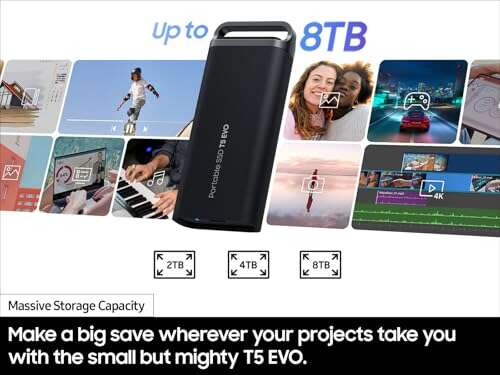
The unit arrived in tidy, compact packaging that felt secure. Unboxing revealed a slim aluminum case with a matte finish that’s familiar in Samsung’s SSD line. The build felt solid and lightweight. The drive slips easily into a pocket without being flimsy. Included was a short USB-C cable and a USB-A adapter — a smart touch for compatibility.
Setup took seconds: plug into a USB-C port, and macOS/Windows recognized it immediately. My first transfer was a folder of mixed RAW and JPEG files — speeds matched the advertised “up to 460MB/s” range for large sequential transfers. I felt pleased rather than surprised; the unit met my expectations for a USB 3.2 Gen 1 portable SSD. Emotionally, it’s the kind of gear that reassures you: solid design, quick to use, and predictable in performance.

What Makes It Stand Out / Key Features
- Large 4TB capacity in a pocketable form factor.
- USB 3.2 Gen 1 interface offering up to ~460MB/s sequential reads/writes.
- Compact metal chassis for light durability and better heat dispersion.
- Wide compatibility: includes USB-C cable and USB-A adapter for older ports.
- Simple plug-and-play setup on macOS and Windows with optional software tools.

What I Like
- Plenty of storage: 4TB handles large photo and video libraries.
- Consistent transfer speeds for day-to-day media work.
- Very portable — easy to carry while traveling for shoots.
- Solid build quality that feels premium without excess weight.
- Good cross-platform compatibility straight out of the box.

What Could Be Better
- Limited by USB 3.2 Gen 1 — not as fast as Thunderbolt or NVMe enclosures.
- No active shock resistance rating beyond the solid casing.
- For power users, there’s no hardware encryption toggle on the unit itself.

My Recommendation
If you’re a content creator or a professional who needs dependable external storage, the Samsung T5 EVO Portable SSD is worth strong consideration. The Samsung T5 EVO Portable SSD offers a blend of capacity and real-world speed that fits mobile editors and photographers. It’s also a smart backup drive for travel thanks to its compact size. If your priority is maximum transfer speed via Thunderbolt, consider other NVMe options. For most users needing a large, durable portable drive, this model delivers excellent value.
| Best for | Why |
|---|---|
| Traveling photographers | High capacity and pocketable design for on-the-road backups. |
| Video editors on a budget | Consistent sequential speeds for editing proxy and medium-res footage. |
| General users needing large external storage | Easy, plug-and-play setup with broad compatibility. |

Alternative Products You Can Consider
If you want options, here are a few I’d consider alongside the Samsung T5 EVO Portable SSD.
SanDisk Extreme Portable SSD — This one is a great pick if you need ruggedness and slightly faster real-world bursts. It’s best for outdoor shooters who want IP55 water and dust resistance. The SanDisk unit trades a bit of raw capacity-per-dollar for tougher build and compact speed.
WD My Passport SSD — Western Digital’s My Passport SSD is good for users who want a balance of style and reliable performance. It often matches similar speeds, comes with password protection and backup software, and is aimed at creatives who want simple setup and brand trust.
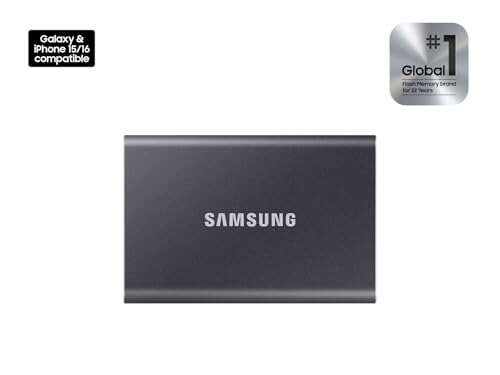
Samsung T7 Portable SSD — If you want a small bump in speed and a sleeker look, the T7 line (including more advanced T7 models) is worth a look. It’s often faster than USB 3.2 Gen 1 drives when paired with higher interface versions. Best for those who want Samsung’s reliability but with broader speed options.
| Product | Best For | Key Difference |
|---|---|---|
| Samsung T5 EVO Portable SSD | High-capacity portable storage | Good capacity-to-portability balance at USB 3.2 Gen 1 speeds |
| SanDisk Extreme Portable SSD | Outdoor and rugged use | Better environmental resistance (IP-rated) |
| WD My Passport SSD | Everyday creatives wanting bundled tools | Includes backup software and similar compact design |
| Samsung T7 Portable SSD | Users wanting faster transfers | Higher-speed variants available (USB 3.2 Gen 2 / NVMe options) |
Final Verdict: Which Should You Buy?
For most people who need a large, portable drive that works well for photos, videos, and general backups, the Samsung T5 EVO Portable SSD is a solid buy. It blends roomy 4TB capacity with reliable real-world speeds and excellent portability. If you prioritize ruggedness or peak NVMe speeds, choose the SanDisk Extreme or a Thunderbolt/NVMe option instead. Overall, the Samsung T5 EVO Portable SSD offers strong value and dependable performance for everyday creators and traveling pros.
FAQs Of samsung t5 evo portable ssd review
Is the Samsung T5 EVO Portable SSD compatible with my laptop?
Yes. The drive uses USB-C and includes an adapter for USB-A. It works on Windows, macOS, and many modern Linux setups. No special drivers are usually required for basic use.
Can I edit video directly from the drive?
You can. For 1080p and many 4K workflows (with proxy editing or optimized codecs), the drive performs well. For very high-bitrate raw 4K or 8K editing, a faster NVMe/Thunderbolt drive will give smoother real-time playback.
How durable is the Samsung T5 EVO Portable SSD?
The metal case is sturdy and handles everyday bumps. It’s not fully water- or dust-proof like some rugged SSDs. For rough field use, consider a drive with an IP rating or add an extra protective sleeve.
Does it come with encryption or backup software?
Samsung typically offers optional software tools for drive management and password protection. For hardware-level encryption or advanced backup suites, check the product details or third-party software options.

Everett Ashford is a tech reviewer at mytechgrid.com specializing in SSDs, cameras, TVs, earbuds, headphones, and other consumer electronics. He provides honest, data-driven reviews based on hands-on testing and real-world performance analysis. Everett simplifies complex tech details to help readers make smart, confident buying decisions.