A camera contains a lens, sensor, shutter, processor, storage system, power source, and controls that capture images.
Knowing what is inside a camera makes photography far less mysterious. Each part has a clear job, from guiding light through the lens to turning that light into a digital image. This guide explains the main camera components, how they work together, and what to check when choosing or caring for a camera.
How a Camera Creates an Image
To understand what is inside a camera, start with its basic task: controlling light. A camera collects light from a scene and records it as an image. The lens directs the light, the shutter controls how long it enters, and the image sensor changes it into electrical data.
The camera’s processor then studies that data. It adjusts color, sharpness, noise, and exposure based on your settings. In a film camera, the light reaches photographic film instead of a digital sensor.
The process usually follows these steps:
- Light reflects from a subject.
- The lens gathers and focuses that light.
- The aperture controls the amount of light.
- The shutter controls the exposure time.
- The sensor records the light.
- The processor converts the data into an image.
- The camera saves the image to a memory card or internal storage.
This is why a camera is more than a simple box with a lens. It is a small optical, mechanical, and electronic system working in a precise order.

The Camera Lens
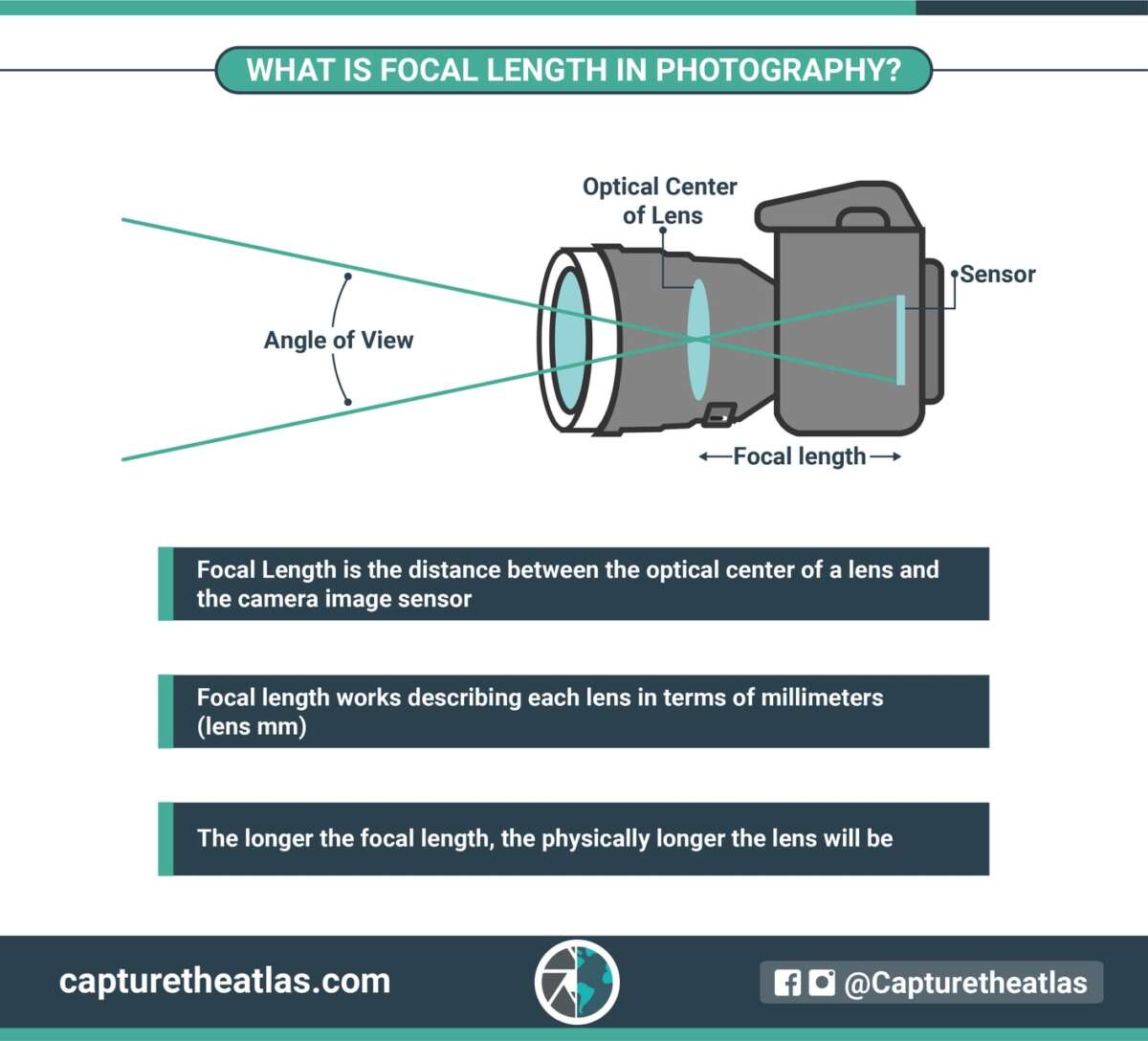
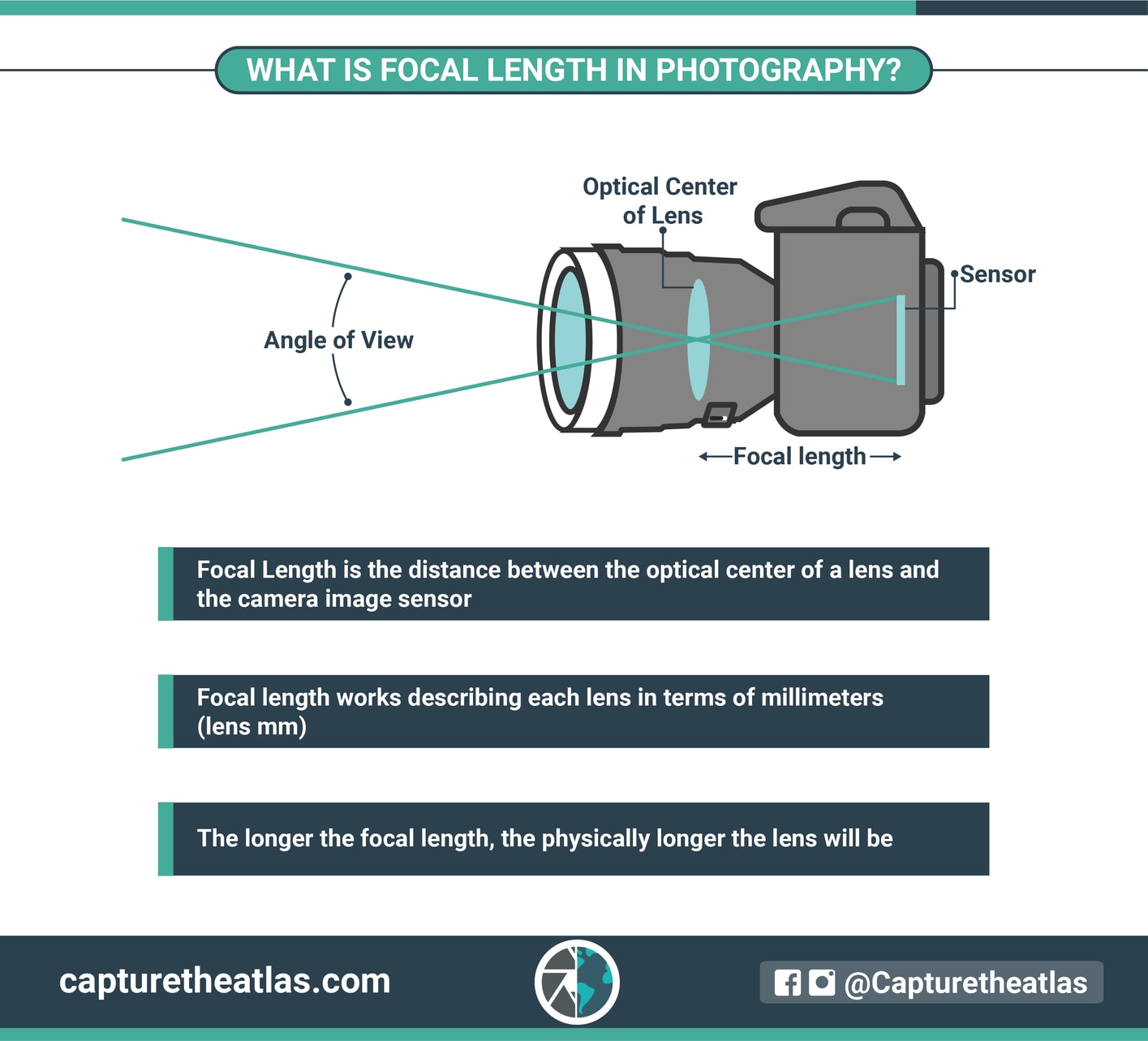
The lens is one of the most important parts of what is inside a camera, even though it may sit on the outside. It contains several glass or plastic elements that bend and focus light onto the image sensor. A well-designed lens can improve detail, contrast, color, and sharpness.
Lens elements are arranged in groups. Some groups move when you zoom or focus. In a prime lens, the focal length stays fixed. In a zoom lens, internal elements move to offer different focal lengths.
Key parts of a camera lens
• Front element: The large glass surface that first receives light.
• Lens elements: Internal pieces that focus and correct the light path.
• Aperture diaphragm: A set of blades that forms an opening to control light.
• Focus system: Mechanical or electronic parts that move elements into focus.
• Image stabilization unit: A floating element or sensor system that reduces the effect of hand movement.
• Lens mount: The connection between the lens and the camera body.
The aperture is often described with an f number, such as f/1.8 or f/8. A smaller f number means a wider opening, more light, and usually a softer background. A larger f number means a smaller opening and less light.
A lens also affects the angle of view. A wide angle lens captures more of a scene, while a telephoto lens magnifies distant subjects. This is why two cameras with the same sensor can produce very different images when paired with different lenses.
From practical use, one lesson stands out: people often spend too much time comparing camera bodies and too little time choosing the right lens. For portraits, a fast 85mm lens may matter more than moving from one camera body to a slightly newer model.
:max_bytes(150000):strip_icc()/GettyImages-141482590-581d080e5f9b581c0b8483a8.jpg)
The Image Sensor
The image sensor is the digital heart of what is inside a camera. It sits behind the shutter and receives light when you take a photo. The sensor contains millions of tiny light sensitive areas called pixels, or photosites.
Each photosite measures the brightness of light. Since most sensor photosites do not directly see full color, a color filter array helps the camera record red, green, and blue information. The camera processor combines this information to create a full color image.
Common sensor sizes
• Full frame: Similar in size to 35mm film and popular for professional work.
• APS C: Smaller than full frame and common in enthusiast and entry level cameras.
• Micro Four Thirds: Smaller still, with compact cameras and lenses.
• Medium format: Larger than full frame and known for high detail and strong tonal range.
Sensor size affects several camera traits:
• Field of view: A smaller sensor shows a narrower view with the same lens.
• Depth of field: Larger sensors can make it easier to create a very blurred background.
• Low light performance: Larger sensors often collect more total light, although sensor design also matters.
• Camera size: Smaller sensors can support smaller bodies and lenses.
Megapixels describe image resolution, but they do not tell the whole story. A camera with more megapixels is not always better. Pixel size, sensor quality, lens quality, processing, and lighting all affect the final image.
A useful real world test is to view images at the size you actually use. A 24 megapixel image may be more than enough for family photos, online posts, and many prints. Extra resolution helps when you crop heavily or make large prints, but it can also create larger files.

The Shutter Mechanism
The shutter controls how long light reaches the sensor. It is one of the key mechanical parts inside a camera. A short shutter speed, such as 1/1000 second, can freeze fast movement. A slower speed, such as 1/10 second, can show motion blur.
Many interchangeable lens cameras use a mechanical shutter. It has curtains or blades that open and close in front of the sensor. Some cameras also offer an electronic shutter, which reads the sensor without moving physical parts.
Mechanical and electronic shutters
A mechanical shutter can provide natural motion rendering and a familiar sound. It may also create small vibrations at certain speeds. Because it has moving parts, it can wear over time.
An electronic shutter is quiet and can reduce mechanical vibration. It is useful for wildlife, theater, weddings, and quiet streets. However, some electronic shutters can produce skewed lines when a fast subject moves across the frame. This effect is often called rolling shutter distortion.
Some cameras use a hybrid shutter system. The photographer can select the best option for the situation.
One mistake many new photographers make is blaming the lens or sensor for a blurry photo when the real cause is shutter speed. Before changing equipment, check whether the shutter speed matches the movement of the subject and the stability of your hands.

The Aperture and Exposure System
The aperture controls the size of the opening inside the lens. It works with shutter speed and sensor sensitivity to create the exposure. These three settings are known as the exposure triangle:
• Aperture controls light and depth of field.
• Shutter speed controls light and motion.
• ISO controls the sensor’s sensitivity to the incoming signal.
A wide aperture, such as f/1.4, lets in more light. It can also create a shallow depth of field, which keeps a subject sharp while making the background soft.
A narrow aperture, such as f/16, lets in less light. It can keep more of a landscape in focus. Very small apertures may reduce fine detail because of diffraction, so the highest f number is not always the sharpest choice.
Modern cameras use an exposure meter to estimate brightness. The meter may examine the whole frame, the center, or a selected subject. Automatic modes then adjust the aperture, shutter, ISO, or shutter speed.
The meter is helpful, but it can be fooled by very bright or dark scenes. Snow, beaches, black clothing, and bright windows often cause errors. Exposure compensation lets you tell the camera to make the image brighter or darker.
The Image Processor
The image processor is the electronic brain of what is inside a camera. It receives raw data from the sensor and turns it into a usable photo. It also manages many camera functions that happen before and after the exposure.
The processor may handle:
• Autofocus calculations
• Exposure measurements
• White balance
• Noise reduction
• Color rendering
• Face and eye detection
• Video compression
• Image stabilization control
• File creation
• Menu and display functions
When you shoot a JPEG, the processor applies many decisions before saving the file. It may increase sharpness, change contrast, reduce noise, and adjust colors.
When you shoot a RAW file, the camera saves much more sensor data with less permanent processing. RAW files offer greater control during editing, but they are larger and require software that supports the format.
Two cameras with similar sensors can produce different images because their processors use different color profiles and noise reduction methods. This is one reason online specifications cannot fully predict real image quality.
The Viewfinder and Display
The viewfinder and rear display help you compose and review photos. Their design depends on the camera type.
A digital single lens reflex camera uses an optical viewfinder. Light travels through the lens, reflects from a mirror, and reaches the viewfinder through a prism or mirror system. When you press the shutter, the mirror moves so light can reach the sensor.
A mirrorless camera does not use this large mirror system. Its electronic viewfinder displays a live feed from the sensor. You can often preview exposure, white balance, and depth of field before taking the photo.
The rear screen can show:
• Live view
• Menus
• Histograms
• Focus areas
• Playback images
• Video
• Exposure warnings
Electronic viewfinders can feel more informative because they show the likely result before you press the shutter. Optical viewfinders use no sensor power for the view itself and can feel more direct in bright conditions.
Neither system is perfect. An electronic viewfinder may use more battery power, while an optical viewfinder may not show the final exposure accurately. The best choice depends on how and where you photograph.
Autofocus and Metering Systems
Autofocus is a major part of what is inside a camera. It uses information from the sensor or a separate focusing system to identify areas of contrast, phase differences, or subjects. The camera then adjusts the lens until the subject appears sharp.
Modern cameras may include:
• Single autofocus for still subjects
• Continuous autofocus for moving subjects
• Face detection
• Eye detection
• Animal and vehicle recognition
• Manual focus assistance
• Focus tracking
Phase detection can estimate whether the lens needs to move closer or farther from the correct focus point. Contrast detection checks image sharpness directly. Many current cameras combine both methods.
The metering system measures light in the frame. It helps select an exposure, but it does not understand the subject in the same way a human does. A camera sees brightness values. You see a bride in a white dress, a child under a tree, or a bright sunset.
For reliable results, place the focus point on the most important part of the subject. For a portrait, that is often the nearest eye. Then check the image and histogram instead of trusting autofocus and metering without review.
The Camera Body and Internal Frame
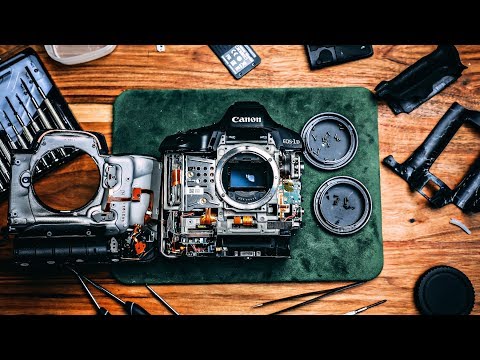
The camera body protects the delicate parts inside a camera. It also provides the structure that holds the lens mount, sensor, shutter, circuit boards, screen, and controls in the correct position.
Many camera bodies use a metal frame made from magnesium alloy or aluminum. Some use strong engineering plastic. Weather resistant cameras may include seals around buttons, doors, and connection points.
The body usually contains:
• Lens mount
• Sensor chamber
• Shutter assembly
• Main circuit board
• Battery compartment
• Memory card slot
• USB and video ports
• Cooling parts
• Buttons and control dials
• Flash system or flash connection
The sensor must sit at a precise distance from the lens mount. Even a small alignment error can affect focus and image quality. This is why opening a camera body without proper tools can cause serious damage.
Dust is another practical concern. When you change lenses, small particles can enter the sensor chamber. Most cameras include a sensor cleaning cycle that vibrates the sensor or its protective filter. Use a proper air blower and follow the manufacturer’s instructions. Never touch the sensor surface with a finger or an unapproved tool.
Battery, Memory, and Connections
Power management is another important part of what is inside a camera. The battery supplies energy to the sensor, processor, autofocus motor, display, electronic viewfinder, stabilization system, and wireless features.
Mirrorless cameras often use more power because the sensor and electronic viewfinder remain active during composition. Cold weather, video recording, image stabilization, and frequent screen use can also reduce battery life.
The memory card stores the image files. Common card types include SD, microSD in some compact systems, CompactFlash, and newer high speed formats. The correct card depends on the camera and the type of files you record.
High resolution photos and video need fast write speeds. A slow or unsuitable card can cause recording delays, reduce burst shooting performance, or stop video recording.
Good habits include:
• Format the card in the camera after backing up your files.
• Use a spare battery for long shoots.
• Avoid removing the card while the camera is writing data.
• Keep backup copies of important photos.
• Check the camera’s recommended card speed for high resolution video.
Wireless systems such as Wi Fi and Bluetooth may also be built into the camera. They support file transfer, remote control, location data, and firmware updates.
Flash and Image Stabilization
Some cameras have a built in flash. Others use a hot shoe to connect an external flash or other accessory. A flash contains a capacitor that stores electrical energy and releases it quickly through a small flash tube or LED based system.
A flash can brighten a dark subject, soften strong shadows, or freeze motion in low light. Direct flash can look harsh, so bouncing the light from a ceiling or wall often creates a more natural result.
Image stabilization is another useful system. It reduces blur caused by camera movement. Lens based stabilization moves elements inside the lens, while in body stabilization shifts the sensor. Some cameras combine both methods.
Stabilization does not stop a moving person from blurring. It mainly corrects movement from the photographer. You still need a fast shutter speed for sports, animals, children, and other active subjects.
DSLR, Mirrorless, Film, and Smartphone Cameras
The answer to what is inside a camera changes with the camera type, but the basic goal stays the same.
DSLR cameras
A DSLR contains a mirror, a shutter, an optical viewfinder, a prism, a sensor, and a processor. The mirror directs light to the viewfinder until the exposure begins.
Mirrorless cameras
A mirrorless camera removes the mirror and optical prism. It uses the image sensor for live viewing and often includes an electronic viewfinder. This design can make the body smaller and support advanced subject detection.
Film cameras
A film camera contains a lens, aperture, shutter, film chamber, winding system, and viewfinder. Instead of an electronic sensor, it exposes light sensitive film. The film must then be chemically processed.
Smartphone cameras
A smartphone camera has a tiny lens system, a small sensor, a processor, stabilization parts, and software that combines multiple exposures. Computational photography can improve night scenes, portraits, HDR images, and zoom results.
A larger dedicated camera often offers better lens flexibility and handling. A smartphone is easier to carry and may produce excellent images through advanced software. The best tool is the one you can use quickly and confidently.
How to Care for the Parts Inside a Camera
Careful handling protects the optical, mechanical, and electronic parts inside a camera. Most damage comes from moisture, dust, impact, heat, or poor storage.
Follow these basic practices:
- Keep the camera in a padded bag.
- Use a lens cap when the camera is not in use.
- Change lenses in a clean place with the camera mount facing down.
- Store batteries outside the camera during long periods of nonuse.
- Let a cold camera warm slowly before opening it in a humid room.
- Clean the lens with a blower and a suitable microfiber cloth.
- Do not spray cleaning fluid directly onto the lens or body.
- Back up images before formatting a memory card.
- Have serious faults checked by a qualified repair technician.
Do not try to repair a flash or open a camera casually. Flash capacitors can hold a dangerous electrical charge even after the battery is removed. Internal repairs also require special tools and procedures.
One practical lesson is to avoid overcleaning. A few harmless dust spots are better than scratched glass or a damaged sensor coating. Clean only when marks affect your images.
What Is Inside a Camera? Frequently Asked Questions
Does every camera have an image sensor?
Every digital camera has an image sensor, but film cameras use photographic film instead. The sensor or film records the light that passes through the lens.
What is the most important part inside a camera?
The lens, sensor, shutter, and processor all matter. Image quality depends on how these parts work together, along with lighting, focus, exposure, and technique.
Do cameras have mirrors inside them?
DSLR cameras use a mirror to direct light to the optical viewfinder. Mirrorless cameras do not use this mirror system.
What is the difference between a camera sensor and a processor?
The sensor records light and turns it into electronic signals. The processor interprets those signals and creates the image file while managing focus, exposure, color, and camera controls.
Can dust damage the inside of a camera?
Dust usually creates spots on photos rather than causing immediate damage. It can become a bigger problem if it enters moving parts, so careful lens changes and correct cleaning are important.
Why do cameras have different sensor sizes?
Sensor size affects field of view, depth of field, low light performance, camera size, and lens design. A larger sensor is not automatically better for every photographer or situation.
Conclusion
A camera is a carefully balanced system of optics, mechanics, electronics, and software. The lens gathers light, the aperture and shutter control it, the sensor records it, and the processor turns it into a finished image. Other parts, such as autofocus, stabilization, battery systems, and memory storage, help you work faster and more reliably.
Understanding what is inside a camera can improve your buying choices and your photography skills. The next time you hold a camera, pay attention to how each part affects the image, then practice with different lenses, shutter speeds, and apertures. Explore more photography guides, test your equipment in real conditions, and share your questions or experiences in the comments.

Everett Ashford is a tech reviewer at mytechgrid.com specializing in SSDs, cameras, TVs, earbuds, headphones, and other consumer electronics. He provides honest, data-driven reviews based on hands-on testing and real-world performance analysis. Everett simplifies complex tech details to help readers make smart, confident buying decisions.